> ## Documentation Index
> Fetch the complete documentation index at: https://developers.criteo.com/llms.txt
> Use this file to discover all available pages before exploring further.
# Postman Collection
## Introduction
Use the Criteo API Postman collection to quickly get started with Criteo API.
This guide will help you to make your first request to Criteo API using Postman.
The Criteo Postman Workspace is available [here](https://www.postman.com/realcriteo/workspace/criteo/overview).
***
## Pre-requisites
To be able to use Criteo's Postman collections, please make sure you have:
* Completed the [API setup steps](/criteo-apis/docs/connect-to-the-api) (partner account, app, and credentials),
* Installed and set up the [Postman](https://www.postman.com/downloads/) client, as well as made sure your workspace visibility is set to the right settings (`private`, `public`, or`team`) based on the intended audience.
***
## Fork the Criteo API collection
In this step, you set up the environment variables used to retrieve an access token.
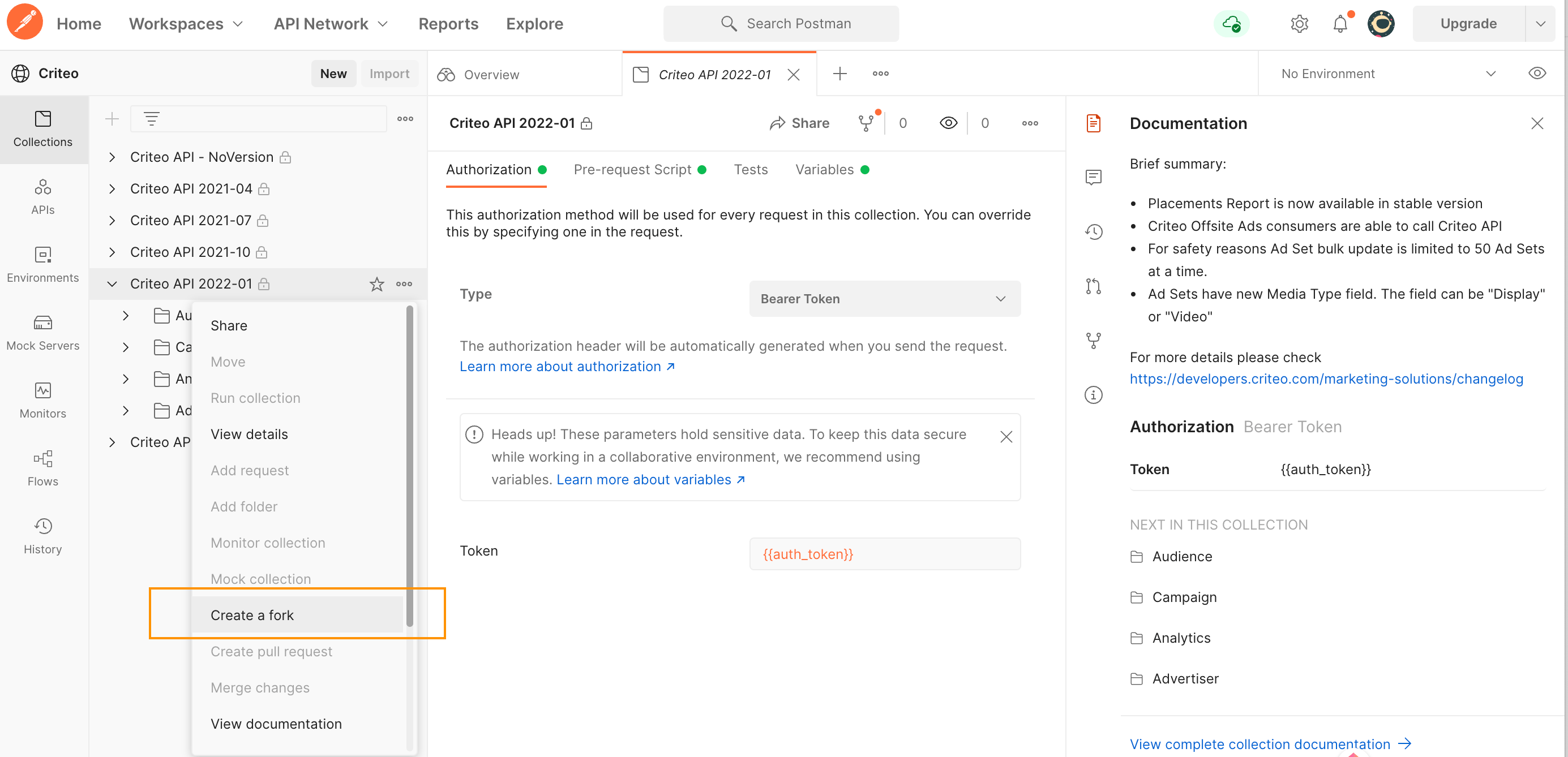
Go to [Criteo Postman Workspace](https://www.postman.com/realcriteo/workspace/criteo/overview) and click on the collection you would like to test. You will see the collection description on the right-hand side and the list configuration options on the left-hand side.
Click `Create fork` and provide the fork label in the newly opened window, as shown on the following screenshots:
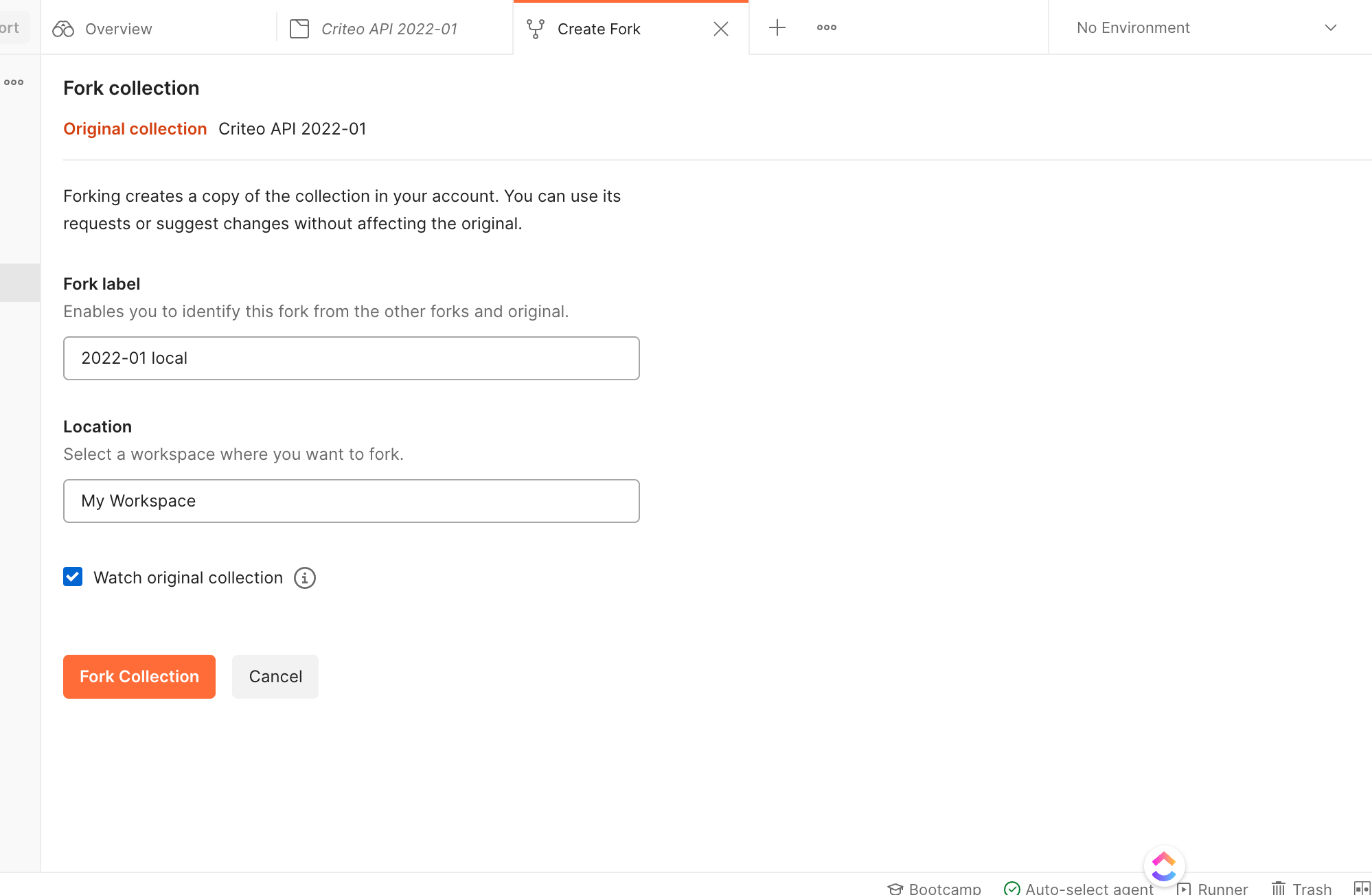 After completing this step, you should have a local version of the Criteo API collection in your workspace.
***
## Configure authentication
Go to the Criteo API [templated environment](https://www.postman.com/realcriteo/workspace/criteo/environment/12547236-5c1c73f6-1e41-4eec-9ae9-fab7f9ac6bf1). You will see collection of variables that you should customize according to your application credentials.
After completing this step, you should have a local version of the Criteo API collection in your workspace.
***
## Configure authentication
Go to the Criteo API [templated environment](https://www.postman.com/realcriteo/workspace/criteo/environment/12547236-5c1c73f6-1e41-4eec-9ae9-fab7f9ac6bf1). You will see collection of variables that you should customize according to your application credentials.
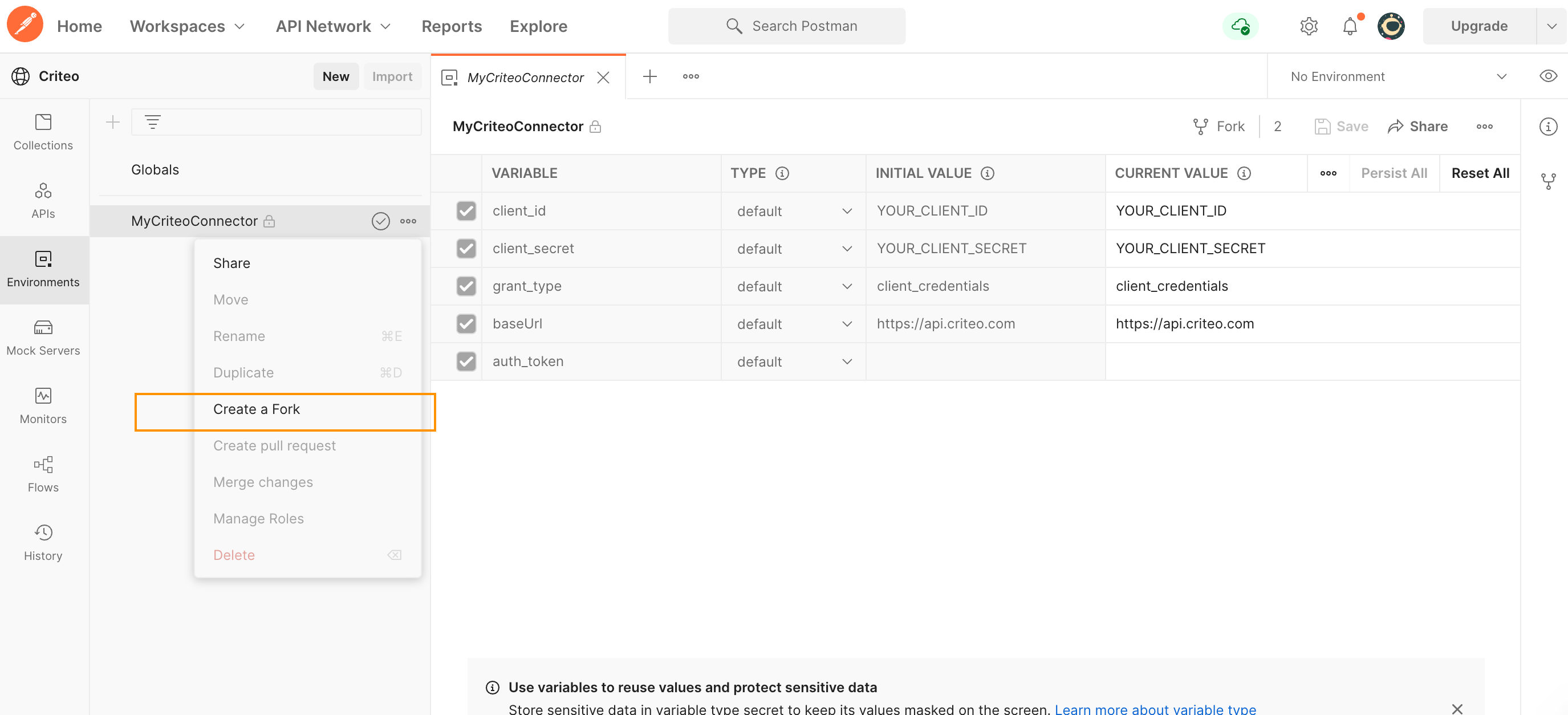 Click `Fork` and add a local label to differentiate the environment in your workspace. Once forked, set up the fields as follows:
* In `client_id` and `client_secret` fields, set the **CURRENT VALUE** column to the application `client_id` and `client_secret` values you received from the onboarding step,
* You don't need to change the remaining rows as long as the application grant type is`client_credentials`. If you have a different application type, please get in touch with our support.
These credentials input in the environment are used for authentication in the pre-request scripts. The pre-request script is a script attached to all Criteo API collections, to automatically fetch and supply an access token to protected endpoints.
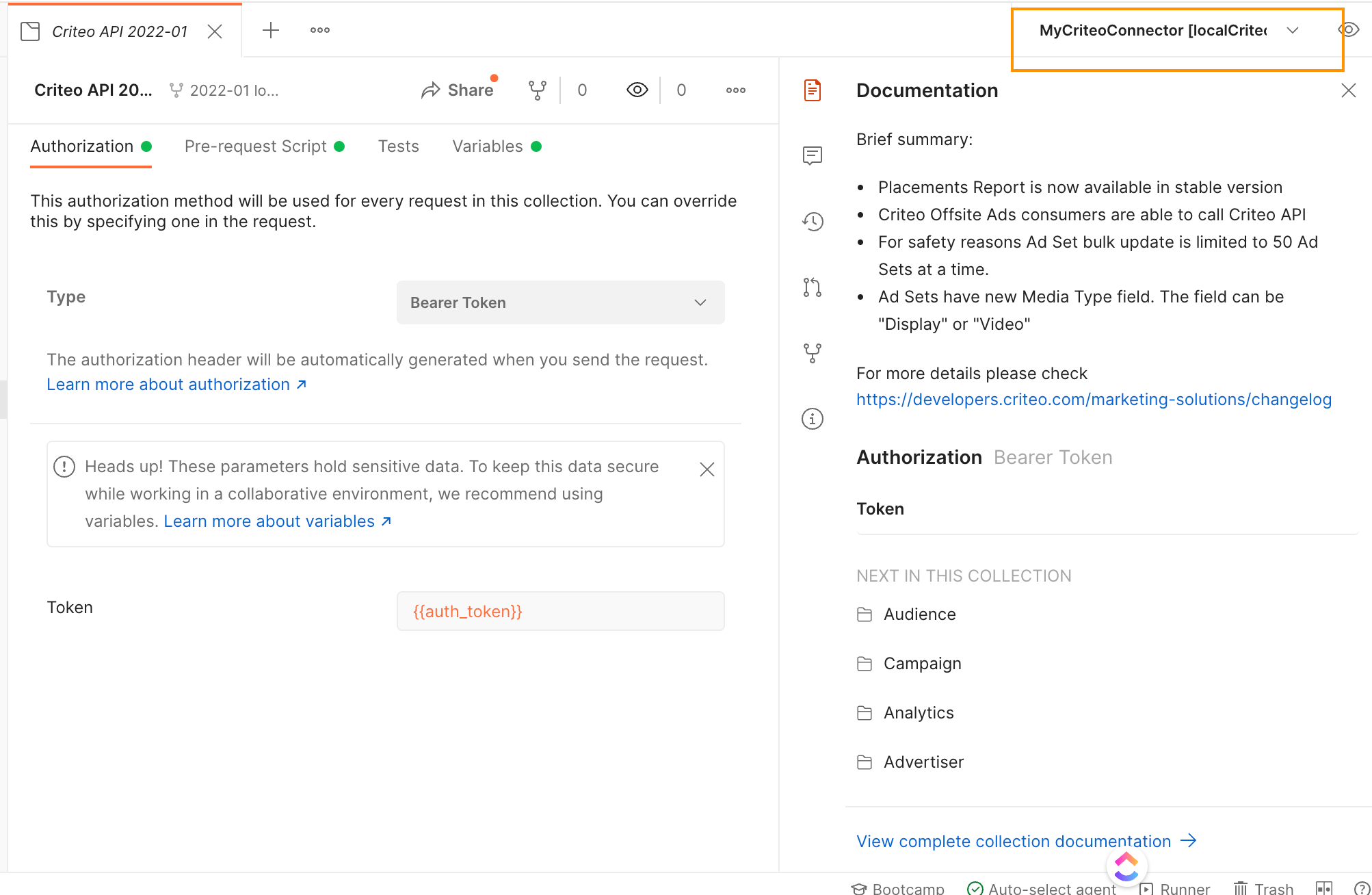
Finally, on the top right, verify that `MyCriteoConnector` Environment is selected in the dropdown as shown in the screenshot:
Click `Fork` and add a local label to differentiate the environment in your workspace. Once forked, set up the fields as follows:
* In `client_id` and `client_secret` fields, set the **CURRENT VALUE** column to the application `client_id` and `client_secret` values you received from the onboarding step,
* You don't need to change the remaining rows as long as the application grant type is`client_credentials`. If you have a different application type, please get in touch with our support.
These credentials input in the environment are used for authentication in the pre-request scripts. The pre-request script is a script attached to all Criteo API collections, to automatically fetch and supply an access token to protected endpoints.
Finally, on the top right, verify that `MyCriteoConnector` Environment is selected in the dropdown as shown in the screenshot:
 ***
## Your first API request
Inside the versioned folder, you will find the requests for the various Criteo API endpoints you can call.
To make your first call:
* Expand the folder and then expand into the Advertiser folder,
* Click `Api Portfolio Get` to open the portfolio request,
* On the top right, select `Send`.
***
## Your first API request
Inside the versioned folder, you will find the requests for the various Criteo API endpoints you can call.
To make your first call:
* Expand the folder and then expand into the Advertiser folder,
* Click `Api Portfolio Get` to open the portfolio request,
* On the top right, select `Send`.
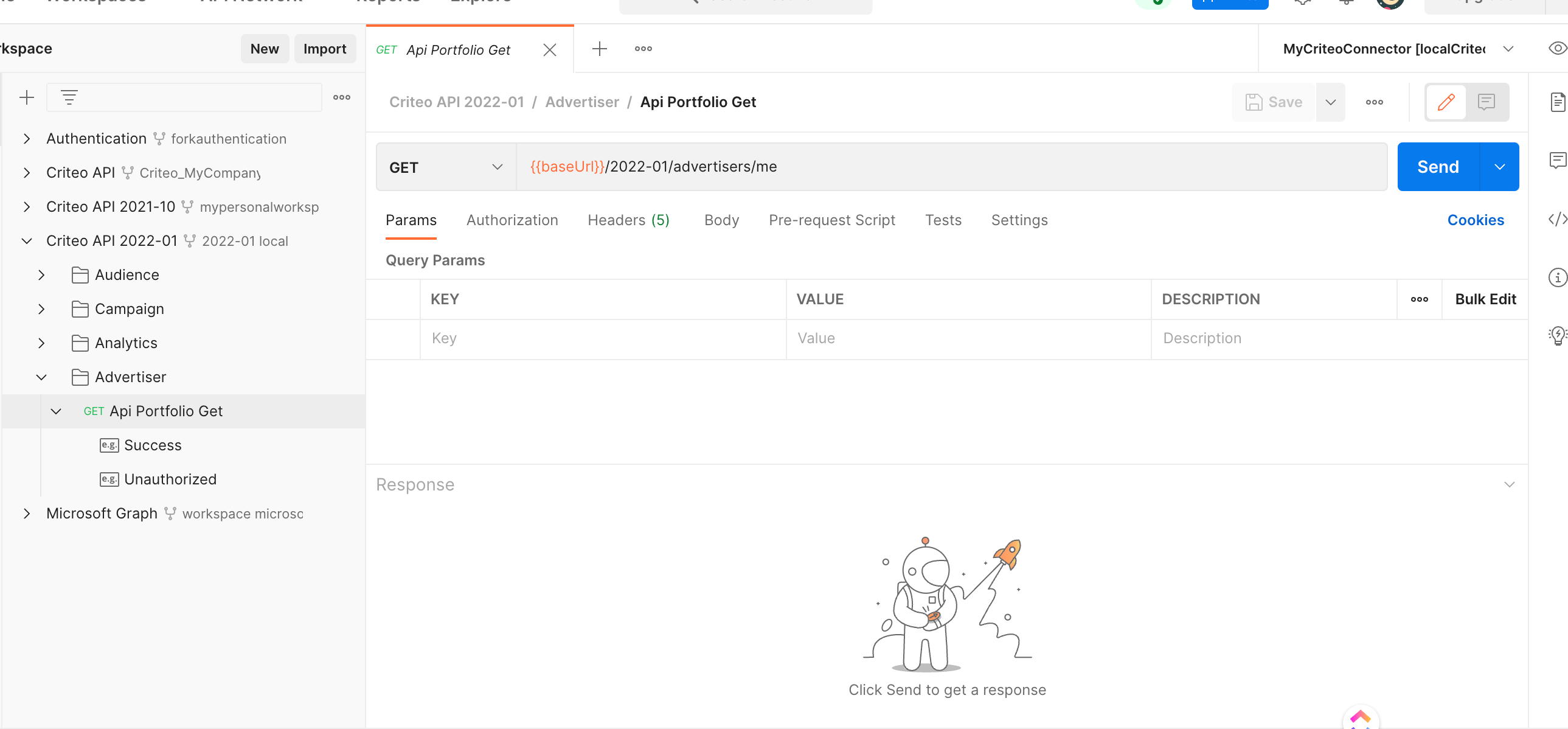 You will receive a list of accounts consented to your application in the response.
You have now successfully made a Criteo API call using a client credentials authentication. You can follow these steps to make other requests to Criteo API.
As a reminder, each of the domains (Audience/Campaign/Analytics, etc.) requires a separate permission which is bound to your application at creation time. If your application does not include `Read` or `Manage` permission on a particular domain, you will get a permission error in response to performing a `GET/PATCH` operation on that domain.
Learn more about application scopes and permissions in [Create your App](/criteo-apis/docs/create-your-app)
More information about error handling can be found in [API Response](/criteo-apis/docs/api-response).
***
## Contributing to Criteo API
Feel free to make your changes to the forked collection, and then hover over the collection top node and select `Create pull request`. The Criteo API team will review the change and merge the change wherever it makes sense.
***
## Questions
If you keep getting a `code authorization-token-invalid` response when issuing a request to Criteo server, the most likely reason is incorrect `client_id`/`client_secret` or an uninitialized environment.
The Postman community forum can be used for generic Postman usage questions.
If you have a question or a bug report which is specific to Criteo API, please get in touch with your Criteo contact.
***
You will receive a list of accounts consented to your application in the response.
You have now successfully made a Criteo API call using a client credentials authentication. You can follow these steps to make other requests to Criteo API.
As a reminder, each of the domains (Audience/Campaign/Analytics, etc.) requires a separate permission which is bound to your application at creation time. If your application does not include `Read` or `Manage` permission on a particular domain, you will get a permission error in response to performing a `GET/PATCH` operation on that domain.
Learn more about application scopes and permissions in [Create your App](/criteo-apis/docs/create-your-app)
More information about error handling can be found in [API Response](/criteo-apis/docs/api-response).
***
## Contributing to Criteo API
Feel free to make your changes to the forked collection, and then hover over the collection top node and select `Create pull request`. The Criteo API team will review the change and merge the change wherever it makes sense.
***
## Questions
If you keep getting a `code authorization-token-invalid` response when issuing a request to Criteo server, the most likely reason is incorrect `client_id`/`client_secret` or an uninitialized environment.
The Postman community forum can be used for generic Postman usage questions.
If you have a question or a bug report which is specific to Criteo API, please get in touch with your Criteo contact.
***