> ## Documentation Index
> Fetch the complete documentation index at: https://developers.criteo.com/llms.txt
> Use this file to discover all available pages before exploring further.
# Authentication
* To get started with our APIs, use the endpoint below to generate an Access Token with your API credentials
* The Access Token is a Bearer token to be included in the Authorization Header of all API requests
* Multiple tokens may be generated and each are valid for 15 minutes, or 900 seconds
# Endpoint
* `POST https://api.criteo.com/oauth2/token` Generate an Access Token
**Generate another access token when it expires, signaled by a `401 Unauthorized` HTTP status code**
# Parameters
| Parameter | Description |
| ---------------------- | --------------------------------------------------------------------------------------------------------------------------- |
| `client_id` string | Please see below to see the instructions to get your credentials through [Developer Dashboard](https://partners.criteo.com) |
| `client_secret` string | Please see below to see the instructions to get your credentials through [Developer Dashboard](https://partners.criteo.com) |
| `grant_type` string | Must be `client_credentials` |
# Generate an Access Token
* This endpoint generates a new access token using your API credentials
* In order to comply with the OAuth2 standards of using client\_credentials Criteo API authorization now supports Content-Type: 'application/x-www-form-urlencoded' - please see example below.
```http theme={null}
POST https://api.criteo.com/oauth2/token
```
```json JSON theme={null}
// Sample Request
curl --location --request POST 'https://api.criteo.com/oauth2/token' --header 'Content-Type: application/x-www-form-urlencoded' --data-urlencode 'client_id=CLIENT_ID' --data-urlencode 'client_secret=CLIENT_SECRET' --data-urlencode 'grant_type=client_credentials'
// Sample Response
{
"access_token": "eyJhbGciOiJSUzI1NiIsImtpZCI6IkVuTTBCZkFELUFrNXZwOU9RMW1ZWXR6T2RaMUVad2RWaHY5T3Z2cVA3YVUiLCJ0eXAiOiJKV1QifQ.eyJjdHg6dXNlcjpkaXNwbGF5TmFtZSI6IkJvYmJ5IFNpYW8gTGVpIEhhbiIsImN0eDp1c2VyOmVtYWlsIjoiYi5oYW5AY3JpdGVvLmNvbSIsImN0eDp1c2VyOnVpZCI6ImIuaGFuIiwiY3R4OnVzZXI6dW1zSWQiOiIzMjM4ODQiLCJzdWIiOiJ1Omk6Yi5oYW5AY3JpdGVvLmNvbSIsImlhdCI6MTYwMTQwNDM1NSwiZXhwIjoxNjAxNDA1MzE1LCJhZGQ6bWFwaTp1bmFtZSI6ImIuaGFuIiwic2NvcGUiOiJnYXRld2F5IiwiY2xpZW50X2lkIjoiYi5oYW4iLCJuYmYiOjE2MDE0MDQ0MTUsImlzcyI6ImNyaXRlby1leGFtb2F1dGgifQ.OI1W8utCbR2a2VbkxOZZaP2JyQ4b8Kf9R2x_yGRp9jjqclvm8huC_iHb9AECLmYVMUYWojvmbIOk0j0BRfLf1xYoOAIvNbcWN-SsrkYOXVh9mYruwOfKJb0t6j8MW7u03PbfvSRtn_29ar3V-7rimDqdMR_iTVhTlBLI0W3jSOCjzKK9sbg0REwtneBu4V3dFLaLNIxXj5EtyaTpLB3v71smFljBHtUC1Go8wRUX2P_GZfWYJCZhatx0xsN46oS8aGQl3a6N4nh4cqdJNA83Y44LYEKpky0ZmBwC9D5j9rpC-BDkUaeWlgkVSicy6yWh-S06JC4e3pJwUHskUMvoiA",
"token_type": "Bearer",
"expires_in": 900
}
```
**Mandatory Content-Type header**
Please ensure you include Content-Type: application/x-www-form-urlencoded header in your call to /oauth2/token endpoint.
# Use an Access Token
* Once you have obtained your access token, you can authenticate all subsequent requests by including an `Authorization` HTTP header, as in the example below:
```bash Bash theme={null}
GET
https://api.criteo.com/preview/advertisers/me
Authorization: Bearer eyJhbGciOiJSUzI1NiIsImtpZCI6IkVuTTBCZkFELUFrNXZwOU9RMW1ZWXR6T2RaMUVad2RWaHY5T3Z2cVA3YVUiLCJ0eXAiOiJKV1QifQ.eyJjdHg6dXNlcjpkaXNwbGF5TmFtZSI6IkJvYmJ5IFNpYW8gTGVpIEhhbiIsImN0eDp1c2VyOmVtYWlsIjoiYi5oYW5AY3JpdGVvLmNvbSIsImN0eDp1c2VyOnVpZCI6ImIuaGFuIiwiY3R4OnVzZXI6dW1zSWQiOiIzMjM4ODQiLCJzdWIiOiJ1Omk6Yi5oYW5AY3JpdGVvLmNvbSIsImlhdCI6MTYwMTQwNDM1NSwiZXhwIjoxNjAxNDA1MzE1LCJhZGQ6bWFwaTp1bmFtZSI6ImIuaGFuIiwic2NvcGUiOiJnYXRld2F5IiwiY2xpZW50X2lkIjoiYi5oYW4iLCJuYmYiOjE2MDE0MDQ0MTUsImlzcyI6ImNyaXRlby1leGFtb2F1dGgifQ.OI1W8utCbR2a2VbkxOZZaP2JyQ4b8Kf9R2x_yGRp9jjqclvm8huC_iHb9AECLmYVMUYWojvmbIOk0j0BRfLf1xYoOAIvNbcWN-SsrkYOXVh9mYruwOfKJb0t6j8MW7u03PbfvSRtn_29ar3V-7rimDqdMR_iTVhTlBLI0W3jSOCjzKK9sbg0REwtneBu4V3dFLaLNIxXj5EtyaTpLB3v71smFljBHtUC1Go8wRUX2P_GZfWYJCZhatx0xsN46oS8aGQl3a6N4nh4cqdJNA83Y44LYEKpky0ZmBwC9D5j9rpC-BDkUaeWlgkVSicy6yWh-S06JC4e3pJwUHskUMvoiA
Accept: text/plain
Content-Type: application/*+json
```
# Get your credentials through the developer portal (self service)
* To get your credentials on a self-service way, you will need to create a Criteo account and to create an Organization and an App within the [Developer Dashboard](https://partners.criteo.com).
* To see how to create an Organization and an App please see the related articles [Create your organization](/marketing-solutions/v2020.07/docs/create-your-organization) and [Create your app](/marketing-solutions/v2020.07/docs/create-your-app)
* Once you have created an App you will be able to generate a set of Credentials through the following dashboard:
 * 💡 When create a set of Credentials you will automatically download a file with your API Key and Secret like this
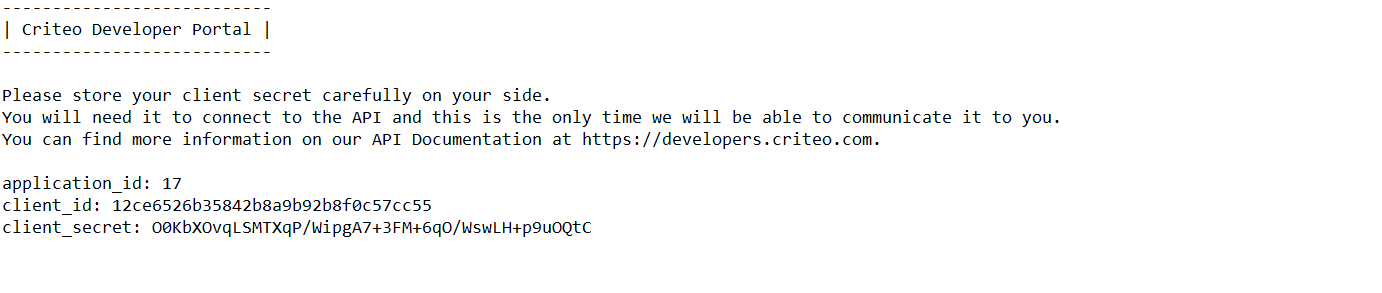 * Please keep it preciously at this will be the only time we will share the API Secret with you!
* You can use this dashboard to manage your API keys. You can also delete an API key from this dashboard. The key will stay valid for fifteen minutes before deactivating.
* 💡 You can change the name of your set of credentials by clicking directly on the credentials name on in the dashboard. For example: Troubleshooting Credentials, Production Credentials, etc.
* 💡 You will be limited to 5 API credentials at for an App (for ex. 1 for production, 1 for troubleshooting and 3 others for any other use case you can imagine)
***
**What’s Next**
* [Analytics](/marketing-solutions/v2020.07/docs/analytics)
* [Catalog](/marketing-solutions/v2020.07/docs/category-level-bidding)
* [Creative](/marketing-solutions/v2020.07/docs/campaign)
* [Go to our Developers Dashboard](https://partners.criteo.com)
* [Go to our API Reference](/marketing-solutions/v2020.07/reference/apiv1oauth2tokenpost)
* Please keep it preciously at this will be the only time we will share the API Secret with you!
* You can use this dashboard to manage your API keys. You can also delete an API key from this dashboard. The key will stay valid for fifteen minutes before deactivating.
* 💡 You can change the name of your set of credentials by clicking directly on the credentials name on in the dashboard. For example: Troubleshooting Credentials, Production Credentials, etc.
* 💡 You will be limited to 5 API credentials at for an App (for ex. 1 for production, 1 for troubleshooting and 3 others for any other use case you can imagine)
***
**What’s Next**
* [Analytics](/marketing-solutions/v2020.07/docs/analytics)
* [Catalog](/marketing-solutions/v2020.07/docs/category-level-bidding)
* [Creative](/marketing-solutions/v2020.07/docs/campaign)
* [Go to our Developers Dashboard](https://partners.criteo.com)
* [Go to our API Reference](/marketing-solutions/v2020.07/reference/apiv1oauth2tokenpost)