> ## Documentation Index
> Fetch the complete documentation index at: https://developers.criteo.com/llms.txt
> Use this file to discover all available pages before exploring further.
# Create Your Organization
This article will guide you through creating an organization, a mandatory step to access the Partner Portal. You will be redirected to the `Create an Organization` screen after setting up your Criteo account.
***
# Create your organization
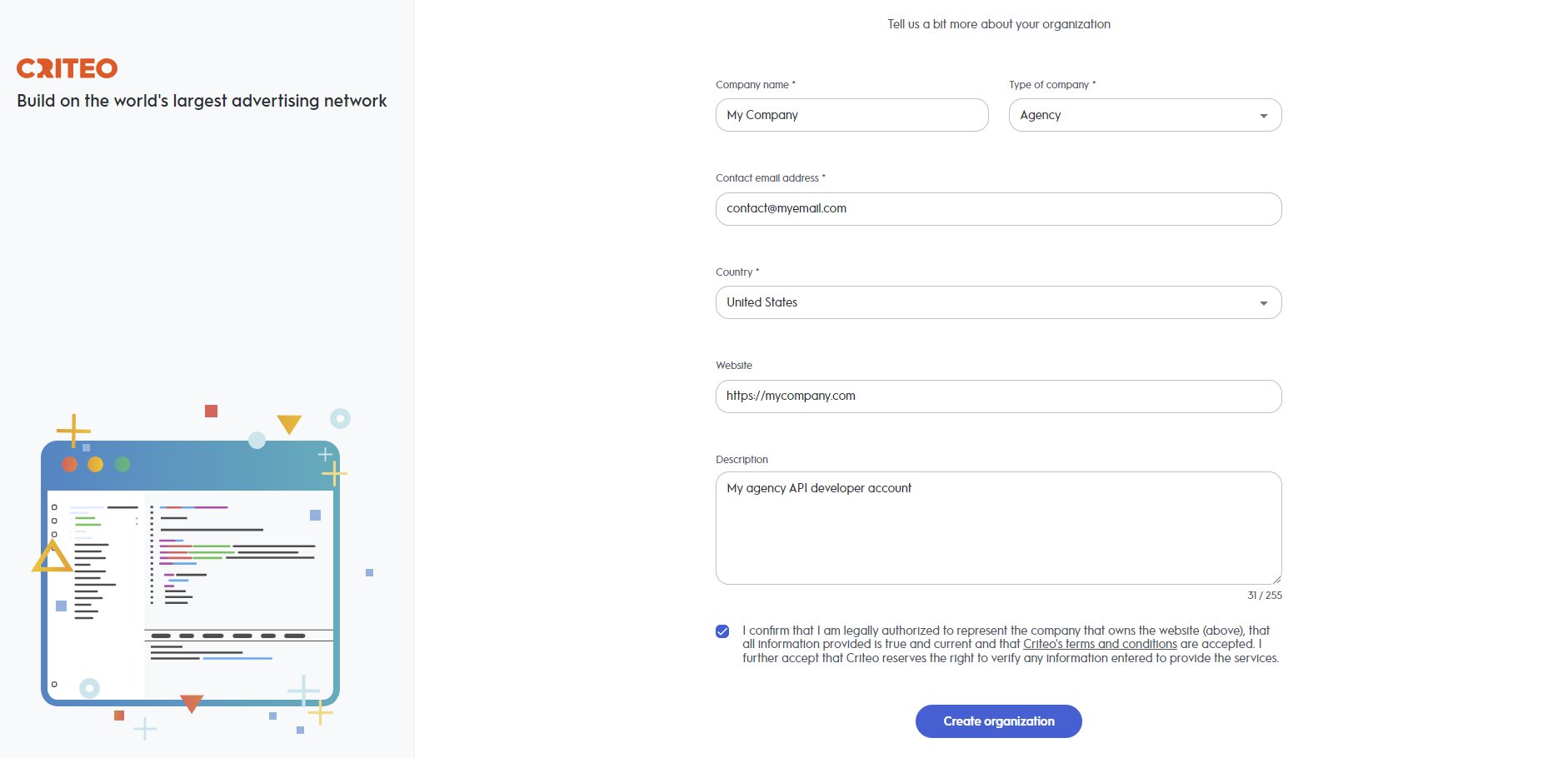 * **Company Name**
* Enter your company name, country, type, and email. We will use this email to send important Criteo API updates, including new features and critical changes. Please ensure that your company has a clear and identifiable name, as this greatly assists our teams in providing faster and more effective support during troubleshooting.
* **Other Optional Details**
* You can also provide your website and a brief company description. This helps us get to know your business better, ensuring we can offer more tailored services.
Once your organization is registered, you will be redirected to the`My Apps` page in the Partner Portal. A confirmation email will be sent to verify your email address. After confirming, you'll be able to start building your first API application. Please note that by proceeding to this step, you acknowledge and agree to our [API Terms and Conditions](/retail-media/docs/criteo-api-terms-and-conditions).
Do you need more information about company types? While this won't impact your experience in the developer portal, it helps us provide you with better support. Here are some details:
✔ Advertiser/Brand – You are a marketer from a retail, travel, or classifieds company, looking to use Criteo APIs on behalf of your own company.
✔ Agency – You work in a media agency and want to use the Criteo API for a Brand or an Advertiser.
✔ Inventory Supplier – You represent the supply side and want to use Criteo API for inventory-related activities.
✔ Data Supplier – Your business focuses on providing 1st or 3rd party audiences.
✔ Technology Company – You are part of the ad-tech ecosystem and plan to use Criteo APIs for services such as DCO, Marketing Dashboards, Measurement, or Brand Safety.
✔ Other – If none of the above categories apply to you.
***
# Creating Multiple Organizations
If you need to create more than one organization, you can easily do so from your partner account.
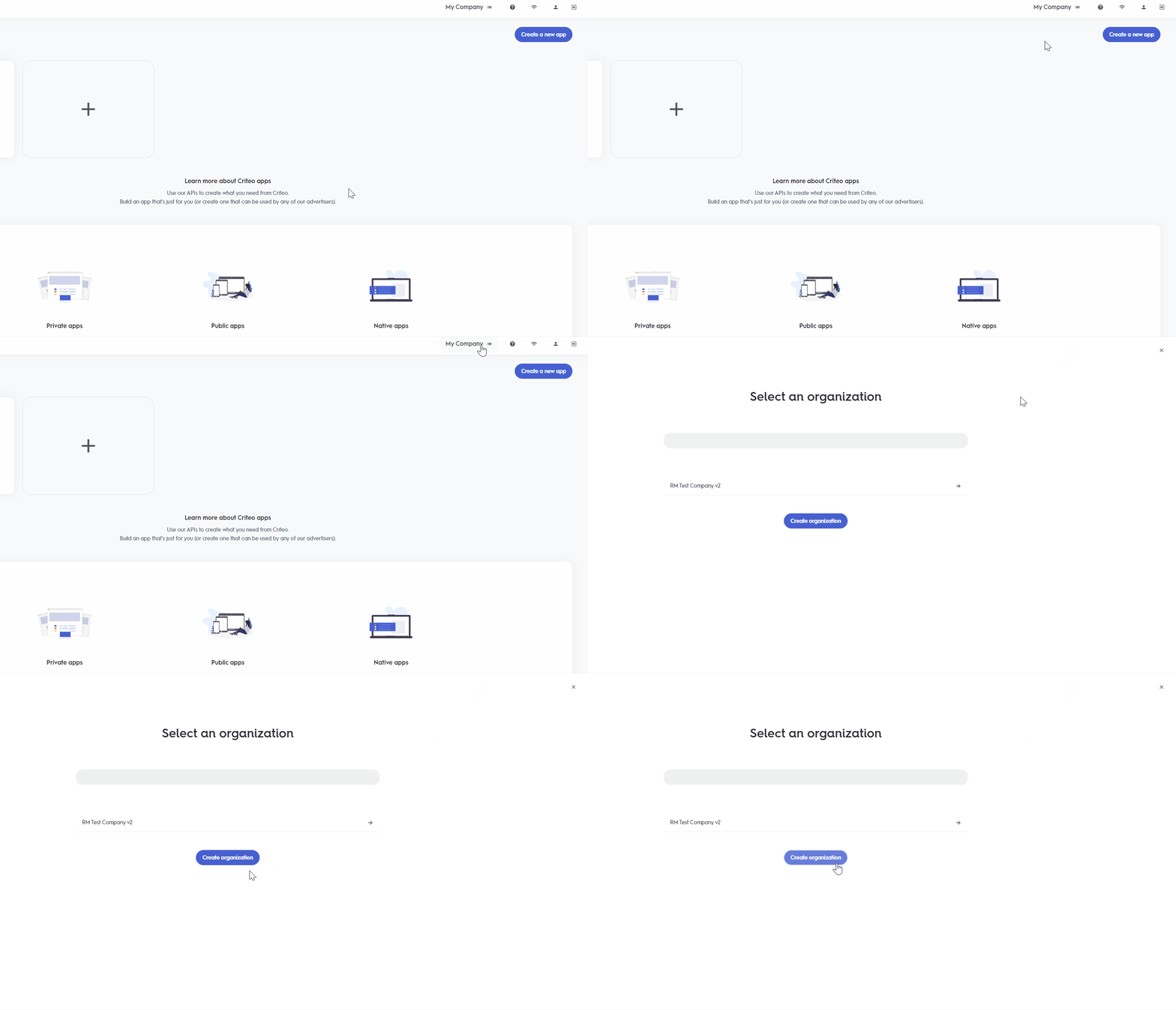
1. Click on the organization button in the top-right corner of the `My Apps` screen.
2. A screen will appear where you can switch between different organizations. To create a new one, click on `Create an Organization`.
3. Your newly created organization will now appear in the list!
* **Company Name**
* Enter your company name, country, type, and email. We will use this email to send important Criteo API updates, including new features and critical changes. Please ensure that your company has a clear and identifiable name, as this greatly assists our teams in providing faster and more effective support during troubleshooting.
* **Other Optional Details**
* You can also provide your website and a brief company description. This helps us get to know your business better, ensuring we can offer more tailored services.
Once your organization is registered, you will be redirected to the`My Apps` page in the Partner Portal. A confirmation email will be sent to verify your email address. After confirming, you'll be able to start building your first API application. Please note that by proceeding to this step, you acknowledge and agree to our [API Terms and Conditions](/retail-media/docs/criteo-api-terms-and-conditions).
Do you need more information about company types? While this won't impact your experience in the developer portal, it helps us provide you with better support. Here are some details:
✔ Advertiser/Brand – You are a marketer from a retail, travel, or classifieds company, looking to use Criteo APIs on behalf of your own company.
✔ Agency – You work in a media agency and want to use the Criteo API for a Brand or an Advertiser.
✔ Inventory Supplier – You represent the supply side and want to use Criteo API for inventory-related activities.
✔ Data Supplier – Your business focuses on providing 1st or 3rd party audiences.
✔ Technology Company – You are part of the ad-tech ecosystem and plan to use Criteo APIs for services such as DCO, Marketing Dashboards, Measurement, or Brand Safety.
✔ Other – If none of the above categories apply to you.
***
# Creating Multiple Organizations
If you need to create more than one organization, you can easily do so from your partner account.
1. Click on the organization button in the top-right corner of the `My Apps` screen.
2. A screen will appear where you can switch between different organizations. To create a new one, click on `Create an Organization`.
3. Your newly created organization will now appear in the list!
 ***
**What’s Next**
* [Create Your API Application](/retail-media/v2025.01/docs/create-your-app)
* [Get Your Credentials](/retail-media/v2025.01/docs/get-credentials)
* [API Authorization](/retail-media/v2025.01/docs/api-authorization)
***
**What’s Next**
* [Create Your API Application](/retail-media/v2025.01/docs/create-your-app)
* [Get Your Credentials](/retail-media/v2025.01/docs/get-credentials)
* [API Authorization](/retail-media/v2025.01/docs/api-authorization)