> ## Documentation Index
> Fetch the complete documentation index at: https://developers.criteo.com/llms.txt
> Use this file to discover all available pages before exploring further.
# Use Postman with the Criteo Retail Media API
## Introduction
Use the Criteo API Postman collection to quickly get started with Criteo API.
This guide will help you to make your first request to Criteo API using Postman.
***
## Pre-requisites
To be able to use Criteo's Postman collections, please make sure you have:
* Completed the application [onboarding checklist](/retail-media/v2026-preview/docs/onboarding-checklist),
* Installed and set up the [Postman](https://www.postman.com/downloads/) client, as well as made sure your workspace visibility is set to the right settings (`private`, `public`, or`team`) based on the intended audience.
***
## Fork the Criteo API collection
In this step, you set up the environment variables used to retrieve an access token.
Go to [Criteo Postman workspace](https://www.postman.com/realcriteo/workspace/criteo/overview) and click on the collection you would like to test. You will see the collection description on the right-hand side and the list configuration options on the left-hand side.
Click `Create fork` and provide the fork label in the newly opened window, as shown on the following screenshots:
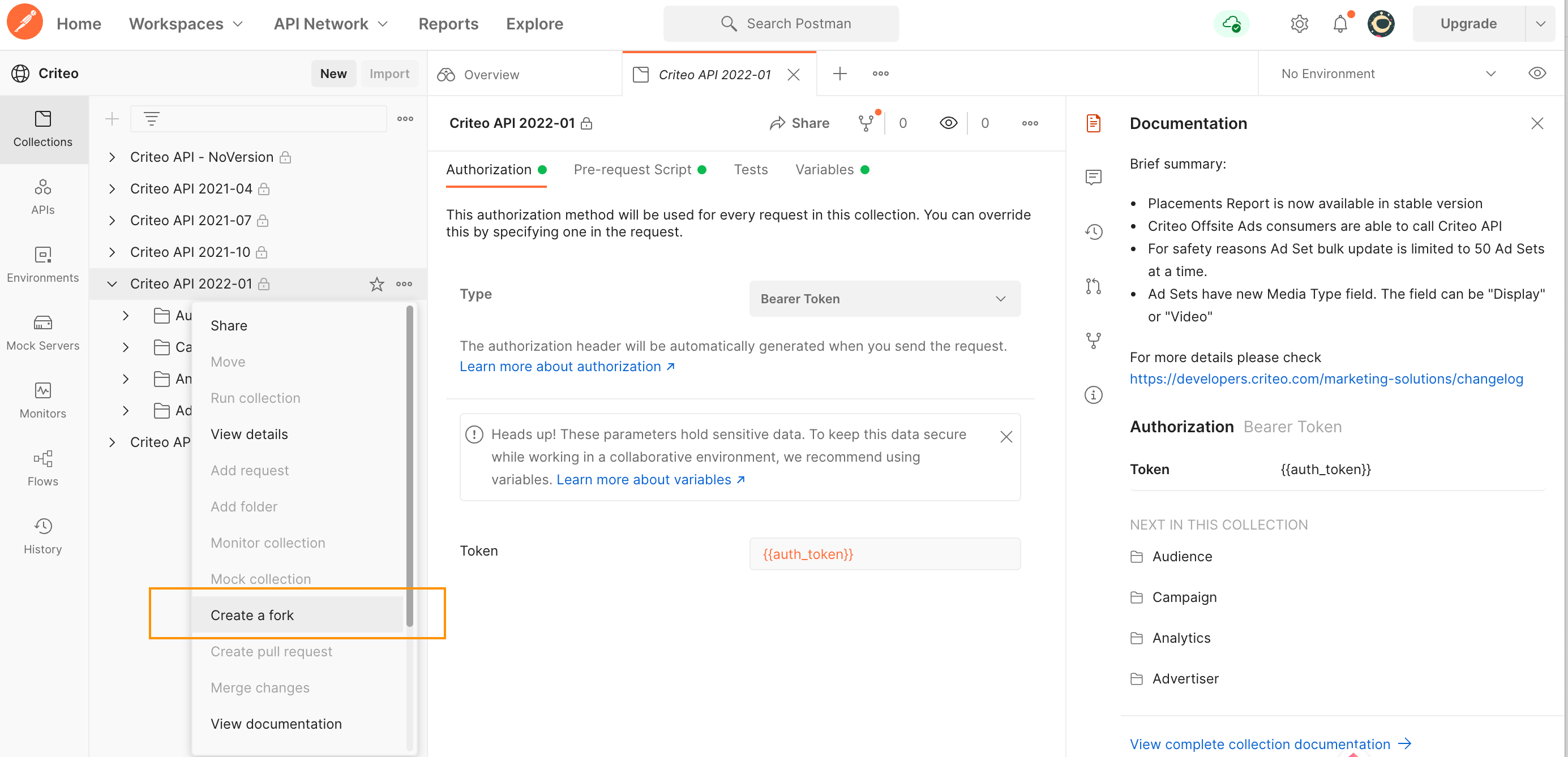
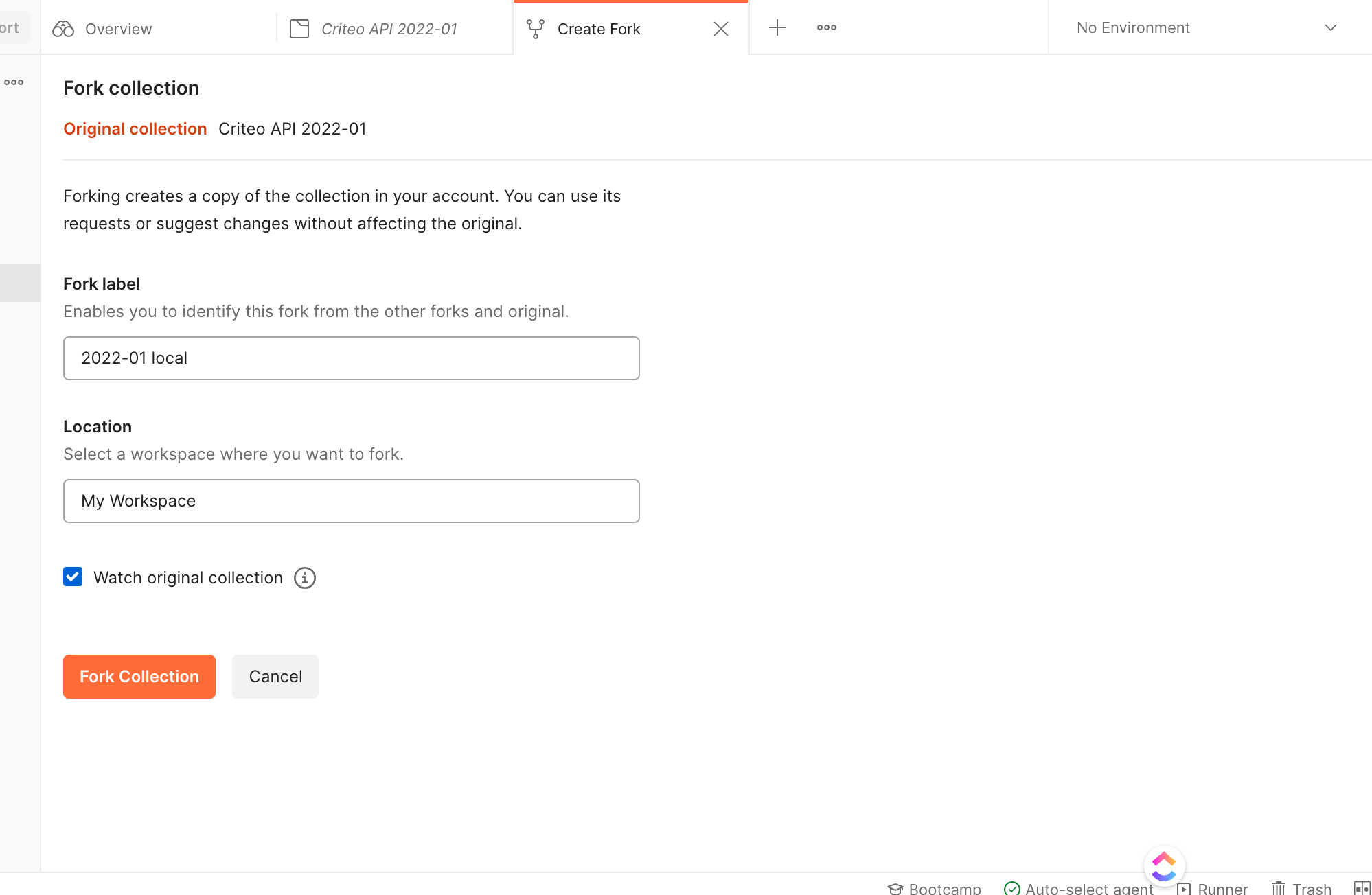 After completing this step, you should have a local version of the Criteo API collection in your workspace.
***
## Configure authentication
Go to the Criteo API [templated environment](https://www.postman.com/realcriteo/workspace/criteo/environment/12547236-5c1c73f6-1e41-4eec-9ae9-fab7f9ac6bf1). You will see collection of variables that you should customize according to your application credentials.
After completing this step, you should have a local version of the Criteo API collection in your workspace.
***
## Configure authentication
Go to the Criteo API [templated environment](https://www.postman.com/realcriteo/workspace/criteo/environment/12547236-5c1c73f6-1e41-4eec-9ae9-fab7f9ac6bf1). You will see collection of variables that you should customize according to your application credentials.
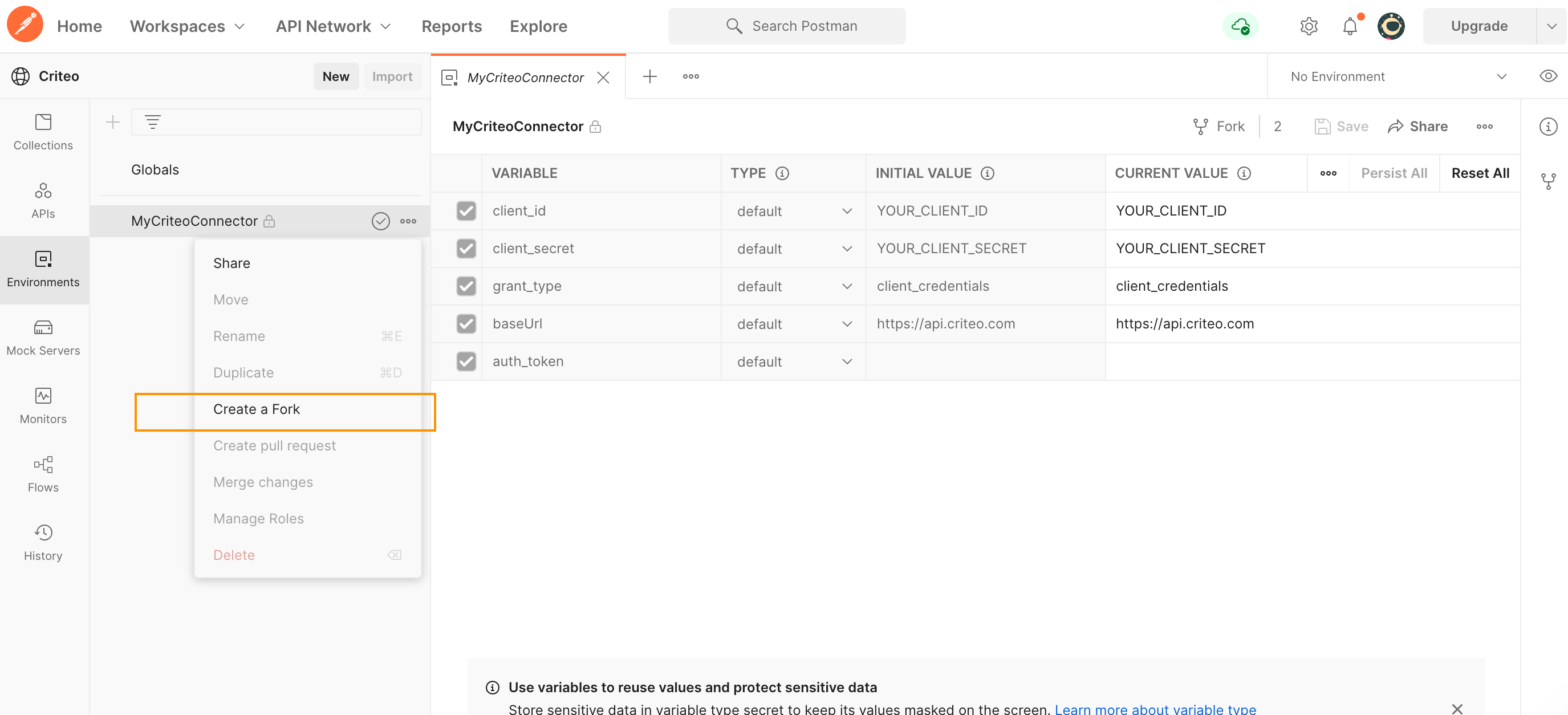 Click `Fork` and add a local label to differentiate the environment in your workspace. Once forked, set up the fields as follows:
* In `client_id` and `client_secret` fields, set the **CURRENT VALUE** column to the application `client_id` and `client_secret` values you received from the onboarding step,
* You don't need to change the remaining rows as long as the application grant type is`client_credentials`. If you have a different application type, please get in touch with our support.
These credentials input in the environment are used for authentication in the pre-request scripts. The pre-request script is a script attached to all Criteo API collections, to automatically fetch and supply an access token to protected endpoints.
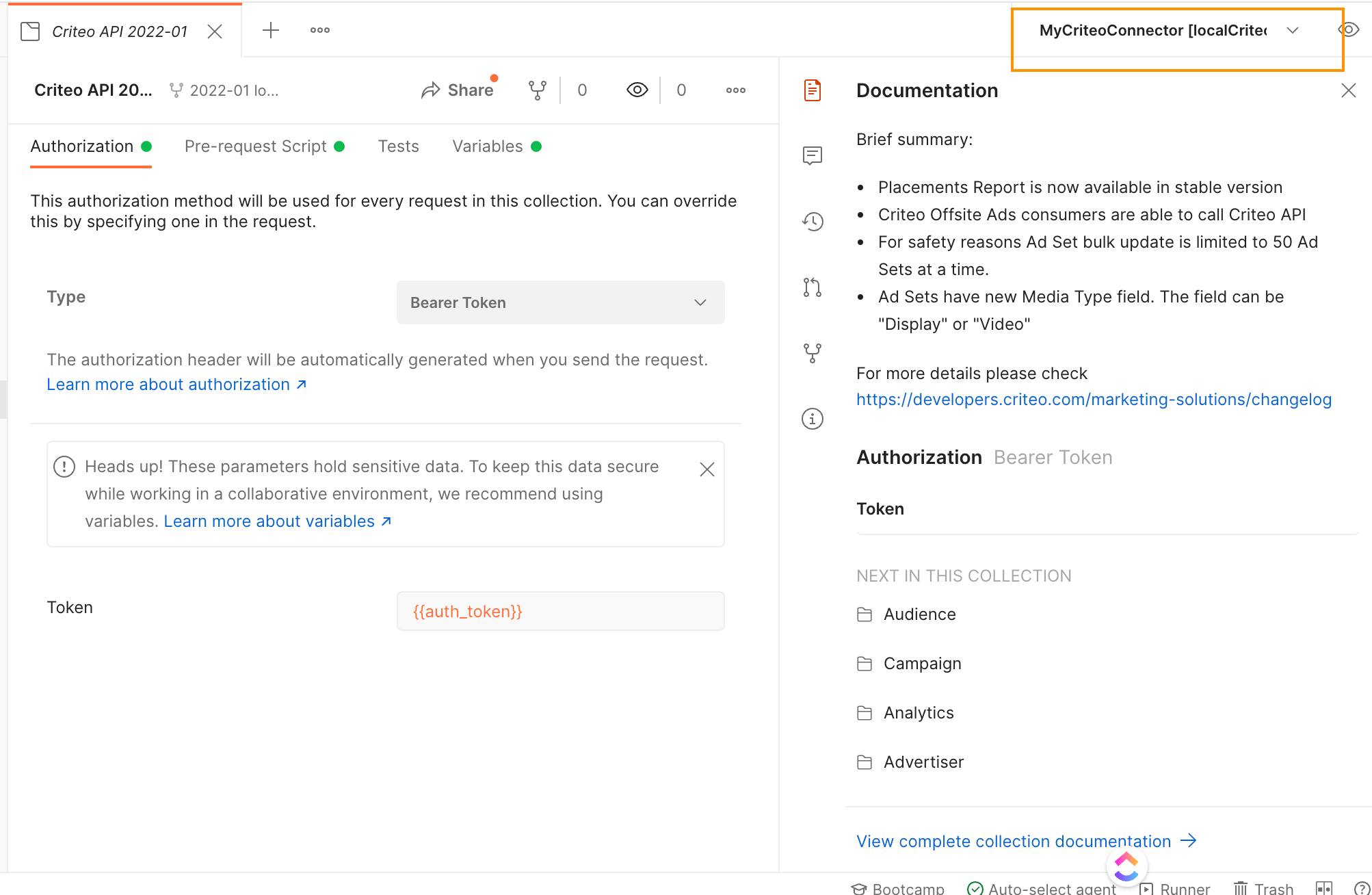
Finally, on the top right, verify that `MyCriteoConnector` Environment is selected in the dropdown as shown in the screenshot:
Click `Fork` and add a local label to differentiate the environment in your workspace. Once forked, set up the fields as follows:
* In `client_id` and `client_secret` fields, set the **CURRENT VALUE** column to the application `client_id` and `client_secret` values you received from the onboarding step,
* You don't need to change the remaining rows as long as the application grant type is`client_credentials`. If you have a different application type, please get in touch with our support.
These credentials input in the environment are used for authentication in the pre-request scripts. The pre-request script is a script attached to all Criteo API collections, to automatically fetch and supply an access token to protected endpoints.
Finally, on the top right, verify that `MyCriteoConnector` Environment is selected in the dropdown as shown in the screenshot:
 ***
## Your first API request
Inside the versioned folder, you will find the requests for the various Criteo API endpoints you can call.
To make your first call:
* Expand the folder and then expand into the Advertiser folder,
* Click `Api Portfolio Get` to open the portfolio request,
* On the top right, select `Send`.
***
## Your first API request
Inside the versioned folder, you will find the requests for the various Criteo API endpoints you can call.
To make your first call:
* Expand the folder and then expand into the Advertiser folder,
* Click `Api Portfolio Get` to open the portfolio request,
* On the top right, select `Send`.
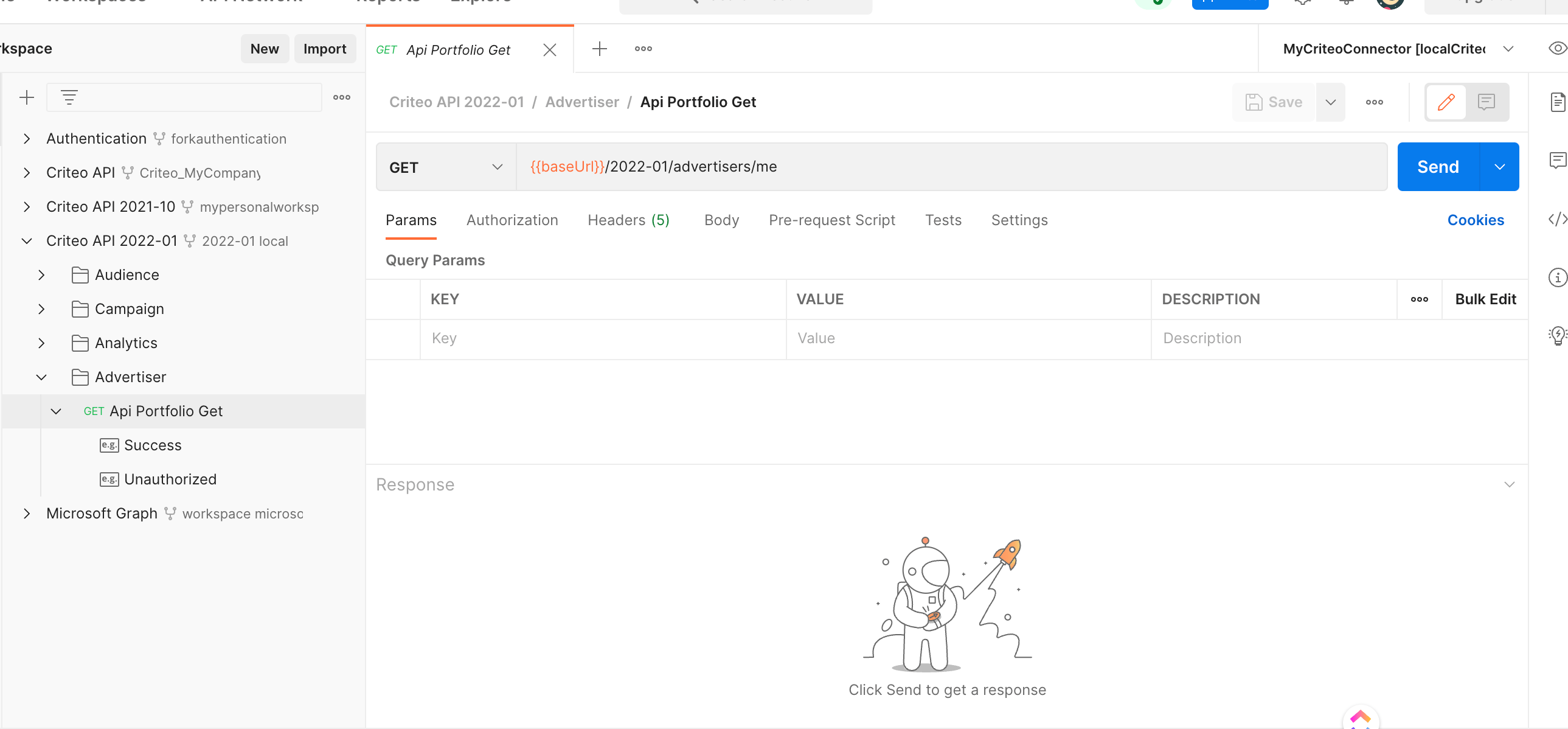 You will receive a list of accounts consented to your application in the response.
You have now successfully made a Criteo API call using a client credentials authentication. You can follow these steps to make other requests to Criteo API.
As a reminder, each of the domains (Audience/Campaign/Analytics, etc.) requires a separate permission which is bound to your application at creation time. If your application does not include `Read` or `Manage` permission on a particular domain, you will get a permission error in response to performing a `GET/PATCH` operation on that domain.
Learn more about application scopes and permissions in [Onboarding Checklist](/retail-media/v2026-preview/docs/onboarding-checklist#3-define-your-app-scope)
More information about error handling can be found in [API Response](/retail-media/v2025.01/docs/api-response).
***
## Contributing to Criteo API
Feel free to make your changes to the forked collection, and then hover over the collection top node and select `Create pull request`. The Criteo API team will review the change and merge the change wherever it makes sense.
***
## Questions
If you keep getting a `code authorization-token-invalid` response when issuing a request to Criteo server, the most likely reason is incorrect `client_id`/`client_secret` or an uninitialized environment.
The Postman community forum can be used for generic Postman usage questions.
If you have a question or a bug report which is specific to Criteo API, please get in touch with your Criteo contact.
You will receive a list of accounts consented to your application in the response.
You have now successfully made a Criteo API call using a client credentials authentication. You can follow these steps to make other requests to Criteo API.
As a reminder, each of the domains (Audience/Campaign/Analytics, etc.) requires a separate permission which is bound to your application at creation time. If your application does not include `Read` or `Manage` permission on a particular domain, you will get a permission error in response to performing a `GET/PATCH` operation on that domain.
Learn more about application scopes and permissions in [Onboarding Checklist](/retail-media/v2026-preview/docs/onboarding-checklist#3-define-your-app-scope)
More information about error handling can be found in [API Response](/retail-media/v2025.01/docs/api-response).
***
## Contributing to Criteo API
Feel free to make your changes to the forked collection, and then hover over the collection top node and select `Create pull request`. The Criteo API team will review the change and merge the change wherever it makes sense.
***
## Questions
If you keep getting a `code authorization-token-invalid` response when issuing a request to Criteo server, the most likely reason is incorrect `client_id`/`client_secret` or an uninitialized environment.
The Postman community forum can be used for generic Postman usage questions.
If you have a question or a bug report which is specific to Criteo API, please get in touch with your Criteo contact.