> ## Documentation Index
> Fetch the complete documentation index at: https://developers.criteo.com/llms.txt
> Use this file to discover all available pages before exploring further.

# OAuth App – Authorization Code & PKCE Setup

> This guide provides step-by-step instructions for implementing OAuth 2.0 Authorization Code with PKCE, including authorization requests and token exchange.

## PKCE Overview

Proof Key for Code Exchange (PKCE) is an extension of the OAuth 2.0 Authorization Code flow that enhances security for public or mobile clients that cannot safely store a client secret. It adds a verification step between the authorization request and token exchange to prevent intercepted authorization codes from being reused by malicious actors.

You should use PKCE if your application is a mobile app, single-page app (SPA), or any client that cannot securely store a client secret. If your application is a traditional server-side (confidential) client, you can continue using the standard [Authorization Code flow](/retail-media/docs/oauth-app-authorization-code).

<Info>
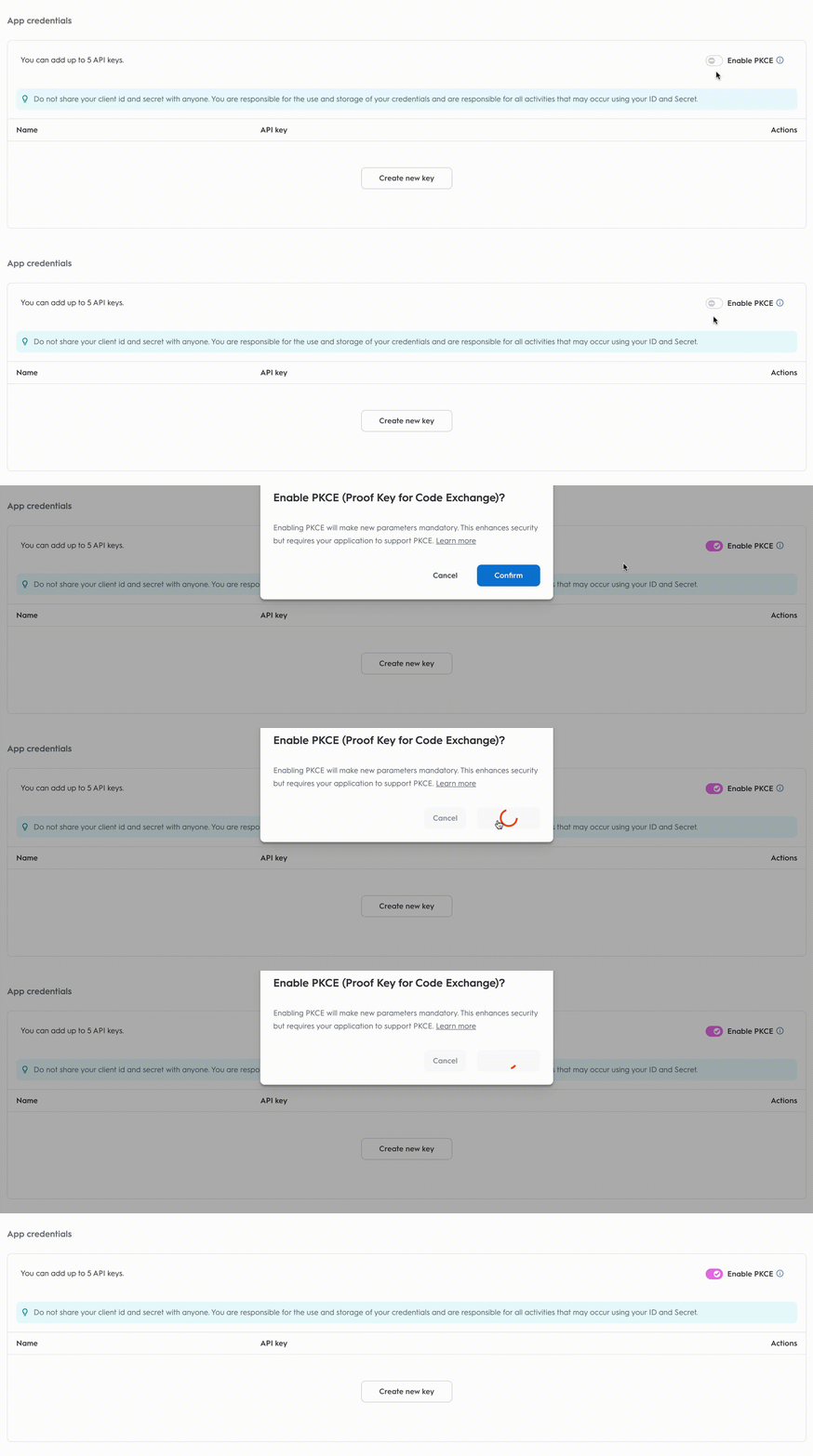
  PKCE (RFC 7636) is also available to developers as an extension of the authorization code flow. To enable it, toggle `PKCE` in the App details page.

  <Frame>
    <img src="https://mintcdn.com/criteo-e1682996/xLJjp01XGpYNB6pV/images/retail-media/v2025.10/docs/5d438b48f6491e173c4f3f92e9c350000b1ff8497477459e6db264edc8026016-pkce-gif.gif?s=372dfb4fd151be350fe29778043ad626" alt="5d438b48f6491e173c4f3f92e9c350000b1ff8497477459e6db264edc8026016 pkce gif" width="2998" height="896" data-path="images/retail-media/v2025.10/docs/5d438b48f6491e173c4f3f92e9c350000b1ff8497477459e6db264edc8026016-pkce-gif.gif" />
  </Frame>
</Info>

<Warning>
  Once PKCE is enabled, the application can only use the PKCE workflow. If PKCE parameters are not provided, the authorization code flow will fail. To switch back the toggle, the application should have no active keys.
</Warning>

***

## Step 1. Consent URL

Once your app parameters are set, you can implement the authorization code flow.

### Consent URL

To request access, create a Consent link that redirects the user.

<Info>
  #### Authorization Code vs. Client Credentials Consent URLs

  If you're familiar with the [Client Credentials workflow](/retail-media/docs/oauth-app-client-credentials), you might notice that the **Generate Consent URL** button is not present in the partner portal for the authorization code workflow. This is because, with the authorization code method, you need to provide a redirect URI specific to your organization. Therefore, these URLs must be configured directly within your workflow.
</Info>

<Warning>
  If the redirect URI is not declared in the application, the redirection will be blocked.
</Warning>

If you have PKCE enabled, then the consent URL will require additional parameters:

```http URL theme={null}
https://consent.criteo.com/request?response_type=code
&client_id={client_id}
&redirect_uri={redirect_uri}
&state={state}
&code_challenge={code_challenge}
&code_challenge_method={code_challenge_method}
```

<table>
  <thead>
    <tr>
      <th>
        <p>
          Parameter
        </p>
      </th>

      <th>
        <p>
          Required
        </p>
      </th>

      <th>
        <p>
          Description
        </p>
      </th>
    </tr>
  </thead>

  <tbody>
    <tr>
      <td>
        <p>
          <code>
            response\_type=code
          </code>
        </p>
      </td>

      <td>
        <p>
          Yes
        </p>
      </td>

      <td>
        <p>
          Indicates that an authorization code is expected as outcome.
        </p>
      </td>
    </tr>

    <tr>
      <td>
        <p>
          <code>
            client\_id
          </code>
        </p>
      </td>

      <td>
        <p>
          Yes
        </p>
      </td>

      <td>
        <p>
          Your public key from the app credentials section.
        </p>
      </td>
    </tr>

    <tr>
      <td>
        <p>
          <code>
            redirect\_uri
          </code>
        </p>
      </td>

      <td>
        <p>
          Yes
        </p>
      </td>

      <td>
        <p>
          The URL to redirect the user after consent. Must match the configured URI.
        </p>
      </td>
    </tr>

    <tr>
      <td>
        <p>
          <code>
            state
          </code>
        </p>
      </td>

      <td>
        <p>
          No
        </p>
      </td>

      <td>
        <p>
          Optional string to prevent Cross-Site Request Forgery attacks.
        </p>
      </td>
    </tr>

    <tr>
      <td>
        <p>
          <code>
            code\_challenge
          </code>
        </p>
      </td>

      <td>
        <p>
          Yes when PKCE is enabled
        </p>
      </td>

      <td>
        <p>
          A challenge derived from the

          <code>
            code\_verifier
          </code>

          that is sent in the authorization request, to be verified against later.
        </p>
      </td>
    </tr>

    <tr>
      <td>
        <p>
          <code>
            code\_challenge\_method
          </code>
        </p>
      </td>

      <td>
        <p>
          No
        </p>
      </td>

      <td>
        <p>
          A method that was used to derive

          <code>
            code\_challenge
          </code>

          .
        </p>

        <p>
          The methods available:
        </p>

        <p>
          <code>
            plain
          </code>

          : no transformation (not recommended)
        </p>

        <p>
          <code>
            S256
          </code>

          : recommended & secure (hash + base64url)(also default when no method is provided)
        </p>
      </td>
    </tr>
  </tbody>
</table>

***

## Step 2. Exchanging the Access Code for the Access Token

<Info>
  You can find more details about the OAuth endpoint in [our API Reference](/retail-media/v2025.10/reference/authorization/v-1-oauth-2-token-post).
</Info>

If you have PKCE enabled and made the consent request with PKCE parameters, your access token request must have one more parameter, which is `code_verifier`:

### Example Request

```bash theme={null}
curl -L 'https://api.criteo.com/oauth2/token' \
-H 'Content-Type: application/x-www-form-urlencoded' \
-d 'client_id=<MY_CLIENT_ID>' \
-d 'client_secret=<MY_CLIENT_SECRET>' \
-d 'redirect_uri=<MY_URI>' \
-d 'code=<MY_CODE>' \
-d 'grant_type=authorization_code' \
-d 'code_verifier=<MY_CODE_VERIFIER>'
```

### Example Response (Success)

```json theme={null}
{
  "access_token": "eyJhbGciOiJIUzI1NiIsInR5cCI6IkpXVCJ9...",
  "token_type": "bearer",
  "expires_in": 3600,
}
```

### Parameters

All the following parameters are required in the context of PKCE.

<table>
  <thead>
    <tr>
      <th>
        <p>
          Parameter
        </p>
      </th>

      <th>
        <p>
          Description
        </p>
      </th>
    </tr>
  </thead>

  <tbody>
    <tr>
      <td>
        <p>
          <code>
            grant\_type=authorization\_code
          </code>
        </p>
      </td>

      <td>
        <p>
          Indicates that you are providing an authorization code.
        </p>
      </td>
    </tr>

    <tr>
      <td>
        <p>
          <code>
            code
          </code>
        </p>
      </td>

      <td>
        <p>
          Authorization code returned during redirection.
        </p>
      </td>
    </tr>

    <tr>
      <td>
        <p>
          <code>
            redirect\_uri
          </code>
        </p>
      </td>

      <td>
        <p>
          Must match the

          <code>
            redirect\_uri
          </code>

          used for the authorization request.
        </p>
      </td>
    </tr>

    <tr>
      <td>
        <p>
          <code>
            client\_id
          </code>
        </p>
      </td>

      <td>
        <p>
          Your public key from the app credentials.
        </p>
      </td>
    </tr>

    <tr>
      <td>
        <p>
          <code>
            client\_secret
          </code>
        </p>
      </td>

      <td>
        <p>
          Your secret key, accessible when creating credentials.
        </p>
      </td>
    </tr>

    <tr>
      <td>
        <p>
          <code>
            code\_verifier
          </code>
        </p>
      </td>

      <td>
        <p>
          A high-entropy random string created by the client (usually 43–128 characters).
        </p>
      </td>
    </tr>
  </tbody>
</table>

### Using the Refresh Token

To renew an access token, use the following request:

```bash theme={null}
curl -X POST https://api.criteo.com/oauth2/token \
-H "Content-Type: application/x-www-form-urlencoded" \
-d "grant_type=refresh_token&code={code}&redirect_uri={redirect_uri}&client_id={client_id}&client_secret={client_secret}"

```

<table>
  <thead>
    <tr>
      <th>
        <p>
          Parameter
        </p>
      </th>

      <th>
        <p>
          Description
        </p>
      </th>
    </tr>
  </thead>

  <tbody>
    <tr>
      <td>
        <p>
          <code>
            grant\_type=refresh\_token
          </code>
        </p>
      </td>

      <td>
        <p>
          Indicates that you are providing a refresh token.
        </p>
      </td>
    </tr>

    <tr>
      <td>
        <p>
          <code>
            refresh\_token
          </code>
        </p>
      </td>

      <td>
        <p>
          Refresh token shared when requesting an access token.
        </p>
      </td>
    </tr>

    <tr>
      <td>
        <p>
          <code>
            client\_id
          </code>
        </p>
      </td>

      <td>
        <p>
          Your public key accessible in app credentials section.
        </p>
      </td>
    </tr>

    <tr>
      <td>
        <p>
          <code>
            client\_secret
          </code>
        </p>
      </td>

      <td>
        <p>
          Your secret key, accessible only once when creating a pair of

          <code>
            client\_id
          </code>

          and

          <code>
            client\_secret
          </code>

          in credentials section.
        </p>
      </td>
    </tr>
  </tbody>
</table>

The response will be the same as when issuing an access token.

<br />
