> ## Documentation Index
> Fetch the complete documentation index at: https://developers.criteo.com/llms.txt
> Use this file to discover all available pages before exploring further.

# Branding Display Spotlight Solo

> This guide provides the specifications and technical details for the Branding Display Spotlight Solo format rendering.

# Introduction

The **Branding Display Spotlight Solo** is a responsive horizontal display banner consisting of a still image and a redirect link.

<Frame>
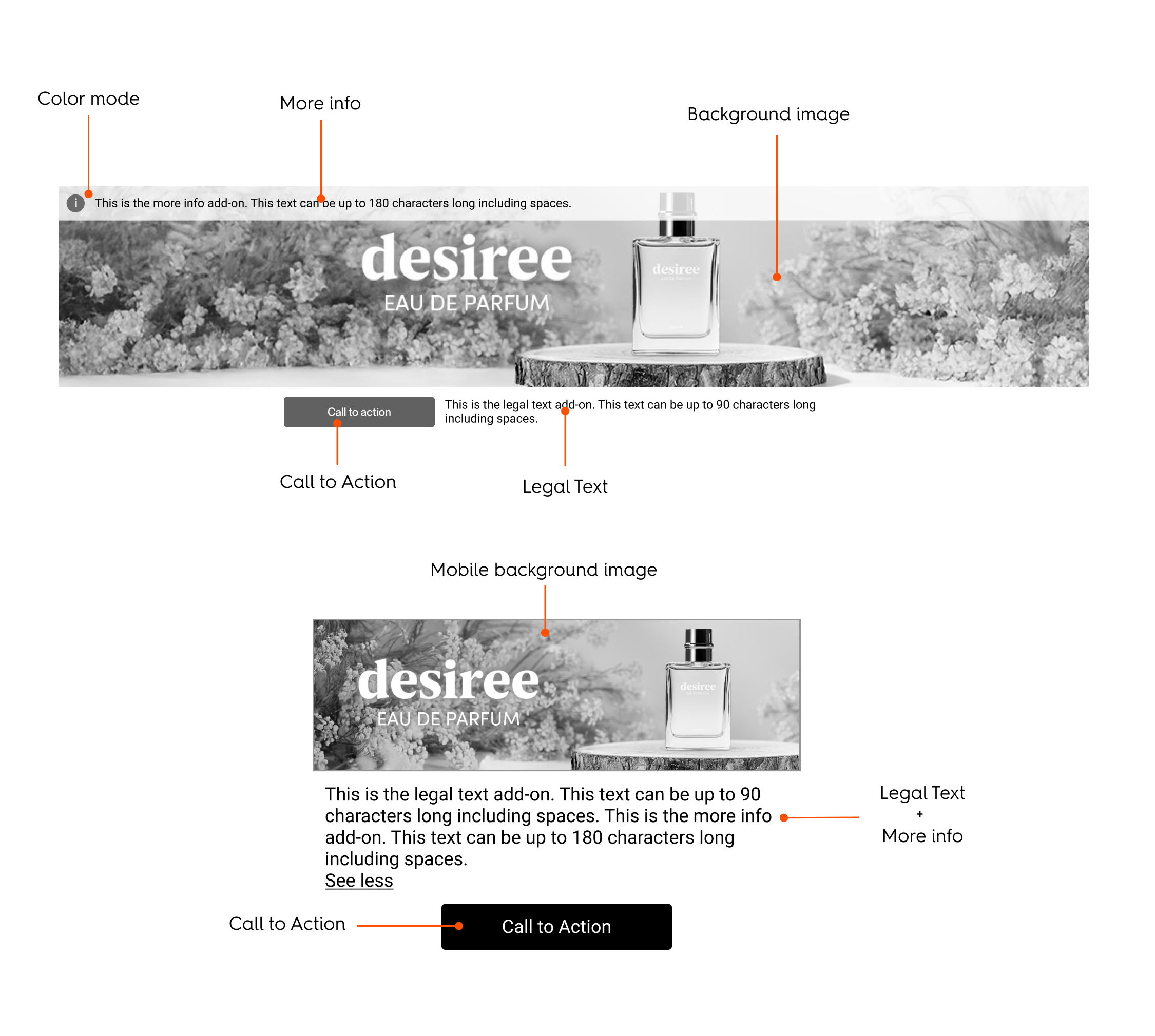
  <img src="https://mintcdn.com/criteo-e1682996/PtO-HGDADAVLvs2M/images/retailer-integration/docs/68641a940611c0f465f0327e2a8ea3feaa03d313ed959a6fecf49920a3b8c9ae-BD_Spotlight_Solo_-_Fields.png?fit=max&auto=format&n=PtO-HGDADAVLvs2M&q=85&s=6e9f5e01183e64f98c480fc803a05ca5" alt="68641a940611c0f465f0327e2a8ea3feaa03d313ed959a6fecf49920a3b8c9ae BD_Spotlight_Solo_ _Fields" width="2250" height="2019" data-path="images/retailer-integration/docs/68641a940611c0f465f0327e2a8ea3feaa03d313ed959a6fecf49920a3b8c9ae-BD_Spotlight_Solo_-_Fields.png" />
</Frame>

***

# Rendering Examples

## CodePen

<iframe height="400" style={{ width: "100%", border: "none" }} src="https://codepen.io/demo_placement/embed/ByKgggw" loading="lazy" allowfullscreen />

## Desktop

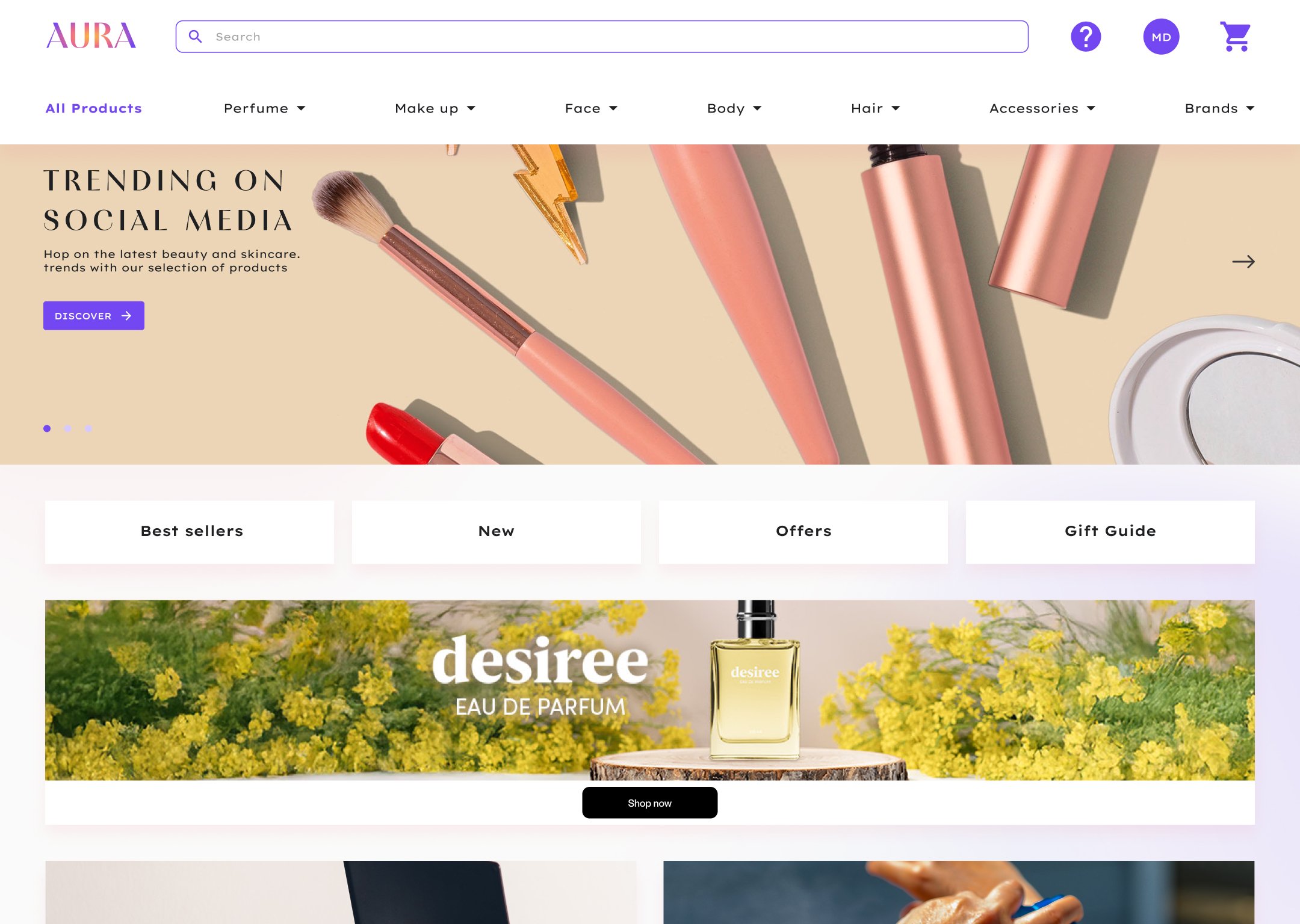
<Frame caption="Rendering example of the Branding Display Spotlight Solo format (desktop)">
  <img src="https://mintcdn.com/criteo-e1682996/T1671lE5Qb9IdIDU/images/retailer-integration/docs/daa347f1339e4784f8b7a083570e909934b8f6bd4802e1a5b220aa82241fb976-BD_Spotlight_Solo_-_Mockup_-_Desktop.jpg?fit=max&auto=format&n=T1671lE5Qb9IdIDU&q=85&s=7446e7fda847b7ce1933db26a210774f" alt="Rendering example of the Branding Display Spotlight Solo format (desktop)" width="2160" height="1536" data-path="images/retailer-integration/docs/daa347f1339e4784f8b7a083570e909934b8f6bd4802e1a5b220aa82241fb976-BD_Spotlight_Solo_-_Mockup_-_Desktop.jpg" />
</Frame>

## Mobile

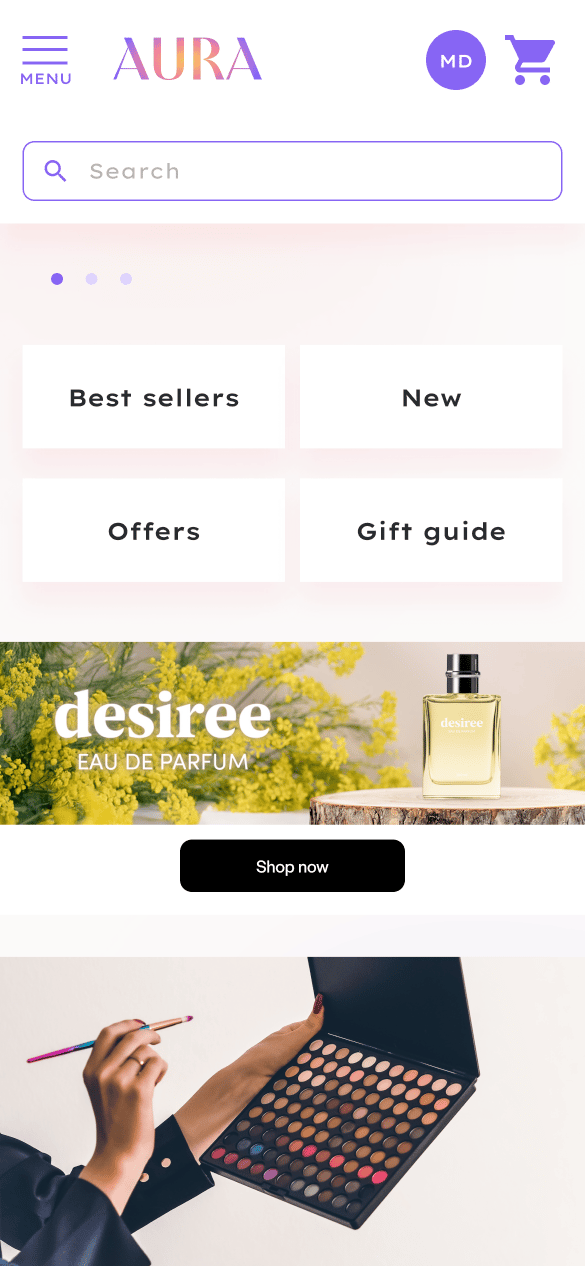
<Frame caption="Rendering example of the Branding Display Spotlight Solo format (mobile)">
  <img src="https://mintcdn.com/criteo-e1682996/fr3QURzyzf6m9Hkn/images/retailer-integration/docs/2bdca605ecc674ff118b8f43cf9e028923ef902999575b962705d1d4af62171d-image.png?fit=max&auto=format&n=fr3QURzyzf6m9Hkn&q=85&s=5af09298f53466fe7b53d70c8554e7f1" alt="Rendering example of the Branding Display Spotlight Solo format (mobile)" width="585" height="1266" data-path="images/retailer-integration/docs/2bdca605ecc674ff118b8f43cf9e028923ef902999575b962705d1d4af62171d-image.png" />
</Frame>

***

# Specifications

## General

* The format can be displayed in any page but only for out-of-grid locations.
* The **branding zone** redirects to 1 URL.

The branding zone refers to the container that holds the background image asset.

***

## Asset Sizes and Behavior

### Desktop and Tablet Specifications

**Dimensions**

The background image asset is 1400x450 pixels.

**Device Support**

This asset will render at its original size and can cover both desktop and tablet placements as small as 576 px wide or based on the detected device.

**Alignment and Cropping**

There is a minimum cropping area of the image asset called the Safety zone, therefore the background image needs to be centered within the branding zone and cropped on all sides. The height of the branding zone can be determined by the retailer as long as the Safety zone is respected.

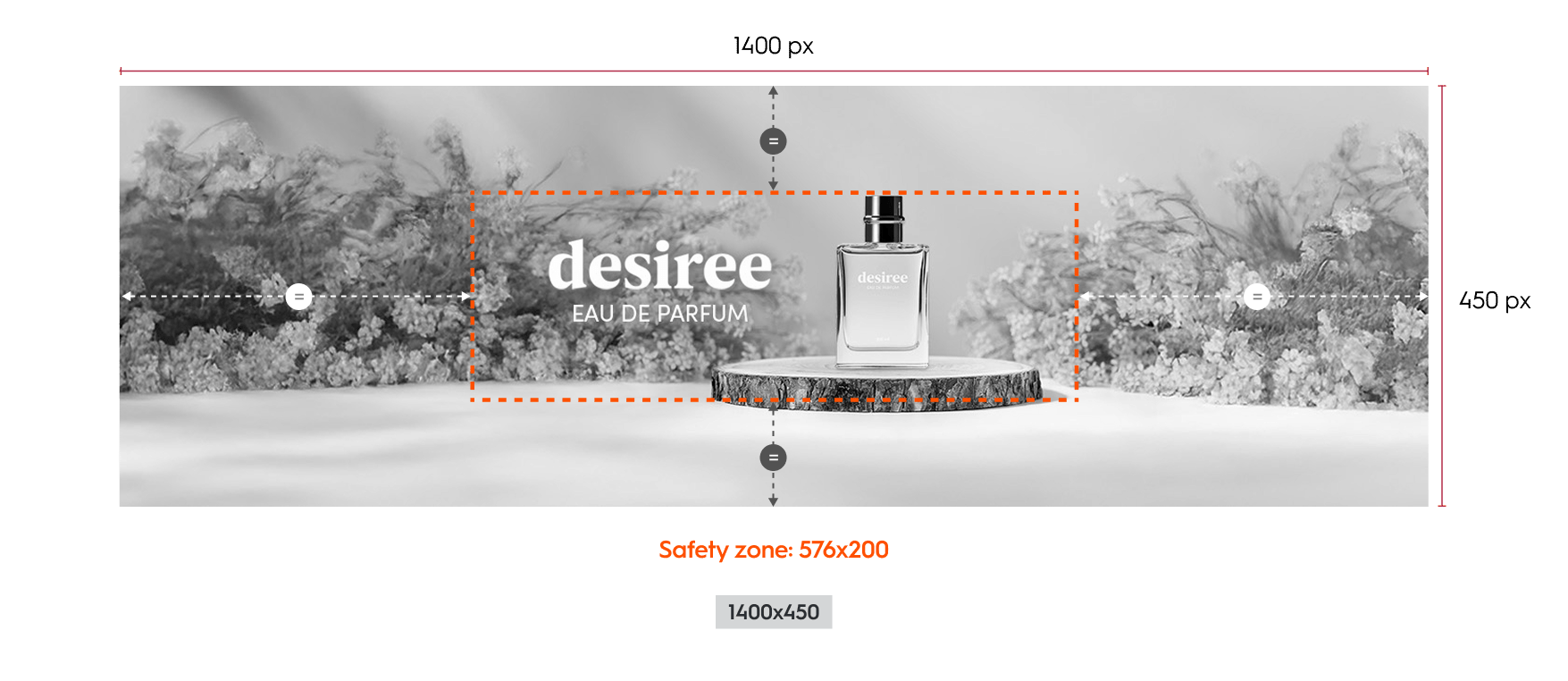
<br />

<Frame>
  <img src="https://mintcdn.com/criteo-e1682996/PtO-HGDADAVLvs2M/images/retailer-integration/docs/97c4add02a9288ebdfb1c3edc274f9175ded4ca1fe94d3efc6ef2d0b56bd55d6-BD_Spotlight_Solo_-_Web.png?fit=max&auto=format&n=PtO-HGDADAVLvs2M&q=85&s=5332be142d395340eac1035be592b786" alt="97c4add02a9288ebdfb1c3edc274f9175ded4ca1fe94d3efc6ef2d0b56bd55d6 BD_Spotlight_Solo_ _Web" width="1024" height="200" data-path="images/retailer-integration/docs/97c4add02a9288ebdfb1c3edc274f9175ded4ca1fe94d3efc6ef2d0b56bd55d6-BD_Spotlight_Solo_-_Web.png" />
</Frame>

<Frame caption="Example of the Branding Display Spotlight Solo format and safety zone on original asset size (desktop)">
  <img src="https://mintcdn.com/criteo-e1682996/PtO-HGDADAVLvs2M/images/retailer-integration/docs/9ed2f3b4ad577611cf103b57297f302104d159e09f4e5058ac4544e1b5a7665a-251118_-_Horizontal_Web_Asset.png?fit=max&auto=format&n=PtO-HGDADAVLvs2M&q=85&s=be90f90a42bfc9c3f6c72696519c6404" alt="Example of the Branding Display Spotlight Solo format and safety zone on original asset size (desktop)" width="1755" height="762" data-path="images/retailer-integration/docs/9ed2f3b4ad577611cf103b57297f302104d159e09f4e5058ac4544e1b5a7665a-251118_-_Horizontal_Web_Asset.png" />
</Frame>

**Flexible Scaling Rules**

The asset can be scaled down to accommodate placements sizes that are thinner(height as small as 133 pixels) only if the width is less than 933 pixels. In this specific layout scenario,

* the image can scale to 66.67% (933x300),
* and the Safety zone = 384x133.
<br />

### Mobile Specifications

This layout is optimized for mobile devices and high density screens.

**Background Image**

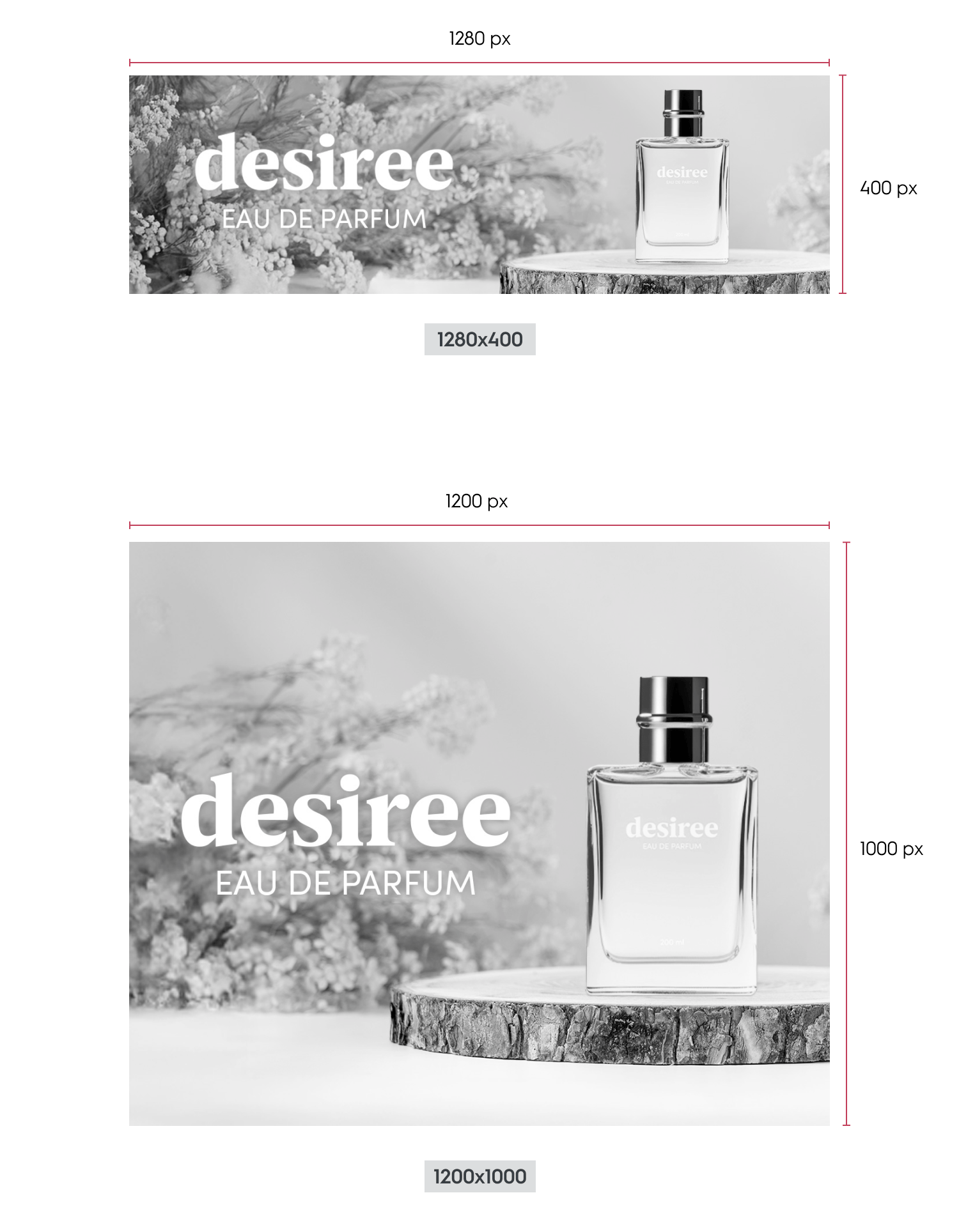
* The background image size is 1280 by 400 pixels or 1200 x 1000 pixels.
  * Please note that only one of these size will be used once chosen.
* The image is fully responsive:
  * It scales proportionally based on the width of its parent container.
  * As the width decreases, the height decreases proportionally.
  * The image is never cropped.

<Frame caption="Dimensions for the Branding Display Spotlight Solo format (mobile horizontal & vertical)">
  <img src="https://mintcdn.com/criteo-e1682996/T1671lE5Qb9IdIDU/images/retailer-integration/docs/f96c919edcf5467e54e0971d031bdd8e7f9daf8bda755e09189f86e5a8447e4c-image.png?fit=max&auto=format&n=T1671lE5Qb9IdIDU&q=85&s=dc060e3ba8a1771955f5c7c2f550080c" alt="Dimensions for the Branding Display Spotlight Solo format (mobile horizontal & vertical)" width="1500" height="1928" data-path="images/retailer-integration/docs/f96c919edcf5467e54e0971d031bdd8e7f9daf8bda755e09189f86e5a8447e4c-image.png" />
</Frame>

***

## Available Options

The available options are adding a CTA, a legal text, a "more info" text as well as color modes

<Frame caption="Example of the Branding Display Spotlight Solo (desktop) with CTA, legal text and &#x22;more info&#x22; text">
  <img src="https://mintcdn.com/criteo-e1682996/fr3QURzyzf6m9Hkn/images/retailer-integration/docs/5b1a7bd2662e19914d3482a77974ab5aff043cd84d816e6c7c0b99f00cfc3b3c-bd-spoltlight-dsktop-all.png?fit=max&auto=format&n=fr3QURzyzf6m9Hkn&q=85&s=0f70952caf355743b4b194ae034c858d" alt="Example of the Branding Display Spotlight Solo (desktop) with CTA, legal text and &#x22;more info&#x22; text" width="1024" height="249" data-path="images/retailer-integration/docs/5b1a7bd2662e19914d3482a77974ab5aff043cd84d816e6c7c0b99f00cfc3b3c-bd-spoltlight-dsktop-all.png" />
</Frame>

### Redirection

When a user clicks on the branding zone (anywhere on banner image) or the CTA button, they will be taken to the redirection link defined within the response. There are two possible redirection options:

* *Self* (open in the same tab)
* *Blank* (open in a new tab)

### Call to Action (CTA)

A CTA button can be added as an option. If enabled, it will appear below the branding zone. When the user clicks on button, they will be redirected to the link.

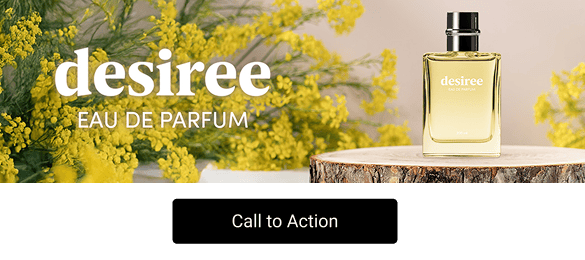
<Frame>
  <img src="https://mintcdn.com/criteo-e1682996/fr3QURzyzf6m9Hkn/images/retailer-integration/docs/142ec83275ca2adf7217c6cd82fe7f768ff5c4f8ac53d8a86b3d3fdac680bda1-BD_Spotlight_Solo_-_CTA.png?fit=max&auto=format&n=fr3QURzyzf6m9Hkn&q=85&s=a7d19694ba950990b08fcb4ef6114e36" alt="142ec83275ca2adf7217c6cd82fe7f768ff5c4f8ac53d8a86b3d3fdac680bda1 BD_Spotlight_Solo_ _CTA" width="1024" height="249" data-path="images/retailer-integration/docs/142ec83275ca2adf7217c6cd82fe7f768ff5c4f8ac53d8a86b3d3fdac680bda1-BD_Spotlight_Solo_-_CTA.png" />
</Frame>

<Frame caption="CTA example for the Branding Display Spotlight Solo format">
  <img src="https://mintcdn.com/criteo-e1682996/T1671lE5Qb9IdIDU/images/retailer-integration/docs/da458da111fd6dc2621f65712dd65919c8561d4a736cbce18507e1b51b68ba16-BD_Spotlight_Solo_-_Mobile_CTA.png?fit=max&auto=format&n=T1671lE5Qb9IdIDU&q=85&s=712bcb750d9a6d891d4029c49d3088f9" alt="CTA example for the Branding Display Spotlight Solo format" width="585" height="260" data-path="images/retailer-integration/docs/da458da111fd6dc2621f65712dd65919c8561d4a736cbce18507e1b51b68ba16-BD_Spotlight_Solo_-_Mobile_CTA.png" />
</Frame>

### Legal Text

Legal text can be added as an option. It is always visible (90 characters maximum, including spaces) and placed below the branding zone.

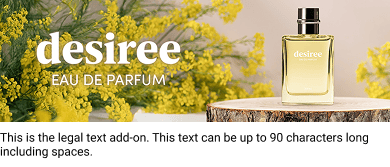
<Frame>
  <img src="https://mintcdn.com/criteo-e1682996/PtO-HGDADAVLvs2M/images/retailer-integration/docs/79020c187a98d6659f72194051e17bab7198c4829fb8480d90ee64610488692b-BD_Spotlight_Solo_-_Legal.png?fit=max&auto=format&n=PtO-HGDADAVLvs2M&q=85&s=7f337766d144acd8fe8bfa9ecf8a030b" alt="79020c187a98d6659f72194051e17bab7198c4829fb8480d90ee64610488692b BD_Spotlight_Solo_ _Legal" width="1024" height="231" data-path="images/retailer-integration/docs/79020c187a98d6659f72194051e17bab7198c4829fb8480d90ee64610488692b-BD_Spotlight_Solo_-_Legal.png" />
</Frame>

<Frame caption="Legal Text example for the Branding Display Spotlight Solo format">
  <img src="https://mintcdn.com/criteo-e1682996/T1671lE5Qb9IdIDU/images/retailer-integration/docs/f983d504c125c72282c9f04e9e8a0a12a53fc8ddbef0197de7e34d3da6b1ccdb-BD_Spotlight_Solo_-_Mobile_legal.png?fit=max&auto=format&n=T1671lE5Qb9IdIDU&q=85&s=661ebbe7aac020f0cb4e8f6d8565ac88" alt="Legal Text example for the Branding Display Spotlight Solo format" width="390" height="167" data-path="images/retailer-integration/docs/f983d504c125c72282c9f04e9e8a0a12a53fc8ddbef0197de7e34d3da6b1ccdb-BD_Spotlight_Solo_-_Mobile_legal.png" />
</Frame>

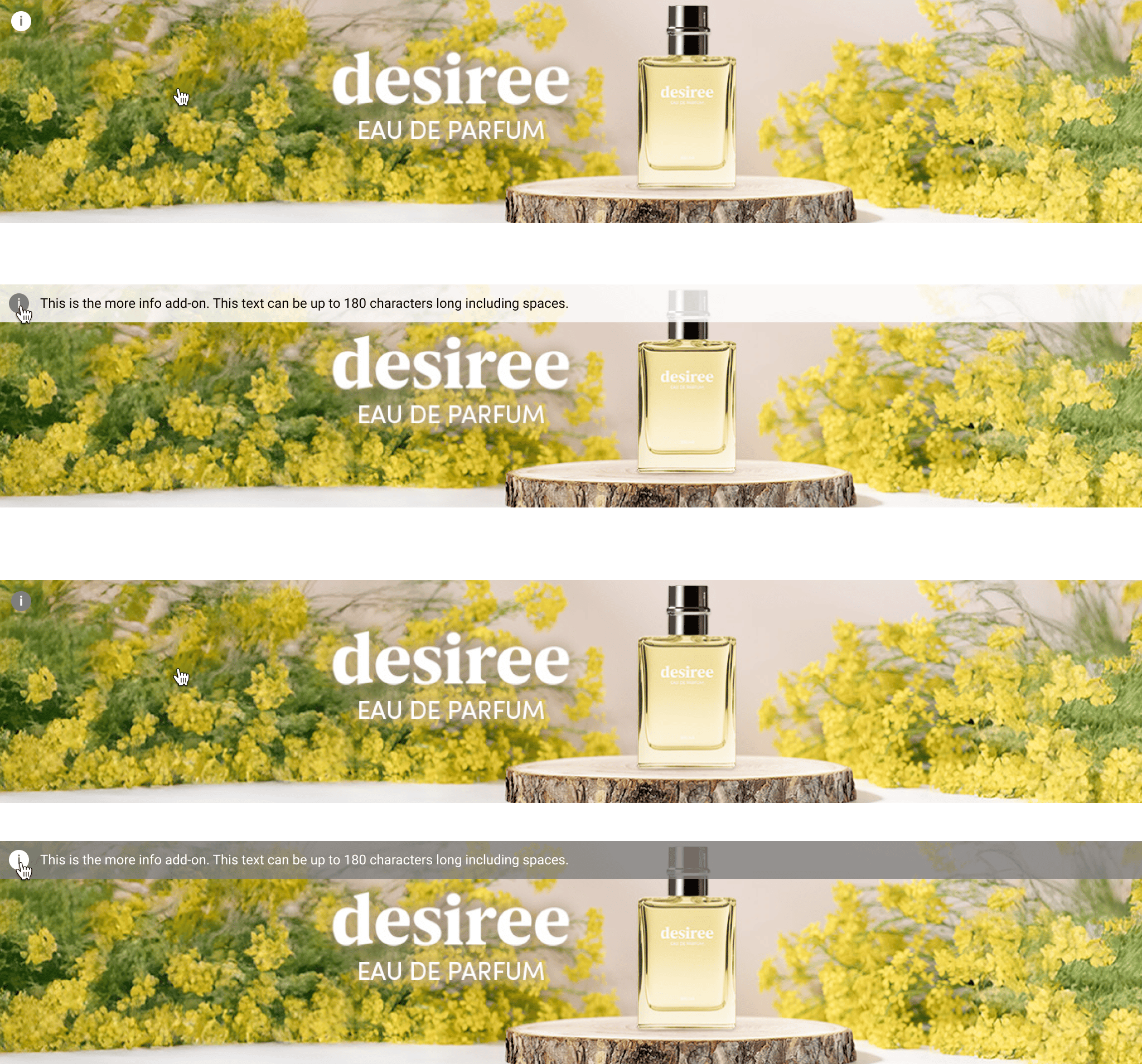
### More Info

More info text can be added as an option (180 characters maximum, including spaces).

If the option is enabled:

* While hovering over the branding zone, an (i) icon is displayed in the top-left corner
* When hovering the (i) icon, the "More info" text is displayed on top of the branding zone.
* On mobile, it is always visible or displayed when the user clicks on `see more`.


<br />

<Frame>
  <img src="https://mintcdn.com/criteo-e1682996/T1671lE5Qb9IdIDU/images/retailer-integration/docs/c5b920b6e1867418c426f4c534dcf21639918142721f01a0ab87c8bf4c935c6f-BD_Spotlight_Solo_-_more_info.png?fit=max&auto=format&n=T1671lE5Qb9IdIDU&q=85&s=38b43391713c101c28395b92be41dcd4" alt="c5b920b6e1867418c426f4c534dcf21639918142721f01a0ab87c8bf4c935c6f BD_Spotlight_Solo_ _more_info" width="1024" height="200" data-path="images/retailer-integration/docs/c5b920b6e1867418c426f4c534dcf21639918142721f01a0ab87c8bf4c935c6f-BD_Spotlight_Solo_-_more_info.png" />
</Frame>

<Frame>
  <img src="https://mintcdn.com/criteo-e1682996/PtO-HGDADAVLvs2M/images/retailer-integration/docs/82304c5906acd3eba2283bcc364e973f5a9551a4f28c5f92f28a3c769be67365-251212_-_BD_Spotlight_Solo_-_more_info_hover.png?fit=max&auto=format&n=PtO-HGDADAVLvs2M&q=85&s=71569b2f697a9406a0842d314d187161" alt="82304c5906acd3eba2283bcc364e973f5a9551a4f28c5f92f28a3c769be67365 251212_ BD_Spotlight_Solo _more_info_hover" width="1024" height="200" data-path="images/retailer-integration/docs/82304c5906acd3eba2283bcc364e973f5a9551a4f28c5f92f28a3c769be67365-251212_-_BD_Spotlight_Solo_-_more_info_hover.png" />
</Frame>

<Frame caption="Example of CTA, legal text and 'More Info' for the Branding Display Spotlight Solo format (mobile)">
  <img src="https://mintcdn.com/criteo-e1682996/fr3QURzyzf6m9Hkn/images/retailer-integration/docs/29173220bcfe070dafc1dccf8592c37d90cfb544074ce8c5f0ca81503370bc2d-bdss_-_more_info_mob.png?fit=max&auto=format&n=fr3QURzyzf6m9Hkn&q=85&s=0fe8c52f468ac26c1cd782c82b1d8d81" alt="Example of CTA, legal text and 'More Info' for the Branding Display Spotlight Solo format (mobile)" width="1845" height="335" data-path="images/retailer-integration/docs/29173220bcfe070dafc1dccf8592c37d90cfb544074ce8c5f0ca81503370bc2d-bdss_-_more_info_mob.png" />
</Frame>

***

### Color Mode

The advertiser can choose between two preset color modes to ensure the best contrast between text options and the branding zone. Options appear while hovering over the Branding Zone.

#### Light mode

Background color: `#FFFFFF` 80%
Icon color: `#6A6A6A`
Legal text color: `#000000`

#### Dark mode

Background color: `6A6A6A` 80%
Icon color: `#FFFFFF`
Legal text color: `#FFFFFF`
<Frame caption="Light & Dark Mode examples for the Branding Display Spotlight Solo format (desktop)">
  <img src="https://mintcdn.com/criteo-e1682996/T1671lE5Qb9IdIDU/images/retailer-integration/docs/fb4fd8eb52db3f7ad2d5e58516665a8600cb35615d883c814d696f625d9b61eb-image.png?fit=max&auto=format&n=T1671lE5Qb9IdIDU&q=85&s=37c80a8725016e78e153a129320f3ace" alt="Light & Dark Mode examples for the Branding Display Spotlight Solo format (desktop)" width="2048" height="1908" data-path="images/retailer-integration/docs/fb4fd8eb52db3f7ad2d5e58516665a8600cb35615d883c814d696f625d9b61eb-image.png" />
</Frame>

***

# Technical Details

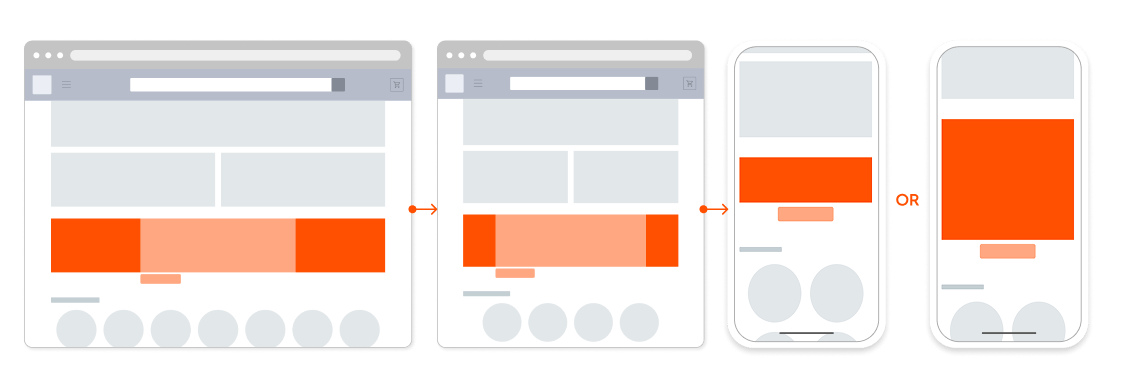
## Responsive Layout Rules

The rendering is based on the placement on the page and detected device.
<Frame>
  <img src="https://mintcdn.com/criteo-e1682996/T1671lE5Qb9IdIDU/images/retailer-integration/docs/fdc1393278d07d9d06641c7fbe8ac96b3958b31598be1fd333115182344eae38-251212_-_CD_Spotlight_Solo_-_Responsive_layout.png?fit=max&auto=format&n=T1671lE5Qb9IdIDU&q=85&s=e7ee24010e5b56ccc9f012280d9141d4" alt="fdc1393278d07d9d06641c7fbe8ac96b3958b31598be1fd333115182344eae38 251212_ CD_Spotlight_Solo _Responsive_layout" width="1125" height="389" data-path="images/retailer-integration/docs/fdc1393278d07d9d06641c7fbe8ac96b3958b31598be1fd333115182344eae38-251212_-_CD_Spotlight_Solo_-_Responsive_layout.png" />
</Frame>

### Placement width between 576px and 1400 px

* Branding Zone width is 100% of the placement.
* The **height** is set during integration and remains fixed between **200px and 450px**.
* The background image is rendered at 100% the asset size, centered and cropped from all sides
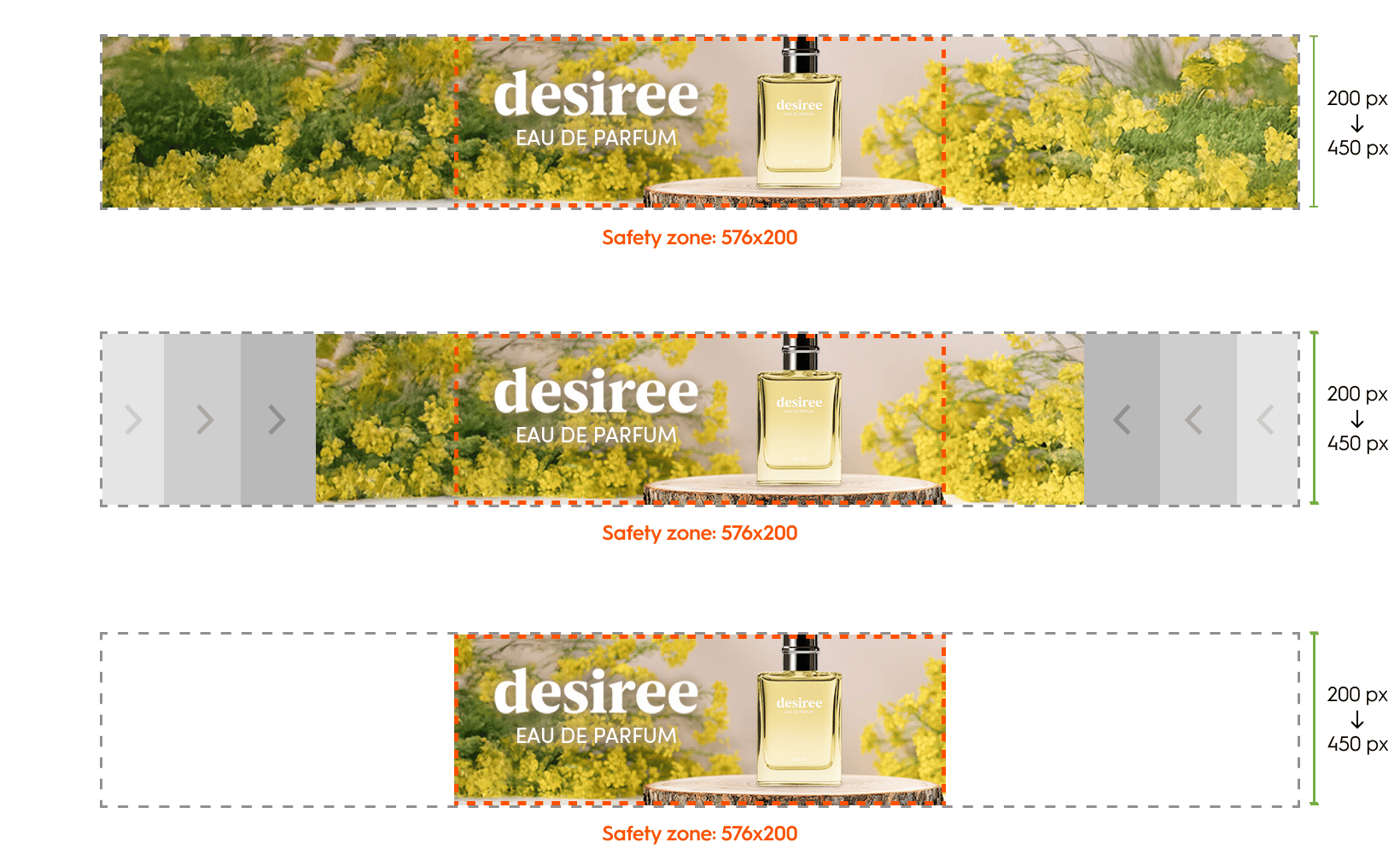
<Frame caption="Dimensions for a placement width between 576 px and 1400 px (Branding Display Spotlight Solo, desktop)">
  <img src="https://mintcdn.com/criteo-e1682996/T1671lE5Qb9IdIDU/images/retailer-integration/docs/ffa1c1bb36336e55bd01fd1aa0975c0d99c84ec1768245e9ebb688c7e999d479-bdss-scaling.png?fit=max&auto=format&n=T1671lE5Qb9IdIDU&q=85&s=232d667009847f29c00f5d915ef5d6d0" alt="Dimensions for a placement width between 576 px and 1400 px (Branding Display Spotlight Solo, desktop)" width="1640" height="1014" data-path="images/retailer-integration/docs/ffa1c1bb36336e55bd01fd1aa0975c0d99c84ec1768245e9ebb688c7e999d479-bdss-scaling.png" />
</Frame>

### Placement width between under 575px

* The layout switches to **mobile**.
* The banner spans **100% of the device width** and scales proportionally, maintaining its original aspect ratio.

<Frame caption="Dimensions for a placement width below 575 px (Branding Display Spotlight Solo, mobile)">
  <img src="https://mintcdn.com/criteo-e1682996/PtO-HGDADAVLvs2M/images/retailer-integration/docs/64b4bba0dadde93b1a1eb6aa47bef3338d923aff5d689d71327735d68b5920c5-BD_Spotlight_Solo_-_Placement_width___576_px.png?fit=max&auto=format&n=PtO-HGDADAVLvs2M&q=85&s=ec330a812e803f693ee89a43106f4e0f" alt="Dimensions for a placement width below 575 px (Branding Display Spotlight Solo, mobile)" width="839" height="381" data-path="images/retailer-integration/docs/64b4bba0dadde93b1a1eb6aa47bef3338d923aff5d689d71327735d68b5920c5-BD_Spotlight_Solo_-_Placement_width___576_px.png" />
</Frame>

***

## Styling

Element styles, such as fonts and button corner radius, are determined by the retailer and the following details shows our default styles. We strongly advise to adhere to our button sizes to keep designs streamlined and consistent.

## Borders

* Desktop and Tablet layout: 1px border surrounds the branding zone.
* Mobile Layout: 2px border surrounds the full creative.

## Background Image

* Desktop and Tablet layout:
  * The background image is centered and is cropped from all sides
* Mobile Layout:
  * The background image has a **fixed position** and is never cropped
  * It scales proportionally to fit its container.

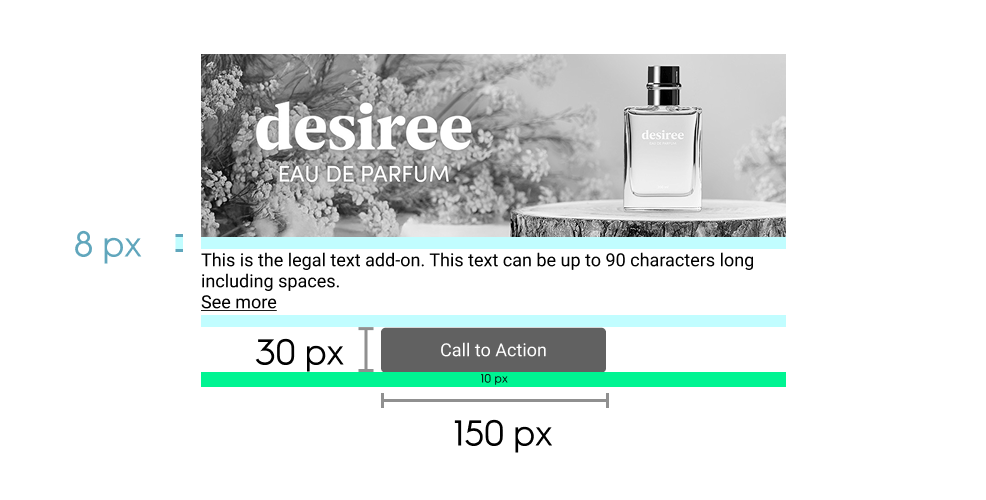
## CTA Button

* **Max characters:** 25
* **Size:** 150 x 30 pixels
* **Font:** Roboto Regular, 12 pixels
* **Margin & Alignment**
  * Desktop and Tablet layout:
    * 8 pixels below branding zone & below button
    * When there is no legal text: Centered below branding zone
    * If legal text enabled: left aligned and 10 pixels to the right of the button
  * Mobile Layout: 10 pixels below navigation dots and 10 pixels below button

### Legal Text and More Info

**Desktop and Tablet layout**

<table>
  <thead>
    <tr>
      <th>
        <p>
          Detail
        </p>
      </th>

      <th>
        <p>
          Legal text
        </p>
      </th>

      <th>
        <p>
          More info
        </p>
      </th>
    </tr>
  </thead>

  <tbody>
    <tr>
      <td>
        <p>
          Location
        </p>
      </td>

      <td>
        <p>
          below branding zone (right of CTA button if enabled)
        </p>
      </td>

      <td>
        <p>
          contained in interactive overlay
        </p>
      </td>
    </tr>

    <tr>
      <td>
        <p>
          Height
        </p>
      </td>

      <td>
        <p>
          Dynamic, based on text length
        </p>
      </td>

      <td>
        <p>
          Dynamic, based on text length
        </p>
      </td>
    </tr>

    <tr>
      <td>
        <p>
          Padding
        </p>
      </td>

      <td>
        <ul>
          <li>
            8 pixels below branding zone & below text.
          </li>

          <li>
            If CTA button is enabled, 10 pixels to the left.
          </li>
        </ul>
      </td>

      <td>
        <p>
          8 pixels, all around
        </p>
      </td>
    </tr>

    <tr>
      <td>
        <p>
          Font
        </p>
      </td>

      <td>
        <p>
          Roboto Regular, 12 pixels
        </p>
      </td>

      <td>
        <p>
          Roboto Regular, 12 pixels
        </p>
      </td>
    </tr>

    <tr>
      <td>
        <p>
          Max characters
        </p>
      </td>

      <td>
        <p>
          90
        </p>
      </td>

      <td>
        <p>
          180
        </p>
      </td>
    </tr>

    <tr>
      <td>
        <p>
          Background
        </p>
      </td>

      <td>
        <p>
          Displayed over a colored layer (the layer color adapts based on color mode)
        </p>
      </td>

      <td>
        <p>
          Same as legal text
        </p>
      </td>
    </tr>
  </tbody>
</table>

<br />

**Mobile layout**

* Legal and More info text will be displayed together
* "See less" / "See more" option for expanded or contracted view of text
* Padding: 8 pixels, all sides
* Font: Roboto Regular, 12 pixels
* Max characters: same as Desktop and Tablet layout
* Background: Displayed over a colored layer (the layer color adapts based on color mode)

<Frame caption="Dimensions and spacing for the Branding Display Spotlight Solo format (mobile)">
  <img src="https://mintcdn.com/criteo-e1682996/fr3QURzyzf6m9Hkn/images/retailer-integration/docs/15f595c87bc3ffbfc2ca0dc757c866c9ecd0344f11115c6c9ff1aae20583b51e-251212_-_BD_Spotlight_Solo_-_Tech_details_-_Mobile_Options.png?fit=max&auto=format&n=fr3QURzyzf6m9Hkn&q=85&s=9fa1c3334d85189b965040ad3bbc3701" alt="Dimensions and spacing for the Branding Display Spotlight Solo format (mobile)" width="986" height="500" data-path="images/retailer-integration/docs/15f595c87bc3ffbfc2ca0dc757c866c9ecd0344f11115c6c9ff1aae20583b51e-251212_-_BD_Spotlight_Solo_-_Tech_details_-_Mobile_Options.png" />
</Frame>

***

# Response Keys

<table>
  <thead>
    <tr>
      <th>
        <p>
          <b>
            Name (API key)
          </b>
        </p>
      </th>

      <th>
        <p>
          <b>
            Parameters
          </b>
        </p>
      </th>

      <th>
        <p>
          <b>
            Description
          </b>
        </p>
      </th>
    </tr>
  </thead>

  <tbody>
    <tr>
      <td>
        <p>
          <code>
            background\_image
          </code>
        </p>
      </td>

      <td>
        <p>
          required:

          <code>
            true
          </code>
        </p>

        <p>
          maxBytes:

          <code>
            307200
          </code>
        </p>

        <p>
          extensions:

          <code>
            \["jpg", "png", "gif"]
          </code>

          width:

          <code>
            1400
          </code>
        </p>

        <p>
          height:

          <code>
            450
          </code>
        </p>

        <p>
          safeZoneWidth:

          <code>
            576
          </code>
        </p>

        <p>
          safeZoneHeight:

          <code>
            200
          </code>
        </p>
      </td>

      <td>
        <p>
          Background image of desktop ad
        </p>
      </td>
    </tr>

    <tr>
      <td>
        <p>
          <code>
            background\_image\_alt\_text
          </code>
        </p>
      </td>

      <td>
        <p>
          required:

          <code>
            true
          </code>
        </p>

        <p>
          maxChars:

          <code>
            120
          </code>
        </p>
      </td>

      <td>
        <p>
          Text description of the desktop background image for ADA compliance
        </p>
      </td>
    </tr>

    <tr>
      <td>
        <p>
          <code>
            mobile\_background\_image
          </code>
        </p>
      </td>

      <td>
        <p>
          required:

          <code>
            true
          </code>
        </p>

        <p>
          maxBytes:

          <code>
            307200
          </code>
        </p>

        <p>
          extensions:

          <code>
            \["jpg", "png", "gif"]
          </code>
        </p>

        <p>
          width:

          <code>
            1280
          </code>
        </p>

        <p>
          height:

          <code>
            400
          </code>
        </p>
      </td>

      <td>
        <p>
          Background image of mobile ad. Alternate size allowed:

          <code>
            1200x1000
          </code>
        </p>
      </td>
    </tr>

    <tr>
      <td>
        <p>
          <code>
            mobile\_background\_image\_alt\_text
          </code>
        </p>
      </td>

      <td>
        <p>
          required:

          <code>
            true
          </code>

          maxChars:

          <code>
            120
          </code>
        </p>
      </td>

      <td>
        <p>
          Text description of the mobile background image for ADA compliance
        </p>
      </td>
    </tr>

    <tr>
      <td>
        <p>
          <code>
            redirect\_url
          </code>
        </p>
      </td>

      <td>
        <p>
          required:

          <code>
            true
          </code>
        </p>
      </td>

      <td>
        <p>
          URL user is redirected to upon clicking on the CTA button
        </p>
      </td>
    </tr>

    <tr>
      <td>
        <p>
          <code>
            redirect\_target
          </code>
        </p>
      </td>

      <td>
        <p>
          required:

          <code>
            true
          </code>
        </p>

        <p>
          Options:

          <code>
            \_self
          </code>

          ,

          <code>
            \_blank
          </code>
        </p>
      </td>

      <td>
        <p>
          Defines whether redirection opens in the same tab or a new tab
        </p>
      </td>
    </tr>

    <tr>
      <td>
        <p>
          <code>
            redirect\_url\_app
          </code>
        </p>
      </td>

      <td>
        <p>
          required:

          <code>
            true
          </code>
        </p>
      </td>

      <td>
        <p>
          App URL user is redirected to upon clicking CTA from an app environment
        </p>
      </td>
    </tr>

    <tr>
      <td>
        <p>
          <code>
            cta\_text
          </code>
        </p>
      </td>

      <td>
        <p>
          required:

          <code>
            true
          </code>

          maxChars:

          <code>
            20
          </code>
        </p>
      </td>

      <td>
        <p>
          Text label of the CTA button
        </p>
      </td>
    </tr>

    <tr>
      <td>
        <p>
          <code>
            cta\_text\_color
          </code>
        </p>
      </td>

      <td>
        <p>
          default:

          <code>
            \#FFFFFF
          </code>
        </p>
      </td>

      <td>
        <p>
          Text color of the CTA button
        </p>
      </td>
    </tr>

    <tr>
      <td>
        <p>
          <code>
            cta\_color
          </code>
        </p>
      </td>

      <td>
        <p>
          default:

          <code>
            \#CCCCCC
          </code>
        </p>
      </td>

      <td>
        <p>
          Background color of the CTA button
        </p>
      </td>
    </tr>

    <tr>
      <td>
        <p>
          <code>
            legal\_text
          </code>
        </p>
      </td>

      <td>
        <p>
          maxChars:

          <code>
            90
          </code>
        </p>
      </td>

      <td>
        <p>
          (Desktop) Visible next to the CTA (Mobile & app) Always visible
        </p>
      </td>
    </tr>

    <tr>
      <td>
        <p>
          <code>
            more\_info\_text
          </code>
        </p>
      </td>

      <td>
        <p>
          maxChars:

          <code>
            180
          </code>
        </p>
      </td>

      <td>
        <p>
          (Desktop) Shown on hover via “i” icon- (Mobile & app) Always visible
        </p>
      </td>
    </tr>

    <tr>
      <td>
        <p>
          <code>
            color\_mode
          </code>
        </p>
      </td>

      <td>
        <p>
          default:

          <code>
            lightmode
          </code>

          Options:

          <code>
            light
          </code>

          ,

          <code>
            dark
          </code>
        </p>
      </td>

      <td>
        <p>
          Determines the contrast mode for optimal legibility depending on image brightness
        </p>
      </td>
    </tr>
  </tbody>
</table>

***

# Response Example

```json theme={null}
{
  "status": "OK",
  "placements": [{
    "viewHome_API_desktop-branding-display-spotlight-solo": [{
      "format": "BDSS",
      "products": [],
      "rendering": {
        "background_image": "/creativeassets-live/desktop-banner.jpg",
        "background_image_alt_text": "Alt text for desktop background image",
        "mobile_background_image": "/creativeassets-live/mobile-banner.jpg",
        "mobile_background_image_alt_text": "Alt text for mobile background image",
        "redirect_url": "https://www.example.com/product",
        "redirect_url_app": "app://product",
        "redirect_target": "_self",
        "cta_text": "Buy Now",
        "cta_text_color": "#FFFFFF",
        "cta_color": "#CCCCCC",
        "legal_text": "© 2025 Example Co. All rights reserved.",
        "more_info_text": "Click to view terms and conditions.",
        "color_mode": "light"
      },
      "OnLoadBeacon": "//b.us5.us.criteo.com/rm?rm_e=OnLoadBeaconExample&ev=2",
      "OnViewBeacon": "//b.us5.us.criteo.com/rm?rm_e=OnViewBeaconExample&ev=2",
      "OnClickBeacon": "//b.us5.us.criteo.com/rm?rm_e=OnClickBeaconExample&ev=2",
      "OnBundleBasketChangeBeacon": "//b.us5.us.criteo.com/rm?rm_e=OnBundleBasketChangeExample&ev=2"
    }]
  }]
}

```

***

<br />

## What's next

* [Commerce Display Grid Duet](/retailer-integration/docs/commerce-display-grid-duet)
* [Commerce Display Spotlight](/retailer-integration/docs/commerce-display-spotlight)
* [Commerce Display Grid Shelf](/retailer-integration/docs/commerce-display-grid-shelf)
* [Branding Display Spotlight Solo](/retailer-integration/docs/branding-display-spotlight-solo)