> ## Documentation Index
> Fetch the complete documentation index at: https://developers.criteo.com/llms.txt
> Use this file to discover all available pages before exploring further.

# Butterfly

# Introduction

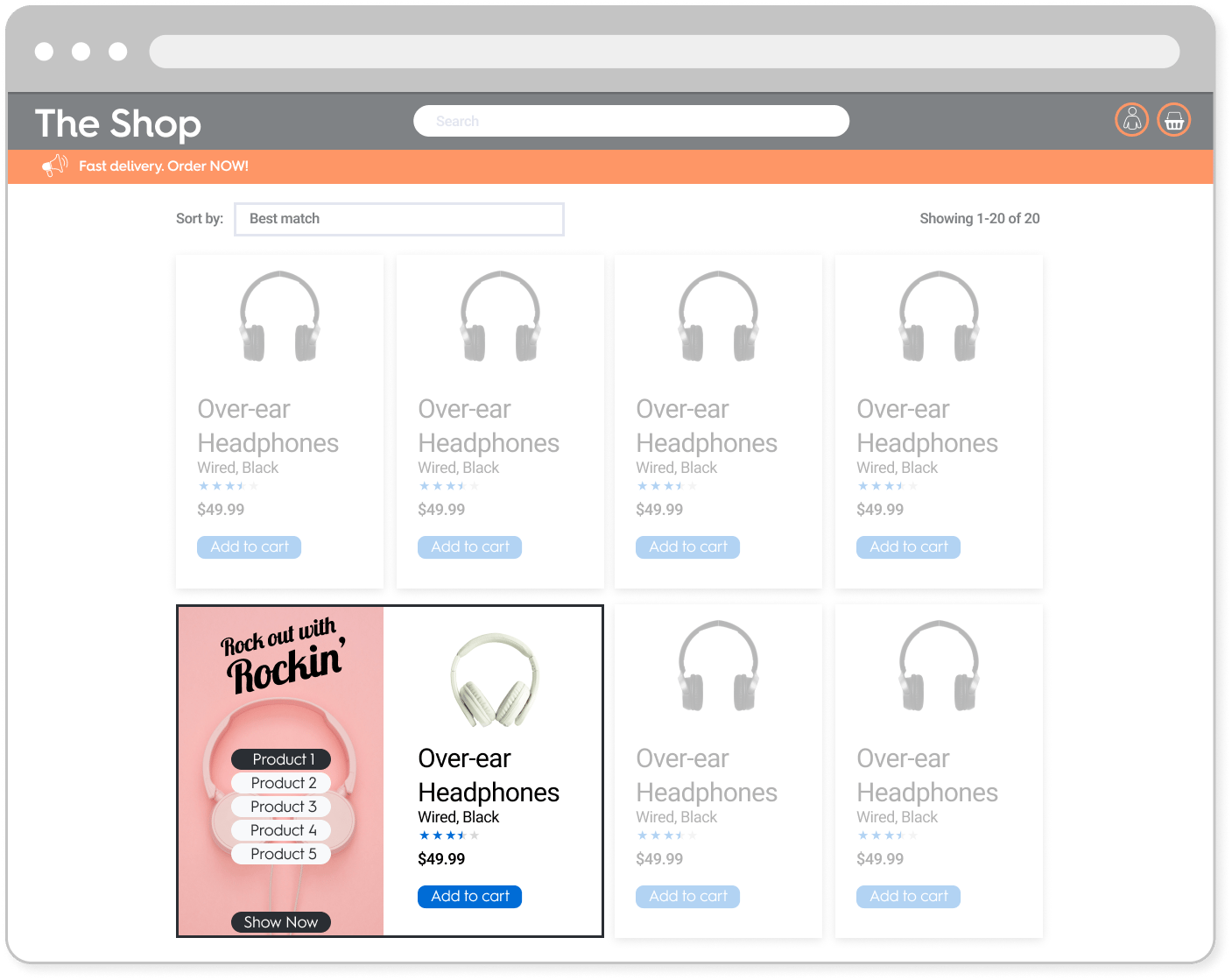
The Butterfly is an **in-grid Commerce Display unit combining branded assets with product tiles**.

<Frame caption="Example of the Butterfly ad format">
  <img src="https://mintcdn.com/criteo-e1682996/fr3QURzyzf6m9Hkn/images/retailer-integration/docs/32e70a3d774de37f73f5bf1437e76f121505f6f82b3dccfc912b6be32c1790e6-Website.png?fit=max&auto=format&n=fr3QURzyzf6m9Hkn&q=85&s=005033c20a0f076555d4ef6d0b07b304" alt="Example of the Butterfly ad format" width="1407" height="1119" data-path="images/retailer-integration/docs/32e70a3d774de37f73f5bf1437e76f121505f6f82b3dccfc912b6be32c1790e6-Website.png" />
</Frame>

<Info>
  This format corresponds to the desktop version of the Butterfly unit. For mobile specs, please refer to [Interactive Header](/retailer-integration/docs/interactive-header).
</Info>

***

# Specifications

## General

* The butterfly unit is composed of two different parts:
  * A **branding zone** on the left side
  * A **product zone** on the right side
* The format must be displayed **on the grid page**.
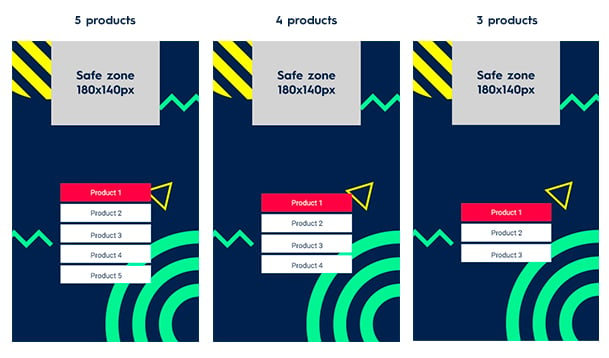
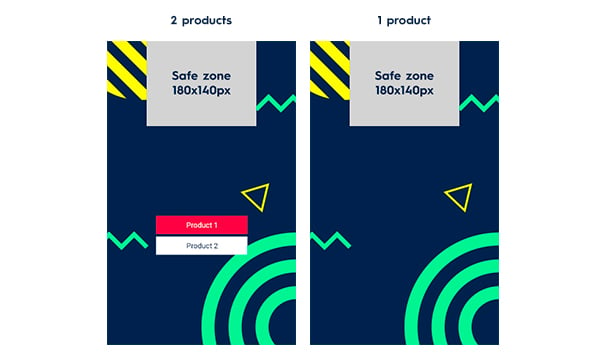
* The format must be able to host up to **5 different products**.

<Frame>
  <img src="https://mintcdn.com/criteo-e1682996/T1671lE5Qb9IdIDU/images/retailer-integration/docs/c4449d5-5-4-3_product.jpg?fit=max&auto=format&n=T1671lE5Qb9IdIDU&q=85&s=143a5e5a7bf8b22975f102bec37f1a67" alt="5-4-3 product.jpg" width="609" height="358" data-path="images/retailer-integration/docs/c4449d5-5-4-3_product.jpg" />
</Frame>

<Frame>
  <img src="https://mintcdn.com/criteo-e1682996/cmPz0RjwwK8-Y1zy/images/retailer-integration/docs/04d5a98-2-1_products.jpg?fit=max&auto=format&n=cmPz0RjwwK8-Y1zy&q=85&s=b5332336e5f49a04444b8f30580aa5d9" alt="2-1 products.jpg" width="609" height="364" data-path="images/retailer-integration/docs/04d5a98-2-1_products.jpg" />
</Frame>

* The user can change the product displayed in the product zone with product buttons.
* **The branding zone size should be equal to the product tile size**. When a website is responsive, both tiles must always be at the same size.
  * If the branding zone is smaller than the background image, then the image should be cropped on both sides uniformly and/or at the bottom.
  * If the branding zone is bigger than the background image, the extra available space should be filled with a plain colored background (CSS).
* **The product zone design and layout are the same as the other product tiles**.
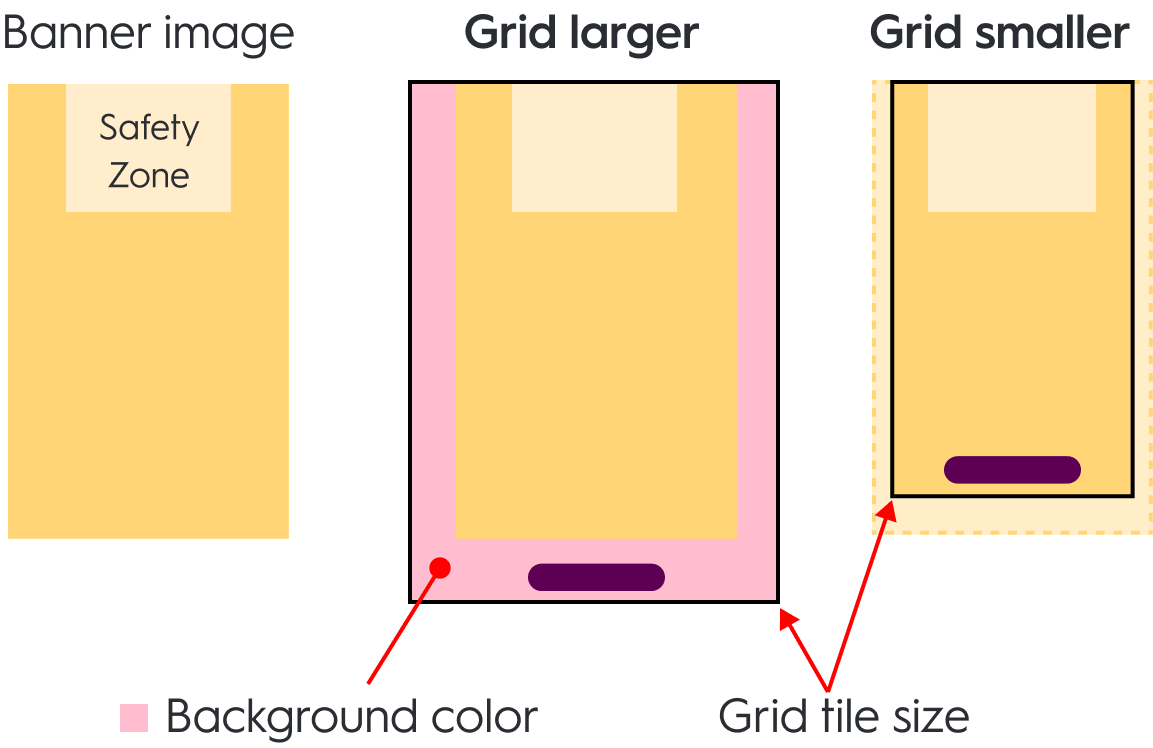
<Frame caption="Branding zone behavior on grid tiles larger and smaller than background image.">
  <img src="https://mintcdn.com/criteo-e1682996/T1671lE5Qb9IdIDU/images/retailer-integration/docs/e430cc6aee910331274715b1ea9b745d0299903cf488185c1b1ce78a0d712927-TileBehavior-BTF.png?fit=max&auto=format&n=T1671lE5Qb9IdIDU&q=85&s=b384daca4b36f55a0bc547c0798df9dc" alt="Branding zone behavior on grid tiles larger and smaller than background image." width="1153" height="748" data-path="images/retailer-integration/docs/e430cc6aee910331274715b1ea9b745d0299903cf488185c1b1ce78a0d712927-TileBehavior-BTF.png" />
</Frame>

***

## Asset sizes

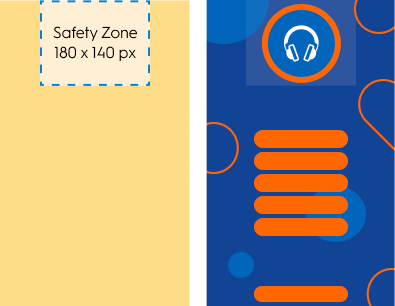
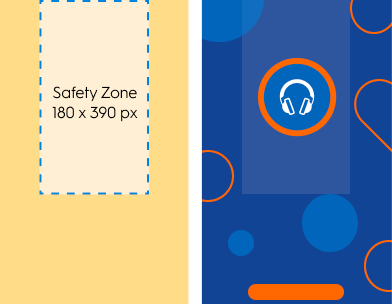
### Background `310x500px`

* If there is more than 1 SKU, the **safety zone** is `180x140px`
<Frame>
  <img src="https://mintcdn.com/criteo-e1682996/cmPz0RjwwK8-Y1zy/images/retailer-integration/docs/007ac13ff22859d582941ccc7c29878942bb2a90ba05012e66f3fba5dc0d1af4-image.png?fit=max&auto=format&n=cmPz0RjwwK8-Y1zy&q=85&s=6ea0e42aa64300334e086233532e1f8f" alt="007ac13ff22859d582941ccc7c29878942bb2a90ba05012e66f3fba5dc0d1af4 image" width="395" height="306" data-path="images/retailer-integration/docs/007ac13ff22859d582941ccc7c29878942bb2a90ba05012e66f3fba5dc0d1af4-image.png" />
</Frame>

* If there is only one SKU (no Product Buttons), the **safety zone** is `180x390px`
<Frame>
  <img src="https://mintcdn.com/criteo-e1682996/T1671lE5Qb9IdIDU/images/retailer-integration/docs/ed2133f9eab626971ff9905de6cf321d76ed5eb1d3b2e4360575e948f806aa20-image.png?fit=max&auto=format&n=T1671lE5Qb9IdIDU&q=85&s=fcee8ae9c17beba3b0f2b45dc60630b3" alt="ed2133f9eab626971ff9905de6cf321d76ed5eb1d3b2e4360575e948f806aa20 image" width="392" height="304" data-path="images/retailer-integration/docs/ed2133f9eab626971ff9905de6cf321d76ed5eb1d3b2e4360575e948f806aa20-image.png" />
</Frame>

***

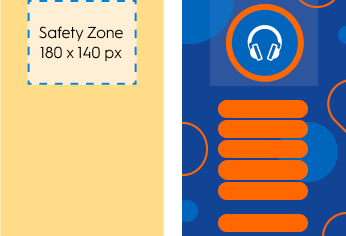
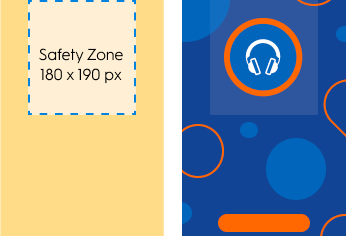
### Background `270x390 px`

* If there is more than 1 SKU, the **safety zone** is `180x140px`
<Frame>
  <img src="https://mintcdn.com/criteo-e1682996/T1671lE5Qb9IdIDU/images/retailer-integration/docs/f6689c82a1452bbcaa43bdff9f1335ad394cbad59760f44a9b371a7a5d061819-image.png?fit=max&auto=format&n=T1671lE5Qb9IdIDU&q=85&s=674f11d83417d3a43bd6efa25c122fcb" alt="f6689c82a1452bbcaa43bdff9f1335ad394cbad59760f44a9b371a7a5d061819 image" width="346" height="236" data-path="images/retailer-integration/docs/f6689c82a1452bbcaa43bdff9f1335ad394cbad59760f44a9b371a7a5d061819-image.png" />
</Frame>

* If there is only one SKU (no Product Buttons), the **safety zone** is `180x190px`
<Frame>
  <img src="https://mintcdn.com/criteo-e1682996/PtO-HGDADAVLvs2M/images/retailer-integration/docs/b393f938c6c2875f6265bcb7396a2e0e0f1a774cf1b5a1cfb648fca08e35bb09-image.png?fit=max&auto=format&n=PtO-HGDADAVLvs2M&q=85&s=f6d21d9b3164d752f5d01a8602a4807b" alt="b393f938c6c2875f6265bcb7396a2e0e0f1a774cf1b5a1cfb648fca08e35bb09 image" width="346" height="236" data-path="images/retailer-integration/docs/b393f938c6c2875f6265bcb7396a2e0e0f1a774cf1b5a1cfb648fca08e35bb09-image.png" />
</Frame>

<Info>
  Please note that **only one of these size will be used once chosen.**
</Info>

***

## Available options

### Redirection

* When a user clicks on the CTA button, they should be redirected to the link defined within the response.
* There are two possible redirection options:
  * `_Self_` (open in the same tab)
  * `_Blank_ `(open in a new tab)

***

### PDF upload

* A brand may choose for the CTA to result in a file download. This file will be included in the ad response.
* At the banner's click, a PDF file opens like a redirection link with both `_Self_ `and `_Blank_` options (see above)

***

### Legal

* Editable text field
* Multiple backgrounds:
  * It's possible to have **up to 5 different backgrounds**, 1 background per product button.
  * The background should change on the click of each product button.

***

## Technical details

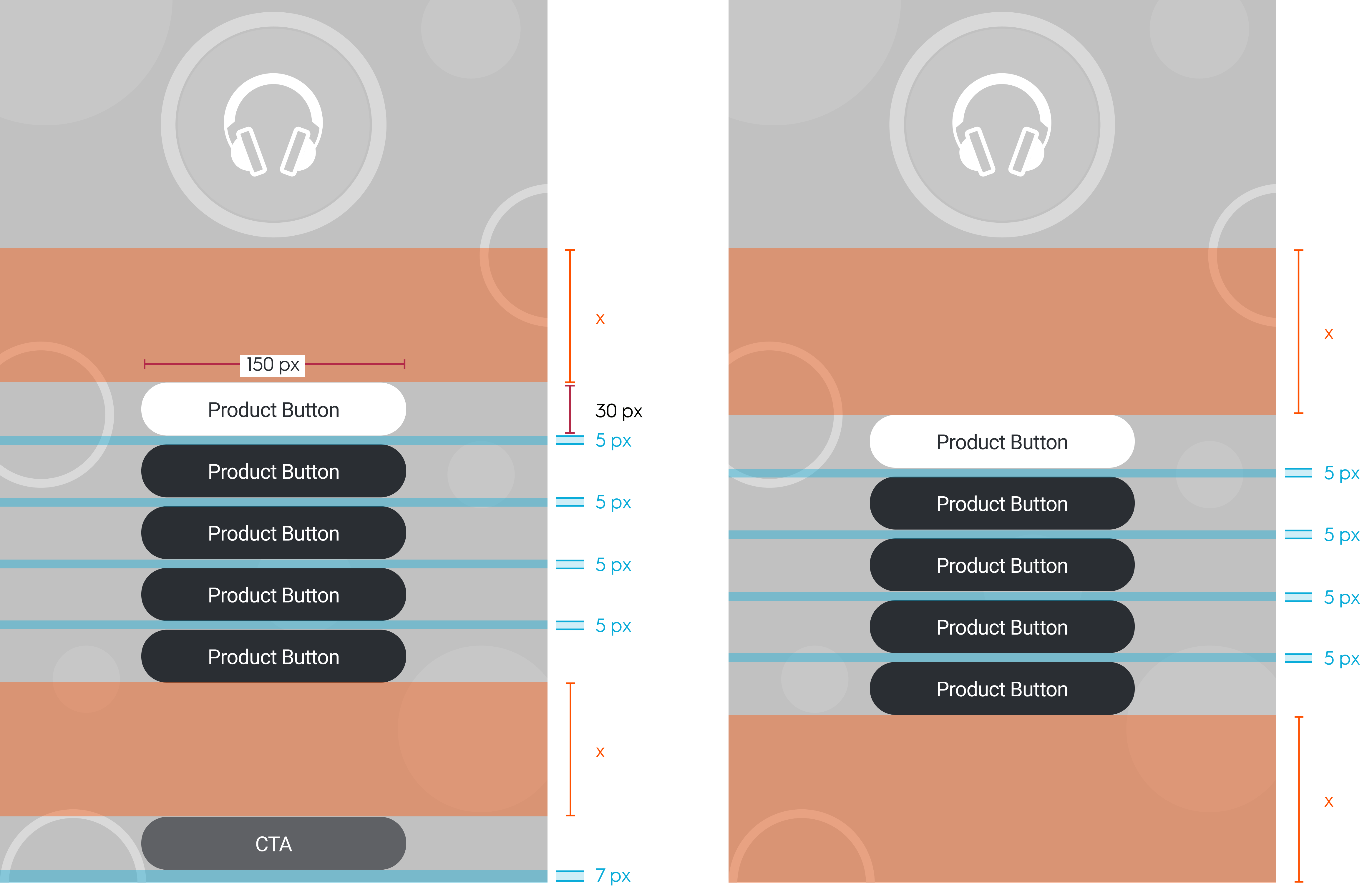
* It's possible to have **up to 5 product buttons and 1 option**: a call to action (CTA) button or legal text. The number of product buttons depends on the size of the branding zone.

### Product buttons

* **Size**: `150x30px`
* **Font**: Roboto Regular `12px`
* There can be **two colors for background product buttons**:
  * one for the hover state (selected),
  * another when not selected.
* There can be **two colors for text product buttons**:
  * one for the hover state (selected),
  * another when not selected.
* **The text can be over two lines** and, in this case, should have a line height of 1.

***

### CTA button

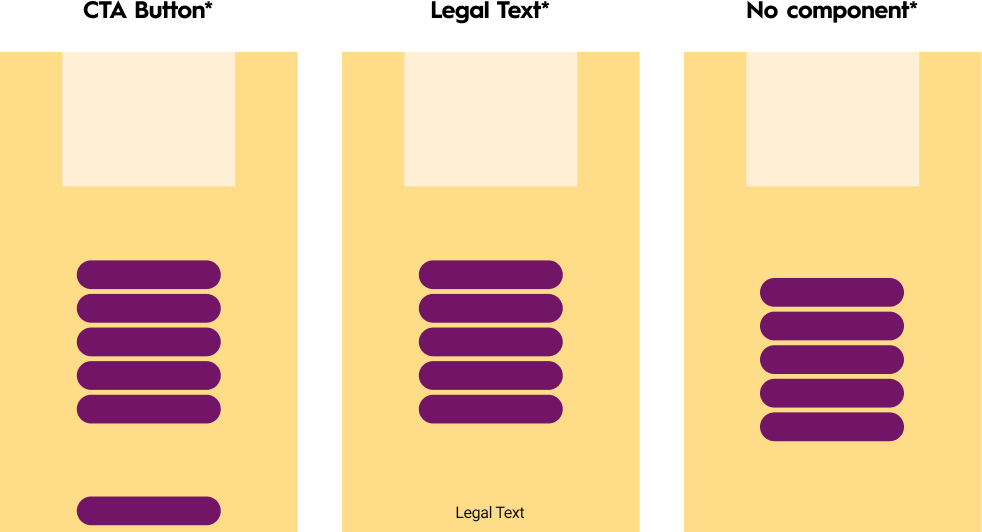
<Frame caption="CTA and legal text specifications for the Butterfly ad format">
  <img src="https://mintcdn.com/criteo-e1682996/T1671lE5Qb9IdIDU/images/retailer-integration/docs/d45109976cb1236a84c3aef3bfaa515020f7233bcca049982ef4e0cef3805d9f-image.png?fit=max&auto=format&n=T1671lE5Qb9IdIDU&q=85&s=6930d16294f4d5af350e1a977c263dd6" alt="CTA and legal text specifications for the Butterfly ad format" width="982" height="532" data-path="images/retailer-integration/docs/d45109976cb1236a84c3aef3bfaa515020f7233bcca049982ef4e0cef3805d9f-image.png" />
</Frame>

* **Size**: `150x30px`
* **Button font**: Roboto Regular `12px`
* **Legal**:
  * The space size occupied by legal text depends on the tile width. There should be `10 px` padding on the right and the left of the tile.
  * **Legal font**: Roboto Regular `10px`.
  * The gap between the options area and the bottom of the branding zone should be fixed to `7px`.
  * The options area height should be fixed at `30px`.
* There should be `5px` between every button.
* **Product buttons are centered on the vertical axis**, **between the safe zone and the bottom of the tile on the horizontal axis**. If there is an option (CTA or legal text), product buttons are centered between the safe zone and the top of the option area.
* The background image position should be **fixed to the top of the tile and centered on the vertical axis**.
* The background color should fill the branding zone.
* There is a `1px` border around branding and product zones.
<Frame caption="Spacing between buttons and base of branding zone with and without CTA button or Legal text.">
  <img src="https://mintcdn.com/criteo-e1682996/PtO-HGDADAVLvs2M/images/retailer-integration/docs/98f13771c02d469864a35447e98d4dc0fe9b71ce420c65c69ebbd453cf1dade1-BTF-compnents.png?fit=max&auto=format&n=PtO-HGDADAVLvs2M&q=85&s=6566dd3e6a3313ef0d5a9cb97a8b9d4d" alt="Spacing between buttons and base of branding zone with and without CTA button or Legal text." width="4661" height="3015" data-path="images/retailer-integration/docs/98f13771c02d469864a35447e98d4dc0fe9b71ce420c65c69ebbd453cf1dade1-BTF-compnents.png" />
</Frame>

***

# Response keys

## `rendering` block

This block has global rendering data for the unit.

<table>
  <thead>
    <tr>
      <th>
        <p>
          Field
        </p>
      </th>

      <th>
        <p>
          Description
        </p>
      </th>
    </tr>
  </thead>

  <tbody>
    <tr>
      <td>
        <p>
          <code>
            desktop\_background\_image
          </code>
        </p>
      </td>

      <td>
        <p>
          URL of the background image file for desktop/tablet app
        </p>
      </td>
    </tr>

    <tr>
      <td>
        <p>
          <code>
            desktop\_background\_image\_alt\_text
          </code>
        </p>
      </td>

      <td>
        <p>
          Alternative text for desktop background image
        </p>
      </td>
    </tr>

    <tr>
      <td>
        <p>
          <code>
            mobile\_background\_image
          </code>
        </p>
      </td>

      <td>
        <p>
          URL of the background image file for mobile
        </p>
      </td>
    </tr>

    <tr>
      <td>
        <p>
          <code>
            mobile\_background\_image\_alt\_text
          </code>
        </p>
      </td>

      <td>
        <p>
          Alternative text for mobile background image
        </p>
      </td>
    </tr>

    <tr>
      <td>
        <p>
          <code>
            mobile\_logo\_image
          </code>
        </p>
      </td>

      <td>
        <p>
          URL of the logo image file for mobile
        </p>
      </td>
    </tr>

    <tr>
      <td>
        <p>
          <code>
            mobile\_logo\_image\_alt\_text
          </code>
        </p>
      </td>

      <td>
        <p>
          Alternative text for mobile logo image
        </p>
      </td>
    </tr>

    <tr>
      <td>
        <p>
          <code>
            border\_color
          </code>
        </p>
      </td>

      <td>
        <p>
          Hex code for the format's outline color
        </p>
      </td>
    </tr>

    <tr>
      <td>
        <p>
          <code>
            background\_color
          </code>
        </p>
      </td>

      <td>
        <p>
          Hex code for the background color of the branding zone
        </p>
      </td>
    </tr>

    <tr>
      <td>
        <p>
          <code>
            button\_color
          </code>
        </p>
      </td>

      <td>
        <p>
          Product button color
        </p>
      </td>
    </tr>

    <tr>
      <td>
        <p>
          <code>
            selected\_button\_color
          </code>
        </p>
      </td>

      <td>
        <p>
          Selected product button color
        </p>
      </td>
    </tr>

    <tr>
      <td>
        <p>
          <code>
            button\_text\_color
          </code>
        </p>
      </td>

      <td>
        <p>
          Product button text color
        </p>
      </td>
    </tr>

    <tr>
      <td>
        <p>
          <code>
            selected\_button\_text\_color
          </code>
        </p>
      </td>

      <td>
        <p>
          Selected button text color
        </p>
      </td>
    </tr>

    <tr>
      <td>
        <p>
          <code>
            optional\_footer\_type
          </code>
        </p>
      </td>

      <td>
        <p>
          Option type. Can have the following values:
        </p>

        <ul>
          <li>
            <code>
              no-option
            </code>

            : no footer option
          </li>

          <li>
            <code>
              redirection
            </code>

            : expect values in

            <code>
              optional\_footer\_redirect\_url
            </code>

            and/or

            <code>
              optional\_footer\_redirect\_url\_app
            </code>

            )
          </li>

          <li>
            <code>
              file
            </code>

            : expect values in

            <code>
              optional\_footer\_media\_file
            </code>
          </li>

          <li>
            <code>
              legal
            </code>

            : expect values in

            <code>
              optional\_footer\_text
            </code>
          </li>
        </ul>
      </td>
    </tr>

    <tr>
      <td>
        <p>
          <code>
            optional\_footer\_text
          </code>
        </p>
      </td>

      <td>
        <p>
          Option text
        </p>

        <p>
          (non-applicable for mobile version)
        </p>
      </td>
    </tr>

    <tr>
      <td>
        <p>
          <code>
            optional\_footer\_redirect\_url
          </code>
        </p>
      </td>

      <td>
        <p>
          Web URL that the user is redirected to
        </p>
      </td>
    </tr>

    <tr>
      <td>
        <p>
          <code>
            optional\_footer\_redirect\_url\_app
          </code>
        </p>
      </td>

      <td>
        <p>
          App deeplink that the user is redirected to
        </p>
      </td>
    </tr>

    <tr>
      <td>
        <p>
          <code>
            optional\_footer\_redirect\_target
          </code>
        </p>
      </td>

      <td>
        <p>
          Redirection target. Can have the following values:
        </p>

        <ul>
          <li>
            <code>
              \_blank
            </code>

            : redirects to a new tab
          </li>

          <li>
            <code>
              \_self
            </code>

            : redirects in the same tab
          </li>
        </ul>

        <p>
          (only applicable for web)
        </p>
      </td>
    </tr>

    <tr>
      <td>
        <p>
          <code>
            optional\_footer\_media\_file
          </code>
        </p>
      </td>

      <td>
        <p>
          URL of media file
        </p>
      </td>
    </tr>

    <tr>
      <td>
        <p>
          <code>
            optional\_footer\_text\_color
          </code>
        </p>
      </td>

      <td>
        <p>
          Option text color
        </p>
      </td>
    </tr>

    <tr>
      <td>
        <p>
          <code>
            optional\_footer\_background\_color
          </code>
        </p>
      </td>

      <td>
        <p>
          Option background color
        </p>
      </td>
    </tr>
  </tbody>
</table>

## `products_order` block

This block defines the order of the buttons on the left panel of the Butterfly unit.

<table>
  <thead>
    <tr>
      <th>
        <p>
          Field
        </p>
      </th>

      <th>
        <p>
          Description
        </p>
      </th>
    </tr>
  </thead>

  <tbody>
    <tr>
      <td>
        <p>
          <code>
            button\_name
          </code>
        </p>
      </td>

      <td>
        <p>
          The button text
        </p>
      </td>
    </tr>

    <tr>
      <td>
        <p>
          <code>
            products
          </code>
        </p>
      </td>

      <td>
        <p>
          The product that should be rendered when the button is clicked. The array is contains the priority order of product rendering. If you are checking product availability in real time, you should render the

          <b>
            first available product
          </b>

          in the array, i.e., if the first product is not available, check the second one, then check the third, and so on.
        </p>
      </td>
    </tr>

    <tr>
      <td>
        <p>
          <code>
            isMandatory
          </code>
        </p>
      </td>

      <td>
        <p>
          If

          <code>
            true
          </code>

          , the unit should only be rendered if

          <b>
            at least one
          </b>

          of the products in the

          <code>
            products
          </code>

          array is available.
        </p>

        <p>
          If

          <code>
            false
          </code>

          , the button can be ignored if no product in the

          <code>
            products
          </code>

          array is available.
        </p>

        <ul>
          <li>
            *Note:*\* This option is only relevant if you are check product availability in real time, before rendering the units.
          </li>
        </ul>
      </td>
    </tr>
  </tbody>
</table>

***

# Sample response

```json expandable theme={null}
{
    "status": "OK",
    "placements": [
        {
            "viewHome_API_desktop-Butterfly": [
                {
                    "format": "BF",
                    "products": [
                        {
                            "ProductId": "134679258",
                            "OnLoadBeacon": "//b.us5.us.criteo.com/rm?rm_e=gLYh9%2fxsFGq%2b67gaahP4kVXGGZXfgfgU1JveA8o1zBL%2bVeGhkRciu4XrLOsI4T7SC%2bNbEtyqg3GhqGgDtwtWLWaTC0EBVHxpNlqJcrfrUzWk3IBuDj7ZAr8t28y7EJfH3BnEZQxAvbjEP3nRJYq9z9TfOhi0mWVLYxVFIURTPBvcp0cVPY5qaHvmPC6%2bppv7TH9Kja6zXlrKhib2DOtKo4aEMw3FQqRbnCeTVdjqmFbHK8s%3d&ev=2",
                            "OnViewBeacon": "//b.us5.us.criteo.com/rm?rm_e=aLSOJrKI2G%2fY8SwmqYnI5SqMi2jvKfgfgnJDZb06hcliInWkDeRqN4Tu%2fKZnJgmGIrIuQVurCYsVELSi%2byX2oOKpicAj5tACVgpEYVcGZxNOU68BYLhRUxn80y3s4USfHLmeeOvP9wxb6RlGyydpJ4U4k%2fM7uL3DawyB9O%2bC9qebO%2bKTIUZ2fbQV5EuwvNxzYqCcfSjxWkMF%2fC5XfdIeovQeU5%2b7UpYhV62LdPj910grWaLwAIZ1BFFDCShQC%2fNTvqXt&ev=2",
                            "OnClickBeacon": "//b.us5.us.criteo.com/rm?rm_e=S82J7C%2fY88eObEWE7XzLk2PMzSUfgfgTawyt81nDPKP2IJov%2byGjGihnQ6n4aM8AN03iCTSLqrRZTClsvRLjR3xIKFGaqgilehlQj2WuFQK5Eht9iUY9Pe9S9fRvms7BB055liFkgZqzmChn6L06LcP0MOPdwUT3dsUhokauwiziBsb3nVQF5k51wvEy%2fQ0YrxsM2ZlOOBmpNrWij8%2fnRxJiCMylA%2fOxqr6%2bJw5nCICO18dWz8SvNAyV0TeI2h9mUSk3jOljbyNUUAK%2fpNYfzRPDuw%3d%3d&ev=2",
                            "OnBasketChangeBeacon": "//b.us5.us.criteo.com/rm?rm_e=LQNEHBKa5%2bIRktK7%2bD%2fR5fgfgD1TbxYrFDDNLffHIbCiNsnssxDZSllOGbux%2f88BUiFFUTugPFOhm0oaM9DsesFQmoNghWjKaIr76vj9B7fcvNR1zZmYOOseWCbQZlkpozMPlugkYyH0W33iV6j2w%2fRdBY%2bQVgQT0BBmYdVPRODed3SIOgkAxOZF4upAfAxSf83%2bp4Nh8bvlY6b840bGvL9UMgQHy1FM8ncNj90PsUwnANQrLmidsAghSTnZELKUpQZYmFXAVPPk%2bBHu%2bpB6QhkK8twFzGcDVBp5MCtpmZGe%2brg%3d&ev=2",
                            "OnWishlistBeacon": "//b.us5.us.criteo.com/rm?rm_e=8yGOJDbiWkOj%2bHVuvsc59my1UyuWPnozIfwfOmrFm5ZtZmX4a4bi3IZLEYS57LOv59wkboF346v%2fKa4X8Zim7YSCjw9tNN2yBYCr%2fb%2fgfgb9QELv2JEprUOfBSZ1ZIwILrpD5CgOWkvQpEnYP137RzR4LFirlrSnfXe0Tanl8sHU5PjOXA%2f9iKHps%2bYB2aD35M02Br8%2fPx%2b2%2bDlQq4RKw4xMuAmnlafk2dUWI%2f%2bjGVwATj0LfINKS2LSt77USBGLOcWw5cDekIMvWptqyccI3oKCQQ%3d%3d&ev=2"
                        },
                        {
                            // other products
                        },
                    ],
                    "products_order": [
                        {
                            "button_name": "text button 1",
                            "products": [
                                "134679258"
                            ],
                            "isMandatory": false
                        },
                        {
                            // other products
                        }
                    ],
                    "rendering": {
                        "border_color": "#ff0000",
                        "background_color": "#000000",
                        "button_color": "#000000",
                        "selected_button_color": "#000000",
                        "button_text_color": "#000000",
                        "selected_button_text_color": "#010000",
                        "optional_footer_type": "no-option",
                        "optional_footer_text": "",
                        "optional_footer_text_color": "",
                        "optional_footer_background_color": "",
                        "optional_footer_redirect_url": "",
                        "optional_footer_redirect_url_app": "",
                        "optional_footer_redirect_target": "",
                        "optional_footer_media_file": "",
                        "mobile_logo_image": "//crtormassetmguseprod.blob.core.windows.net/creativeassets-live/try44gf6h46tyu4yj46gfh64fg6h4rt46r78t8rfb4cdf178378c.jpg",
                        "mobile_logo_image_alt_text": "alttext ofr mobile logo",
                        "mobile_background_image": "//crtormassetmguseprod.blob.core.windows.net/creativeassets-live/try44gf6h46tyu4yj46gfh64fg6h4rt46r78t8rfb4cdf178378c.jpg",
                        "mobile_background_image_alt_text": "alt text for mobile background",
                        "desktop_background_image": "//crtormassetmguseprod.blob.core.windows.net/creativeassets-live/try44gf6h46tyu4yj46gfh64fg6h4rt46r78t8rfb4cdf178378c.jpg",
                        "desktop_background_image_alt_text": "alt text for desktop background"
                    },
                    "OnLoadBeacon": "//b.us5.us.criteo.com/rm?rm_e=2DP313G8ktSXXaFvImaO4VKGjOamMqFSCkvmGlcTz98dfgdfgdmtngUKQgwShE9%2bvNSjDndYD%2bnpLT4PWDoNaCb862AMTvSopOdYNFGidZfBHggUmtpL%2fYOudEdDP7kANk%2bGmsBy3OCIm58C0uAYEJSHBdruRC%2fhbWLKUdZ2VdHdFwvBg8IT9Yt4V0DS%2bufcBDtvWbEhioZmIPaBY3uuykPSXyOlpMB6eGyzI1s6hD6xIgZ1h%2bWR398LW3neLVwwmgtpHax%2f%2bEObEu9bzKawPFfHqZ%2bg%3d%3d&ev=2",
                    "OnViewBeacon": "//b.us5.us.criteo.com/rm?rm_e=YIfuO34D8lTreAuY8MIlZiNjtIYz4b8eDlYzK0kXFMI9RuhZjwV6cVwkirv6Tbbix2k6Wgh7TLqia3Gw1uOcHcNCs%2f4hpPjT2yIGBXUv36EjR20dfgdfgsjFkZFPx8QGY9uakIYTCoH73BwvmoZdM5ForssG%2fkumRGMydeN9VqXHDdF8PxDvlVFUP3M%2fgFsSYQcCTO%2brLIhUs4%2bTKzg3mOxt%2fzSrsyOkQzOP7b7x5lupA2unc%3d&ev=2",
                    "OnClickBeacon": "//b.us5.us.criteo.com/rm?rm_e=Db34znl4Lx0Oq1zpo6o%2fb%2b2A1ExBZx5W7GLNmopfgN3f4DE5lpjSxb8eBUtw1dsIWqH8%2fbjaLIwGVlIukvlY5suhA5G%2fYZcU2Lx0aiFdfgdfgR7hNwL%2blregzZewZ6wuArnzW9sBqia4vvWq%2bBsGU39FRUuYm94OcSReYRutW%2fXtQ5Vx7lExUKg0P3%2fQRk%2bWuroBUmFR5M0atLoYvduF7Qmb4Vms1Ma4dOAwiCKtgh0t27j5Z5IPvlm3I%2fwHMEiS3jnBSD&ev=2",
                    "OnFileClickBeacon": "//b.us5.us.criteo.com/rm?rm_e=Db34znl4Lx0Oq1zpo6o%2fb%2b2A1ExBZx5W7GLNmohjpfgN3f4DE5lpjSxb8eBUtw1dsIWqH8%2fbjaLIwGVlIukvlY5suhA5G%2fYZcU2Lx0aiFdfgdfgR7hNwL%2blregzZewZ6wuArnzW9sBqia4vvWq%2bBsGU39FRUuYm94OcSReYRutW%2fXtQ5Vx7lExUKg0P3%2fQRk%2bWuroBUmFR5M0atLoYvduF7Qmb4Vms1Ma4dOAwiCKtgh0t27j5Z5IPvlm3I%2fwHMEiS3jnBSD&ev=2",
                    "OnBundleBasketChangeBeacon": "//b.us5.us.criteo.com/rm?rm_e=EPQZxjkhpjUK980SuOdWt4pHabkuwfAR3bGmfCsTUVMLvk3FuugK%2f7NaEZDdh5JUtR8YNx8PZUKRY2b93LwBFzLYDA3EppPd336FlC3y9%2dfgdfgbUcOP6qdW5k27ef5KwplDMOMh%2bnhF%2blpeguQpact691q70oFry4KYaNbRhKHmCm9wtVmDBbiwGBNW77%2f0lIKintx2O3Dv%2fuCEymreHBITagpX7GXLP0pTQ6O0%2fdMEH%2fI4Z2dPtUHa3ps7G4V%2fvDspyR&ev=2"
                }
            ]
        }
    ],
}
```

***

# Implementation Example

<iframe height="400" style={{ width: "100%", border: "none" }} src="https://codepen.io/demo_placement/embed/xxojPqG" loading="lazy" allowfullscreen />

***

<br />

## What's next

* [Branded Header](/retailer-integration/docs/branded-header)
* [Interactive Header](/retailer-integration/docs/interactive-header)