> ## Documentation Index
> Fetch the complete documentation index at: https://developers.criteo.com/llms.txt
> Use this file to discover all available pages before exploring further.

# Commerce Display Spotlight

> This guide provides the specifications and technical details for the Commerce Display Spotlight format rendering.

# Introduction

The **Commerce Display Spotlight** is a responsive horizontal commerce display unit combining branded assets with products.

<Frame>
  <img src="https://mintcdn.com/criteo-e1682996/T1671lE5Qb9IdIDU/images/retailer-integration/docs/d3985fcf051952e1578e6b5ee51c84ed85566d547c406052dfbad3f7c3885c23-image.png?fit=max&auto=format&n=T1671lE5Qb9IdIDU&q=85&s=af8a2ad09021616fa84f50a014ab7385" alt="d3985fcf051952e1578e6b5ee51c84ed85566d547c406052dfbad3f7c3885c23 image" width="1467" height="1194" data-path="images/retailer-integration/docs/d3985fcf051952e1578e6b5ee51c84ed85566d547c406052dfbad3f7c3885c23-image.png" />
</Frame>

***

# Rendering Examples

## CodePen

<iframe height="400" style={{ width: "100%", border: "none" }} src="https://codepen.io/demo_placement/embed/myPzOqj" loading="lazy" allowfullscreen />

## Desktop

<Frame caption="Example of rendering of the CommerceDisplay Spotlight format (desktop)">
  <img src="https://mintcdn.com/criteo-e1682996/PtO-HGDADAVLvs2M/images/retailer-integration/docs/8cf04325afa3679a1a892476d9b454feda0f70cbedf38ad5e53b132616cc6711-image.png?fit=max&auto=format&n=PtO-HGDADAVLvs2M&q=85&s=120e7be98df01e9d19921e35325fbcbb" alt="Example of rendering of the CommerceDisplay Spotlight format (desktop)" width="2160" height="1536" data-path="images/retailer-integration/docs/8cf04325afa3679a1a892476d9b454feda0f70cbedf38ad5e53b132616cc6711-image.png" />
</Frame>

<br />

## Mobile

<Frame caption="Rendering example for the Commerce Display Spotlight format (mobile)">
  <img src="https://mintcdn.com/criteo-e1682996/PtO-HGDADAVLvs2M/images/retailer-integration/docs/65b5b4a6d639deaa63f386c953bd8473b689a2acd66ba67338cbe932b72817cd-image.png?fit=max&auto=format&n=PtO-HGDADAVLvs2M&q=85&s=84b865a01ea7104ea59147deed6180fb" alt="Rendering example for the Commerce Display Spotlight format (mobile)" width="585" height="1266" data-path="images/retailer-integration/docs/65b5b4a6d639deaa63f386c953bd8473b689a2acd66ba67338cbe932b72817cd-image.png" />
</Frame>

<br />

***

# Response Keys

<table>
  <thead>
    <tr>
      <th>
        <p>
          <code>
            Name (API key)
          </code>
        </p>
      </th>

      <th>
        <p>
          Parameters
        </p>
      </th>

      <th>
        <p>
          Description
        </p>
      </th>
    </tr>
  </thead>

  <tbody>
    <tr>
      <td>
        <p>
          <code>
            background\_image
          </code>
        </p>
      </td>

      <td>
        <p>
          required:

          <code>
            true
          </code>
        </p>

        <p>
          maxBytes:

          <code>
            307200
          </code>
        </p>

        <p>
          extensions:

          <code>
            \["jpg, png, gif"]
          </code>
        </p>

        <p>
          width:

          <code>
            1400
          </code>
        </p>

        <p>
          height:

          <code>
            450
          </code>
        </p>

        <p>
          safeZoneWidth:

          <code>
            576
          </code>
        </p>

        <p>
          safeZoneHeight:

          <code>
            200
          </code>
        </p>
      </td>

      <td>
        <p>
          Background image of desktop ad
        </p>
      </td>
    </tr>

    <tr>
      <td>
        <p>
          <code>
            background\_image\_alt\_text
          </code>
        </p>
      </td>

      <td>
        <p>
          required:

          <code>
            true
          </code>
        </p>

        <p>
          maxChars:

          <code>
            120
          </code>
        </p>
      </td>

      <td>
        <p>
          Text description of the Desktop background image for ADA compliancy purposes.
        </p>
      </td>
    </tr>

    <tr>
      <td>
        <p>
          <code>
            mobile\_background\_image
          </code>
        </p>
      </td>

      <td>
        <p>
          required:

          <code>
            true
          </code>
        </p>

        <p>
          maxBytes:

          <code>
            307200
          </code>
        </p>

        <p>
          extensions:

          <code>
            \["jpg, png, gif"]
          </code>
        </p>

        <p>
          width:

          <code>
            1280
          </code>
        </p>

        <p>
          height:

          <code>
            400
          </code>
        </p>
      </td>

      <td>
        <p>
          Background image of mobile ad
        </p>
      </td>
    </tr>

    <tr>
      <td>
        <p>
          <code>
            mobile\_background\_image\_alt\_text
          </code>
        </p>
      </td>

      <td>
        <p>
          required:

          <code>
            true
          </code>
        </p>

        <p>
          maxChars:

          <code>
            120
          </code>
        </p>
      </td>

      <td>
        <p>
          Text description of the Desktop background image for ADA compliancy purposes.
        </p>
      </td>
    </tr>

    <tr>
      <td>
        <p>
          <code>
            redirect\_url
          </code>
        </p>
      </td>

      <td>
        <p>
          required:

          <code>
            true
          </code>
        </p>
      </td>

      <td>
        <p>
          URL user is redirected to upon clicking on CTA button
        </p>
      </td>
    </tr>

    <tr>
      <td>
        <p>
          <code>
            redirect\_target
          </code>
        </p>
      </td>

      <td>
        <p>
          required:

          <code>
            true
          </code>
        </p>

        <p>
          Option 1:

          <code>
            \_self
          </code>
        </p>

        <p>
          Option 2:

          <code>
            \_blank
          </code>
        </p>
      </td>

      <td>
        <p>
          Defines where the link opens: same tab (

          <code>
            \_self
          </code>

          ) or new tab (

          <code>
            \_blank
          </code>

          )
        </p>
      </td>
    </tr>

    <tr>
      <td>
        <p>
          <code>
            redirect\_url\_app
          </code>
        </p>
      </td>

      <td>
        <p>
          required:

          <code>
            true
          </code>
        </p>
      </td>

      <td>
        <p>
          App URL user is redirected to upon clicking on CTA button from App environment
        </p>
      </td>
    </tr>

    <tr>
      <td>
        <p>
          <code>
            cta\_text
          </code>
        </p>
      </td>

      <td>
        <p>
          required:

          <code>
            true
          </code>
        </p>

        <p>
          maxChars:

          <code>
            20
          </code>
        </p>
      </td>

      <td>
        <p>
          Text of CTA button
        </p>
      </td>
    </tr>

    <tr>
      <td>
        <p>
          <code>
            cta\_text\_color
          </code>
        </p>
      </td>

      <td>
        <p>
          default:

          <code>
            \#FFFFFF
          </code>
        </p>
      </td>

      <td>
        <p>
          Text color of CTA button
        </p>
      </td>
    </tr>

    <tr>
      <td>
        <p>
          <code>
            cta\_color
          </code>
        </p>
      </td>

      <td>
        <p>
          default:

          <code>
            \#CCCCCC
          </code>
        </p>
      </td>

      <td>
        <p>
          CTA button background color
        </p>
      </td>
    </tr>

    <tr>
      <td>
        <p>
          <code>
            legal\_text
          </code>
        </p>
      </td>

      <td>
        <p>
          maxChars:

          <code>
            90
          </code>
        </p>
      </td>

      <td>
        <p>
          Legal text (Desktop: next to CTA; Mobile and App: always visible)
        </p>
      </td>
    </tr>

    <tr>
      <td>
        <p>
          <code>
            more\_info\_text
          </code>
        </p>
      </td>

      <td>
        <p>
          maxChars:

          <code>
            180
          </code>
        </p>
      </td>

      <td>
        <p>
          Legal text (Desktop: on hover “i” icon; Mobile and App: always visible)
        </p>
      </td>
    </tr>

    <tr>
      <td>
        <p>
          <code>
            color\_mode
          </code>
        </p>
      </td>

      <td>
        <p>
          default:

          <code>
            lightmode
          </code>
        </p>

        <p>
          Option 1:

          <code>
            lightcommand
          </code>

          Option 2:

          <code>
            darkcommand
          </code>
        </p>
      </td>

      <td>
        <p>
          Defines light or dark display mode for better viewing experience
        </p>
      </td>
    </tr>
  </tbody>
</table>

***

# Response Example

```json expandable theme={null}
{
  "status": "OK",
  "placements": [
    {
      "viewHome_API_desktop-commerce-display-spotlight": [
        {
          "format": "CDS",
          "products": [
            {
              "ProductId": "134679258",
              "OnLoadBeacon": "//b.us5.us.criteo.com/rm?rm_e=...",
              "OnViewBeacon": "//b.us5.us.criteo.com/rm?rm_e=...",
              "OnClickBeacon": "//b.us5.us.criteo.com/rm?rm_e=...",
              "OnBasketChangeBeacon": "//b.us5.us.criteo.com/rm?rm_e=...",
              "OnWishlistBeacon": "//b.us5.us.criteo.com/rm?rm_e=..."
            }
          ],
          "products_order": [
            {
              "products": ["134679258"],
              "isMandatory": false
            }
          ],
          "rendering": {
            "background_image": "//assets.example.com/images/desktop-banner.jpg",
            "background_image_alt_text": "Promotional desktop banner showing featured product.",
            "mobile_background_image": "//assets.example.com/images/mobile-banner.jpg",
            "mobile_background_image_alt_text": "Promotional mobile banner showing featured product.",
            "redirect_url": "https://example.com/featured-product",
            "redirect_target": "_blank",
            "redirect_url_app": "app://example/featured-product",
            "cta_text": "Shop Now",
            "cta_text_color": "#FFFFFF",
            "cta_color": "#CCCCCC",
            "legal_text": "©2025 Example Co. All rights reserved.",
            "more_info_text": "Terms and conditions apply. Tap for details.",
            "color_mode": "lightcommand"
          },
          "OnLoadBeacon": "//b.us5.us.criteo.com/rm?rm_e=...",
          "OnViewBeacon": "//b.us5.us.criteo.com/rm?rm_e=...",
          "OnClickBeacon": "//b.us5.us.criteo.com/rm?rm_e=...",
          "OnFileClickBeacon": "//b.us5.us.criteo.com/rm?rm_e=...",
          "OnBundleBasketChangeBeacon": "//b.us5.us.criteo.com/rm?rm_e=..."
        }
      ]
    }
  ]
}

```

***

# Specifications

## General

The Commerce Display Spotlight is composed of two different parts:

* A **branding zone**,
* A **product zone**.

The format can be displayed in any page but only for out-of-grid locations. The width is dependent on the placement, however, the height is flexible within a range and can be determined by the retailer.

The format must be able to host up to 5 products and support navigation arrows which allow the user to scroll through the products. Products will redirect to the respective PDP and the branding zone will redirect to 1 URL.

When a website is responsive:

* the branding and product zone will be side by side as a horizontal format
* for smaller breakpoints and mobile or app, the branding zone will stack above the product zone

***

## Asset Sizes and Behavior

### Desktop and Tablet Specifications

**Dimensions**

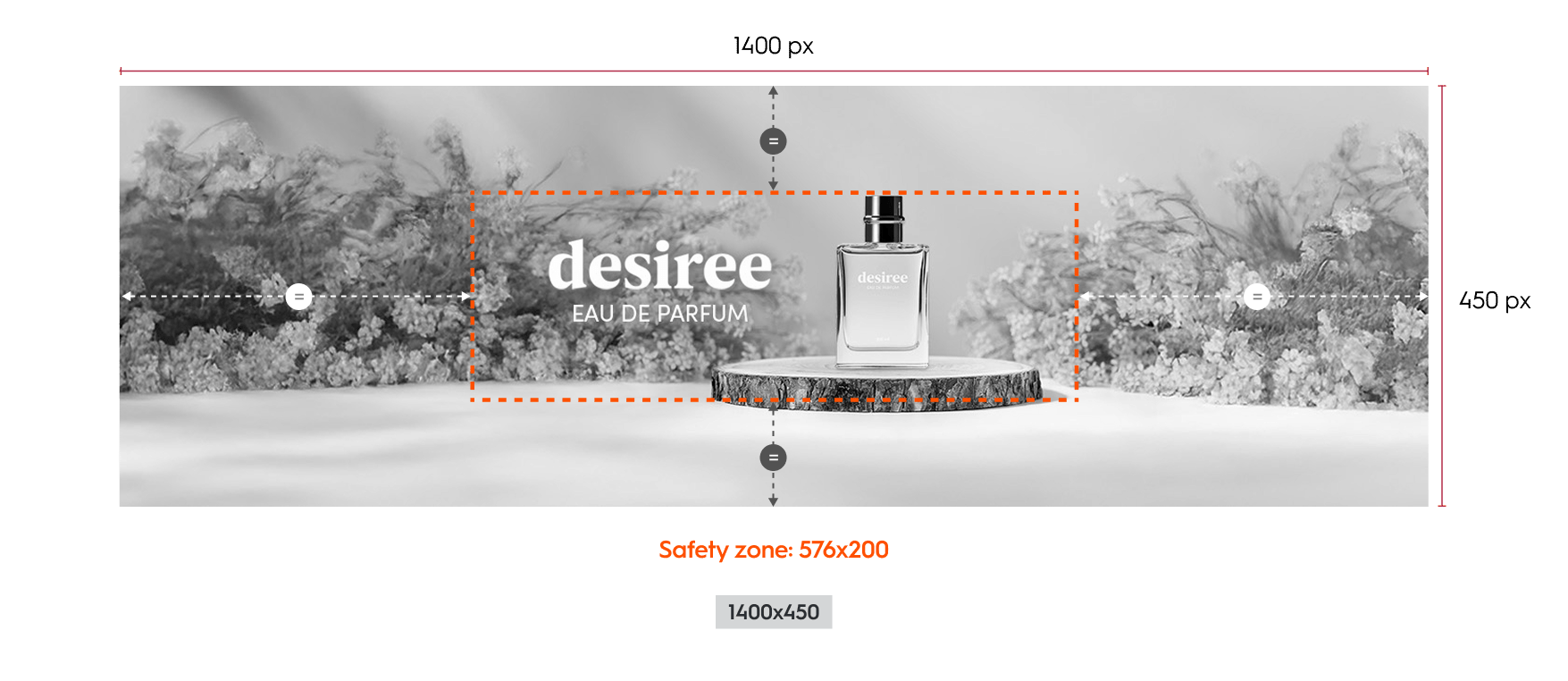
The background image asset is 1400x450 pixels.

**Device Support**

This asset will render at its original size and can cover both desktop and tablet placements as small as 576 px wide or based on the detected device.

**Alignment and Cropping**

There is a minimum cropping area of the image asset called the Safety zone, therefore the background image needs to be centered within the branding zone and cropped on all sides. The height of the branding zone can be determined by the retailer as long as the Safety zone is respected.

<br />

<Frame>
  <img src="https://mintcdn.com/criteo-e1682996/PtO-HGDADAVLvs2M/images/retailer-integration/docs/a54bb8e5659307dbb01b55c15485546089b891865bc980edeadde04c26922bfd-CD_Spotlight_-_Web.png?fit=max&auto=format&n=PtO-HGDADAVLvs2M&q=85&s=b801708bb9d6e5ae2d9b832981229b50" alt="a54bb8e5659307dbb01b55c15485546089b891865bc980edeadde04c26922bfd CD_Spotlight_ _Web" width="1302" height="202" data-path="images/retailer-integration/docs/a54bb8e5659307dbb01b55c15485546089b891865bc980edeadde04c26922bfd-CD_Spotlight_-_Web.png" />
</Frame>

<Frame caption="Example of the Commerce Display Spotlight format and safety zone on original asset size (desktop)">
  <img src="https://mintcdn.com/criteo-e1682996/PtO-HGDADAVLvs2M/images/retailer-integration/docs/9ed2f3b4ad577611cf103b57297f302104d159e09f4e5058ac4544e1b5a7665a-251118_-_Horizontal_Web_Asset.png?fit=max&auto=format&n=PtO-HGDADAVLvs2M&q=85&s=be90f90a42bfc9c3f6c72696519c6404" alt="Example of the Commerce Display Spotlight format and safety zone on original asset size (desktop)" width="1755" height="762" data-path="images/retailer-integration/docs/9ed2f3b4ad577611cf103b57297f302104d159e09f4e5058ac4544e1b5a7665a-251118_-_Horizontal_Web_Asset.png" />
</Frame>

### Mobile Specifications

This layout is optimized for mobile devices and includes a horizontal product slider beneath a branded background area.

**Background Image**

* The background image size is 1280 by 400 pixels.
* It is divided into two sections:
  * A branding zone at the top
  * A product zone positioned below the branding zone
* The image is fully responsive:
  * It scales proportionally based on the width of its parent container.
  * As the width decreases, the height decreases proportionally.
  * The image is never cropped.

**Product Slider Behavior**

* Products are displayed in a horizontally scrollable slider.
* Navigation dots appear below the slider to indicate the user’s current position:
* One dot is shown for each product.
* The dot representing the visible product is darker to show its active status.
* If there is only one product, no dots are displayed.

<Frame caption="Background and dimensions for the Commerce Display Spotlight format (mobile)">
  <img src="https://mintcdn.com/criteo-e1682996/fr3QURzyzf6m9Hkn/images/retailer-integration/docs/4fa2781a3d61a1d9382285660fb3d07e6613a277164e70200d3b1dfbea6720dd-image.png?fit=max&auto=format&n=fr3QURzyzf6m9Hkn&q=85&s=17c5f72f38f046c26042b2306b7c7c91" alt="Background and dimensions for the Commerce Display Spotlight format (mobile)" width="1398" height="1666" data-path="images/retailer-integration/docs/4fa2781a3d61a1d9382285660fb3d07e6613a277164e70200d3b1dfbea6720dd-image.png" />
</Frame>

***

## Available Options

The available options are adding a CTA, a legal text, a "more info" text as well as color modes

<Frame caption="Example of the Commerce Display Spotlight (desktop) with CTA, legal text and &#x22;more info&#x22; text">
  <img src="https://mintcdn.com/criteo-e1682996/PtO-HGDADAVLvs2M/images/retailer-integration/docs/6ad3490ba9916ee3f6e6a59926fbfe2ab007079feba4779012af3c4bed8069c1-CD_Spotlight-all.png?fit=max&auto=format&n=PtO-HGDADAVLvs2M&q=85&s=4488351ca93c3ffa8e8a0ac58143e9f6" alt="Example of the Commerce Display Spotlight (desktop) with CTA, legal text and &#x22;more info&#x22; text" width="1402" height="250" data-path="images/retailer-integration/docs/6ad3490ba9916ee3f6e6a59926fbfe2ab007079feba4779012af3c4bed8069c1-CD_Spotlight-all.png" />
</Frame>

### Redirection

When a user clicks on the branding zone (anywhere on banner image) or the CTA button, they will be taken to the redirection link defined within the response. There are two possible redirection options:

* `Self` (open in the same tab)
* `Blank` (open in a new tab)

### Call to Action (CTA)

A CTA button can be added as an option. If enabled, it will appear below the branding zone. When the user clicks on button, they will be redirected to the link.

<Frame>
  <img src="https://mintcdn.com/criteo-e1682996/PtO-HGDADAVLvs2M/images/retailer-integration/docs/6ad3490ba9916ee3f6e6a59926fbfe2ab007079feba4779012af3c4bed8069c1-CD_Spotlight-all.png?fit=max&auto=format&n=PtO-HGDADAVLvs2M&q=85&s=4488351ca93c3ffa8e8a0ac58143e9f6" alt="6ad3490ba9916ee3f6e6a59926fbfe2ab007079feba4779012af3c4bed8069c1 CD_Spotlight all" width="1402" height="250" data-path="images/retailer-integration/docs/6ad3490ba9916ee3f6e6a59926fbfe2ab007079feba4779012af3c4bed8069c1-CD_Spotlight-all.png" />
</Frame>

<Frame caption="CTA example for the Commerce Display Spotlight format">
  <img src="https://mintcdn.com/criteo-e1682996/fr3QURzyzf6m9Hkn/images/retailer-integration/docs/508bd7874cb54528ed6a76b4def971133ea78a096d23f9c3b8593f03fa07652c-CD_Spotlight-_Mobile_CTA.png?fit=max&auto=format&n=fr3QURzyzf6m9Hkn&q=85&s=1d2b2ad7a3d68cce0b0f6dd8faf8ff76" alt="CTA example for the Commerce Display Spotlight format" width="756" height="699" data-path="images/retailer-integration/docs/508bd7874cb54528ed6a76b4def971133ea78a096d23f9c3b8593f03fa07652c-CD_Spotlight-_Mobile_CTA.png" />
</Frame>

### Legal Text

Legal text can be added as an option. It is always visible (90 characters maximum, including spaces) and placed below the branding zone.

<Frame>
  <img src="https://mintcdn.com/criteo-e1682996/fr3QURzyzf6m9Hkn/images/retailer-integration/docs/44cbc0ae49ac52f10928df0fc1fe9f048f1bf82228cdec8840ef36c09ed336f9-CD_Spotlight_-_Legal.png?fit=max&auto=format&n=fr3QURzyzf6m9Hkn&q=85&s=b593ee0f3592de19910491887bc1ed83" alt="44cbc0ae49ac52f10928df0fc1fe9f048f1bf82228cdec8840ef36c09ed336f9 CD_Spotlight_ _Legal" width="1154" height="236" data-path="images/retailer-integration/docs/44cbc0ae49ac52f10928df0fc1fe9f048f1bf82228cdec8840ef36c09ed336f9-CD_Spotlight_-_Legal.png" />
</Frame>

<Frame caption="CTA example for the Commerce Display Spotlight format">
  <img src="https://mintcdn.com/criteo-e1682996/fr3QURzyzf6m9Hkn/images/retailer-integration/docs/107816335da95a4ab616d46899db71c4df614382298e4a96def804d3f3973712-CD_Spotlight_-_Mobile_legal.jpg?fit=max&auto=format&n=fr3QURzyzf6m9Hkn&q=85&s=8b213bde14064038038c906f3bc46fda" alt="CTA example for the Commerce Display Spotlight format" width="756" height="684" data-path="images/retailer-integration/docs/107816335da95a4ab616d46899db71c4df614382298e4a96def804d3f3973712-CD_Spotlight_-_Mobile_legal.jpg" />
</Frame>

### More info

More info text can be added as an option (180 characters maximum, including spaces).
If the option is enabled:

* While hovering over the branding zone, an (i) icon is displayed in the top-left corner
* When hovering the (i) icon, the "More info" text is displayed on top of the branding zone.
* On mobile, it is always visible or displayed when the user clicks on `see more`.

<br />

<Frame>
  <img src="https://mintcdn.com/criteo-e1682996/PtO-HGDADAVLvs2M/images/retailer-integration/docs/83c050714ea1ddbb35fc84ffaa98a1c09c84008f605ee73d2b1e5a2c0814293b-CD_Spotlight_-_more_info.png?fit=max&auto=format&n=PtO-HGDADAVLvs2M&q=85&s=ef83467ec8fa3cdf83cf8159d66ff9db" alt="83c050714ea1ddbb35fc84ffaa98a1c09c84008f605ee73d2b1e5a2c0814293b CD_Spotlight_ _more_info" width="1154" height="202" data-path="images/retailer-integration/docs/83c050714ea1ddbb35fc84ffaa98a1c09c84008f605ee73d2b1e5a2c0814293b-CD_Spotlight_-_more_info.png" />
</Frame>

<Frame>
  <img src="https://mintcdn.com/criteo-e1682996/T1671lE5Qb9IdIDU/images/retailer-integration/docs/df7ab7636d243382dc558f48c886955d8d826f53c20c1d1dc183bf6de574af1b-CD_Spotlight_-_more_info_hover.png?fit=max&auto=format&n=T1671lE5Qb9IdIDU&q=85&s=4da5525f6511dc6836ffa0659ffaa97b" alt="df7ab7636d243382dc558f48c886955d8d826f53c20c1d1dc183bf6de574af1b CD_Spotlight_ _more_info_hover" width="1154" height="202" data-path="images/retailer-integration/docs/df7ab7636d243382dc558f48c886955d8d826f53c20c1d1dc183bf6de574af1b-CD_Spotlight_-_more_info_hover.png" />
</Frame>

<br />

<Frame caption="Example of &#x22;More Info&#x22;, CTA and legal text for the Commerce Display Spotlight (mobile)">
  <img src="https://mintcdn.com/criteo-e1682996/fr3QURzyzf6m9Hkn/images/retailer-integration/docs/422e326c8b8b314624824b519443ce6a3ab4c132840c9fb6eb2db76e77fa0e4e-cds-mob-more-info.png?fit=max&auto=format&n=fr3QURzyzf6m9Hkn&q=85&s=721b2e100adedeacdedf47bf5ef58742" alt="Example of &#x22;More Info&#x22;, CTA and legal text for the Commerce Display Spotlight (mobile)" width="1632" height="550" data-path="images/retailer-integration/docs/422e326c8b8b314624824b519443ce6a3ab4c132840c9fb6eb2db76e77fa0e4e-cds-mob-more-info.png" />
</Frame>

***

### Color Mode

The advertiser can choose between two preset color modes to ensure the best contrast between text options and the branding zone. Options appear while hovering over the Branding Zone.

#### Light mode

Background color: `#FFFFFF` 80%
Icon color: `#6A6A6A`
Legal text color: `#000000`

#### Dark mode

Background color: `#6A6A6A` 80%
Icon color: `#FFFFFF`
Legal text color: `#FFFFFF`

<Frame>
  <img src="https://mintcdn.com/criteo-e1682996/PtO-HGDADAVLvs2M/images/retailer-integration/docs/9b6a36c03eb5223e81f29d71675026f24c63aff4d14248b76d066eca31857bc7-CD_Spotlight_-_light_mode_2.png?fit=max&auto=format&n=PtO-HGDADAVLvs2M&q=85&s=730e81cdf744352adda314384fe5e3d2" alt="9b6a36c03eb5223e81f29d71675026f24c63aff4d14248b76d066eca31857bc7 CD_Spotlight_ _light_mode_2" width="1154" height="202" data-path="images/retailer-integration/docs/9b6a36c03eb5223e81f29d71675026f24c63aff4d14248b76d066eca31857bc7-CD_Spotlight_-_light_mode_2.png" />
</Frame>

<Frame caption="Example of the Light & Dark color modes for the Commerce Display Spotlight format (desktop & mobile)">
  <img src="https://mintcdn.com/criteo-e1682996/PtO-HGDADAVLvs2M/images/retailer-integration/docs/6be9624264c1019145d88e056e6a662ecda2e80855f9b2f751a3e8b2188e7fa7-CD_Spotlight_-_dark_mode_4.png?fit=max&auto=format&n=PtO-HGDADAVLvs2M&q=85&s=88fb83967df50af4ab62235c53f947e7" alt="Example of the Light & Dark color modes for the Commerce Display Spotlight format (desktop & mobile)" width="1154" height="202" data-path="images/retailer-integration/docs/6be9624264c1019145d88e056e6a662ecda2e80855f9b2f751a3e8b2188e7fa7-CD_Spotlight_-_dark_mode_4.png" />
</Frame>

***

# Technical Details

## Responsive Layout Rules

The rendering is based on the grid of the page and detected device.

<Frame>
  <img src="https://mintcdn.com/criteo-e1682996/PtO-HGDADAVLvs2M/images/retailer-integration/docs/883ec4d02e0d99fb2d77c6153b79d2044d70f89fc61c2ccdef60bf20510c7fc9-260109_-_CD_Spotlight_-_Responsive_layout.png?fit=max&auto=format&n=PtO-HGDADAVLvs2M&q=85&s=4fbee6e6f7fb560eeeadf94aee5a9953" alt="883ec4d02e0d99fb2d77c6153b79d2044d70f89fc61c2ccdef60bf20510c7fc9 260109_ CD_Spotlight _Responsive_layout" width="1434" height="389" data-path="images/retailer-integration/docs/883ec4d02e0d99fb2d77c6153b79d2044d70f89fc61c2ccdef60bf20510c7fc9-260109_-_CD_Spotlight_-_Responsive_layout.png" />
</Frame>

### Placement width between 1152px and 2800px

* Branding Zone and Product Zone each take up **50% of the total width**.
* Height is defined by the retailer.
* The background image is rendered at 100% the asset size, centered and cropped from all sides

<Frame caption="Dimensions for a placement width between 1152 px and 2800 px (Commerce Display Spotlight - desktop)">
  <img src="https://mintcdn.com/criteo-e1682996/fr3QURzyzf6m9Hkn/images/retailer-integration/docs/3c41eb6a9b15279be491a04146eca5875df8a49e17b11a545c2fe1475a920f5f-image.png?fit=max&auto=format&n=fr3QURzyzf6m9Hkn&q=85&s=6e4da6d05f62954ace9732a4b3bd4069" alt="Dimensions for a placement width between 1152 px and 2800 px (Commerce Display Spotlight - desktop)" width="2810" height="594" data-path="images/retailer-integration/docs/3c41eb6a9b15279be491a04146eca5875df8a49e17b11a545c2fe1475a920f5f-image.png" />
</Frame>

***

### Placement width between 769px and 1152px

* Same as above: both zones are **50% width**.
* The Branding Image asset is rendered at **67% scale** of the original size (approximately **933.33 × 300px**).

<Frame caption="Dimensions for a placement width between 769 px and 1152 px (Commerce Display Spotlight, desktop)">
  <img src="https://mintcdn.com/criteo-e1682996/fr3QURzyzf6m9Hkn/images/retailer-integration/docs/5d906c81941b5a169cc485f47f7896ccb17e0c3abeb37ab2874a0d401ce7f183-image.png?fit=max&auto=format&n=fr3QURzyzf6m9Hkn&q=85&s=8877cd75872ff40363b4fef127bfebff" alt="Dimensions for a placement width between 769 px and 1152 px (Commerce Display Spotlight, desktop)" width="2268" height="592" data-path="images/retailer-integration/docs/5d906c81941b5a169cc485f47f7896ccb17e0c3abeb37ab2874a0d401ce7f183-image.png" />
</Frame>

***

### Placement width between 640px and 769px

At this breakpoint, you can choose between the two layout options outlined below.

<Frame caption="Main layout (recommended) and Alternative layout">
  <img src="https://mintcdn.com/criteo-e1682996/PtO-HGDADAVLvs2M/images/retailer-integration/docs/79caa54201dfe00b217144d1bca2d04aba1778bd20d91b0a2192283f7a97ab83-260109_-_CD_Spotlight_-_Responsive_layout_2_1.png?fit=max&auto=format&n=PtO-HGDADAVLvs2M&q=85&s=277ae3cc021ef7e0b03ca1c4bd12ef14" alt="Main layout (recommended) and Alternative layout" width="952" height="518" data-path="images/retailer-integration/docs/79caa54201dfe00b217144d1bca2d04aba1778bd20d91b0a2192283f7a97ab83-260109_-_CD_Spotlight_-_Responsive_layout_2_1.png" />
</Frame>

<br />

#### Main layout (recommended)

* Desktop asset renders at **67% scale**.
* The banner height is fixed to the **safety zone height (134px)**.
* The Product Zone moves **below the banner**, with a suggested height of **136px**
* Total format height: **270px**\
  Please note that the presence of optional elements such as the CTA button, “More info”, and "Legal" components may increase the overall height of the banner.

<Frame caption="Dimensions for a placement width between 640 px and 769 px (Commerce Display Spotlight, desktop)">
  <img src="https://mintcdn.com/criteo-e1682996/PtO-HGDADAVLvs2M/images/retailer-integration/docs/6b51be48c948409d2b089a35d4bbd985ae03797ccf798873a0a32bb1a5284278-image.png?fit=max&auto=format&n=PtO-HGDADAVLvs2M&q=85&s=19bc85813f274a6b8580432c8eb98c65" alt="Dimensions for a placement width between 640 px and 769 px (Commerce Display Spotlight, desktop)" width="1705" height="744" data-path="images/retailer-integration/docs/6b51be48c948409d2b089a35d4bbd985ae03797ccf798873a0a32bb1a5284278-image.png" />
</Frame>

<br />

#### Alternative layout

* The Branding Zone has a **fixed width of 384px**.
* The Product Zone occupies **no more than 50% of the total width**, and is sized to fit all product content.
* If product content does not fit:
  * The Product Zone height may adjust automatically (up to **300px**), or
  * The main layout above may be applied instead

<Frame caption="Dimensions for a placement width between 640 px and 769 px (Commerce Display Spotlight, desktop)">
  <img src="https://mintcdn.com/criteo-e1682996/PtO-HGDADAVLvs2M/images/retailer-integration/docs/a9016030bd34d48b99d5d57f223a8ec74a7437788eb172f73d9f79c139abe352-Group_79311.png?fit=max&auto=format&n=PtO-HGDADAVLvs2M&q=85&s=f12a755f8709e253eb5960a043d7a1ed" alt="Dimensions for a placement width between 640 px and 769 px (Commerce Display Spotlight, desktop)" width="1756" height="603" data-path="images/retailer-integration/docs/a9016030bd34d48b99d5d57f223a8ec74a7437788eb172f73d9f79c139abe352-Group_79311.png" />
</Frame>

***

### Placement width under 640px (Mobile Mode)

* The layout switches to **mobile**.
* The banner spans **100% of the device width** and scales proportionally, maintaining its original aspect ratio.

<Frame caption="Dimensions for a placement width below 640 px (Commerce Display Spotlight, mobile)">
  <img src="https://mintcdn.com/criteo-e1682996/T1671lE5Qb9IdIDU/images/retailer-integration/docs/ede3e713f085030199c2d6daac44ff680ee7dfad89a2a1ee73779c83486abbfa-image.png?fit=max&auto=format&n=T1671lE5Qb9IdIDU&q=85&s=3ee887b6bfe4a1a9dd0acfcb1d38f06e" alt="Dimensions for a placement width below 640 px (Commerce Display Spotlight, mobile)" width="993" height="735" data-path="images/retailer-integration/docs/ede3e713f085030199c2d6daac44ff680ee7dfad89a2a1ee73779c83486abbfa-image.png" />
</Frame>

***

## Styling

Element styles, such as fonts, button corner radius, and navigation controls, are determined by the retailer and the following details shows our default styles. We strongly advise to adhere to our button sizes to keep designs streamlined and consistent.

### Borders

* **Desktop and Tablet layout:** 1px border surrounds both the branding and product zones.
* **Mobile Layout:** 2px border surrounds the full creative, including product listings.

### Background Image

* Desktop and Tablet layout:
  * The background image is centered and is cropped from all sides
  * Image size rendering is determined by scaling presets

* Mobile Layout:
  * The background image has a fixed position and is never cropped
  * It scales proportionally to fit its container.

### Navigation and Slider Behavior

* The design of navigation dots or arrows are customizable to match the retailer’s native UI
* When the user releases the slide, the product with the largest percentage of visibility becomes the main displayed product

### Product Zone Behavior

* Product information dynamically fits within the product zone
* For the Mobile Layout, the product zone maintains a consistent height, regardless of the width of the branded header
  * Padding: 10 pixels of spacing around each product listing.

### Mobile Layout Product Visibility Logic

* If only one product is present:
  * The product is 100% in view
* If the viewed product is first or last in the list:
  * The main product is 80% in view
  * The adjacent (secondary) product is 20% in view
* If the viewed product is in the middle of the list:
  * The main product is 80% in view
  * Each adjacent product is 10% in view

<Frame>
  <img src="https://mintcdn.com/criteo-e1682996/cmPz0RjwwK8-Y1zy/images/retailer-integration/docs/087ce7295af0412f339fefafaacf6f4767b188095f45e64e54614fc5f82a5900-image.png?fit=max&auto=format&n=cmPz0RjwwK8-Y1zy&q=85&s=2226a7391c258eb17965b907ba89eb67" alt="087ce7295af0412f339fefafaacf6f4767b188095f45e64e54614fc5f82a5900 image" width="1062" height="404" data-path="images/retailer-integration/docs/087ce7295af0412f339fefafaacf6f4767b188095f45e64e54614fc5f82a5900-image.png" />
</Frame>

<Frame>
  <img src="https://mintcdn.com/criteo-e1682996/fr3QURzyzf6m9Hkn/images/retailer-integration/docs/19d4c3b6dc26d953ffba02f78084f1af3a851aeadf6a60a867b16cfb71b39100-image.png?fit=max&auto=format&n=fr3QURzyzf6m9Hkn&q=85&s=9de6bf490f0f32edc85872ee57052bae" alt="19d4c3b6dc26d953ffba02f78084f1af3a851aeadf6a60a867b16cfb71b39100 image" width="1062" height="404" data-path="images/retailer-integration/docs/19d4c3b6dc26d953ffba02f78084f1af3a851aeadf6a60a867b16cfb71b39100-image.png" />
</Frame>

<br />

### Call-to-Action (CTA) Button

* **Max characters:** 25
* **Size:** 150 x 30 pixels
* **Font:** Roboto Regular, 12 pixels
* **Margin & Alignment**
  * Desktop and Tablet layout:
    * 8 pixels below branding zone & below button
    * When there is no legal text: Centered below branding zone
    * If legal text enabled: left aligned and 10 pixels to the right of the button
  * Mobile Layout: 8 pixels above and 10 pixels below button
  * Mobile Layout: 10 pixels below navigation dots and 10 pixels below button

### Legal Text and More Info

**Desktop and Tablet layout**

<table>
  <thead>
    <tr>
      <th>
        <p>
          Detail
        </p>
      </th>

      <th>
        <p>
          Legal text
        </p>
      </th>

      <th>
        <p>
          More info
        </p>
      </th>
    </tr>
  </thead>

  <tbody>
    <tr>
      <td>
        <p>
          Location
        </p>
      </td>

      <td>
        <p>
          below branding zone (right of CTA button if enabled)
        </p>
      </td>

      <td>
        <p>
          contained in interactive overlay
        </p>
      </td>
    </tr>

    <tr>
      <td>
        <p>
          Height
        </p>
      </td>

      <td>
        <p>
          Dynamic, based on text length
        </p>
      </td>

      <td>
        <p>
          Dynamic, based on text length
        </p>
      </td>
    </tr>

    <tr>
      <td>
        <p>
          Padding
        </p>
      </td>

      <td>
        <ul>
          <li>
            8 pixels below branding zone & below text.
          </li>

          <li>
            If CTA button is enabled, 10 pixels to the left.
          </li>
        </ul>
      </td>

      <td>
        <p>
          8 pixels, all around
        </p>
      </td>
    </tr>

    <tr>
      <td>
        <p>
          Font
        </p>
      </td>

      <td>
        <p>
          Roboto Regular, 12 pixels
        </p>
      </td>

      <td>
        <p>
          Roboto Regular, 12 pixels
        </p>
      </td>
    </tr>

    <tr>
      <td>
        <p>
          Max characters
        </p>
      </td>

      <td>
        <p>
          90
        </p>
      </td>

      <td>
        <p>
          180
        </p>
      </td>
    </tr>

    <tr>
      <td>
        <p>
          Background
        </p>
      </td>

      <td>
        <p>
          Displayed over a colored layer (the layer color adapts based on color mode)
        </p>
      </td>

      <td>
        <p>
          Same as legal text
        </p>
      </td>
    </tr>
  </tbody>
</table>

**Mobile Layout**

* Legal and More info text will be displayed together
* "See less" / "See more" option for expanded or contracted view of text
* **Padding:** 8 pixels, all sides
* **Font:** Roboto Regular, 12 pixels
* **Max characters:** same as Desktop and Tablet layout
* **Background:** Displayed over a colored layer (the layer color adapts based on color mode)

<br />

<Frame caption="Dimensions and spacings for the Commerce Display Spotlight (desktop)">
  <img src="https://mintcdn.com/criteo-e1682996/T1671lE5Qb9IdIDU/images/retailer-integration/docs/fa8c37b6de97ba2a88afcd612e2c5fce48782b256df06833cf43f3a7d3c2fef6-image.png?fit=max&auto=format&n=T1671lE5Qb9IdIDU&q=85&s=9c0f33b7e7ff165666b7443bd5e67d1a" alt="Dimensions and spacings for the Commerce Display Spotlight (desktop)" width="2787" height="602" data-path="images/retailer-integration/docs/fa8c37b6de97ba2a88afcd612e2c5fce48782b256df06833cf43f3a7d3c2fef6-image.png" />
</Frame>

<Frame caption="Dimensions and spacings for the Commerce Display Spotlight (mobile)">
  <img src="https://mintcdn.com/criteo-e1682996/PtO-HGDADAVLvs2M/images/retailer-integration/docs/bd3e423328c6dc7128196de819eb9033e8f06b336ffa59029343cbc7343f0f66-CD_Grid_Duet_-_Options.png?fit=max&auto=format&n=PtO-HGDADAVLvs2M&q=85&s=f23204f11655601cbcd8a9c20c780402" alt="Dimensions and spacings for the Commerce Display Spotlight (mobile)" width="764" height="698" data-path="images/retailer-integration/docs/bd3e423328c6dc7128196de819eb9033e8f06b336ffa59029343cbc7343f0f66-CD_Grid_Duet_-_Options.png" />
</Frame>

***

<br />

## What's next

* [Commerce Display Grid Duet](/retailer-integration/docs/commerce-display-grid-duet)
* [Commerce Display Grid Shelf](/retailer-integration/docs/commerce-display-grid-shelf)
* [Branding Display Grid Solo](/retailer-integration/docs/branding-display-grid-solo)
* [Branding Display Spotlight Solo](/retailer-integration/docs/branding-display-spotlight-solo)