> ## Documentation Index
> Fetch the complete documentation index at: https://developers.criteo.com/llms.txt
> Use this file to discover all available pages before exploring further.

# Commerce Video Grid Duet

> Commerce Video Grid Duet is an in-grid format combining a video file with one or more product SKUs.

# Overview

The **Commerce Video Grid Duet** format combines a video file with one or more product SKUs.

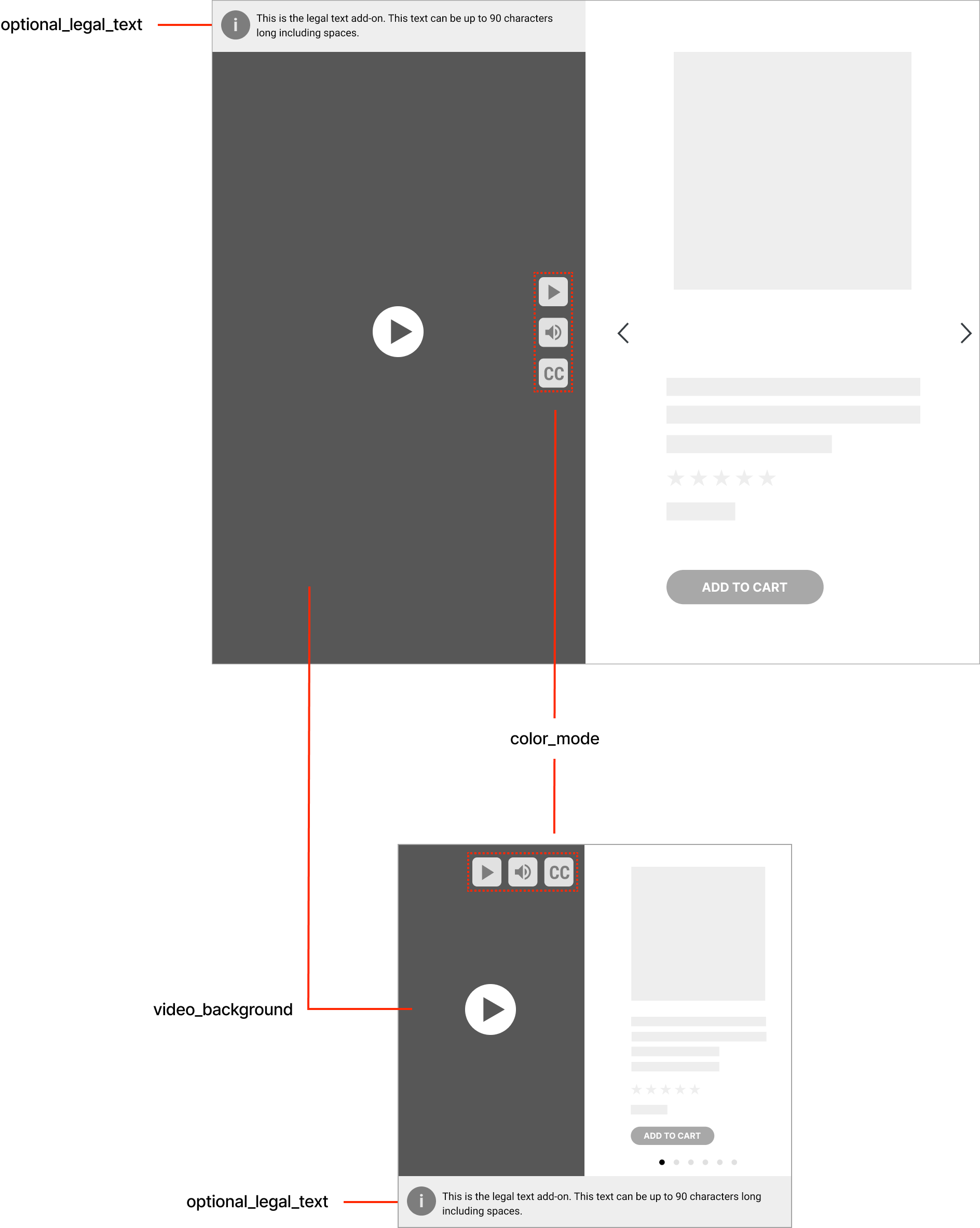
The image below showcases the desktop format at the top and the mobile format at the bottom.

<Frame caption="Web (on top) and mobile showcases (at the bottom) of the Commerce Video Grid Duet format">
  <img src="https://mintcdn.com/criteo-e1682996/T1671lE5Qb9IdIDU/images/retailer-integration/docs/d7d060a9464b893919b83b9f16b99b3f3aa48b09faac179ff4e8cab8612e253b-image.png?fit=max&auto=format&n=T1671lE5Qb9IdIDU&q=85&s=21b6f9c4247683fd0812cc746e6f545b" alt="Web (on top) and mobile showcases (at the bottom) of the Commerce Video Grid Duet format" width="1888" height="2366" data-path="images/retailer-integration/docs/d7d060a9464b893919b83b9f16b99b3f3aa48b09faac179ff4e8cab8612e253b-image.png" />
</Frame>

***

# Response Keys

The following is a description of the different keys used to render ads.

## In the Rendering Section

<table>
  <thead>
    <tr>
      <th>
        <p>
          Key
        </p>
      </th>

      <th>
        <p>
          Description
        </p>
      </th>
    </tr>
  </thead>

  <tbody>
    <tr>
      <td>
        <p>
          <code>
            color\_mode
          </code>
        </p>
      </td>

      <td>
        <p>
          This parameter controls the visibility and color theme of player controls (play/pause, mute/unmute, closed captions, and the legal text “i” icon) to ensure sufficient contrast over the video background.
        </p>

        <p>
          Required:

          <code>
            true
          </code>
        </p>

        <p>
          Default:

          <code>
            lightcommand
          </code>
        </p>

        <p>
          <code>
            isRadioDisplay
          </code>

          :

          <code>
            true
          </code>
        </p>

        <p>
          There are two default theme options for the control elements to ensure visibility over any video file provided:
        </p>

        <p>
          It can have one of the following values:
        </p>

        <ul>
          <li>
            <code>
              lightcommand
            </code>

            →

            <b>
              Light mode
            </b>

            <code>
              \#000000
            </code>
          </li>

          <li>
            <code>
              darkcommand
            </code>

            →

            <b>
              Dark mode
            </b>

            <code>
              \#FFFFFF
            </code>
          </li>
        </ul>
      </td>
    </tr>

    <tr>
      <td>
        <p>
          <code>
            optional\_redirect\_target
          </code>
        </p>
      </td>

      <td>
        <p>
          Standard option to open the link on current page or new page.
        </p>

        <p>
          Ignored if no

          <code>
            ClickThrough
          </code>

          is provided in the VAST.
        </p>

        <p>
          Values:
        </p>

        <p>
          <code>
            \_blank
          </code>

          (new tab),
        </p>

        <p>
          <code>
            \_self
          </code>

          (same tab).
        </p>
      </td>
    </tr>

    <tr>
      <td>
        <p>
          <code>
            optional\_legal\_text
          </code>
        </p>
      </td>

      <td>
        <p>
          Legal text add-on for the video.
        </p>

        <p>
          Max

          <code>
            90 characters
          </code>

          , including spaces.
        </p>

        <p>
          Desktop: visible on hover of the “i” icon;
        </p>

        <p>
          Mobile / App: always visible below the video.
        </p>
      </td>
    </tr>

    <tr>
      <td>
        <p>
          <code>
            background\_color
          </code>
        </p>
      </td>

      <td>
        <p>
          Video background color.
        </p>

        <p>
          Required:

          <code>
            true
          </code>
        </p>

        <p>
          Default:

          <code>
            \#CCCCCC
          </code>
        </p>
      </td>
    </tr>

    <tr>
      <td>
        <p>
          <code>
            background\_video\_alt\_text
          </code>
        </p>
      </td>

      <td>
        <p>
          Video alt text.
        </p>

        <p>
          Required:

          <code>
            true
          </code>
        </p>

        <p>
          <code>
            maxChars
          </code>

          :

          <code>
            120
          </code>
        </p>
      </td>
    </tr>
  </tbody>
</table>

<Info>
  The video-specific keys (`video_background`, `video_caption_file`, `video_optional_redirect_url` and `video_optional_redirect_url_app`) are defined at the VAST level and not part of the rendering schema.
</Info>

***

## Format/Placement VAST Options

Depending on your integration configuration, you may find one of the following VAST options for the video placement in the ad response.

<table>
  <thead>
    <tr>
      <th>
        <p>
          Key
        </p>
      </th>

      <th>
        <p>
          Description
        </p>
      </th>
    </tr>
  </thead>

  <tbody>
    <tr>
      <td>
        <p>
          <code>
            TagVideoVAST
          </code>
        </p>
      </td>

      <td>
        <p>
          A URL to load a VAST XML that includes all information to render the video part (left side).
        </p>
      </td>
    </tr>

    <tr>
      <td>
        <p>
          OR
        </p>
      </td>

      <td>
        <p>
          *
        </p>
      </td>
    </tr>

    <tr>
      <td>
        <p>
          <code>
            XmlVideoVAST
          </code>
        </p>
      </td>

      <td>
        <p>
          A VAST XML to provide a video player
        </p>
      </td>
    </tr>
  </tbody>
</table>

***

# Sample Response

## Commerce Video Grid Duet: VAST Tag

```json expandable theme={null}
{
  "status": "OK",
  "placements": [
    {
      "viewHome_API_desktop-Flagship": [
        {
          "format": "CVGD",
          "products": [
            {
              "ProductId": "134679258",
              "OnLoadBeacon": "//b.us5.us.criteo.com/rm?rm_e=gLYh9%2fxsFGq%2b67gaahP4kVXGGZXfgfgU1JA8o1zBL%2bVeGhkRciu4XrLOsI4T7SC%2bNbEtyqg3GhqGgDtwtWLWaTC0EBVHxpNlqJcrfrUzWk3IBuDj7ZAr8t28y7EJfH3BnEZQxAvbjEP3nRJYq9z9TfOhi0mWVLYxVFIURTPBvcp0cVPY5qaHvmPC6%2bppv7TH9Kja6zXlrKhib2DOtKo4aEMw3FQqRbnCeTVdjqmFbHK8s%3d&ev=2",
              "OnViewBeacon": "//b.us5.us.criteo.com/rm?rm_e=aLSOJrKI2G%2fY8SwmqYnI5SqMi2jvKfgfgnJDZb06hiInWkDeRqN4Tu%2fKZnJgmGIrIuQVurCYsVELSi%2byX2oOKpicAj5tACVgpEYVcGZxNOU68BYLhRUxn80y3s4USfHLmeeOvP9wxb6RlGyydpJ4U4k%2fM7uL3DawyB9O%2bC9qebO%2bKTIUZ2fbQV5EuwvNxzYqCcfSjxWkMF%2fC5XfdIeovQeU5%2b7UpYhV62LdPj910grWaLwAIZ1BFFDCShQC%2fNTvqXt&ev=2",
              "OnClickBeacon": "//b.us5.us.criteo.com/rm?rm_e=S82J7C%2fY88eObEWE7XzLk2PMzSUfgfgTawyt81nDP2IJov%2byGjGihnQ6n4aM8AN03iCTSLqrRZTClsvRLjR3xIKFGaqgilehlQj2WuFQK5Eht9iUY9Pe9S9fRvms7BB055liFkgZqzmChn6L06LcP0MOPdwUT3dsUhokauwiziBsb3nVQF5k51wvEy%2fQ0YrxsM2ZlOOBmpNrWij8%2fnRxJiCMylA%2fOxqr6%2bJw5nCICO18dWz8SvNAyV0TeI2h9mUSk3jOljbyNUUAK%2fpNYfzRPDuw%3d%3d&ev=2",
              "OnBasketChangeBeacon": "//b.us5.us.criteo.com/rm?rm_e=LQNEHBKa5%2bIRktK7%2bD%2fR5fgfgD1xYrFDDNLffHIbCiNsnssxDZSllOGbux%2f88BUiFFUTugPFOhm0oaM9DsesFQmoNghWjKaIr76vj9B7fcvNR1zZmYOOseWCbQZlkpozMPlugkYyH0W33iV6j2w%2fRdBY%2bQVgQT0BBmYdVPRODed3SIOgkAxOZF4upAfAxSf83%2bp4Nh8bvlY6b840bGvL9UMgQHy1FM8ncNj90PsUwnANQrLmidsAghSTnZELKUpQZYmFXAVPPk%2bBHu%2bpB6QhkK8twFzGcDVBp5MCtpmZGe%2brg%3d&ev=2",
              "OnWishlistBeacon": "//b.us5.us.criteo.com/rm?rm_e=8yGOJDbiWkOj%2bHVuvsc59my1UyuWPnozIfwfOFm5ZtZmX4a4bi3IZLEYS57LOv59wkboF346v%2fKa4X8Zim7YSCjw9tNN2yBYCr%2fb%2fgfgb9QELv2JEprUOfBSZ1ZIwILrpD5CgOWkvQpEnYP137RzR4LFirlrSnfXe0Tanl8sHU5PjOXA%2f9iKHps%2bYB2aD35M02Br8%2fPx%2b2%2bDlQq4RKw4xMuAmnlafk2dUWI%2f%2bjGVwATj0LfINKS2LSt77USBGLOcWw5cDekIMvWptqyccI3oKCQQ%3d%3d&ev=2"
            }
          ],
          "rendering": {
            "background_color": "#CCCCCC",
            "optional_legal_text": "This is the optional legal text.",
            "optional_redirect_target": "_blank",
            "background_video_alt_text": "This is the video alternative text",
            "color_mode": "lightcommand"
          },
          "TagVideoVAST": "//rm-v.us5.eu.criteo.com/v?rm_e=cTPHYkD46JXqUp9svzl4FwDN_Re-KWTFmSn1QREFzvxlBjtyuwqDRDnVL8lIDel4Th9npJBHSThNiJLriLBlmmJlLg3E7oRRs-IIthJ3MTTQGMWNlOPHOebj8aiWu-YTK7Esx7vZ_fdMtLSLuHYbwqZnpT2xb3zqTJ96A2TPZWaVJPUqCO8KuUd5MBgT1mvs_o-L4lim6g9KZmIWT4c0EbOwA&ev=4",
          "OnLoadBeacon": "//b.us5.us.criteo.com/rm?rm_e=2DP313G8ktSXXaFvImaO4VKMqFSCkvmlcTz98dfgdfmtngUKQgwShE9%bvNSjDndYD%2bnpLT4PWDoNaCb862AMTvSopOdYNFGidZfBHggUmtpL%2fYOudEdDP7kANk%2bGmsBy3OCIm58C0uAYEJSHBdruRC%2fhbWLKUdZ2VdHdFwvBg8IT9Yt4V0DS%2bufcBDtvWbEhioZmIPaBY3uuykPSXyOlpMPFfHqZ%2bg%3d%3d&ev=2",
          "OnViewBeacon": "//b.us5.us.criteo.com/rm?rm_e=YIfuO34D8lTreAuY8MIlZiNjtIYz48eDlYzK0kXFMIuhZjwV6cVwkirv6Tbbixk6Wgh7TLqia3Gw1uOcHcNCs%2f4hpPjT2yIGBXUv36EjR20dfgdfgsjFkZFPx8QGY9uakIYTCoH73BwvmoZdM5ForssG%2fkumRGMydeN9VqXHDdF8PxDvlVFUP3M%2fgFsSYQcCTO%2brLIhUs4%2bTKzg3mOxt%2fzSrsyOkQzOP7b7x5lupA2unc%3d&ev=2",
          "OnClickBeacon": "//b.us5.us.criteo.com/rm?rm_e=Db34znl4Lx0Oq1zpo6o%2f5W7GNmopfgN3f4DEpjSxb8eBUtw1dsIWqH82fbjaLIwGVlIukvlY5suhA5G%2fYZcU2Lx0aiFdfgdfgR7hNwL%2blregzZewZ6wuArnzW9sBqia4vvWq%2bBsGU39FRUuYm94OcSReYRutW%2fXtQ5Vx7lExUKg0P3%2fQRk%2bWuroBUmFR5M0atLoYvduF7Qmb4Vms1Ma4dOAwiCKtgh0t27j5Z5IPvlm3I%2fwHMEiS3jnBSD&ev=2",
          "OnFileClickBeacon": "//b.us5.us.criteo.com/rm?rm_e=Db34znl4Lx0Oq1zpo6o%2Nf4DE5lpjSxbBUtw1dsIWqH8%2fbjLIwGVlIukvlY5suhA5G%2fYZcU2Lx0aiFdfgdfgR7hNwL%2blregzZewZ6wuArnzW9sBqia4vvWq%2bBsGU39FRUuYm94OcSReYRutW%2fXtQ5Vx7lExUKg0P3%2fQRk%2bWuroBUmFR5M0atLoYvduF7Qmb4Vms1Ma4dOAwiCKtgh0t27j5Z5IPvlm3I%2fwHMEiS3jnBSD&ev=2",
          "OnBundleBasketChangeBeacon": "//b.us5.us.criteo.com/rm?rm_e=EPQZxjkhpjUK980SuOfCsTUVMLvFuugK%2f7NaEZDdh5JUt8YNx8PZUKRY2b93LwBFzLYDA3EppPd336FlC3y9%2dfgdfgbUcOP6qdW5k27ef5KwplDMOMh%2bnhF%2blpeguQpact691q70oFry4KYaNbRhKHmCm9wtVmDBbiwGBNW77%2f0lIKintx2O3Dv%2fuCEymreHBITagpX7GXLP0pTQ6O0%2fdMEH%2fI4Z2dPtUHa3ps7G4V%2fvDspyR&ev=2"
        }
      ]
    }
  ]
}

```

***

## Commerce Video Grid Duet: VAST XML

### Embedded in the JSON File

```json theme={null}
{
  "status": "OK",
  "placements": [
    {
      "viewHome_API_desktop-Flagship": [
        {
          "format": "CVGD",
          "products": [
            {
              "ProductId": "134679258",
              "OnLoadBeacon": "//b.us5.us.criteo.com/rm?rm_e=gLYh9%2fxsFGq%2b67gaahP4kVXGGZXfgfgU1JA8o1zBL%2bVeGhkRciu4XrLOsI4T7SC%2bNbEtyqg3GhqGgDtwtWLWaTC0EBVHxpNlqJcrfrUzWk3IBuDj7ZAr8t28y7EJfH3BnEZQxAvbjEP3nRJYq9z9TfOhi0mWVLYxVFIURTPBvcp0cVPY5qaHvmPC6%2bppv7TH9Kja6zXlrKhib2DOtKo4aEMw3FQqRbnCeTVdjqmFbHK8s%3d&ev=2",
              "OnViewBeacon": "//b.us5.us.criteo.com/rm?rm_e=aLSOJrKI2G%2fY8SwmqYnI5SqMi2jvKfgfgnJDZb06hiInWkDeRqN4Tu%2fKZnJgmGIrIuQVurCYsVELSi%2byX2oOKpicAj5tACVgpEYVcGZxNOU68BYLhRUxn80y3s4USfHLmeeOvP9wxb6RlGyydpJ4U4k%2fM7uL3DawyB9O%2bC9qebO%2bKTIUZ2fbQV5EuwvNxzYqCcfSjxWkMF%2fC5XfdIeovQeU5%2b7UpYhV62LdPj910grWaLwAIZ1BFFDCShQC%2fNTvqXt&ev=2",
              "OnClickBeacon": "//b.us5.us.criteo.com/rm?rm_e=S82J7C%2fY88eObEWE7XzLk2PMzSUfgfgTawyt81nDP2IJov%2byGjGihnQ6n4aM8AN03iCTSLqrRZTClsvRLjR3xIKFGaqgilehlQj2WuFQK5Eht9iUY9Pe9S9fRvms7BB055liFkgZqzmChn6L06LcP0MOPdwUT3dsUhokauwiziBsb3nVQF5k51wvEy%2fQ0YrxsM2ZlOOBmpNrWij8%2fnRxJiCMylA%2fOxqr6%2bJw5nCICO18dWz8SvNAyV0TeI2h9mUSk3jOljbyNUUAK%2fpNYfzRPDuw%3d%3d&ev=2",
              "OnBasketChangeBeacon": "//b.us5.us.criteo.com/rm?rm_e=LQNEHBKa5%2bIRktK7%2bD%2fR5fgfgD1xYrFDDNLffHIbCiNsnssxDZSllOGbux%2f88BUiFFUTugPFOhm0oaM9DsesFQmoNghWjKaIr76vj9B7fcvNR1zZmYOOseWCbQZlkpozMPlugkYyH0W33iV6j2w%2fRdBY%2bQVgQT0BBmYdVPRODed3SIOgkAxOZF4upAfAxSf83%2bp4Nh8bvlY6b840bGvL9UMgQHy1FM8ncNj90PsUwnANQrLmidsAghSTnZELKUpQZYmFXAVPPk%2bBHu%2bpB6QhkK8twFzGcDVBp5MCtpmZGe%2brg%3d&ev=2",
              "OnWishlistBeacon": "//b.us5.us.criteo.com/rm?rm_e=8yGOJDbiWkOj%2bHVuvsc59my1UyuWPnozIfwfOFm5ZtZmX4a4bi3IZLEYS57LOv59wkboF346v%2fKa4X8Zim7YSCjw9tNN2yBYCr%2fb%2fgfgb9QELv2JEprUOfBSZ1ZIwILrpD5CgOWkvQpEnYP137RzR4LFirlrSnfXe0Tanl8sHU5PjOXA%2f9iKHps%2bYB2aD35M02Br8%2fPx%2b2%2bDlQq4RKw4xMuAmnlafk2dUWI%2f%2bjGVwATj0LfINKS2LSt77USBGLOcWw5cDekIMvWptqyccI3oKCQQ%3d%3d&ev=2"
            }
          ],
          "rendering": {
            "background_color": "#CCCCCC",
            "optional_legal_text": "This is the optional legal text.",
            "optional_redirect_target": "_blank",
            "background_video_alt_text": "This is the video alternative text",
            "color_mode": "lightcommand"
          },
          "XmlVideoVAST": "<?xml version=\"1.0\" encoding=\"UTF-8\"?>\n&lt;VAST xmlns:xsi=\"http://www.w3.org/2001/XMLSchema-instance\" xmlns:xsd=\"http://www.w3.org/2001/XMLSchema\" version=\"4.2\"&gt;\n  &lt;Ad id=\"1234567890\"&gt;\n    &lt;InLine&gt;\n      &lt;AdSystem&gt;Criteo&lt;/AdSystem&gt;\n      &lt;AdTitle&gt;Onsite Branding Video&lt;/AdTitle&gt;\n      &lt;Description&gt;This is the primary messaging text.&lt;/Description&gt;\n      &lt;Advertiser&gt;The Brand&lt;/Advertiser&gt;\n      &lt;Impression&gt;<![CDATA[https://b.us5.us.criteo.com/rm?rm_e=IMP_TRACKING_URL]]>&lt;/Impression&gt;\n      &lt;Error&gt;<![CDATA[https://b.us5.us.criteo.com/rm?rm_e=ERROR_TRACKING_URL]]>&lt;/Error&gt;\n      &lt;Creatives&gt;\n        &lt;Creative id=\"creative123\"&gt;\n          &lt;Linear&gt;\n            &lt;Duration&gt;00:00:20.000&lt;/Duration&gt;\n            &lt;TrackingEvents&gt;\n              &lt;Tracking event=\"start\"&gt;<![CDATA[https://tracking/start]]>&lt;/Tracking&gt;\n              &lt;Tracking event=\"firstQuartile\"&gt;<![CDATA[https://tracking/firstQuartile]]>&lt;/Tracking&gt;\n              &lt;Tracking event=\"midpoint\"&gt;<![CDATA[https://tracking/midpoint]]>&lt;/Tracking&gt;\n              &lt;Tracking event=\"thirdQuartile\"&gt;<![CDATA[https://tracking/thirdQuartile]]>&lt;/Tracking&gt;\n              &lt;Tracking event=\"complete\"&gt;<![CDATA[https://tracking/complete]]>&lt;/Tracking&gt;\n            &lt;/TrackingEvents&gt;\n            &lt;VideoClicks&gt;\n              &lt;ClickThrough id=\"brandingClick\"&gt;<![CDATA[https://retailer.com/branding-landing-page]]>&lt;/ClickThrough&gt;\n              &lt;ClickTracking&gt;<![CDATA[https://tracking/click]]>&lt;/ClickTracking&gt;\n            &lt;/VideoClicks&gt;\n            &lt;MediaFiles&gt;\n              &lt;MediaFile delivery=\"progressive\" type=\"video/mp4\" width=\"640\" height=\"360\" scalable=\"true\" maintainAspectRatio=\"true\"&gt;\n                <![CDATA[https://static.retailer.com/videos/branding_video.mp4]]>\n              &lt;/MediaFile&gt;\n            &lt;/MediaFiles&gt;\n          &lt;/Linear&gt;\n        &lt;/Creative&gt;\n      &lt;/Creatives&gt;\n    &lt;/InLine&gt;\n  &lt;/Ad&gt;\n&lt;/VAST&gt;"
        }
      ]
    }
  ]
}
```

***

### XML Video VAST Standalone

This is the content of `XmlVideoVAST` from the example above, presented as a standalone XML snippet for better readability.

```xml expandable theme={null}
<?xml version="1.0" encoding="UTF-8"?>
&lt;VAST xmlns:xsi="http://www.w3.org/2001/XMLSchema-instance"
      xmlns:xsd="http://www.w3.org/2001/XMLSchema"
      version="4.2"&gt;
  &lt;Ad id="1234567890"&gt;
    &lt;InLine&gt;
      &lt;AdSystem&gt;Criteo&lt;/AdSystem&gt;
      &lt;AdTitle&gt;Onsite Branding Video&lt;/AdTitle&gt;
      &lt;Description&gt;This is the primary messaging text.&lt;/Description&gt;
      &lt;Advertiser&gt;The Brand&lt;/Advertiser&gt;
      &lt;Impression&gt;<![CDATA[https://b.us5.us.criteo.com/rm?rm_e=IMP_TRACKING_URL]]>&lt;/Impression&gt;
      &lt;Error&gt;<![CDATA[https://b.us5.us.criteo.com/rm?rm_e=ERROR_TRACKING_URL]]>&lt;/Error&gt;
      &lt;Creatives&gt;
        &lt;Creative id="creative123"&gt;
          &lt;Linear&gt;
            &lt;Duration&gt;00:00:20.000&lt;/Duration&gt;
            &lt;TrackingEvents&gt;
              &lt;Tracking event="start"&gt;<![CDATA[https://tracking/start]]>&lt;/Tracking&gt;
              &lt;Tracking event="firstQuartile"&gt;<![CDATA[https://tracking/firstQuartile]]>&lt;/Tracking&gt;
              &lt;Tracking event="midpoint"&gt;<![CDATA[https://tracking/midpoint]]>&lt;/Tracking&gt;
              &lt;Tracking event="thirdQuartile"&gt;<![CDATA[https://tracking/thirdQuartile]]>&lt;/Tracking&gt;
              &lt;Tracking event="complete"&gt;<![CDATA[https://tracking/complete]]>&lt;/Tracking&gt;
            &lt;/TrackingEvents&gt;
            &lt;VideoClicks&gt;
              &lt;ClickThrough id="brandingClick"&gt;
                <![CDATA[https://retailer.com/branding-landing-page]]>
              &lt;/ClickThrough&gt;
              &lt;ClickTracking&gt;<![CDATA[https://tracking/click]]>&lt;/ClickTracking&gt;
            &lt;/VideoClicks&gt;
            &lt;MediaFiles&gt;
              &lt;MediaFile delivery="progressive"
                         type="video/mp4"
                         width="640"
                         height="360"
                         scalable="true"
                         maintainAspectRatio="true"&gt;
                <![CDATA[https://static.retailer.com/videos/branding_video.mp4]]>
              &lt;/MediaFile&gt;
            &lt;/MediaFiles&gt;
          &lt;/Linear&gt;
        &lt;/Creative&gt;
      &lt;/Creatives&gt;
    &lt;/InLine&gt;
  &lt;/Ad&gt;
&lt;/VAST&gt;

```

***

# Specifications

## General

* The Commerce Video Grid Duet unit is composed of two parts:
  * A **branding video zone**
  * A **product zone**
* The branding zone dimensions will only allow a **9:16** ratio.
* The format must be able to host up to **5 products**, which is also the maximum number of products.
* The product zone is clickable. The user can click on the product zone to be redirected to the product detail page.

## Video Specifications

<table>
  <thead>
    <tr>
      <th>
        <p>
          Attribute
        </p>
      </th>

      <th>
        <p>
          Specification
        </p>
      </th>
    </tr>
  </thead>

  <tbody>
    <tr>
      <td>
        <p>
          <b>
            File size
          </b>
        </p>
      </td>

      <td>
        <p>
          300 MB
        </p>
      </td>
    </tr>

    <tr>
      <td>
        <p>
          <b>
            Supported file types
          </b>
        </p>
      </td>

      <td>
        <p>
          MP4
        </p>
      </td>
    </tr>

    <tr>
      <td>
        <p>
          <b>
            Video ratio
          </b>
        </p>
      </td>

      <td>
        <p>
          9:16
        </p>
      </td>
    </tr>

    <tr>
      <td>
        <p>
          <b>
            Min duration
          </b>
        </p>
      </td>

      <td>
        <p>
          4 seconds
        </p>
      </td>
    </tr>

    <tr>
      <td>
        <p>
          <b>
            Max duration
          </b>
        </p>
      </td>

      <td>
        <p>
          30 seconds
        </p>
      </td>
    </tr>
  </tbody>
</table>

***

### Legal Text Option

<table>
  <thead>
    <tr>
      <th>
        <p>
          Attribute
        </p>
      </th>

      <th>
        <p>
          Specification
        </p>
      </th>
    </tr>
  </thead>

  <tbody>
    <tr>
      <td>
        <p>
          <b>
            Maximum characters
          </b>
        </p>
      </td>

      <td>
        <p>
          90 characters, including spaces
        </p>
      </td>
    </tr>
  </tbody>
</table>

***

### Alt Text

<table>
  <thead>
    <tr>
      <th>
        <p>
          Attribute
        </p>
      </th>

      <th>
        <p>
          Specification
        </p>
      </th>
    </tr>
  </thead>

  <tbody>
    <tr>
      <td>
        <p>
          <b>
            Maximum characters
          </b>
        </p>
      </td>

      <td>
        <p>
          120 characters, multi-line text field
        </p>
      </td>
    </tr>
  </tbody>
</table>

***

### Closed Captions

<table>
  <thead>
    <tr>
      <th>
        <p>
          Attribute
        </p>
      </th>

      <th>
        <p>
          Specification
        </p>
      </th>
    </tr>
  </thead>

  <tbody>
    <tr>
      <td>
        <p>
          <b>
            File type
          </b>
        </p>
      </td>

      <td>
        <p>
          <code>
            .vtt
          </code>
        </p>
      </td>
    </tr>

    <tr>
      <td>
        <p>
          <b>
            Encoding
          </b>
        </p>
      </td>

      <td>
        <p>
          UTF-8
        </p>
      </td>
    </tr>
  </tbody>
</table>

***

### Click Option

User redirection occurs when clicking on the video area, excluding control buttons and the legal text icon.

All clickable elements within the video (e.g., video surface, optional “Add to Cart” button) redirect to the same destination URL defined in the VAST `&lt;ClickThrough&gt;` section. This ensures a consistent redirection experience across all assets.

<table>
  <thead>
    <tr>
      <th>
        <p>
          Attribute
        </p>
      </th>

      <th>
        <p>
          Specification
        </p>
      </th>
    </tr>
  </thead>

  <tbody>
    <tr>
      <td>
        <p>
          <b>
            Redirection URL
          </b>
        </p>
      </td>

      <td>
        <p>
          There are two possible redirection options:
        </p>

        <p>
          <code>
            \_self
          </code>

          (opens in the same tab),
        </p>

        <p>
          <code>
            \_blank
          </code>

          (opens in a new tab).
        </p>
      </td>
    </tr>
  </tbody>
</table>

***

## Desktop Overview

<br />

<Frame>
  <img src="https://mintcdn.com/criteo-e1682996/fr3QURzyzf6m9Hkn/images/retailer-integration/docs/18c02f4ba0cbdf52c89790af3de0035b37bac74a03c3ed45491826600806ff6b-image.png?fit=max&auto=format&n=fr3QURzyzf6m9Hkn&q=85&s=e3ce294fbd37ea8720cf31f8f60f9124" alt="18c02f4ba0cbdf52c89790af3de0035b37bac74a03c3ed45491826600806ff6b image" width="1480" height="1280" data-path="images/retailer-integration/docs/18c02f4ba0cbdf52c89790af3de0035b37bac74a03c3ed45491826600806ff6b-image.png" />
</Frame>

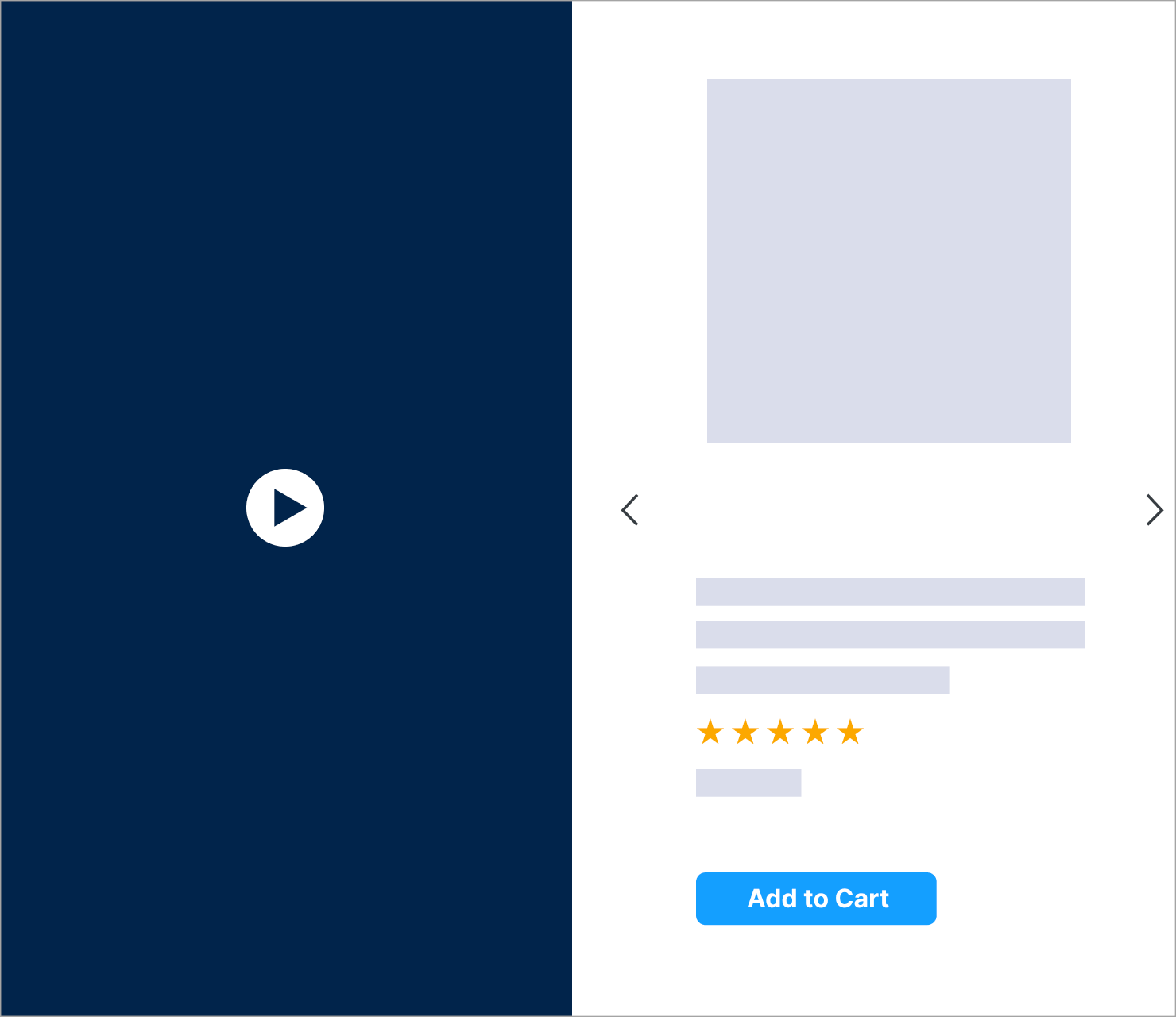
The desktop version of the Commerce Video Grid Duet is designed as follows:

* The branding video zone is on the left,
* The product zone is on the right.
* The product zone includes clickable navigation arrows that allow the user to change the displayed product.
  If there is only one product in the carousel, the arrows will not display.

***

## Mobile Overview
<br />

<Frame>
  <img src="https://mintcdn.com/criteo-e1682996/fr3QURzyzf6m9Hkn/images/retailer-integration/docs/11100335949530da6255cc0d03f1ee0a702112e9007fb0e6eb5ee1d242f4aa35-image.png?fit=max&auto=format&n=fr3QURzyzf6m9Hkn&q=85&s=d162edabb22922b81fdae4dd4b76e0d4" alt="11100335949530da6255cc0d03f1ee0a702112e9007fb0e6eb5ee1d242f4aa35 image" width="968" height="816" data-path="images/retailer-integration/docs/11100335949530da6255cc0d03f1ee0a702112e9007fb0e6eb5ee1d242f4aa35-image.png" />
</Frame>

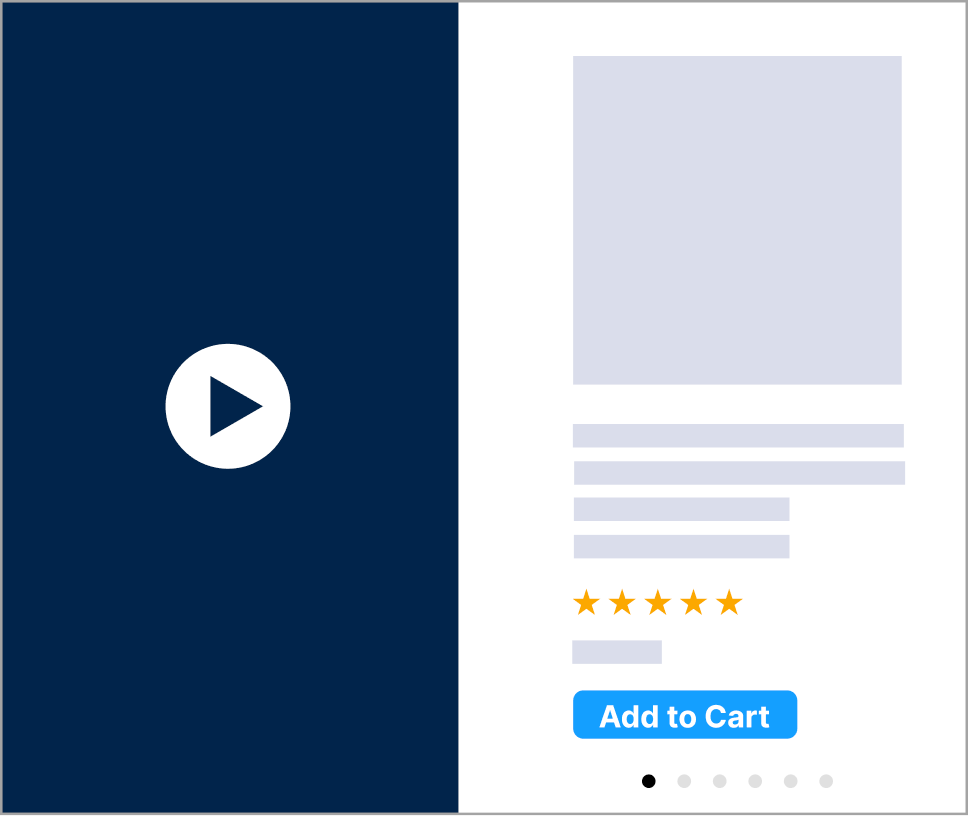
The mobile version of the Commerce Video Grid Duet is designed as follows:

* The branding video zone is on the left,
* The product zone is on the right,
* The user can browse the product using the horizontal slider. Below, some dots indicate the user's position on the slider. There is one dot per product. The product viewable dot should be darker to indicate the position.
  If there is only one product in the slider, the dot is not displayed.

***

## Asset Sizes and Details

### Global

* The border should be fixed to `1px` and should surround the video creative and the product zone.
* Depending on placement size, the format dimensions may vary. However, the video ratio will remain constant at `9:16`.

***

### Width Between 1200px and 1400px

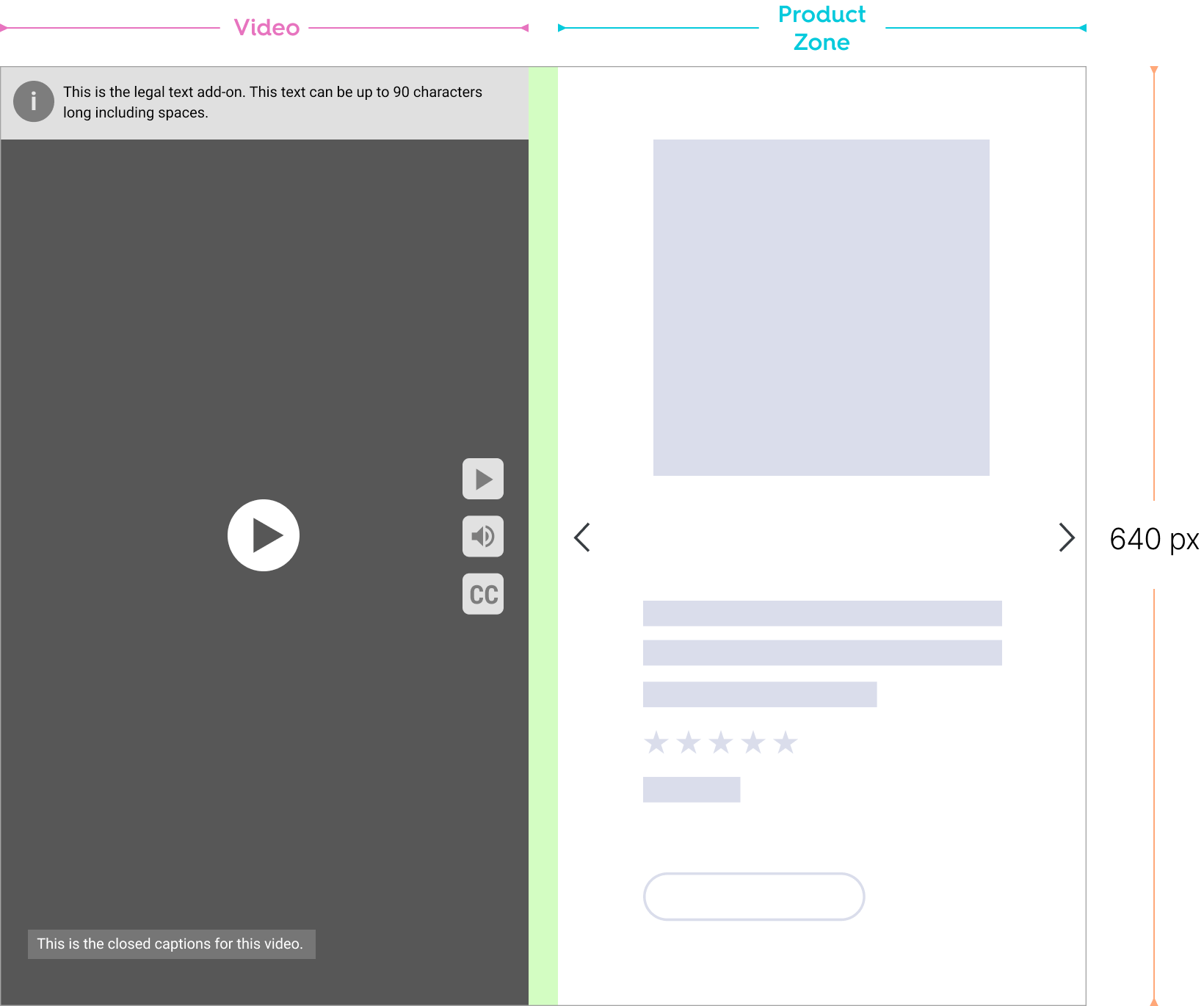
* Between 1440 px and 1200 px browser width, the video remains fixed at 360 × 640 px (9:16 aspect ratio). As the grid narrows, surrounding elements (such as legal text) will wrap and reposition, but the video itself will not scale.
* Video consistently renders at `360 x 640 px` and maintains a 9:16 aspect ratio.
* The background color will appear behind the video asset while it’s letterboxed to fill the rest with the video container (top & bottom) to preserve its original aspect ratio.
<Frame>
  <img src="https://mintcdn.com/criteo-e1682996/T1671lE5Qb9IdIDU/images/retailer-integration/docs/ec2bbcf68549a5cd5009e95d7adc623e0b3d5f9ec8ea3dedc483b65100347706-image.png?fit=max&auto=format&n=T1671lE5Qb9IdIDU&q=85&s=83ea7b7fad86675d964fe607c9562bac" alt="ec2bbcf68549a5cd5009e95d7adc623e0b3d5f9ec8ea3dedc483b65100347706 image" width="1640" height="1370" data-path="images/retailer-integration/docs/ec2bbcf68549a5cd5009e95d7adc623e0b3d5f9ec8ea3dedc483b65100347706-image.png" />
</Frame>

***

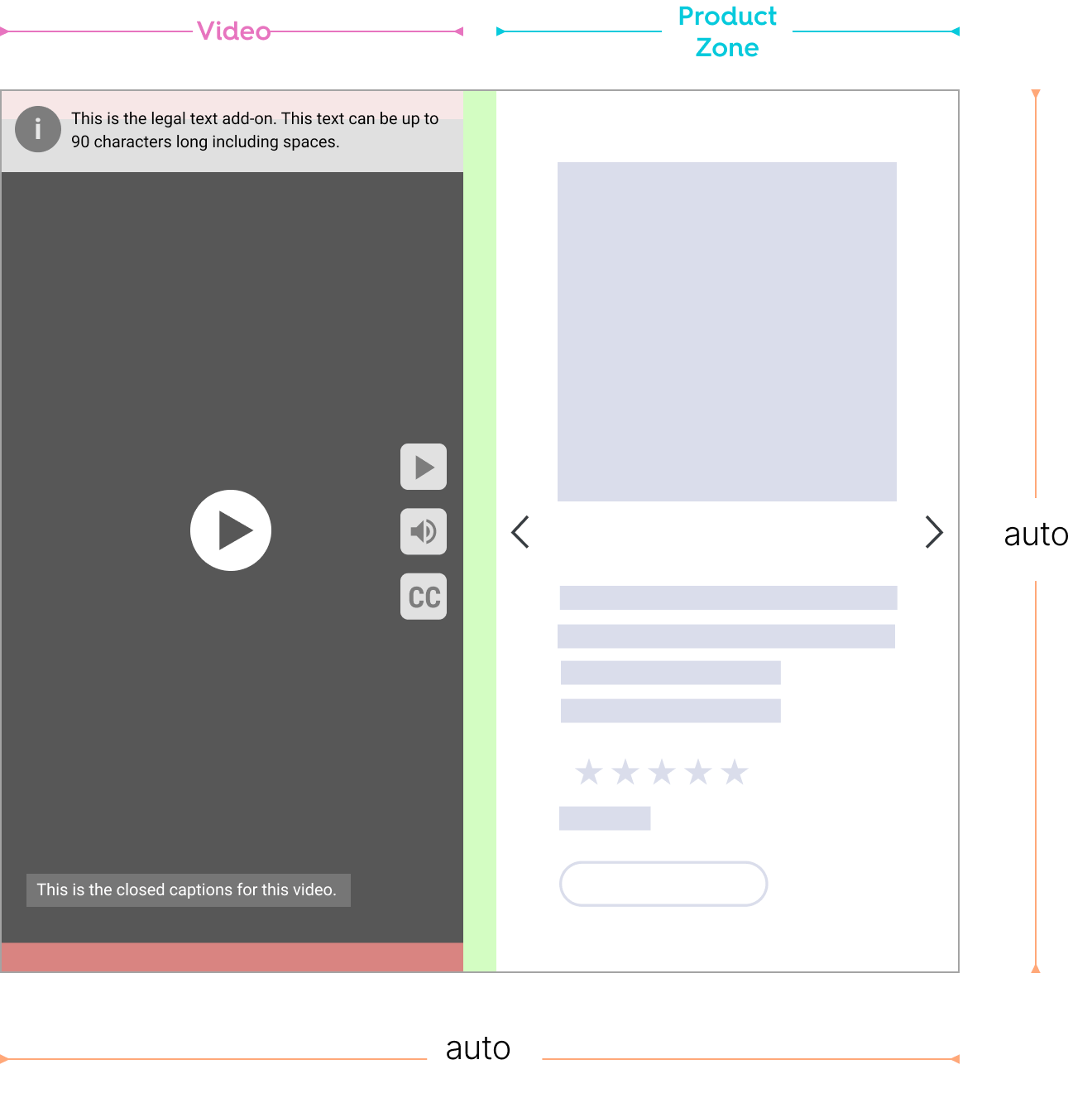
### Width Between 768px and 1200px

* As grid width changes, the unit’s width and height scale automatically with the product grid, while keeping its aspect ratio of 9:16.
* The “Sponsored By” tag will sit below the unit at the bottom right.
* As grid width decreases, the video asset will consistently render, keeping its aspect ratio within the video container.
* The background color will appear behind the video asset while it’s letterboxed to fill the rest with the video container (top & bottom) to preserve its original aspect ratio.
* The legal text is locked at the top of the Video. This area will have a height of 50 px. Messaging text will wrap as unit width changes.
<Frame>
  <img src="https://mintcdn.com/criteo-e1682996/PtO-HGDADAVLvs2M/images/retailer-integration/docs/8dd2902c5b3edb5da072b2c9e062b030086199cffddba4b9769e7ecdbe1804cc-image.png?fit=max&auto=format&n=PtO-HGDADAVLvs2M&q=85&s=bc97ac5cd3efb09a0af16d89399912f4" alt="8dd2902c5b3edb5da072b2c9e062b030086199cffddba4b9769e7ecdbe1804cc image" width="1320" height="1327" data-path="images/retailer-integration/docs/8dd2902c5b3edb5da072b2c9e062b030086199cffddba4b9769e7ecdbe1804cc-image.png" />
</Frame>

***

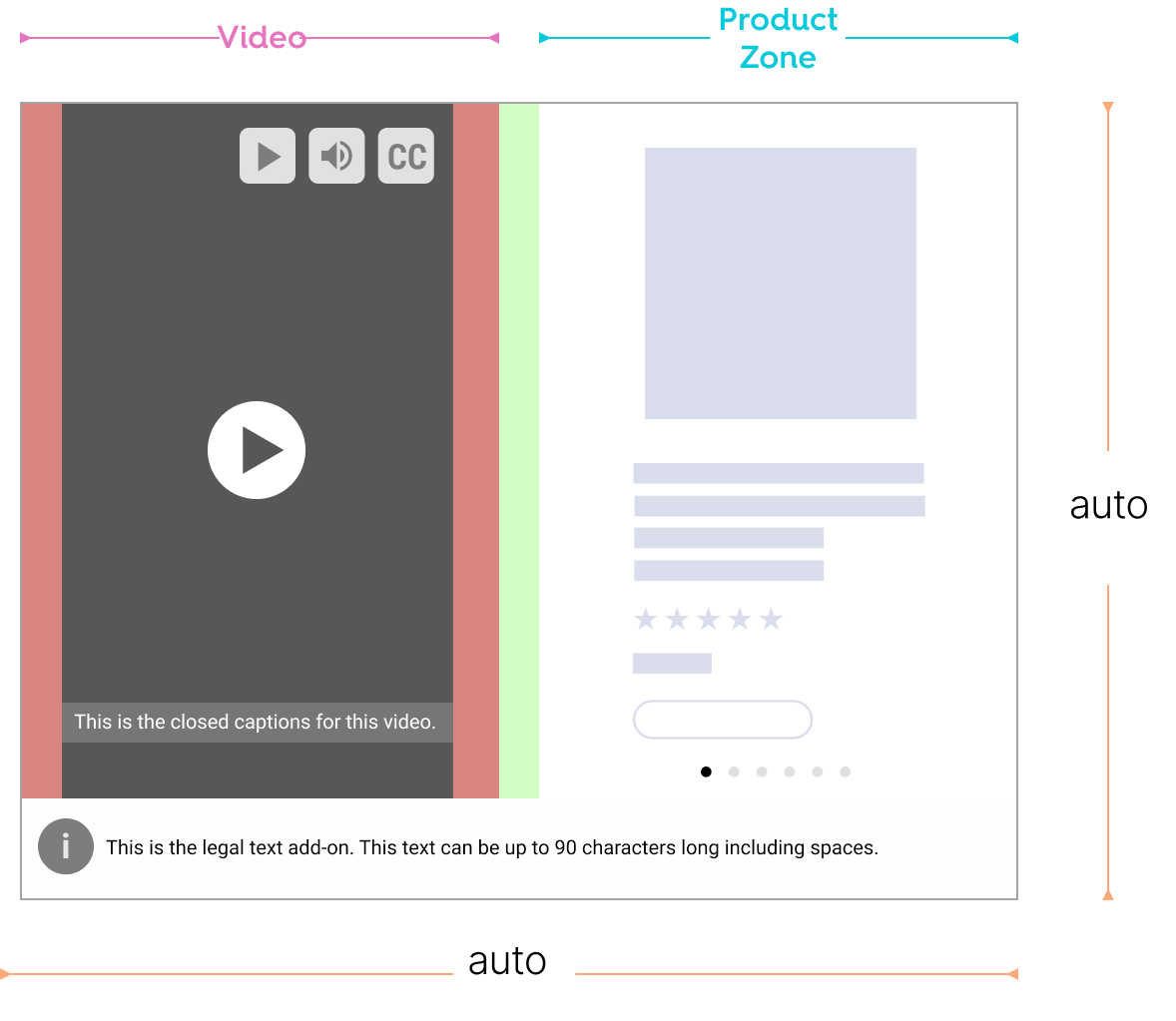
### Width Between 480px and 768px

* Below `768 px`, the mobile unit renders and resizes to fit the grid width.
* The video asset will scale down to 22% of the video container's width, maintaining its 9:16 ratio.
* The video and product zone are each 50% of the entire unit.
* The buttons will now render horizontally at the top right of the video area and remain in that position as the video scales.
* The “Sponsored By” tag will sit below the unit at the bottom right.
* Legal text will now render below the video and product zone, across the entire unit. This area will have a height of 50 px. Messaging text will wrap as unit width changes.
<Frame>
  <img src="https://mintcdn.com/criteo-e1682996/PtO-HGDADAVLvs2M/images/retailer-integration/docs/a0589f3033e646807be0b5b685b8fea8644415509c8276b79d186447d95de290-image.png?fit=max&auto=format&n=PtO-HGDADAVLvs2M&q=85&s=fe32019152080e587bcff0418bc2ab09" alt="a0589f3033e646807be0b5b685b8fea8644415509c8276b79d186447d95de290 image" width="1178" height="1023" data-path="images/retailer-integration/docs/a0589f3033e646807be0b5b685b8fea8644415509c8276b79d186447d95de290-image.png" />
</Frame>

***

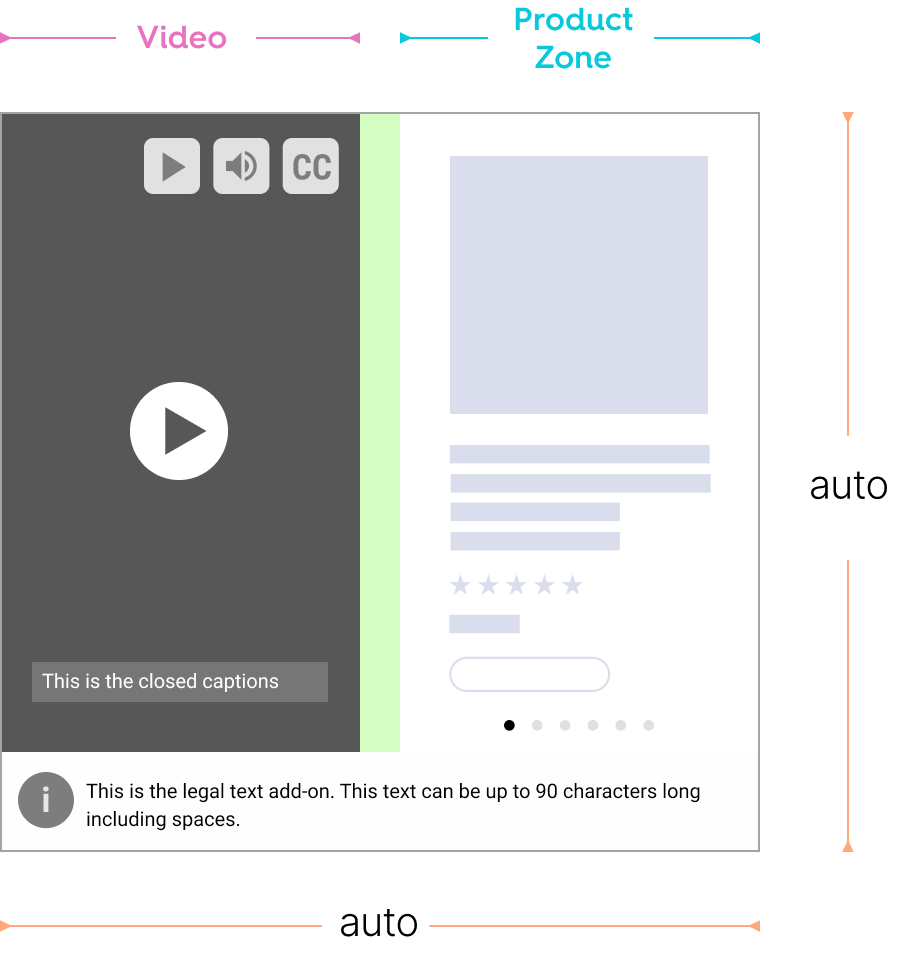
### Width Below 480px

* As grid width changes, the unit’s width and height adjust.
* The video will render at 100% of the unit's width. The buttons continue to render horizontally at the top right of the video area.
* The “Sponsored By” tag will sit below the unit at the bottom right.
* Legal text will now render below the video and product zone, across the entire unit. This area will have a height of 50 px. Messaging text will wrap as unit width changes.
<br />

<Frame>
  <img src="https://mintcdn.com/criteo-e1682996/PtO-HGDADAVLvs2M/images/retailer-integration/docs/93da054442ab4d8fc471f6710931306db6957ddede276a9bf5593c204fcf70a7-image.png?fit=max&auto=format&n=PtO-HGDADAVLvs2M&q=85&s=6a6d41f4ba9de7a09ab5d983b3abfba2" alt="93da054442ab4d8fc471f6710931306db6957ddede276a9bf5593c204fcf70a7 image" width="916" height="956" data-path="images/retailer-integration/docs/93da054442ab4d8fc471f6710931306db6957ddede276a9bf5593c204fcf70a7-image.png" />
</Frame>

***

<br />

## What's next

* [Ad Rendering Best Practices](/retailer-integration/docs/ad-rendering-best-practices)