> ## Documentation Index
> Fetch the complete documentation index at: https://developers.criteo.com/llms.txt
> Use this file to discover all available pages before exploring further.
# Introduction to Beacons
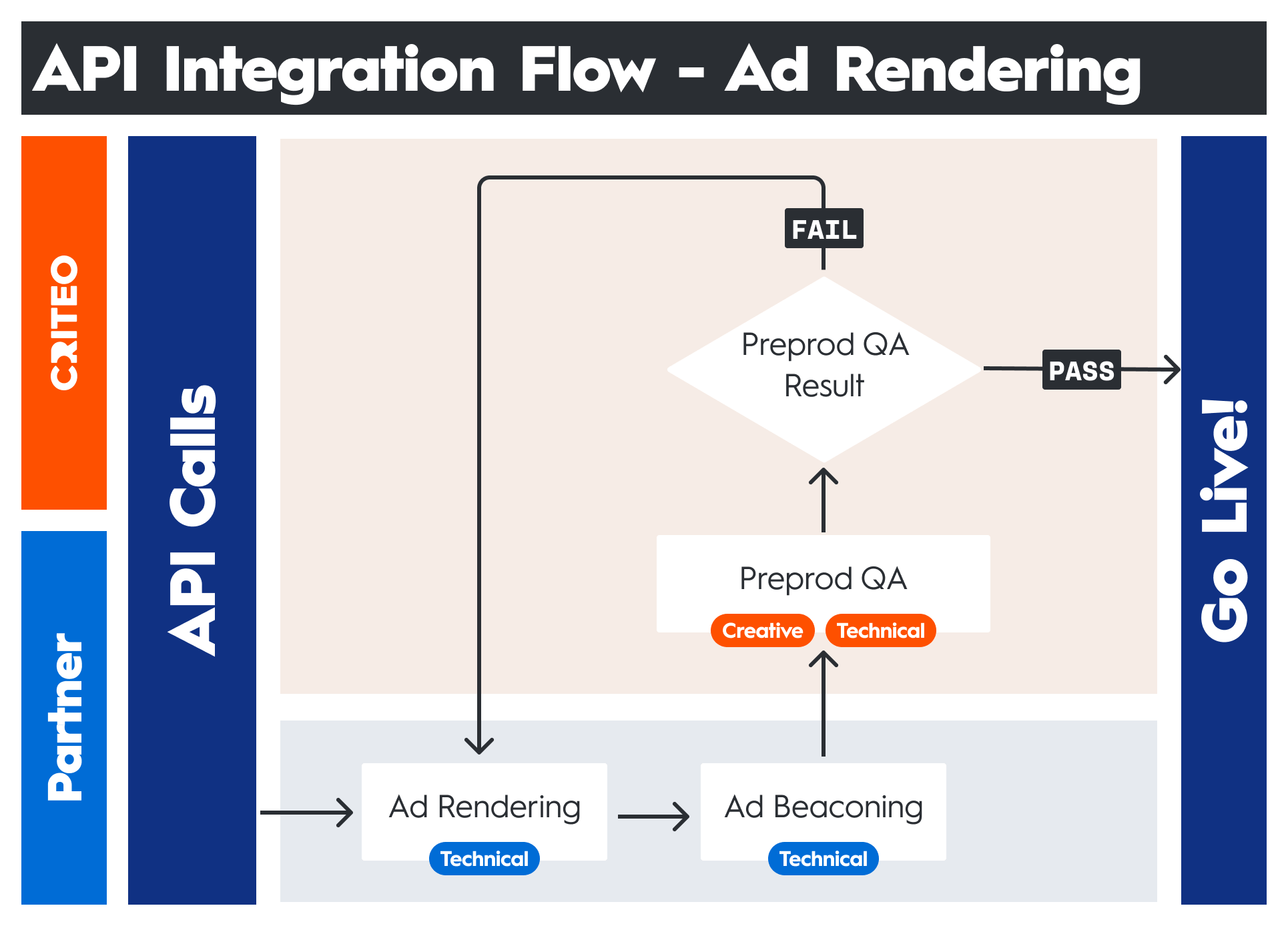
> Tracking interaction events using beacons is the last process to complete your integration with Criteo
**Definition**
A web beacon is a small embedded object, such as a 1-pixel image, used to transmit data to a web server or third-party servers. Beacons are primarily utilized for gathering statistical insights about users. They are commonly integrated within third-party scripts to collect user data, measure performance, and report errors.
**General Ad Server Requirements**
You can find the general ad server requirements [here](/retailer-integration/docs/integration-process#general-ad-server-requirements).
 ***
# How Criteo Uses Beacons
When you call Criteo's ad delivery API, it returns a JSON object containing all the necessary details to render and track ads. This object includes ad creatives, metadata, and beacons.
For web integrations, we recommend using **BeaconSDK** when applicable, as it automates beacon tracking and simplifies implementation. You can find more information about BeaconSDK [here](/retailer-integration/docs/beacon-sdk).
Criteo provides unique beacon URLs that must be triggered when specific events occur, ensuring accurate tracking and measurement.
For example:
* **Load/Impression beacon:** Triggered when the ad placement is rendered on the user's page.
* **View beacon:** Triggered when the ad placement and/or products enter the user’s viewport.
* **Click beacon:** Triggered when the user clicks on an ad placement or product.
By accurately calling these beacons at the appropriate times, you ensure that all relevant ad interactions are accurately tracked and reported. This data is then processed within the Criteo platform, contributing to key metrics used for reporting, optimization, and billing.
***
# Beacon Implementation Best Practices
Effective beacon implementation is crucial for accurate ad tracking and measurement.
Below are key best practices to ensure beacons function properly.
## Sending Beacons Client-side
This is recommended for:
* **Accuracy:** Ensures data reflects actual user interactions and behaviors.
* **Troubleshooting:** Criteo has custom web extensions that allow for easier troubleshooting when compared to beacons that are fired server-side
* **Real-Time Tracking:** Provides immediate insights into user actions, essential for dynamic ad campaigns.
* **Reduced Server Load:** Offloading beacon transmission to the client minimizes server resource usage and enhances scalability.
***
## Using the `sendBeacon()` Method
Criteo supports both `GET` and `POST` requests for beacon URLs, but for web implementations, the `sendBeacon()` method is recommended
### Why it's a best practice
As described in [Mozilla's Developer Network (MDN)](https://developer.mozilla.org/en-US/docs/Web/API/Navigator/sendBeacon):
> The `navigator.sendBeacon()` method asynchronously sends an HTTP POST request containing a small amount of data to a web server.
>
> It's intended to be used for sending analytics data to a web server, and avoids some of the problems with legacy techniques for sending analytics, such as the use of XMLHttpRequest.
#### Benefits
* **Reliability:** Ensures data is sent even if the page is unloading.
* **Performance:** Uses a low-overhead approach, minimizing impact on user experience.
* **Guaranteed delivery:** Prevents data loss when users navigate away from a page.
### Implementation
Use `sendBeacon()` when supported, with a fallback for older browsers::
```javascript theme={null}
function sendBeacon(beaconUrl) {
if (navigator.sendBeacon) {
navigator.sendBeacon(beaconUrl);
} else {
var img = new Image();
img.src = beaconUrl;
}
}
```
***
## Avoiding API Call Caching
### Why it's important
* **Unique tokens**: Each beacon URL contains session-specific data like `timestamps` and `user IDs`. Caching these calls will lead to inaccurate and duplicate tracking.
* **Accurate data**: Ensuring beacons are always fresh guarantees correct reporting.
### Implementation
Use **HTTP headers** to prevent caching of API calls:
```javascript theme={null}
fetch(beaconUrl, {
method: 'POST',
headers: {
'Cache-Control': 'no-cache, no-store, must-revalidate',
'Pragma': 'no-cache',
'Expires': '0'
}
});
```
***
## Avoiding hard-coded checks on beacon URLs
### Why it's a best practice
* **Flexibility:** Beacon URLs may change dynamically due to load balancing. Hard-coded checks could cause failures.
* **Maintainability:** Prevents unnecessary dependencies and simplifies code updates.
* **Adaptability:** Ensures continued functionality even if infrastructure changes.
### Implementation
Simply use the provided beacon URL without additional validation.
```javascript theme={null}
function sendBeacon(beaconUrl) {
if (navigator.sendBeacon) {
navigator.sendBeacon(beaconUrl);
} else {
var img = new Image();
img.src = beaconUrl;
}
}
```
***
## Ad Tracking Best Practice
### Double Tracking Metrics
* Ensuring data accuracy & performance insights: Since the retailer is responsible for firing all `load`, `view`, and `click` events to Criteo, they should also track these metrics internally.
**Benefit**
This allows for **cross-verification**, better **performance analysis**, and **independent optimization**.
***
***
# How Criteo Uses Beacons
When you call Criteo's ad delivery API, it returns a JSON object containing all the necessary details to render and track ads. This object includes ad creatives, metadata, and beacons.
For web integrations, we recommend using **BeaconSDK** when applicable, as it automates beacon tracking and simplifies implementation. You can find more information about BeaconSDK [here](/retailer-integration/docs/beacon-sdk).
Criteo provides unique beacon URLs that must be triggered when specific events occur, ensuring accurate tracking and measurement.
For example:
* **Load/Impression beacon:** Triggered when the ad placement is rendered on the user's page.
* **View beacon:** Triggered when the ad placement and/or products enter the user’s viewport.
* **Click beacon:** Triggered when the user clicks on an ad placement or product.
By accurately calling these beacons at the appropriate times, you ensure that all relevant ad interactions are accurately tracked and reported. This data is then processed within the Criteo platform, contributing to key metrics used for reporting, optimization, and billing.
***
# Beacon Implementation Best Practices
Effective beacon implementation is crucial for accurate ad tracking and measurement.
Below are key best practices to ensure beacons function properly.
## Sending Beacons Client-side
This is recommended for:
* **Accuracy:** Ensures data reflects actual user interactions and behaviors.
* **Troubleshooting:** Criteo has custom web extensions that allow for easier troubleshooting when compared to beacons that are fired server-side
* **Real-Time Tracking:** Provides immediate insights into user actions, essential for dynamic ad campaigns.
* **Reduced Server Load:** Offloading beacon transmission to the client minimizes server resource usage and enhances scalability.
***
## Using the `sendBeacon()` Method
Criteo supports both `GET` and `POST` requests for beacon URLs, but for web implementations, the `sendBeacon()` method is recommended
### Why it's a best practice
As described in [Mozilla's Developer Network (MDN)](https://developer.mozilla.org/en-US/docs/Web/API/Navigator/sendBeacon):
> The `navigator.sendBeacon()` method asynchronously sends an HTTP POST request containing a small amount of data to a web server.
>
> It's intended to be used for sending analytics data to a web server, and avoids some of the problems with legacy techniques for sending analytics, such as the use of XMLHttpRequest.
#### Benefits
* **Reliability:** Ensures data is sent even if the page is unloading.
* **Performance:** Uses a low-overhead approach, minimizing impact on user experience.
* **Guaranteed delivery:** Prevents data loss when users navigate away from a page.
### Implementation
Use `sendBeacon()` when supported, with a fallback for older browsers::
```javascript theme={null}
function sendBeacon(beaconUrl) {
if (navigator.sendBeacon) {
navigator.sendBeacon(beaconUrl);
} else {
var img = new Image();
img.src = beaconUrl;
}
}
```
***
## Avoiding API Call Caching
### Why it's important
* **Unique tokens**: Each beacon URL contains session-specific data like `timestamps` and `user IDs`. Caching these calls will lead to inaccurate and duplicate tracking.
* **Accurate data**: Ensuring beacons are always fresh guarantees correct reporting.
### Implementation
Use **HTTP headers** to prevent caching of API calls:
```javascript theme={null}
fetch(beaconUrl, {
method: 'POST',
headers: {
'Cache-Control': 'no-cache, no-store, must-revalidate',
'Pragma': 'no-cache',
'Expires': '0'
}
});
```
***
## Avoiding hard-coded checks on beacon URLs
### Why it's a best practice
* **Flexibility:** Beacon URLs may change dynamically due to load balancing. Hard-coded checks could cause failures.
* **Maintainability:** Prevents unnecessary dependencies and simplifies code updates.
* **Adaptability:** Ensures continued functionality even if infrastructure changes.
### Implementation
Simply use the provided beacon URL without additional validation.
```javascript theme={null}
function sendBeacon(beaconUrl) {
if (navigator.sendBeacon) {
navigator.sendBeacon(beaconUrl);
} else {
var img = new Image();
img.src = beaconUrl;
}
}
```
***
## Ad Tracking Best Practice
### Double Tracking Metrics
* Ensuring data accuracy & performance insights: Since the retailer is responsible for firing all `load`, `view`, and `click` events to Criteo, they should also track these metrics internally.
**Benefit**
This allows for **cross-verification**, better **performance analysis**, and **independent optimization**.
***
## What's next
* [Beacon types](/retailer-integration/docs/beacon-types)
* [Legacy & Universal beacons](/retailer-integration/docs/legacy-universal-beacons)
* [BeaconSDK](/retailer-integration/docs/beacon-sdk)
* [Server-Side Beacons](/retailer-integration/docs/server-side-beacons)
* [Ad Tracking best practices](/retailer-integration/docs/ad-tracking-best-practices)