> ## Documentation Index
> Fetch the complete documentation index at: https://developers.criteo.com/llms.txt
> Use this file to discover all available pages before exploring further.
# Integration Introduction
> Learn more about the Criteo Retail Media Ad Delivery System and how to integrate with it
# Welcome
This documentation will guide you through the integration of our Onsite retail media delivery solution.
In this documentation, you will find content about:
* [The product feed](/retailer-integration/docs/product-upload-guide)
* [Requesting ads](/retailer-integration/docs/api-calls)
* [Rendering ads and the available ad formats](/retailer-integration/docs/format-overview)
* [Tracking ad activity and beacon configuration](/retailer-integration/docs/introduction-1)
* [Commerce Onsite Video (video ads integration)](/retailer-integration/docs/commerce-video-integration)
* [A QA checklist per ad format](/retailer-integration/docs/qa-checklists)
* [OneTag JavaScript documentation](/retailer-integration/docs/onetag)
* [The Google Ad Manager (GAM)](/retailer-integration/docs/gam-overview)
***
## Integration flow
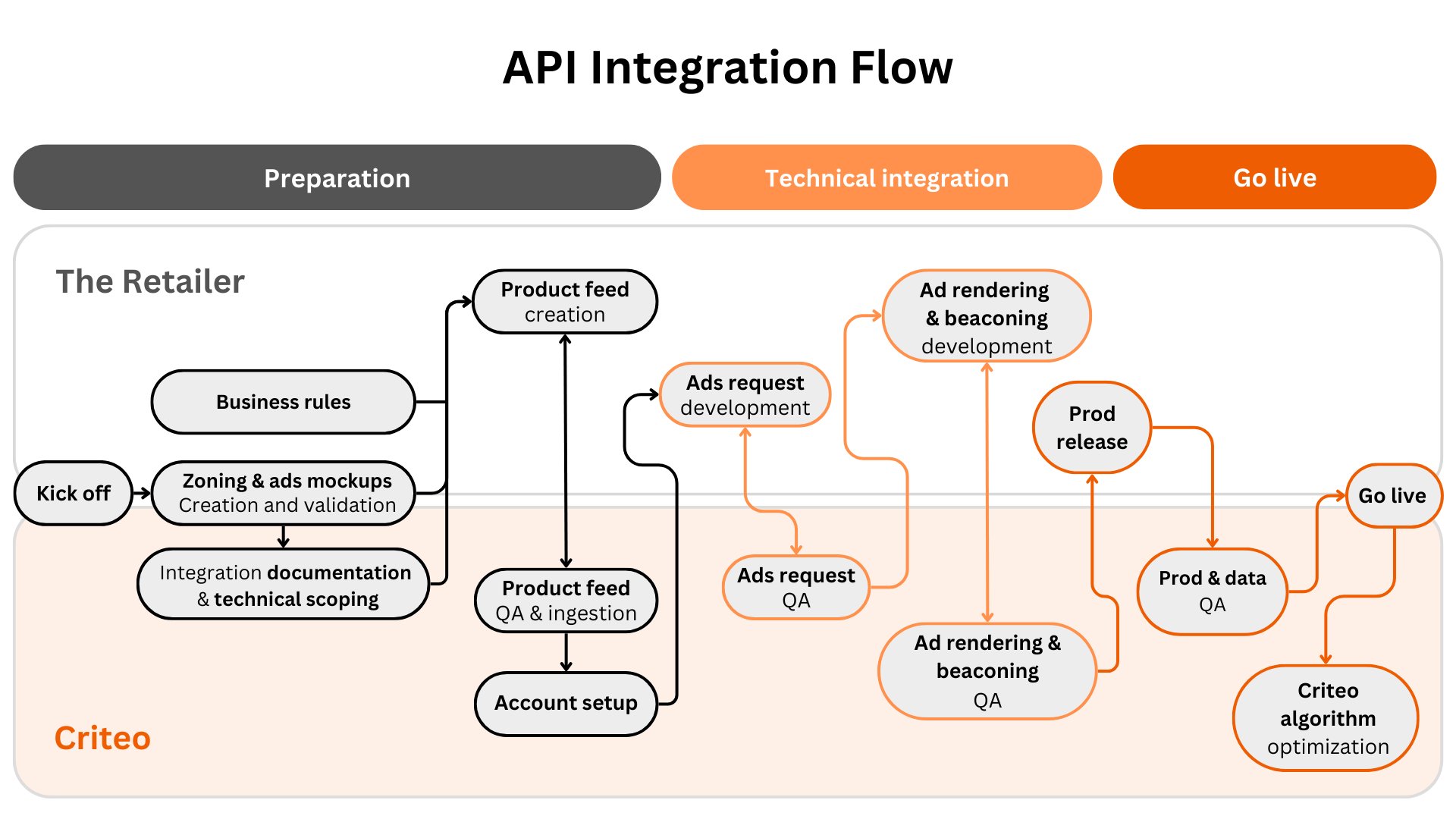
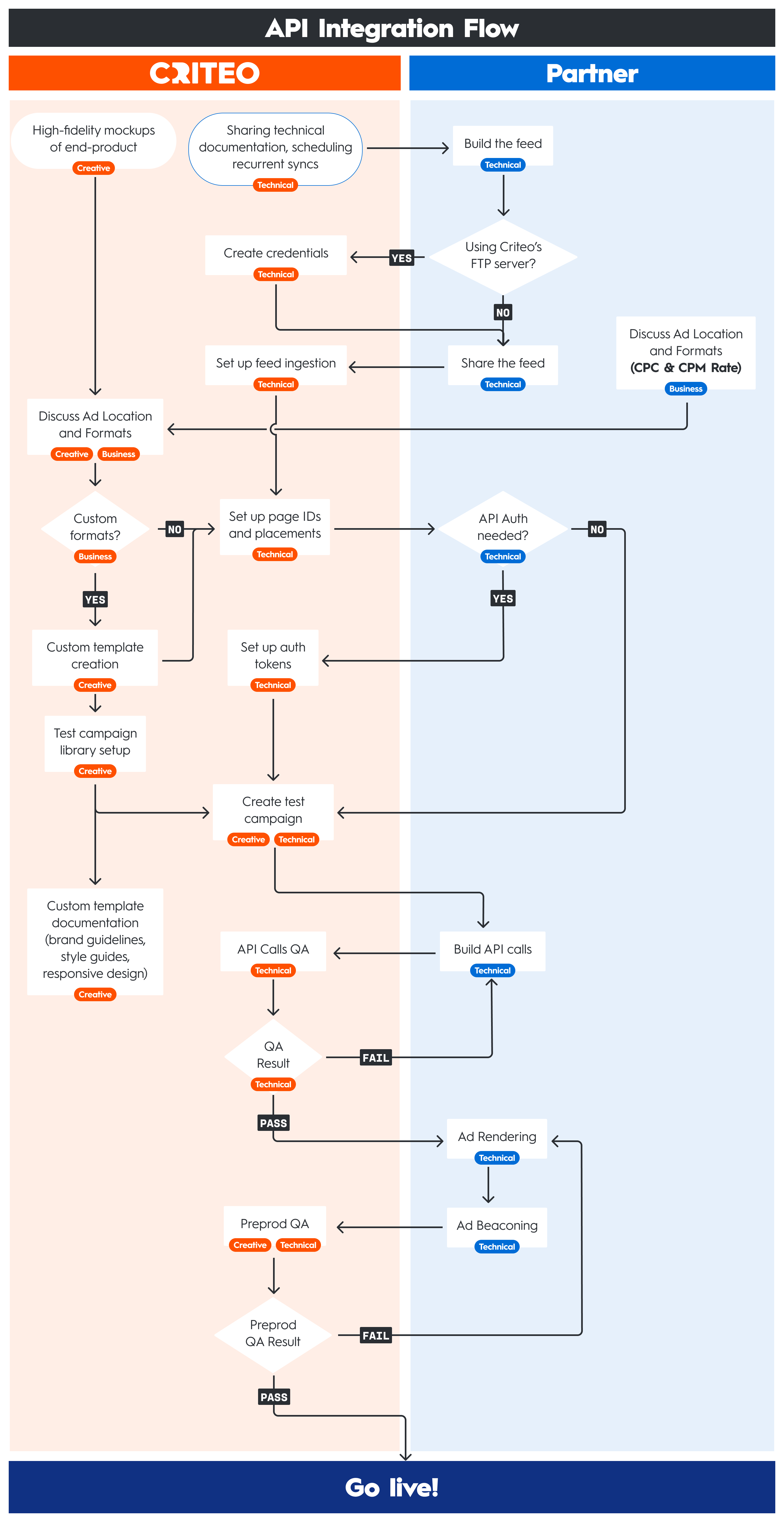
The integration timeline can vary depending on the resources available and the level of prioritization. Here is an overview of the integration flow and steps:
* **The preparation phase** follows the initial kick-off. That's a time dedicated to the creation and validation of the ad formats and mock-ups, as well as providing the integration documentation and setting up the product feed alongside its QA and ingestion. This is followed by the account setup.
* **The technical integration phase** has two parts:
* the first part is dedicated to Ad requests development, testing and QA,
* the second part focuses on Ad rendering and beaconing development, testing and QA.
* **The "Go live" phase** goes from Prod release, to Prod & Data QA, to the actual "go live", followed by algorithm optimization
 ## Timeline precisions
* Each step duration depends on the integrated scope and on retailer’s integration capacity and resources.
* QA duration depends on the scope and round(s) of feedback between Criteo and the Retailer.
* For example, an 8 to 10 weeks duration is standard for a scope of `Sponsored Products` in one environment (Web/Web mobile or Apps). Whereas, simultaneously integrating a scope of `Sponsored Products` & `Commerce display` formats in multiple environments and countries is estimated to take from 15 to 20 weeks.
***
## Onsite vs. Offsite
At Criteo, Retail Media solutions are split into two categories: **Onsite** and **Offsite**.
### Onsite
Onsite advertisements are displayed within a retailer's website or mobile app. Onsite ads use first party data to reach shoppers who visit, browse, or search on a specific retailer. There are two campaign types, which include Onsite Display and Sponsored products.
### Offsite
Offsite is a Retail Media solution used to target unique audiences using retailer first-party data to reach shoppers across the open internet.
**C-Yield Help Center**
You can learn more about [Onsite Display](https://help.cyield.criteo.com/kb/guide/en/introduction-to-onsite-monetization-VL8zE0Bv9w/Steps/3358081) and [Offsite](https://help.cyield.criteo.com/kb/guide/en/offsite-monetization-overview-mC5iDvxIgO/Steps/3357447) on the dedicated pages of the [C-Yield Criteo Help Center.](https://help.cyield.criteo.com/kb/en/)
This documentation addresses the integration of **Onsite solutions only**. In order to activate Offsite, a separate OneTag integration is needed. Please reach out to your technical representative for more information.
***
## Integration best practices
You will find best practices to guide you at each step of the integration process:
* [Best practices for the product feed](/retailer-integration/docs/feed-best-practices),
* [Best practices for Ads requests](/retailer-integration/docs/requesting-ads-best-practices),
* [Best practices for Ads rendering](/retailer-integration/docs/ad-rendering-best-practices),
* [Best practices for Ad Tracking](/retailer-integration/docs/ad-tracking-best-practices).
***
## Assistance
**Contact**
If you require assistance along the integration process for ad delivery, please contact your technical account manager.
## Timeline precisions
* Each step duration depends on the integrated scope and on retailer’s integration capacity and resources.
* QA duration depends on the scope and round(s) of feedback between Criteo and the Retailer.
* For example, an 8 to 10 weeks duration is standard for a scope of `Sponsored Products` in one environment (Web/Web mobile or Apps). Whereas, simultaneously integrating a scope of `Sponsored Products` & `Commerce display` formats in multiple environments and countries is estimated to take from 15 to 20 weeks.
***
## Onsite vs. Offsite
At Criteo, Retail Media solutions are split into two categories: **Onsite** and **Offsite**.
### Onsite
Onsite advertisements are displayed within a retailer's website or mobile app. Onsite ads use first party data to reach shoppers who visit, browse, or search on a specific retailer. There are two campaign types, which include Onsite Display and Sponsored products.
### Offsite
Offsite is a Retail Media solution used to target unique audiences using retailer first-party data to reach shoppers across the open internet.
**C-Yield Help Center**
You can learn more about [Onsite Display](https://help.cyield.criteo.com/kb/guide/en/introduction-to-onsite-monetization-VL8zE0Bv9w/Steps/3358081) and [Offsite](https://help.cyield.criteo.com/kb/guide/en/offsite-monetization-overview-mC5iDvxIgO/Steps/3357447) on the dedicated pages of the [C-Yield Criteo Help Center.](https://help.cyield.criteo.com/kb/en/)
This documentation addresses the integration of **Onsite solutions only**. In order to activate Offsite, a separate OneTag integration is needed. Please reach out to your technical representative for more information.
***
## Integration best practices
You will find best practices to guide you at each step of the integration process:
* [Best practices for the product feed](/retailer-integration/docs/feed-best-practices),
* [Best practices for Ads requests](/retailer-integration/docs/requesting-ads-best-practices),
* [Best practices for Ads rendering](/retailer-integration/docs/ad-rendering-best-practices),
* [Best practices for Ad Tracking](/retailer-integration/docs/ad-tracking-best-practices).
***
## Assistance
**Contact**
If you require assistance along the integration process for ad delivery, please contact your technical account manager.
## What's next
* [Integration process](/retailer-integration/docs/integration-process)
* [Glossary](/retailer-integration/docs/rm-glossary)