> ## Documentation Index
> Fetch the complete documentation index at: https://developers.criteo.com/llms.txt
> Use this file to discover all available pages before exploring further.

# Product Feed Parameters

## Introduction

This page provides a comprehensive list of fields that can be included in your product feed.

Recommended fields are not mandatory but help streamline campaign management, improve performance, and enhance the shopper experience.

Below is the list of mandatory and recommended parameters, including their descriptions and status (required or recommended), for both Onsite and Offsite Retail Media.

***

# Required Parameters

<Warning>
  These are parameters that will prevent product ingestion if left blank/not included.
</Warning>

## **`id`**

**Definition**

A unique identifier assigned to a single product variant. Each version of a product (such as different sizes or colors) must have its own distinct ID to ensure accurate tracking and management.

**Specifications**

* Must be unique and consistent; changes to product IDs will break attribution and reporting.
* Must match with the data shared in API requests.
* Quotation marks, non-ASCII characters.
* Will default to lowercase in our ad response if using alphanumeric IDs.
* Case-insensitive,
* Cannot match `item_group_id`, `seller_id`.
* Limit: `50`
* Type: `String`
* Example: `25c48`
* Required for Onsite: ` Yes`
* Required for Offsite:` Yes`

***

## **`title`**

**Definition**

The product’s name, typically as shown on its detail page. This will be used as the primary text descriptor in banners for the product.

**Specifications**

* Must start with a letter or number.
* Limit: `500`
* Type: `String`
* Example: `Working Boots – Size 7.5`
* Required for Onsite:  `Yes`
* Required for Offsite: `Yes`

***

## **`description`**

**Definition:**

The `description` is a detailed and informative text field that highlights the product’s key features, specifications, benefits, and use cases. A robust, keyword-rich description improves search recommendations and enhances product discoverability across platforms.

**Specifications**

* The description must start with a letter or number. Remove all HTML tags from this field, including style, embed, object, and anchor tags.
* Limit: `5000`
* Type: `String`
* Example: `"Get ready for sunny days in comfortable style with this short-sleeve T-shirt. Fashioned in a relaxed fit, the short-sleeve tee is crafted from cotton jersey fabric for comfortable wear. You can coordinate it with different bottoms and match it with layering pieces to create a range of outfits...."`
* Required for Onsite:  `Yes`
* Required for Offsite: `Yes`

***

## **`link`**

**Definition**

The URL of the product’s dedicated detail page. It should be unique to each product, and the information on the page must match the details provided in your catalog.

**Specifications**

* The `link` must start with the protocol (http\:// or https\://) followed by the full URL of the product detail page.
* All symbols must be encoded. For example, “\$” must be replaced with “%24”.
* Limit: `2000 characters`, including CAT prefix + encoded URL.
* Type: `String`.
* Example: `https://www.example.com/ProductA`
* Required for Onsite:  `Yes`
* Required for Offsite: `Yes`

***

## **`image_link`**

**Definition**

The URL linking directly to an image of the product (SKU). The image should accurately represent the product being sold.

**Specifications**

* Limit: `2000 characters`.
* Size: Recommended to be at least `800x800 pixels` and less than 16MB.
* Supported formats: `PNG`, `JPEG`, or `GIF`.
* Example: `https://www.example.com/image.png`
* Required for Onsite:  `Yes`
* Required for Offsite: `Yes`

***

## **`product_type`**

**Definition**

The categorization of the product as defined on your website. It should reflect the product’s placement within your site's hierarchy or category structure.

**Specifications:**

* Only ASCII characters.
* Must start with a letter or number.
* Individual levels of a path must be separated by `>` or `&gt` in the XML file.
* Multiple categories should be comma-separated.
* `Case sensitive`: please ensure that you use proper casing to reflect what is shown on site.
* Each path should be wrapped in single quotes (`'`).
* Must match your website architecture.
* If multiple categories are passed: the first one must be the most relevant (main category for PDP recommendations).
* Submit up to `10 categories`.
* Limit: Maximum of `10240 characters`. The maximum length of an individual category node is `750 characters`.
* Type: `String`
* Example: `'Computing>Keyboards and Mice>Mice','Hardware>Input Device'`
* Required for Onsite:  `Yes`
* Required for Offsite: `Yes`

***

## **`product_type_key`**

**Definition**

The corresponding IDs of the categories passed in the `product_type` field.

**Specifications:**

* These category IDs should match those shown on the site.
* Limit: Maximum of `10240 characters`. - The maximum length of an individual category node is `750 characters`.
* Type: `String`
* Example: `'123>4567>89012','456>7890'`
* Required for Onsite:  `Yes `
* Required for Offsite: `Yes`

***

## **`mpn`**

**Description:**

A unique identifier assigned by the manufacturer to distinguish an individual product.

**Specifications:**

* The MPN of a product is a series of numbers and letters. Required for all products without a `GTIN` assigned. Only provide an `MPN` if you are sure it is correct. When in doubt, do not provide an MPN.
* Limit: `70`
* Type: `String`
* Example: `T49025028767898`
* Required for Onsite:  `Yes` *(if no`gtin` is assigned)*
* Required for Offsite: `Yes` (*if no`gtin` is assigned)*

***

## **`gtin`**

**Definition**

A unique identifier used to identify a product, service, or item in the global marketplace. Providing a GTIN makes products easier to find and properly categorized. Products without a GTIN may be harder to categorize and could be ineligible for some features.

**Specifications**

* The value must be an 8-, 12-, 13-, or 14-digit number (UPC, EAN, JAN, or ISBN):
* `GTIN-8 (EAN/UCC-8)`: this is an 8-digit number used predominately outside of North America.
* `GTIN-12 (UPC-A)`: this is a 12-digit number used primarily in North America.
* `GTIN-13 (EAN/UCC-13)`: this is a 13-digit number used predominately outside of North America.
* `GTIN-14 (EAN/UCC-14 or ITF-14)`: this is a 14-digit number used to identify trade items at various packaging levels.
* Limit: `50`
* Type: `String`
* Example: `00012345678905`
* Required for Onsite:  `Yes` *(if no`mpn` is assigned)*
* Required for Offsite: `Yes` *(if no`mpn` is assigned)*

***

## **`brand`**

**Definition**

The name of the consumer-facing brand under which the product is marketed and sold.\
*This excludes the name of the parent company or manufacturer.*

**Specifications:**

* Must be consistently set across products: changes to brand values will break campaign attribution and reporting.
* Maximum of `70 characters`.
* Must start with either a letter or number.
* Recommended: only ASCII characters.
* Non-ASCII version of the brand can be added as an extra parameter.
* Example: `Adidas`
* Required for Onsite:  `Yes` (*Blank values in this field will prevent the SKU from being added to campaigns*)
* Required for Offsite: `No` (*recommended*)

***

## **`price`**

**Definition**

The standard price of the product before any discounts or promotions are applied.

**Specifications:**

* The decimal separator must be a period (.) with no thousands separator.
* Limit: `14`
* Type: `Number`
* Example: `19.99`
* Required for Onsite:  `Yes`
* Required for Offsite: `No` (*Recommended*)

***

## **`availability`**

**Definition**

Indicates whether the product can be purchased on the site. Populate this field with one of three values: `preorder` (the item is not shipping yet and orders are not being accepted), `out of stock` (the item is not available for shipping and orders are not being accepted), or `in stock` (the item is available for shipping and can be ordered). Products marked as out of stock will be excluded from appearing in ad placements.

**Specifications:**

* The availability must be populated with one of the following three values: preorder, out of stock, or in stock.
* Limit: `25`
* Type: `String`
* Example: `in stock`
* Required for Onsite:  `Yes`
* Required for Offsite: `No` (Recommended)

***

## **`size`**

**Definition**

Describes the product's size.

Sizes should follow standardized formatting, depending on category (apparel, shoes, accessories, etc.).

**Specifications**

<table>
  <thead>
    <tr>
      <th>
        <p>
          Product Category
        </p>
      </th>

      <th>
        <p>
          Example Sizes
        </p>
      </th>
    </tr>
  </thead>

  <tbody>
    <tr>
      <td>
        <p>
          Men's T-Shirt
        </p>
      </td>

      <td>
        <p>
          S, M, L, XL, XXL
        </p>
      </td>
    </tr>

    <tr>
      <td>
        <p>
          Women's Dress
        </p>
      </td>

      <td>
        <p>
          2, 4, 6, 8, 10
        </p>
      </td>
    </tr>

    <tr>
      <td>
        <p>
          Shoes (US)
        </p>
      </td>

      <td>
        <p>
          7, 7.5, 8, 8.5, 9
        </p>
      </td>
    </tr>

    <tr>
      <td>
        <p>
          Kids Apparel
        </p>
      </td>

      <td>
        <p>
          2T, 3T, 4T, 5T
        </p>
      </td>
    </tr>

    <tr>
      <td>
        <p>
          Accessories
        </p>
      </td>

      <td>
        <p>
          One Size, Adjustable
        </p>
      </td>
    </tr>

    <tr>
      <td>
        <p>
          Furniture
        </p>
      </td>

      <td>
        <p>
          Small, Medium, Large, Queen, King
        </p>
      </td>
    </tr>
  </tbody>
</table>

* For clothing, use either alpha (S, M, L) or numeric (4, 6, 8), not both.
* Use "One Size" or "Adjustable" for items like hats, scarves, or belts.
* 100 characters max.
* Required for Onsite: `Yes`
* Required for Offsite: `Yes`

***

## **`color`**

**Definition**

Describes the product's color(s).

These should be simple, user-friendly, and consistent. Avoid internal color codes or overly specific color names.

**Specifications:**

<table>
  <thead>
    <tr>
      <th>
        <p>
          Product Example
        </p>
      </th>

      <th>
        <p>
          Color Description
        </p>
      </th>
    </tr>
  </thead>

  <tbody>
    <tr>
      <td>
        <p>
          Nike Air Max (Black/White)
        </p>
      </td>

      <td>
        <p>
          Black/White
        </p>
      </td>
    </tr>

    <tr>
      <td>
        <p>
          Levi's 501 Jeans – Indigo Rinse
        </p>
      </td>

      <td>
        <p>
          Indigo
        </p>
      </td>
    </tr>

    <tr>
      <td>
        <p>
          Patagonia Down Jacket – Forge Grey
        </p>
      </td>

      <td>
        <p>
          Grey
        </p>
      </td>
    </tr>

    <tr>
      <td>
        <p>
          Apple Watch Band – Midnight Blue
        </p>
      </td>

      <td>
        <p>
          Midnight Blue
        </p>
      </td>
    </tr>

    <tr>
      <td>
        <p>
          Floral Summer Dress – Red/Pink Combo
        </p>
      </td>

      <td>
        <p>
          Red/Pink
        </p>
      </td>
    </tr>
  </tbody>
</table>

* Use Title Case (capitalize each word).
* If multiple colors, specify up to three colors separated by a slash ( / )(for instance, `Blue/White`).
* Avoid brand color names like "Solar Red" unless widely recognized.
* 100 characters max.
* Required for Onsite: `Yes`
* Required for Offsite: `Yes`

***

# Recommended Parameters

## **`google_product_category`**

**Definition**

The category of the product based on Google's product taxonomy. If a product fits multiple categories, provide only the single most relevant one.

**Specifications:**

* Limit: `750`
* We accept both IDs and full category path.
* `Case sensitive`
* Type: `String`
* Example: `2271 or Apparel & Accessories > Clothing > Dresses`
* Required for Onsite:  `No` (recommended)(*Not using category1/2/3*)
* Required for Offsite: `No` (recommended)

***

## **`item_group_id`**

**Definition**

Use the same value for the `item_group_id` field to group related product variants. Variants are products that are fundamentally the same but differ in specific details like size, color, material, pattern, age range, or gender.

Grouping products with the same `item_group_id` clearly defines them as variants (children) of a common parent product, and helps prevent duplicate products from being displayed together in the same ad placement.

**Specifications**

* The `item_group_id `can only contain ASCII characters, and must not contain quotation marks.
* Limit: `50 `
* Type: `String `
* Case-insensitive, no quotation marks, ASCII characters,
* Cannot `match id`, `seller_id`, `cross_sellers_product_id`.
* Example for CSV/TSV: `AB1234`
* Example for XML: `<g:item_group_id>Ab1234\</g:item_group_id>`
* Required for Onsite: `No` (recommended)
* Required for Offsite: `No` (recommended)

***

## **`sale_price`**

**Definition**

The final price of the product after applying a discount or promotional offer.

**Specifications:**

* Decimal separator must be a period (.) with no thousands separator.
* Limit: `14`
* Type: `Number`
* Example: `49.99`
* Required for Onsite:  `No` (Recommended)
* Required for Offsite: `No `(Recommended)

***

## **`filters`**

**Definition:**

Attributes that highlight differences between products within the same category, such as size and color. Filters help Criteo return the most relevant products on filtered or refined pages.

**Specifications:**

* Distinct filter sets must be comma-separated.
* Multiple filter values within a set should be separated by pipe character `|`.
* Ensure that there are no ampersands or commas (`&` or `,`) in the filter names or values as this will break the URL parsing when included in an ad request, and Criteo's internal parsing of the product feed.
* Type: `String`
* Example: `'Color=Red|Black, Size=S|M|L|XL, Screen size=21'`
* Required for Onsite:  `No` (*recommended if ads are serving on a page with filtering capabilities*)
* Required for Offsite: `No` (recommended)

***

## **`product_rating`**

**Definition**

The average customer rating for the product, typically based on reviews collected on your site. Ratings help improve product relevance and user trust.

**Specifications**

* Must start with a number or a letter.
* Limit: `8`
* Type: `String `
* Example: `1, 2, 3.50, 4, 4.92`, or `5`
* Required for Onsite:  `No` (recommended)
* Required for Offsite: `No` (recommended)

***

## **`number_of_reviews`**

**Definition**

The number of user reviews the product has received on site.

**Specifications**

* Limit:` 8`
* Type: `String`
* Example: `215`
* Required for Onsite:  `Yes`
* Required for Offsite: `N/A`

***

## **`regiondata`**

**Definition**

The store IDs where the product is available and, optionally, its local prices.

**Specifications**

* Comma-separated
* It is possible to send the price object empty (i.e.`{'123':{}, '456':{}}`) In this case, we will fallback to `price` as its value.
* If the product is “out of stock” on the website across all stores, this field should contain `{}` (no stores).
* Limit: `200`
* Type: `String`
* Example: `{'123':{'Price':'3.50'}, '456':{'Price':'4.29'}, '872':{'Price':'3.75'}, '958':{'Price':'5.00'}}`
* Required for Onsite:  `Yes` (*only if availability is store-based.*)
* Required for Offsite: `N/A`

***

## **`custom_label_0`**

**Definition**

A field to include additional custom details about the product. It is useful for sorting, filtering, or categorizing products within the feed.

**Specifications**

* Create up to 5 custom labels, named from `custom_label_0` to `custom_label_4`.
* Submit only one value for each custom label attribute.
* Limit: `100`
* Type: `String`
* Example: `Best Seller`
* Required for Onsite:  `No` (recommended)
* Required for Offsite: `No` (recommended)

***

# Marketplace

## **`seller_name`**

**Definition**

The name of the marketplace seller.

**Specifications:**

* Only required if you are a marketplace and are reselling a product for several sellers.
* Limit: `200`
* Type: `String`
* Example: `Best Shoe Store`
* Required for Onsite:  `Yes `(*If the client is using private market and reselling a product for several sellers, the user needs to set`isMarketplace` field to true*)
* Required for Offsite: `No` (recommended)

***

## **`seller_id`**

**Definition**

The unique identifier that represents the seller on your site or in your internal systems.

**Specifications:**

* Only required if you are a marketplace and are reselling a product for several sellers.
* Limit: `50`
* Type:` String`
* Example: `seller123`
* Case-insensitive, no quotation marks, ASCII characters,
* Cannot match `id`, `item_group_id`, `cross_sellers_product_id`.
* Required for Onsite:  `Yes` (*If the client is using private market and reselling a product for several sellers, the user needs to set`isMarketplace` field to true*)
* Required for Offsite: `No` (recommended)

***

## **`cross_sellers_product_id`**

**Definition**

The unique identifier that represents the same product sold by another seller in your catalog, used to link equivalent products across different sellers.

**Specifications:**

* Used to associate products that are identical but offered by different sellers.
* Case-insensitive, no quotation marks, ASCII characters.
* Cannot match `item_group_id`, `seller_id`.
* Limit: `50`
* Type: String
* Example: `product_abc_456`
* Required for Onsite: No (optional)
* Required for Offsite: No (optional)

***

## `is_buybox`

**Definition**

Indicates whether an offer is the selected “winning” Buy Box offer for a product at a given time among all offers grouped by the same `cross_sellers_product_id`.

**Specifications**

* True: The offer is the winning Buy Box offer shown by default on the product page.
* False: The offer participates in the Buy Box competition but is not the winning offer.
* Empty: The offer is related to the same product (`cross_sellers_product_id`) but does not participate in the Buy Box competition (e.g., retailer offer).
* Type: Boolean
* Example: true
* Required for Onsite: No (optional)
* Required for Offsite: No (optional)

***

# Custom Parameters

Criteo allows the inclusion of custom parameters to enhance SKU  representation on your site, aligning the appearance of SKUs with your organic tiles more closely.

These customizations ensure that the product tile rendered by Criteo match the native look and feel of your site.

***

## Implementation Details

### JavaScript Implementations

<Warning>
  For JavaScript-based implementations, it is essential that **all data necessary to display the product tile are included in the feed**. This ensures that Criteo can effectively use the data on-site.
</Warning>

If your current feed does not include these fields, they should be added as new columns in the product feed file. This addition enables the dynamic rendering of product tiles that include custom attributes specific to your site's design and functional requirements.

***

### API Implementations

For retailers using API implementations that pull data from their own systems based on product ID, there is no need to adjust the feed for custom parameters. The API method provides flexibility to fetch additional data as needed without changing the feed structure..

***

## Examples of Custom Parameters in Use

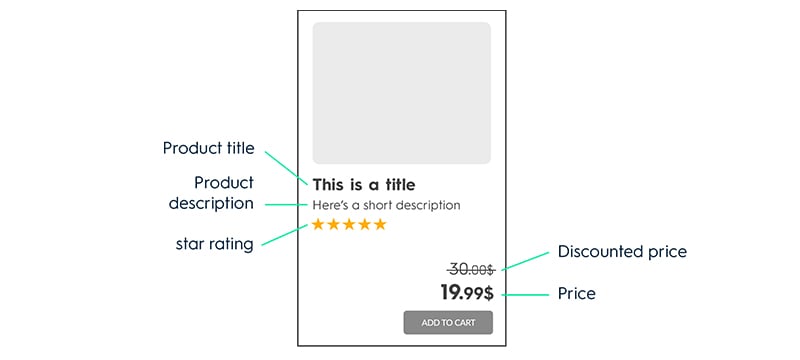
To better understand how custom parameters can be used, here are two visual examples:

### Standard Feed Parameters

<Frame>
  <img src="https://mintcdn.com/criteo-e1682996/cmPz0RjwwK8-Y1zy/images/retailer-integration/docs/01848c7-image_standard_V2.jpg?fit=max&auto=format&n=cmPz0RjwwK8-Y1zy&q=85&s=6422f33f14ab5f41f55dd1b119d22e89" width="800" height="360" data-path="images/retailer-integration/docs/01848c7-image_standard_V2.jpg" />
</Frame>

*In this first example, all the data necessary for the product tile is already included as eligible parameters in the standard feed.*

***

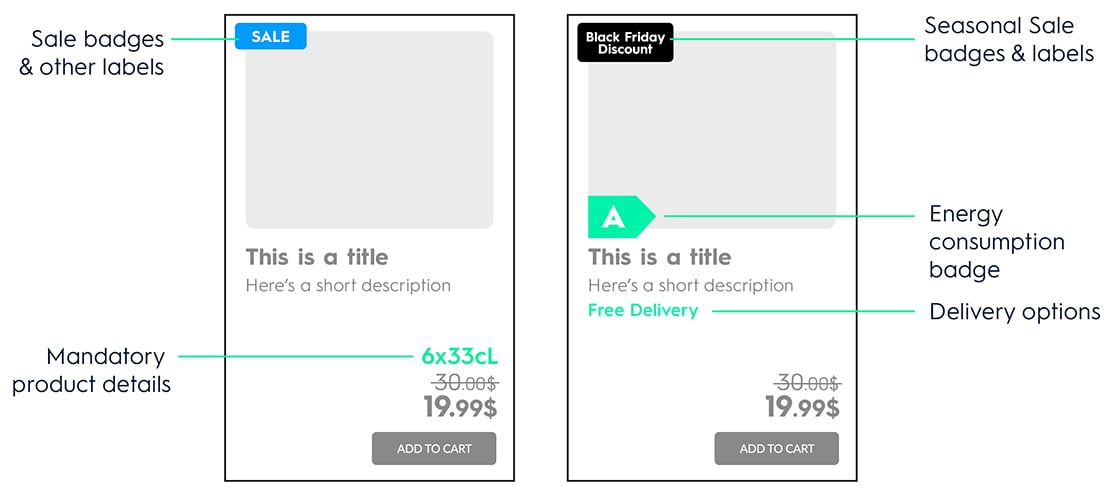
### Custom Feed Parameters
<Frame>
  <img src="https://mintcdn.com/criteo-e1682996/cmPz0RjwwK8-Y1zy/images/retailer-integration/docs/0ad835b-image_custom.jpg?fit=max&auto=format&n=cmPz0RjwwK8-Y1zy&q=85&s=33c09cca5bf7153e6c202d5615383046" width="1112" height="500" data-path="images/retailer-integration/docs/0ad835b-image_custom.jpg" />
</Frame>

*In the second example, the highlighted information includes "custom" data not present in the standard feed. These would need to be added to the feed in additional fields to allow Criteo to utilize them for rendering.*

These examples highlight the flexibility of Criteo's platform in accommodating various data requirements, ensuring that the product tiles seamlessly integrate with the existing user interface of your website.

***

<br />

## What's next

* [Product feed examples](/retailer-integration/docs/product-feed-examples)
* [Lookup files](/retailer-integration/docs/lookup-files)