> ## Documentation Index
> Fetch the complete documentation index at: https://developers.criteo.com/llms.txt
> Use this file to discover all available pages before exploring further.

# Server-Side Beacons

> This guides covers how to implement server-side beacons.

## Overview

In most cases, client-side beacons (from the browser or app) are the preferred and recommended method for tracking ad events.

However, in cases where this is not possible — such as on the server side, inside a mobile app, or within privacy-constrained environments, a **server-side beacon** can be used as a fallback.

<table>
  <thead>
    <tr>
      <th>
        <p>
          Header
        </p>
      </th>

      <th>
        <p>
          Required
        </p>
      </th>

      <th>
        <p>
          Purpose
        </p>
      </th>
    </tr>
  </thead>

  <tbody>
    <tr>
      <td>
        <p>
          <code>
            X-Forwarded-For
          </code>
        </p>
      </td>

      <td>
        <p>
          Yes
        </p>
      </td>

      <td>
        <p>
          Includes original user IP
        </p>
      </td>
    </tr>

    <tr>
      <td>
        <p>
          <code>
            User-Agent
          </code>
        </p>
      </td>

      <td>
        <p>
          Yes
        </p>
      </td>

      <td>
        <p>
          Identifies client device/browser
        </p>
      </td>
    </tr>

    <tr>
      <td>
        <p>
          <code>
            Referer
          </code>
        </p>
      </td>

      <td>
        <p>
          Recommended
        </p>
      </td>

      <td>
        <p>
          Provides page context
        </p>
      </td>
    </tr>
  </tbody>
</table>

<Warning>
  Server-side beacons should be treated as a last resort. The [IAB guidelines](https://www.iab.com/wp-content/uploads/2024/01/IAB_Retail_Media_Measurement_Guidelines_January2024.pdf) state that tracking should happen "as close as possible to the final delivery of an ad to the client." We follow this best practice.
</Warning>

***

## Required HTTP Headers

To ensure server-side beacons are valid and accepted by our systems, specific HTTP headers must be included in the request.

***

### `X-Forwarded-For` format

The `X-Forwarded-For` header is a comma-separated list of IP addresses that tracks the path of the request through proxies.

* If the header is already present, append the client IP to the list: `X-Forwarded-For: ip-address-1, ip-address-2, client-ip-address`

* If the header is not present, create it with just the client IP: `X-Forwarded-For: client-ip-address`

<Info>
  Read more on `X-Forwarded-For` [here](https://developer.mozilla.org/en-US/docs/Web/HTTP/Headers/X-Forwarded-For) (Mozilla Developer documentation).
</Info>

***

### `User-Agent` format

Provide the actual user agent string from the browser or app where the event originated.

**Example:**

```http HTTP theme={null}
User-Agent: Mozilla/5.0 (Macintosh; Intel Mac OS X 10_13_6) AppleWebKit/537.36 (KHTML, like Gecko) Chrome/69.0.3497.100 Safari/537.36
```

<Info>
  Read more on `User-Agent` [here](https://developer.mozilla.org/en-US/docs/Web/HTTP/Headers/User-Agent) (Mozilla Developer documentation).
</Info>

***

## Recommended Header

`Referer` is recommended. It indicates the URL where the beacon event occurred and is helpful for attribution.

<Info>
  Read more on `Referer` [here](https://developer.mozilla.org/en-US/docs/Web/HTTP/Headers/Referer) (Mozilla Developer documentation)
</Info>

***

## Alignment with Ad Delivery API Requirements

These header requirements are consistent with those enforced by [Criteo's Retail Media Ad Delivery API](/retailer-integration/docs/integration-process#general-ad-server-requirements). In both cases, proper client metadata (`IP`, `User-Agent`, `Referer`) must be preserved in server-side requests to ensure accurate attribution and filter out invalid traffic.

If you're implementing both ad delivery and beacon tracking server-side, ensure that your integration includes:

* A realistic and IAB-compliant `User-Agent`,
* A well-formed `X-Forwarded-For` header including the end-user IP,
* A valid `Referer` indicating the origin page or context.

<Info>
  **Mobile developers**

  Make sure to avoid using default agents like `okhttp/x.y.z`, as these are considered invalid under IAB rules. Customize your User-Agent string to include OS and app version, e.g. `app_android 1.2.3`.
</Info>

***

## Example

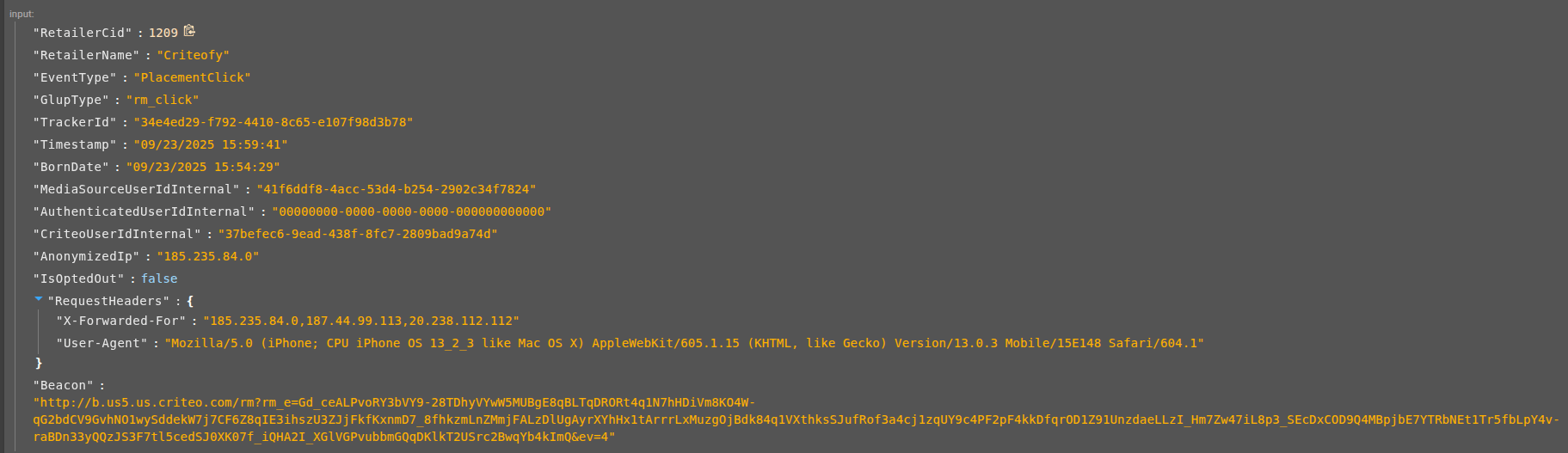
Here is an API call example including the `X-Forwarded-For`, a `User-Agent` and a `Referer` in the header.

```bash theme={null}
curl -X POST \
  "https://b.us5.us.criteo.com/rm?rm_e=Gd_ceALPvoRY3bVY9-28TDhyVYwW5MUBgE8qBLTqDRORt4q1N7hHDiVm8KO4W-qG2bdCV9GvhNO1wySddekW7j7CF6Z8qIE3ihszU3ZJjFkfKxnmD7_8fhkzmLnZMmjFALzDlUgAyrXYhHx1tArrrLxMuzgOjBdk84q1VXthksSJufRof3a4cj1zqUY9c4PF2pF4kkDfqrOD1Z91UnzdaeLLzI_Hm7Zw47iL8p3_SEcDxCOD9Q4MBpjbE7YTRbNEt1Tr5fbLpY4v-raBDn33yQQzJS3F7tl5cedSJ0XK07f_iQHA2I_XGlVGPvubbmGQqDKlkT2USrc2BwqYb4kImQ&ev=4" \
  -H "X-Forwarded-For: 185.235.84.0,187.44.99.113" \
  -H "User-Agent: Mozilla/5.0 (iPhone; CPU iPhone OS 13_2_3 like Mac OS X) AppleWebKit/605.1.15 (KHTML, like Gecko) Version/13.0.3 Mobile/15E148 Safari/604.1" \
  -H "Referer: https://www.example.com" 
```

<Frame>
  <img src="https://mintcdn.com/criteo-e1682996/fr3QURzyzf6m9Hkn/images/retailer-integration/docs/50978b61305298ed04b303dbf7aef9d3455e1c8ce2687d6a85592d9f1463b97b-image.png?fit=max&auto=format&n=fr3QURzyzf6m9Hkn&q=85&s=b77bfeb6d31bd4e34ae1b915f9d82845" alt="50978b61305298ed04b303dbf7aef9d3455e1c8ce2687d6a85592d9f1463b97b image" width="1823" height="527" data-path="images/retailer-integration/docs/50978b61305298ed04b303dbf7aef9d3455e1c8ce2687d6a85592d9f1463b97b-image.png" />
</Frame>

***

<br />

## What's next

* [Ad Tracking Best Practices](/retailer-integration/docs/ad-tracking-best-practices)