> ## Documentation Index
> Fetch the complete documentation index at: https://developers.criteo.com/llms.txt
> Use this file to discover all available pages before exploring further.

# Video Player Implementation (App: iOS)

> This document provides implementation guidance for Onsite Video Ads in iOS Apps.

<Info>
  **Onsite Video for Apps is in Beta**

  The documentation is subject to change. Please report any issues and check back for updates.
</Info>

***

# Introduction

This document provides implementation guidance for **Onsite Video ads** in **iOS apps**.

It introduces a ready-to-integrate video ad wrapper that handles VAST parsing, video playback, and Open Measurement SDK compatibility for viewability and verification, helping retailers easily render, track, and measure in-app Onsite Video ad placements with minimal code.

<Warning>
  **Version requirements**

  iOS version **15.0+**
</Warning>

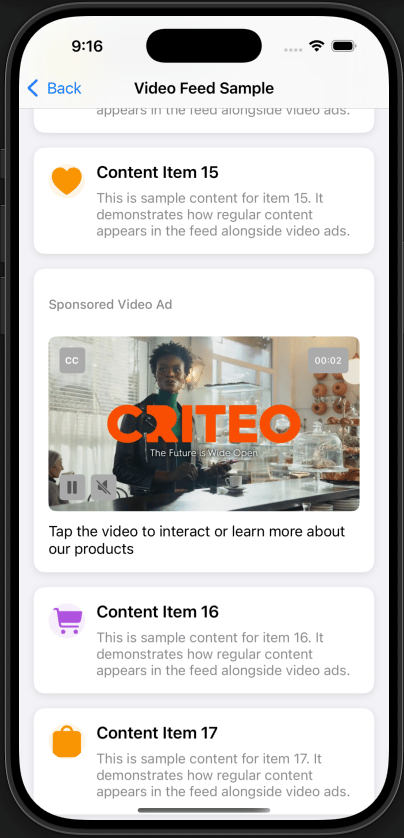
<Frame caption="**Example:** Video Player in an iOS sample app">
  <img src="https://mintcdn.com/criteo-e1682996/fr3QURzyzf6m9Hkn/images/retailer-integration/docs/19d8d3c69ed7e7540cf289d8aa68f4209713f3d9f4b7f400fbafc867e03d06ac-iOSVideoExample.png?fit=max&auto=format&n=fr3QURzyzf6m9Hkn&q=85&s=0ae111b30871c92eb90204a26aefb3fc" alt="**Example:** Video Player in an iOS sample app" width="404" height="838" data-path="images/retailer-integration/docs/19d8d3c69ed7e7540cf289d8aa68f4209713f3d9f4b7f400fbafc867e03d06ac-iOSVideoExample.png" />
</Frame>

***

## Integrate into your own project

1. Add the Criteo sample folders to your app target

   1. Download/clone [the GitHub repo](https://github.com/criteo/video-ad-player-ios).

   2. In Xcode, drag these sample source folders from `OM-Demo/` into your project. (Copy items if needed, check your app target):

* `CriteoPlayer + Wrapper/`

* `Managers/`

* `Utilities/`

2. Use the wrapper where you need an ad.

* Pick one of the patterns in this guide and adapt the snippet:

  * [Single Video](/retailer-integration/docs/video-player-implementation-ios-app#single-video-uikit): Small placement with one ad on screen.

  * [UIKit feed](/retailer-integration/docs/video-player-implementation-ios-app#feed-uikit-uitableview): Scrolling feeds require preloading and visibility‑driven playback.

  * [SwiftUI feed](/retailer-integration/docs/video-player-implementation-ios-app#feed-swiftui): SwiftUI app using a shared wrapper and a minimal UIKit bridge.

***

# Instructions for Integrating OM SDK (OMID) into the iOS Sample App

## Step 1: Register & Namespace

**Why:** Generates a unique, namespaced OM SDK so measurement is attributed to your organization.

1. Sign up at [IAB Tech Lab Tools Portal](https://tools.iabtechlab.com/login) with your work email.

2. After login, confirm that a **Namespace** exists for your email domain.

***

## Step 2: Build & Download (iOS)

**Why:** Produces your organization’s signed OMID artifacts (framework + JS) required at runtime.

1. Go to the OMID builder in [IAB Tech Lab Tools Portal](https://tools.iabtechlab.com/omsdk).

2. Select your **Namespace**, then click **Build iOS**.

3. When it finishes (after \~10-15 minutes), go to the iOS tab, confirm the latest build by its timestamp (should be close to the current time), and download the artifacts. Inside the package you’ll find:

   * `OMSDK_.xcframework` (**dynamic**)

   * `OMSDK-Static_.xcframework` (**static**)

   * `omsdk-v1.js`

   * Demo project (reference only)

***

## Step 3: Add the Dynamic XCFramework

**Why:** Dynamic needs **Embed & Sign** so the framework is present at runtime.

1. In Xcode, drag `OMSDK_.xcframework` into your app project.

2. Edit the project’s target, (tab) **General ▸ Frameworks, Libraries, and Embedded Content**
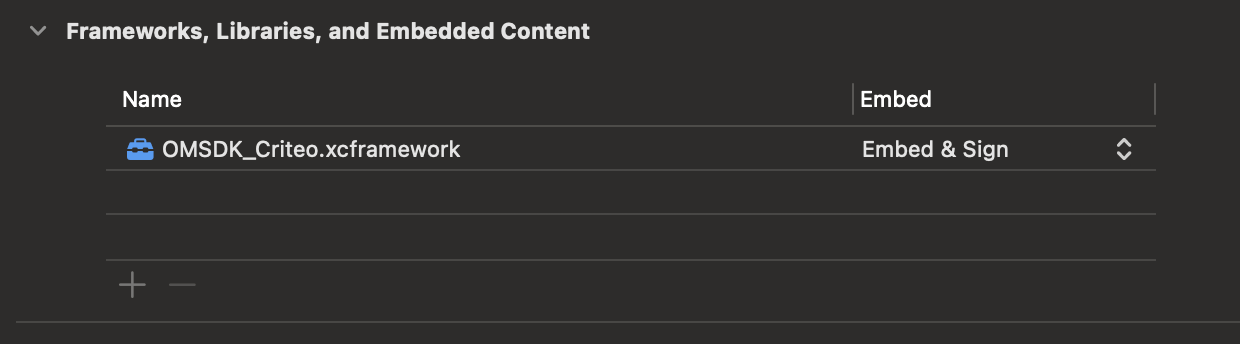
<Frame caption="Ensure the framework is listed and set to “**Embed & Sign**”">
  <img src="https://mintcdn.com/criteo-e1682996/cmPz0RjwwK8-Y1zy/images/retailer-integration/docs/0947bb9c1b6d619a67f73af5d73e4f9156cfc3d82ead13dfc7ab01c6c10a68a2-image.png?fit=max&auto=format&n=cmPz0RjwwK8-Y1zy&q=85&s=a5c779473dc32d271dae2fc0c4026d33" alt="Ensure the framework is listed and set to “**Embed & Sign**”" width="1240" height="344" data-path="images/retailer-integration/docs/0947bb9c1b6d619a67f73af5d73e4f9156cfc3d82ead13dfc7ab01c6c10a68a2-image.png" />
</Frame>

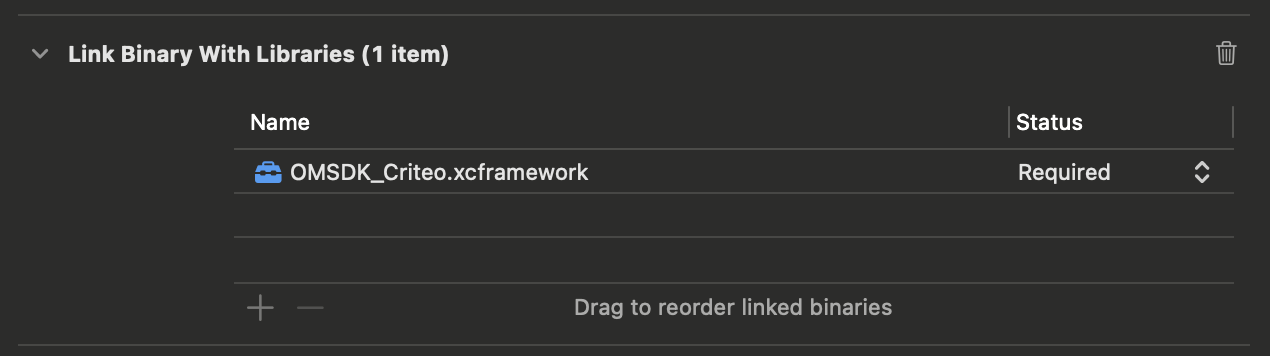
3. (tab) **Build Phases ▸ Link Binary With Libraries**

   * Verify `OMSDK_.xcframework` is linked.
<Frame>
  <img src="https://mintcdn.com/criteo-e1682996/PtO-HGDADAVLvs2M/images/retailer-integration/docs/65b9f3d932c6d49bd741353a6ab56e33499fcfcf1b58edb5ae0c058c03373c42-image.png?fit=max&auto=format&n=PtO-HGDADAVLvs2M&q=85&s=b15de468958e956242ef0e82d743d5cd" alt="65b9f3d932c6d49bd741353a6ab56e33499fcfcf1b58edb5ae0c058c03373c42 image" width="1270" height="356" data-path="images/retailer-integration/docs/65b9f3d932c6d49bd741353a6ab56e33499fcfcf1b58edb5ae0c058c03373c42-image.png" />
</Frame>

***

## Step 4: Add the OMID JS library

**Why:** The **OMID service script** is required by the native session to initialize measurement.

1. In `OMSDK/Service`, find `omsdk-v1.js`. Add it to your app bundle in a directory of your choice (e.g., Resources/OMID/). You can load its content using:

```swift theme={null}
let omidServiceUrl = Bundle.main.url(forResource: "omsdk-v1", withExtension: "js")!
```

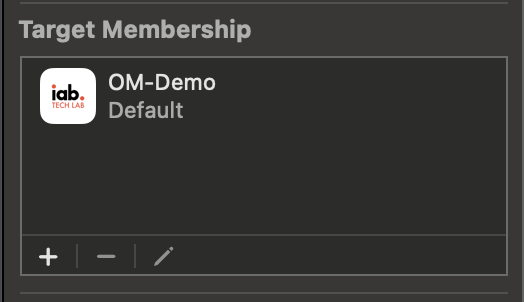
2. In **File Inspector**, ensure **Target Membership** (panel) is enabled for your app target.
<Frame>
  <img src="https://mintcdn.com/criteo-e1682996/T1671lE5Qb9IdIDU/images/retailer-integration/docs/e4651db620b2a9784fd46539c2afd50287d748fee4048f87cad0a456f1f1e280-image.png?fit=max&auto=format&n=T1671lE5Qb9IdIDU&q=85&s=213019450a27f1dc14334cf453b2c85b" alt="e4651db620b2a9784fd46539c2afd50287d748fee4048f87cad0a456f1f1e280 image" width="524" height="302" data-path="images/retailer-integration/docs/e4651db620b2a9784fd46539c2afd50287d748fee4048f87cad0a456f1f1e280-image.png" />
</Frame>

***

## Step 5: Update the OMID Session Interactor

**Why:** Point the sample to **your** OMID and set **partner metadata** so events are attributed correctly.
In `Managers/OMIDSessionInteractor.swift`, make the following changes:

* Import module: replace `OMSDK_Criteo` with `OMSDK_<retailer-namespace>`.

* Types: replace every `OMIDCriteo` type with `OMID<retailer-namespace>`.

* Update `partnerName` to your organization's name.

***

## Step 6: Activate OMID

**Why:** OMID must be activated before any `OMIDAdSession` is created; otherwise, session creation will fail.
Call activation **once,** **on app launch** (in `AppDelegate`):

```swift theme={null}
class AppDelegate: UIResponder, UIApplicationDelegate {
    func application(_ application: UIApplication, didFinishLaunchingWithOptions launchOptions: [UIApplication.LaunchOptionsKey: Any]?) -> Bool {
        
        CriteoLogger.info("🚀 OM-Demo starting up")

        // Activate the OMID SDK at earliest convenience
        OMIDSessionInteractor.activateOMSDK()

        // Prefetch the OMID JS Library
        // The hosted javascript should be periodically (automatically) updated to the latest version on the hosting server
        // This step might not be needed if the consumed Ads are WebView based with server side OMID injection
        OMIDSessionInteractor.prefetchOMIDSDK()

        CriteoLogger.info("✅ App initialization complete", category: .general)

        return true
    }

    // ...
}
```

<Check>
  **Congratulations!**
  You are now ready to use Criteo’s video implementation with the OMID.
</Check>

***

# Integration Key Concepts and Code Snippets

Short, descriptive snippets that explain behavior over boilerplate.

## What you integrated

* `CriteoVideoAdWrapper` (public API): Orchestrates **VAST** parsing, **asset download**, **OMID-compliant** measurement, beacon **tracking**, and video player **lifecycle management.**

* `CriteoVideoPlayer` (internal): managed by the wrapper.

* **Managers** (internal): `NetworkManager`, `VastManager`, `CreativeDownloader`, `OMIDSessionInteractor`, `BeaconManager`, `ClosedCaptionsManager`.

## Single Video (UIKit)

**Code Example:** `/OM-Demo/Examples Final/CriteoAdSingleVideoController_Sample.swift`

**Pattern:**

* Create the wrapper early; optionally enable logs.

* Begin playback on `onVideoLoaded`.

* On exit, `pauseAndDetach` and clear callbacks.

```swift theme={null}
 private var videoAd: CriteoVideoAdWrapper?

    override func viewDidLoad() {
        super.viewDidLoad()
        
        let config = CriteoVideoAdConfiguration(autoLoad: true, startsMuted: true)
        
        let videoAd = CriteoVideoAdWrapper(vastURL: "https://raw.githubusercontent.com/criteo/interview-ios/refs/heads/main/server/sample_vast_app.xml", configuration: config)

        self.videoAd = videoAd

        videoAd.enableLogs = [.ui,.omid,.vast,.video,.network, .beacon]
        
        videoAd.onVideoLoaded = { [weak self] in self?.videoAd?.resumePlayback() }
                
        // Do any additional setup after loading the view.
        view.addSubview(videoAd)

        videoAd.translatesAutoresizingMaskIntoConstraints = false

        NSLayoutConstraint.activate([
            videoAd.centerXAnchor.constraint(equalTo: view.centerXAnchor),
            videoAd.centerYAnchor.constraint(equalTo: view.centerYAnchor),
            videoAd.widthAnchor.constraint(equalToConstant: 350),
          videoAd.heightAnchor.constraint(equalToConstant: 197)
        ])
    }
```

<Info>
  **What happens under the hood**
  The wrapper fetches and parses the VAST, downloads the chosen media, starts the OMID session, and, on play, fires impression and quartiles beacons as playback progresses.
</Info>

***

## Feed (UIKit `UITableView`)

**Code Example:**

* Controller: `/OM-Demo/Examples Final/CriteoAdTableViewController_Sample.swift`

* Cell: `/OM-Demo/Examples Final/Supporting Views/CriteoAdCell_Sample.swift`

**Pattern:**

* **Preload** once when the screen appears.

* On **cell visible**: `resumePlayback()` (autoplays unless user previously paused).

* On **cell hidden**: `pauseAndDetach()` (free UI; state is preserved - position/mute/CC).

```swift expandable theme={null}
override func viewDidLoad() {
    super.viewDidLoad()
    setupTableView()
    generateFeedData()
    startVideoAdPreloading() // Start preloading video ad immediately
}

private func startVideoAdPreloading() {
    // Find video ad and start preloading immediately
    for (index, item) in feedItems.enumerated() {
        if case .videoAd(let vastURL) = item {
            let indexPath = IndexPath(row: index, section: 0)
            preloadVideoAd(at: indexPath, vastURL: vastURL)
            break
        }
    }

private func preloadVideoAd(at indexPath: IndexPath, vastURL: String) {
    let wrapper = CriteoVideoAdWrapper(vastURL: "https://raw.githubusercontent.com/criteo/interview-ios/refs/heads/main/server/sample_vast_app.xml", identifier: nil,
        configuration: .init(
            autoLoad: false,
            startsMuted: true, // Video starts muted
            backgroundColor: .white,
            cornerRadius: 8
        )
    )

    // Enable logging for this wrapper instance (same as single video controller)
    wrapper.enableLogs = [.network, .beacon]

    // Set up callbacks
    setupWrapperCallbacks(wrapper, for: indexPath)

    // Start preloading
    wrapper.preloadAssets()

    // Store wrapper
    videoAdWrappers[indexPath] = wrapper
}

/// Handles play/pause logic based on video cell visibility in the table view.
private func handleVideoVisibility(at indexPath: IndexPath, isVisible: Bool) {
    guard let wrapper = videoAdWrappers[indexPath] else {
        CriteoLogger.warning("⚠️ No wrapper found for \(indexPath)", category: .video)
        return
    }
    if isVisible {
        wrapper.resumePlayback()
    } else {
        wrapper.pauseAndDetach()
    }
}

override func tableView(_ tableView: UITableView, willDisplay cell: UITableViewCell, forRowAt indexPath: IndexPath) {
    // Handle video visibility when cell becomes visible
    if case .videoAd = feedItems[indexPath.row], videoAdWrappers[indexPath] != nil {
        handleVideoVisibility(at: indexPath, isVisible: true)
    }
}

override func tableView(_ tableView: UITableView, didEndDisplaying cell: UITableViewCell, forRowAt indexPath: IndexPath) {
    // Handle video visibility when cell goes out of view
    if case .videoAd = feedItems[indexPath.row], videoAdWrappers[indexPath] != nil {
        handleVideoVisibility(at: indexPath, isVisible: false)
    }
}

deinit {
    // Clean up all video wrappers
    videoAdWrappers.removeAll()
  }
```

***

## Feed (SwiftUI)

**Code Example:** `/OM-Demo/Examples Final/CriteoAdSwiftUIListView_Sample.swift`

**Pattern:**

* Hold a **shared wrapper** in a view model; **preload** once in `.onAppear`.

* Bridge via `UIViewRepresentable`; call **resume/pause** based on visibility.

```swift expandable theme={null}
// SwiftUI list using a shared wrapper from a view model; ad row inserted at index 12.
struct CriteoAdSwiftUIListView_Sample: View {
    @StateObject private var viewModel = VideoAdViewModel(vastURL: "https://raw.githubusercontent.com/criteo/interview-ios/refs/heads/main/server/sample_vast_app.xml")

    var body: some View {
        NavigationView {
            List(0..<20, id: \.self) { index in
                if index == 12 { // Video ad at position 12
                    VideoAdCell(wrapper: viewModel.wrapper)
                        .frame(height: 200)
                        .listRowInsets(EdgeInsets())

        // Preload once on appear; broadcast a cleanup notification when the view disappears.
        .onAppear {
            // Start preloading immediately when view appears (like UIKit viewDidLoad)
            viewModel.startVideoPreloading()
        }
        .onDisappear {
            // Cleanup when entire view disappears (navigating back)
            NotificationCenter.default.post(name: NSNotification.Name("SwiftUIViewDisappeared"), object: nil)
        }

// Ad cell: embeds the wrapper via a UIViewRepresentable and posts visibility notifications.
struct VideoAdCell: View {
    let wrapper: CriteoVideoAdWrapper

    var body: some View {
        ZStack {
            // Simple video player - use preloaded shared wrapper
            CriteoVideoAdSwiftUIView(wrapper: wrapper)
        }
        .onAppear {
            // Signal that cell appeared - start playing if loaded
            NotificationCenter.default.post(name: NSNotification.Name("VideoCellAppeared"), object: nil)
        }
        .onDisappear {
            // Signal that cell disappeared (don't cleanup yet, just pause)
            NotificationCenter.default.post(name: NSNotification.Name("VideoCellDisappeared"), object: nil)
        }
    }
}
                  
// UIViewRepresentable: returns the wrapper and hooks up callbacks through a coordinator.
struct CriteoVideoAdSwiftUIView: UIViewRepresentable {
    let wrapper: CriteoVideoAdWrapper

    func makeUIView(context: Context) -> CriteoVideoAdWrapper {
        context.coordinator.wrapper = wrapper
        setupWrapperCallbacks(wrapper, coordinator: context.coordinator)
        return wrapper
    }

// Coordinator: subscribes to notifications for appear/disappear and reacts.
class Coordinator {
    var wrapper: CriteoVideoAdWrapper?

    init() {
        // Listen for visibility notifications
        NotificationCenter.default.addObserver(
            self,
            selector: #selector(handleCellAppeared),
            name: NSNotification.Name("VideoCellAppeared"),
            object: nil
        )

        NotificationCenter.default.addObserver(
            self,
            selector: #selector(handleCellDisappeared),
            name: NSNotification.Name("VideoCellDisappeared"),
            object: nil
        )

// On cell appear: resume playback via the wrapper.
@objc private func handleCellAppeared() {
    CriteoLogger.debug("Video cell appeared - resuming playback", category: .video)
    if let wrapper = wrapper {
        CriteoLogger.debug("Wrapper exists, attempting to resume playback...", category: .video)
        // Always resume when cell appears (mirror UIKit behavior)
        wrapper.resumePlayback()
        CriteoLogger.debug("resumePlayback() called", category: .video)
    } else {
        CriteoLogger.error("No wrapper available for resume", category: .video)
    }
}

// On cell disappear: pause and detach to free UI resources.
@objc private func handleCellDisappeared() {
    CriteoLogger.debug("Video cell disappeared - pausing and detaching", category: .video)
    if let wrapper = wrapper {
        // This properly cleans up resources without marking as user-paused
        wrapper.pauseAndDetach()
    }
}

// On view disappear: perform full cleanup and clear callbacks.
@objc private func handleViewDisappeared() {
    CriteoLogger.debug("View disappeared - full cleanup", category: .video)
    if let wrapper = wrapper {
        // Stop playback and clean up
        wrapper.pauseAndDetach()
        wrapper.removeFromSuperview()

        // Clear all callbacks to prevent retain cycles
        wrapper.onVideoLoaded = nil
        wrapper.onVideoError = nil
        wrapper.onVideoStarted = nil
        wrapper.onVideoPaused = nil
        wrapper.onUserPauseStateChanged = nil
        wrapper.onPlaybackProgress = nil
    }
    wrapper = nil
}

// View model: owns the shared wrapper and preloads once on demand.
final class VideoAdViewModel: ObservableObject {
    let wrapper: CriteoVideoAdWrapper
    private var hasStartedPreloading = false

    init(vastURL: String) {
        // Create a single shared wrapper without persistence
        let config = CriteoVideoAdConfiguration(
            autoLoad: false,
            startsMuted: true,
            backgroundColor: .white,
            cornerRadius: 8
        )
        self.wrapper = CriteoVideoAdWrapper(
            vastURL: vastURL,
            identifier: nil,
            configuration: config
        )
    }
}
```

***

## Loading from local XML (instead of URL)

* Use the CriteoVideoAdWrapper `source` constructor instead of URL.

* Use `.xml` from `VASTSource` public enum.

```swift theme={null}
let config = CriteoVideoAdConfiguration(autoLoad: true)
let videoAd = CriteoVideoAdWrapper(source: .xml(&lt;VAST...&lt;/VAST&gt;), configuration: config)
```

***

## Wrapper API – Quick Reference

Below are the entry points you’ll typically call from your app.

### Lifecycle

* `preloadAssets()`: Download video & closed caption assets.

* `resumePlayback()`: Attach/create video player (and play automatically if player is not in pause state); Seek time can be provided if needed.

* `pauseAndDetach()`: Fade out the video player, pause the playthrough, remove the video player from the view & preserve the video player’s metadata (seek/mute/closed caption activation) for instant resume.

* `pause()`: Pause the video play-through.

***

### UX

* `toggleMute()`: Enable or disable video player’s mute state.

* `isClosedCaptionsEnabled`: Enable or disable video player’s closed captions activation state.

***

### Callbacks

* `onVideoLoaded`: Fired when assets are downloaded and the ad is ready to play.

* `onVideoStarted`: Fired when playback actually begins (after play/resume is effective).

* `onVideoPaused`: Fired when playback pauses.

* `onVideoTapped`: Fired when the user taps the video view (used for click-through).

* `onVideoError`: Fired when loading or playback fails; provides the underlying Error.

* `onPlaybackProgress`: Periodic updates with currentTime and duration (seconds) during playback.

* `onUserPauseStateChanged`: Fired when the player’s user-pause intent changes (true means don’t auto-resume on visibility).

***

### Configuration

* `CriteoVideoAdConfiguration`: Property description and default values. All parameters will have default values unless otherwise specified on init.

<table>
  <thead>
    <tr>
      <th>
        <p>
          <b>
            Parameter
          </b>
        </p>
      </th>

      <th>
        <p>
          <b>
            Description
          </b>
        </p>
      </th>

      <th>
        <p>
          <b>
            Default value
          </b>
        </p>
      </th>
    </tr>
  </thead>

  <tbody>
    <tr>
      <td>
        <p>
          <code>
            autoLoad
          </code>
        </p>
      </td>

      <td>
        <p>
          Whether to automatically load VAST/assets on init.
        </p>
      </td>

      <td>
        <p>
          <code>
            true
          </code>
        </p>
      </td>
    </tr>

    <tr>
      <td>
        <p>
          <code>
            startsMuted
          </code>
        </p>
      </td>

      <td>
        <p>
          Initial mute state for the first play.
        </p>
      </td>

      <td>
        <p>
          <code>
            true
          </code>
        </p>
      </td>
    </tr>

    <tr>
      <td>
        <p>
          <code>
            backgroundColor
          </code>
        </p>
      </td>

      <td>
        <p>
          Wrapper view background color.
        </p>
      </td>

      <td>
        <p>
          <code>
            .white
          </code>
        </p>
      </td>
    </tr>

    <tr>
      <td>
        <p>
          <code>
            cornerRadius
          </code>
        </p>
      </td>

      <td>
        <p>
          Wrapper view corner radius (pts)
        </p>
      </td>

      <td>
        <p>
          <code>
            8
          </code>
        </p>
      </td>
    </tr>

    <tr>
      <td>
        <p>
          <code>
            loadingBackgroundColor
          </code>
        </p>
      </td>

      <td>
        <p>
          Loading overlay background color.
        </p>
      </td>

      <td>
        <p>
          <code>
            .systemGray5
          </code>
        </p>
      </td>
    </tr>

    <tr>
      <td>
        <p>
          <code>
            loadingIndicatorColor
          </code>
        </p>
      </td>

      <td>
        <p>
          Activity indicator color while loading.
        </p>
      </td>

      <td>
        <p>
          <code>
            .systemGray2
          </code>
        </p>
      </td>
    </tr>

    <tr>
      <td>
        <p>
          <code>
            loadingText
          </code>
        </p>
      </td>

      <td>
        <p>
          Loading message text.
        </p>
      </td>

      <td>
        <p>
          <code>
            "Loading video ad..."
          </code>
        </p>
      </td>
    </tr>

    <tr>
      <td>
        <p>
          <code>
            loadingTextColor
          </code>
        </p>
      </td>

      <td>
        <p>
          Loading text color.
        </p>
      </td>

      <td>
        <p>
          <code>
            .systemGray2
          </code>
        </p>
      </td>
    </tr>

    <tr>
      <td>
        <p>
          <code>
            loadingFont
          </code>
        </p>
      </td>

      <td>
        <p>
          Loading text font.
        </p>
      </td>

      <td>
        <p>
          <code>
            system 14pt medium
          </code>
        </p>
      </td>
    </tr>

    <tr>
      <td>
        <p>
          <code>
            errorBackgroundColor
          </code>
        </p>
      </td>

      <td>
        <p>
          Error overlay background color.
        </p>
      </td>

      <td>
        <p>
          <code>
            .systemGray6
          </code>
        </p>
      </td>
    </tr>

    <tr>
      <td>
        <p>
          <code>
            errorTextColor
          </code>
        </p>
      </td>

      <td>
        <p>
          Error text color.
        </p>
      </td>

      <td>
        <p>
          <code>
            .systemRed
          </code>
        </p>
      </td>
    </tr>

    <tr>
      <td>
        <p>
          <code>
            errorFont
          </code>
        </p>
      </td>

      <td>
        <p>
          Error text font.
        </p>
      </td>

      <td>
        <p>
          <code>
            system 14pt medium
          </code>
        </p>
      </td>
    </tr>
  </tbody>
</table>

***

### (Optional) Unique Identifier

`identifier` (string, optional):

**Purpose**

Assign each ad slot a **stable key** so we can **persist user-facing state** across view lifecycles and reuse it later. The wrapper saves/resumes the state of the video playback by identifier.

**What is persisted (by this identifier)**

* Last playback position

* User-pause intent

* Mute state

* Closed captions preference

(stored in UserDefaults under that key).

**When to use it**

* Apply to scenarios where scrolling feeds or navigation (where the same ad slot can be recreated, say `feed-item-123`) occurs, and functionalities like “persist the playback position” and “respect user-initiated pauses” are desired.

**When it’s not needed**

* Single shared wrapper on one screen

* Demo scenarios where state survival isn’t required.

***

## Sizing, UX, Performance

* Supports arbitrary video aspect ratios. Size the container to fit your layout. Add padding for header/footer UI if needed.

* Preload before the ad becomes visible for instant start.

* Always pause/detach when off-screen to free UI while keeping state.

* User pause prevents auto-resume until explicitly played again. For our comprehensive video player specifications, see [this page](/retailer-integration/docs/video-player-specifications).

***

## Technical Details (Internal): Managers & Flow

A quick tour of what happens under the hood. You **should not** need to call these directly—`CriteoVideoAdWrapper` orchestrates them for you.

### NetworkManager (VAST fetch & parse)

**Why it matters:** Downloads the VAST XML and transforms it into a structured `VASTAd`.

```swift theme={null}
// Wrapper calls this under the hood
let ad: VASTAd = try await NetworkManager.shared.fetchAndParseVAST(from: url)
```

***

### VastManager (VAST structure & URLs)

**Why it matters:** Extracts media URL, verification script URL, click-through, and tracking events.

```swift theme={null}
// Example fields typically extracted
ad.videoURL                 // Creative video
ad.verificationScriptURL    // OMID verification script
ad.vendorKey                // Vendor identifier for verification
ad.trackingEvents           // start / quartiles / complete / pause / resume
```

***

### CreativeDownloader (asset fetch & caching)

**Why it matters:** Downloads the video (and its closed captions) once and reuses them locally for a smooth start.

```swift theme={null}
let localVideoURL = try await CreativeDownloaderAsync().fetchCreative(from: remoteVideoURL)
```

***

### OMIDSessionInteractor (measurement)

**Why it matters:** Starts/stops OMID session, registers friendly obstructions, and emits measurement events.

```swift theme={null}
// Created with vendorKey + verificationScriptURL + parameters from VAST
omid.setupOMIDSession(...)
omid.fireImpression()             // impression
omid.getMediaEventsPublisher().start(...) // start
```

> Note: When OMID is not used, a **stub** is provided within the `OMIDSessionInteractor.swift` file that logs but **does not emit** any beacons.

***

### BeaconManager (URL tracking beacons)

**Why it matters:** Fires video tracking beacons for events related to impressions, quartiles, clicks, and user actions.

```swift theme={null}
// Example inside player events
beaconManager.fireBeacon(url: url, type: "firstQuartile")
```

***

### ClosedCaptionsManager (WebVTT captions)

**Why it matters:** Parses and displays VTT closed captions with frame-accurate timing updates.

```swift theme={null}
try closedCaptionManager.load(from: vttURL)
closedCaptionLabel.text = closedCaptionManager.text(at: playerTime)
```

***

### CriteoVideoPlayer (UI & AVPlayer)

**Why it matters:** Presents controls, loads the cached asset, performs precise seeks, and relays events back to the wrapper.

```swift theme={null}
player.setVASTAd(vastAd)
player.loadVideo(from: localVideoURL)
player.seekPreciselyTo(time: lastPlaybackPosition) { _ in /* resume UI */ }
```

***

### CriteoLogger (structured diagnostics)

**Why it matters:** Centralized logging by category (vast, network, video, beacon, omid, ui), you can enable logs globally or per wrapper instance.

```swift theme={null}
// Enable globally for all components (wrapper, player, managers)
CriteoVideoAdWrapper.setGlobalLogging([.network, .beacon])

// Or limit logging to a single wrapper instance
ad.enableLogs = [.video, .network]

// Disable all logging globally
CriteoVideoAdWrapper.disableAllLogging()

// Initialization for dev logs vs prod logs
#if DEBUG
   CriteoLogger.configureForDevelopment()
#else
   CriteoLogger.configureForProduction()
#endif

```

***

# Troubleshoot

This section covers common problems you might encounter in your integration.

## Build & Linking

### Symptom: `[Build error] No such module 'OMSDK_'`

#### **Likely cause**

The OMID framework isn’t linked to your app target, or is not embedded correctly, or the import name doesn’t match your namespace.

#### **Fix**

Review [Steps 2 & 3](/retailer-integration/docs/video-player-implementation-ios-app#/step-2-build--download-ios) from the *Instruction* section above. Ensure the framework is added to the target, set to **Embed & Sign**, and the import matches the namespace of your organization. (`#if canImport(OMSDK_)`).

***

## OMID Activation

### Symptom: `[Runtime error] OMID is not active (fatal from createAdSession)`

#### Likely cause

OMID is not activated before creating an OMID ad session. If OMID fails to initialize or if the SDK does not initialize properly, all subsequent steps will fail.

#### Fix

* Review [Step 4](/retailer-integration/docs/video-player-implementation-ios-app#/step-4-add-the-omid-js-library) from the *Instruction* section above - ensure `omsdk-v1.js` is bundled (Target Membership enabled).

* Review [Step 6](/retailer-integration/docs/video-player-implementation-ios-app#/step-6-activate-om-sdk) from the *Instruction* section above - Call `OMIDSDK.shared.activate()` once at app launch.

***

### Symptom: Unable to initialize OMID `Partner` object.

#### Likely cause

Partner initialization failed - Invalid partner metadata (empty name/version) or wrong module import.

#### Fix

Review [Step 5](/retailer-integration/docs/video-player-implementation-ios-app#/step-5-update-the-omid-session-interactor). Make sure to use your namespaced partner type (`OMIDPartner`), a valid partner name, and a non-empty version string (fallback to "1.0"). For the `name` parameter, use the unique partner name assigned to your organization at the time of integration.

***

### Symptom: Unable to parse Verification Script URL

#### Likely cause

VAST `verificationScriptURL` is invalid.

#### Fix

Verify the ad response/vendor config. The VAST `verificationScriptURL` must be a valid `http(s)` URL.

***

## VAST / Assets

### Symptom: `CriteoVideoAdError.invalidURL` or `CriteoVideoAdError.vastParsingFailed`

#### Likely cause

Bad VAST URL, network issue, or malformed XML.

#### Fix

* Check network reachability, and the VAST URL returns valid XML over HTTPS.

* Use the same XML locally to isolate network vs. parsing errors.

***

### Symptom: `CriteoVideoAdError.noVideoURL`

#### Likely cause

VAST lacks an iOS-playable media file.

#### Fix

Ensure the VAST `MediaFiles` section includes creatives with iOS-compatible media.

### Symptom: `CriteoVideoAdError.assetDownloadFailed`

#### Likely cause

Media or caption URL unreachable / not HTTPS / blocked by [App Transport Security](https://developer.apple.com/documentation/bundleresources/information-property-list/nsapptransportsecurity) (ATS).

#### Fix

* Check network connectivity.

* Verify the URL is reachable over `https://`, not unsecured HTTP.

***

## Playback

### Symptom: Player failed to load or no playback

#### Likely cause

Unsupported codec/container, non-HTTPS, or ATS block.

#### Fix

* Check that the media is [iOS‑playable](https://developer.apple.com/documentation/avfoundation) (codec/container),

* Confirm the media URL is over HTTPS, and not blocked by [App Transport Security](https://developer.apple.com/documentation/bundleresources/information-property-list/nsapptransportsecurity).

***

## Click-through

### Symptom: Click‑through does not open destination

#### Likely cause

Invalid/missing scheme or non-HTTPS redirect chain.

#### Fix

* Ensure the redirection URL is valid and resolves to `https://` as `http://` is not supported.

***

<br />
