

Usage workflow
The following diagram provides a high-level overview of the API call sequence for submitting one or more products to Criteo’s database.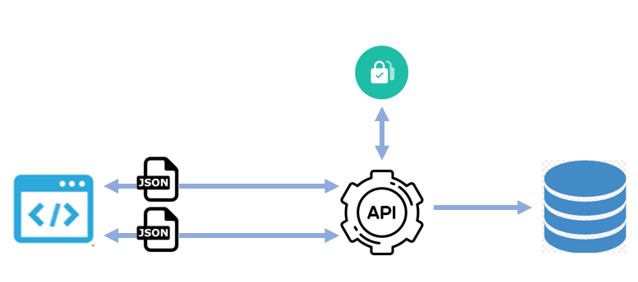
- Step 1: Authenticate your app by calling the
/oauth2/tokenendpoint (please see the dedicated guide for Authentication ), - Step 2: Criteo API will authenticate and authorize your app, and return you an access token to be used in the following calls,
- Step 3: Post your products’ updates in a JSON payload, calling the
POST /preview/retail-media/catalog/products/batchresource, - Step 4: The Criteo API will then process the requested updates to the specified products, which may take up to one hour to complete,
- Step 5: Get a report on the status of your import by calling
GET /preview/retail-media/catalog/products/batch/report/{operationToken}
Best Practices
- Avoid updating your entire product catalog daily. Instead, update only those products whose data has actually changed, as the API is not intended to function as a feed ingestion mechanism.
- Do not send updates for unchanged products. Make sure to only send requests for new, updated, or deleted products, unless the products are going to expire.
- To ensure data remains up to date, make sure to send product updates immediately after changes occur. Do not delay updates in order to batch multiple changes together.
- Avoid including multiple updates for the same product within a single batch request. Such batches will be rejected, and an error response will be returned.
- Ensure that products are updated before they expire. By default, a product remains active for 30 days after its last update. To extend this period, you may use the
expirationDatefield to specify a custom expiration date - up to one year in the future. - Submit a deletion batch immediately after a product is removed from your store. Do not rely on the expiration date, as this may result in the product being displayed even though it is no longer available.
- Use the same value for the
itemGroupIdfield to group all product variants. Product variants are similar products that differ only in one or more specific product attributes. (size,color,material,pattern,age range,gender, etc.). - The
idanditemGroupIdfields must be different. Use theidfield to uniquely identify a single product and useitemGroupIdto group multiple products as variants. - Don’t mix up
itemGroupIdandidattributes. TheitemGroupIdmust be chosen outside of theidrange. If a product has the sameidas an existingitemGroupIdor vice versa, the behavior is undefined and updates on your products may be ignored. - Make sure to provide
itemGroupIdinformation in addition to theidwhen deleting a product variant to avoid any inconsistencies.
URLs and methods
URLs- For AMERICAS: api.us.criteo.com
- For APAC: api.as.criteo.com
- For EMEA: api.eu.criteo.com
Method | HTTP Request | Description |
|---|---|---|
Authenticate |
| Get the token necessary to perform any action through our API. Please see the dedicated guide for Authentication |
Batch |
| Request an asynchronous batch operation of insertions, updates, and deletes. Returns the location of the report of the operation |
Report |
| Get the report of the batch processing |
Rate limitations
- 1000 products per batch,
- One
partner_idper request, - Two updates or more of one product on the same batch are not allowed.
Authentication
This endpoint allows to get detailed information on API authentication in our authentication guide.Type | Endpoint | Objective | Parameters | Remarks |
|---|---|---|---|---|
POST |
| Get the token necessary to perform any action through our API |
| The token will be valid for 900s |
Batch
Description This endpoint is used to publish a batch of operations to insert, update and deletes products. The batch is processed asynchronously. The response provides anoperationToken which can be used to track the status of the report of the operation.
Type | Endpoint | Parameters | Schema |
|---|---|---|---|
POST |
| ProductsCustomBatchRequest
| ProductsCustomBatchRequest |
HTTP code | Description | Schema |
|---|---|---|
202 | Batch accepted. The status of the operation can be tracked using the report endpoint and the | BatchAcceptedResponse |
400 | Bad Request. Allowed error types and errors:
| FailResponse |
401 | Unauthorized. Allowed error types and errors:
| FailResponse |
403 | Forbidden. Allowed error types and errors:
| |
413 | Request too long | No Content |
429 | Too Many Requests. Allowed error types and errors:
| FailResponse |
500 | Internal Server Error. Allowed error types and errors:
| FailResponse |
503 | Service Unavailable. Allowed error types and errors:
| FailResponse |
application/json
Definitions
BatchAcceptedResponse
A batch was accepted. The report can be accessed using the reporting endpoint.
Name | Schema |
|---|---|
operationTokenrequired | string |
CustomAttribute
Defines a custom attribute of a product.
Name | Description | Schema |
|---|---|---|
name required | The name of the attribute. Underscores will be replaced by spaces upon insertion. | string |
value required | The value of the attribute. | string |
Error
Error descriptor.
Name | Description | Schema |
|---|---|---|
code required | A MACHINE-READABLE error code string in kebab-case. Unique across Criteo | string |
detail required | A HUMAN-READABLE detailed explanation specific to this occurrence of the problem.This should not be more that 1 paragraph | string |
instance required | A MACHINE-READABLE URI reference that identifies the specific occurrence of the problem. This could be useful when we want to the return the API Endpoint identifying the exact resource related to the error. | string |
title required | A short, HUMAN-READABLE summary of the problem type. It should not change from occurrence to occurrence of the problem, except for purposes of localization. | string |
traceId required | The MACHINE-READABLE correlation ID provided by the gateway | string |
type required | A MACHINE-READABLE code specifying error category. This information is used on client side to focus on certain type of error, to either retry some processing or display only certain type of errors. | string |
FailResponse
Error server response.
Name | Description | Schema |
|---|---|---|
errors required | List of errors | Error - array |
warnings optional | List of warnings | Warning - array |
Filters
An object mapping filter names to arrays of string values for the product.
Name | Description | Schema |
|---|---|---|
filterName | Name of the filter | string |
values | Values for the filter | string[] |
Installment
Defines the installment of a product.
Name | Description | Schema |
|---|---|---|
amountoptional | The amount the buyer has to pay per month. | |
monthsoptional | The number of installments the buyer has to pay. | Object |
LoyaltyPoints
Defines how a client earns loyalty points after buying this product.
Name | Description | Schema |
|---|---|---|
nameoptional | Name of loyalty points program. It is recommended to limit the name to 12 full-width characters or 24 Roman characters. | string |
pointsValueoptional | The retailer’s loyalty points in absolute value. | Object |
ratiooptional | The ratio of a point when converted to currency. Google assumes currency based on Merchant Center settings. If ratio is left out, it defaults to 1.0. | Number (double) |
Price
Defines a price.
Name | Description | Schema |
|---|---|---|
currencyoptional | The price represented as a number. | string |
valueoptional | The currency of the price. | string |
Product
Defines a product to be inserted or updated.
name | description | schema |
|---|---|---|
id required | A unique identifier for the item. Aka Product ID. Case-insensitive, no quotation marks, ASCII characters, cannot match | string |
offerId optional | Not used by Criteo. | string |
title required | Title of the item. (max 500 UTF-8 chars). | string |
description optional | Description of the item. RECOMMENDED. (max 5000 UTF-8 chars). | string |
link required | URL directly linking to your item’s page on your website. (2000 UTF8 characters max) | string |
imageLink required | URL of an image of the item. Supported formats: PNG, JPEG, GIF. (max 2000 UTF-8 chars). | string |
additionalImageLinks optional | Additional URLs of images of the item.(2000 UTF8 characters max) | string array |
contentLanguage optional | The 2-letter ISO 639-1 language code for the item. | string |
targetCountry optional | The CLDR territory code for the item. | string |
channel optional | The item’s channel ( | enum ( |
expirationDate optional | Date on which the item should expire, as specified upon insertion, in ISO 8601 format. By default the value of the expirationDate is 30 days. | string |
adult optional | Set to true if the item is targeted towards adults. RECOMMENDED. | boolean |
kind optional | Identifies what kind of resource this is. | enum (content#product) |
brand optional | Brand of the item. (70 UTF8 characters max). RECOMMENDED. | string |
color optional | Color of the item. | string |
googleProductCategory optional | Google’s category of the item (see Google product taxonomy). RECOMMENDED. | string |
gtin optional | Global Trade Item Number (GTIN) of the item. (14 digits max). RECOMMENDED. | string |
itemGroupId optional | Shared identifier for all variants of the same product. Case-insensitive, no quotation marks, ASCII characters, cannot match | string |
material optional | The material of which the item is made. | string |
mpn optional | Manufacturer Part Number (MPN) of the item. (70 UTF8 characters max) RECOMMENDED. | string |
pattern optional | The item’s pattern (e.g. polka dots). | string |
price optional | Price of the item. (14 characters max). RECOMMENDED. | |
salePrice optional | Advertised sale price of the item. RECOMMENDED. | |
salePriceEffectiveDate optional | Date range during which the item is on sale. | string |
sizes optional | Size of the item. RECOMMENDED. Only one value is allowed. For variants with different sizes, insert a separate product for each size with the same | string array |
taxes optional | Tax information. | ProductTaxarray |
customAttributes optional | A list of custom (merchant-provided) attributes. This is useful for submitting attributes not explicitly exposed by the API. Declaring attributes explicitly exposed by the API using is forbidden | CustomAttributearray |
identifierExists optional | False when the item does not have unique product identifiers appropriate to its category, such as GTIN, MPN, and brand. Required according to the Unique Product Identifier Rules for all target countries except for Canada. | boolean |
installment optional | Number and amount of installments to pay for an item. Brazil only. | |
loyaltyPoints optional | Loyalty points that users receive after purchasing the item. Japan only. | |
multipack optional | The number of identical products in a merchant-defined multipack. To avoid any overflow issue, pass it as a string. | object |
customLabel0 optional | Custom label 0 for custom grouping of items in a Shopping campaign. | string |
customLabel1 optional | Custom label 1 for custom grouping of items in a Shopping campaign. | string |
customLabel2 optional | Custom label 2 for custom grouping of items in a Shopping campaign. | string |
customLabel3 optional | Custom label 3 for custom grouping of items in a Shopping campaign. | string |
customLabel4 optional | Custom label 4 for custom grouping of items in a Shopping campaign. | string |
isBundle optional | Whether the item is a merchant-defined bundle. A bundle is a custom grouping of different products sold by a merchant for a single price. | boolean |
mobileLink optional | accounts.link to a mobile-optimized version of the landing page. | string |
availabilityDate optional | The day a pre-ordered product becomes available for delivery, in ISO 8601 format. | string |
unitPricingMeasure optional | The measure and dimension of an item. | |
unitPricingBaseMeasure optional | The preference of the denominator of the unit price. | |
shipping optional | Shipping rules. | ProductShippingarray |
shippingLabel optional | The shipping label of the product, used to group product in account-level shipping rules. | string |
shippingLength optional | Length of the item for shipping. | |
shippingWidth optional | Width of the item for shipping. | |
shippingHeight optional | Height of the item for shipping. | |
shippingWeight optional | Weight of the item for shipping. | |
displayAdsId optional | An identifier for an item for dynamic Retargeting campaigns. | string |
displayAdsSimilarIds optional | Advertiser-specified recommendations. | string |
displayAdsTitle optional | Title of an item for dynamic Retargeting campaigns. | string |
displayAdsLink optional | URL directly to your item’s landing page for dynamic Retargeting campaigns. | string |
displayAdsValue optional | Offer margin for dynamic Retargeting campaigns. | number (double) |
sellOnGoogleQuantity optional | The quantity of the product that is available for selling on Google. Supported only for online products. | object |
promotionIds optional | The unique ID of a promotion. | string array |
maxHandlingTime optional | Maximal product handling time (in business days). | object |
minHandlingTime optional | Minimal product handling time (in business days). | object |
costOfGoodsSold optional | Cost of goods sold. Used for gross profit reporting. | |
source optional | The source of the offer, i.e., how the offer was created. | enum ( |
includedDestinations optional | The list of destinations to include for this target (corresponds to checked check boxes in Merchant Center). Default destinations are always included unless provided in | string array |
excludedDestinations optional | The list of destinations to exclude for this target (corresponds to unchecked check boxes in Merchant Center). | string array |
adsLabels optional | Similar to | string array |
adsRedirect optional | Allows advertisers to override the item URL when the product is shown within the context of Product Ads. | string |
productTypeKeysoptional | Category keys of the item (formatted as in productTypes). This information is required by RetailMedia. | string array |
productTypes optional | Categories of the item (formatted as in products data specification). | string array |
ageGroup optional | Target age group of the item. | string |
availability optional | Availability status of the item. RECOMMENDED. | string |
condition optional | Condition or state of the item. | string |
gender optional | Target gender of the item. | string |
sizeSystem optional | System in which the size is specified. Recommended for apparel items. | string |
sizeType optional | The cut of the item. Recommended for apparel items. | string |
energyEfficiencyClass optional | The energy efficiency class as defined in EU directive 2010/30/EU. | string |
minEnergyEfficiencyClass optional | The energy efficiency class as defined in EU directive 2010/30/EU. | string |
maxEnergyEfficiencyClass optional | The energy efficiency class as defined in EU directive 2010/30/EU. | string |
taxCategory optional | The tax category of the product, used to configure detailed tax nexus in account-level tax settings. | string |
transitTimeLabel optional | The transit time label of the product, used to group product in account-level transit time tables. | string |
sellerId optional | ⚠️Deprecated Field, please use The ID of the seller (case-sensitive and max 50 UTF-8 chars). This information is required by the Criteo Offsite Ads. | string |
externalSellerId optional | The external id of the seller (case-insensitive, no quotation marks, ASCII characters, cannot match This information is required by the Criteo Offsite Ads and RetailMedia. | string |
externalSellerNameoptional | The external name of the seller (case sensitive and 200 UTF8 characters max). This information is required by the Criteo Offsite Ads and RetailMedia. | string |
adsGrouping optional | Used to group items in an arbitrary way. Only for CPA%, discouraged otherwise. | string |
numberOfReviews | The number of customer reviews for the product | integer (int32) |
productRating | The product rating for the product | string |
badge | URL of a badge image to display on the product. | string |
Filters optional | Defines filtering criteria to apply when importing products. This object allows specifying conditions such as brand, category, or custom attributes to limit which products are processed. |
ProductShipping
Defines the shipping information of a product.
Name | Description | Schema |
|---|---|---|
country optional | The CLDR territory code of the country to which an item will ship. | string |
locationGroupName optional | The location where the shipping is applicable, represented by a location group name. | string |
locationId optional | The numeric ID of a location that the shipping rate applies to as defined in the AdWords API. | object |
postalCode optional | The postal code range that the tax rate applies to, represented by a ZIP code, a ZIP code prefix using | string |
price optional | Fixed shipping price, represented as a number. | |
region optional | The geographic region to which a shipping rate applies. | string |
service optional | A free-form description of the service class or delivery speed. | string |
ProductShippingDimension
Defines the shipping dimension of a product.
Name | Description | Schema |
|---|---|---|
unit optional | The unit of value. | string |
valueoptional | The dimension of the product used to calculate the shipping cost of the item. | number (double) |
ProductShippingWeight
Defines the shipping weight of a product.
Name | Description | Schema |
|---|---|---|
unit optional | The unit of value. | string |
value optional | The weight of the product used to calculate the shipping cost of the item. | number (double) |
ProductTax
Defines the tax information of a product.
Name | Description | Schema |
|---|---|---|
country optional | The country within which the item is taxed, specified as a CLDR territory code. | string |
locationId optional | The numeric ID of a location that the tax rate applies to as defined in the AdWords API. | object |
postalCode optional | The postal code range that the tax rate applies to, represented by a ZIP code, a ZIP code prefix using | string |
rate optional | The percentage of tax rate that applies to the item price. | number (double) |
region optional | The geographic region to which the tax rate applies. | string |
taxShip optional | Set to true if tax is charged on shipping. | boolean |
ProductUnitPricingBaseMeasure
Defines a measurement.
Name | Description | Schema |
|---|---|---|
unitoptional | The unit of the denominator. | string |
valueoptional | The denominator of the unit price. | object |
ProductUnitPricingMeasure
Defines a measurement.
Name | Description | Schema |
|---|---|---|
unitoptional | The unit of measure. | string |
valueoptional | The measurement of an item. | number (double) |
ProductsCustomBatchRequest
Name | Description | Schema |
|---|---|---|
entries required | The request entries to be processed in the batch. | ProductsCustomBatchRequestEntry
|
ProductsCustomBatchRequestEntry
A batch entry encoding a single non-batch products request.
Name | Description | Schema |
|---|---|---|
batchId optional | An entry ID, unique within the batch request. | integer (int64) |
feedId optional | Not used by Criteo. | string |
merchantId required | The ID of the managing account. Criteo: the partnerId. | integer (int32) |
method required | The method of the batch entry. | enum ( |
product optional | The product to insert. Only required if the method is insert. | |
productId optional | The Product ID to delete. Only defined if the method is delete. | string |
ReportDetailError
An error on a batch operation.
Name | Schema |
|---|---|
isServerRelated required | boolean |
message optional | string |
type required | enum ( |
ReportDetailErrors
A list of errors on a batch operation.
Name | Schema |
|---|---|
errorsrequired |
|
productIdrequired | string |
ReportOkResponse
The report on a given operationToken is ready.
Name | Description | Schema |
|---|---|---|
errorDetails required | The list of errors with details. |
|
importRequestTimestamp required | The date when the original batch request was sent. | integer (int64) |
numberOfProductsDeleted required | The number of products deleted. | integer (int32) |
numberOfProductsInTheBatch required | The number of products present in the batch. | integer (int32) |
numberOfProductsUpserted required | The number of products upserted. | integer (int32) |
numberOfProductsWithErrors required | The number of products with errors. | integer (int32) |
status required | The status of the operation. The operation is completed when the status is one of: | enum ( |
Report
Description This endpoint gets the report of an asynchronous batch operation previously requested.Type | Endpoint | Parameters | Schema |
|---|---|---|---|
GET |
| operation-token required The token returned by the batch endpoint | string |
HTTP Code | Description | Schema |
|---|---|---|
| The report object | |
| Bad Request. Allowed error types and errors:
| |
| Unauthorized. Allowed error types and errors:
| |
| Forbidden. Allowed error types and errors:
| |
| Not Found. Allowed error types and errors:
| |
| Too Many Requests | No Content |
| Internal Server Error. Allowed error types and errors:
| |
| Service Unavailable. Allowed error types and errors:
|
application/json