

- To get started with our APIs, use the endpoint below to generate an Access Token with your API credentials
- The Access Token is a Bearer token to be included in the Authorization Header of all API requests
- Multiple tokens may be generated and each are valid for 15 minutes, or 900 seconds
Endpoint
POST https://api.criteo.com/oauth2/tokenGenerate an Access Token
Generate another access token when it expires, signaled by a
401 Unauthorized HTTP status codeParameters
Generate an Access Token
- This endpoint generates a new access token using your API credentials
- To comply with the OAuth2 standards of using client_credentials, Criteo API authorization now supports Content-Type: ‘application/x-www-form-urlencoded’. See the example below.
Use an Access Token
- Once you have obtained your access token, you can authenticate all subsequent requests by including an
AuthorizationHTTP header, as in the example below:
Get your credentials through the Developer Portal (self-service)
- To get your credentials, you need to create a Criteo account and then create an Organization and an App within the Developer Dashboard
- Learn how to create an Organization and an App in these related articles Create your organization and Create your app
- Once you have created an App you will be able to generate a set of Credentials through the following dashboard:

- 💡 When creating a set of Credentials, you will automatically download a file with your API Key and API Secret like this
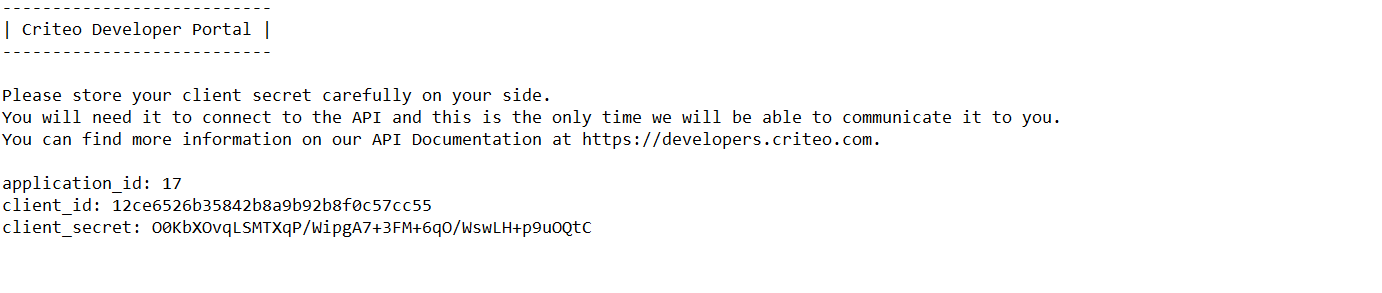
- Make sure to keep your API Secret saved somewhere secure. We can only share the API Secret once with you!
- You can use this dashboard to manage your API keys. You can also delete an API key from this dashboard. The key will stay valid for fifteen minutes before deactivating
- 💡 You can change the name of your set of credentials by clicking directly on the credentials name in the dashboard. For example, Troubleshooting Credentials or Production Credentials
- 💡 You will be limited to five API credentials for an App (for ex. one for production, one for troubleshooting, and three others for any other use cases you’d like)