

Release Schedule
A new Criteo API version is released every three months, at the beginning of each quarter. The version names are date-based by year and month, such as2025-04. This helps to know precisely when your version was released.
If your app calls an endpoint on a stable version that is no longer supported, Criteo will fall forward and respond to your request with the same behavior as the oldest supported stable version.
If an endpoint has been removed in all stable versions, then calling such an endpoint on an out-of-support version of Criteo API will result in an error.
Here is an example release schedule:
Version | Release date | Date Support is Expected by |
|---|---|---|
2024-07 | July 23rd, 2024 | July 31st, 2025 |
2024-10 | October 22nd, 2024 | October 28th, 2025 |
2025-01 | January 21st, 2025 | January 27th, 2026 |
2025-04 | April 22nd, 2025 | April 28th, 2026 |
2025-07 | July 22th, 2025 | July 28th, 2026 |
2025-10 | October 21th, 2025 | October 27th, 2026 |
Fall Forward
If your app calls an endpoint on a stable version that is no longer supported, Criteo will fall forward and respond to your request with the same behavior as the oldest supported stable version. If an endpoint has been removed in all stable versions, then calling such an endpoint on an out-of-support version of Criteo API will result in an error.Breaking vs. non-breaking changes
Each version might include a number of changes. Here’s what each of them mean.Breaking change
A breaking change is a change to the API that could cause errors or failures when your app calls the API. Any change that requires you to change the way you call the API is a breaking change. Another type of breaking change is the deprecation of any functionality previously available in the API. Bug fixes can also create breaking changes if they require you to change how you call the API.Backward-compatible change
A backward-compatible change is a change that guarantees that any previous requests will still be valid and provide the same output. Backward-compatible changes include bug fixes or new features that do not interfere with other endpoints or functionality.Calling an API version
The Criteo API version is explicitly declared in the URL your app call, such as:Criteo-API-Version, which returns the API version that was used to execute the request. If your app is updated, this will match the API version that’s specified in your request. If the returned version is different, then your app is out of date and is using the default API version.
Along with the stable versions, there are two unstable versions available: the preview and the beta versions.
Unstable versions
The Criteo API has an unstable version (Preview) that includes a number of features that may change before its potential inclusion in an upcoming stable version. Developers are welcome to explore and test the features available in this version.Preview version
The preview version lets you see what changes are likely to be released in the next stable version, so that you plan accordingly. The preview version is based on the last stable version . Generally, new changes will be in the preview version for at least a month before going to a quarterly stable version. This version can be called using “preview” as the version number:Deprecation
After 12 months of stability, each Criteo API will sunset and be deprecated. Developers will receive notices when a version is about to be deprecated. These notices will also be posted in the changelog.Endpoint lifecycle
- From release to end-of-support, the response from the endpoint will have
deprecationset to the end-of-support date of the version. - Starting from the day the endpoint is scheduled to decommission,
sunsetis set to the decommission date and thedeprecationattribute is set totrue. - After this date, the endpoint returns a
410(i.e. cannot be used). This date is always after the end-of-support date but can also be equal to the end-of-support date. - After the decommission date, the endpoint answers
410.
Sunset HTTP headers
Our platform uses the Sunset HTTP response header to indicate when an endpoint is scheduled to be removed.
Endpoint scheduled for decommission
Once an endpoint has reached its end-of-support date, we may schedule it for removal. This moment is not predictable, but it is announced in advance. When this happens:- The response returns
Deprecation: true. - The
Sunset headeris present and contains the exact decommission date. - Status remains
200 OK, but this is the last opportunity to migrate.
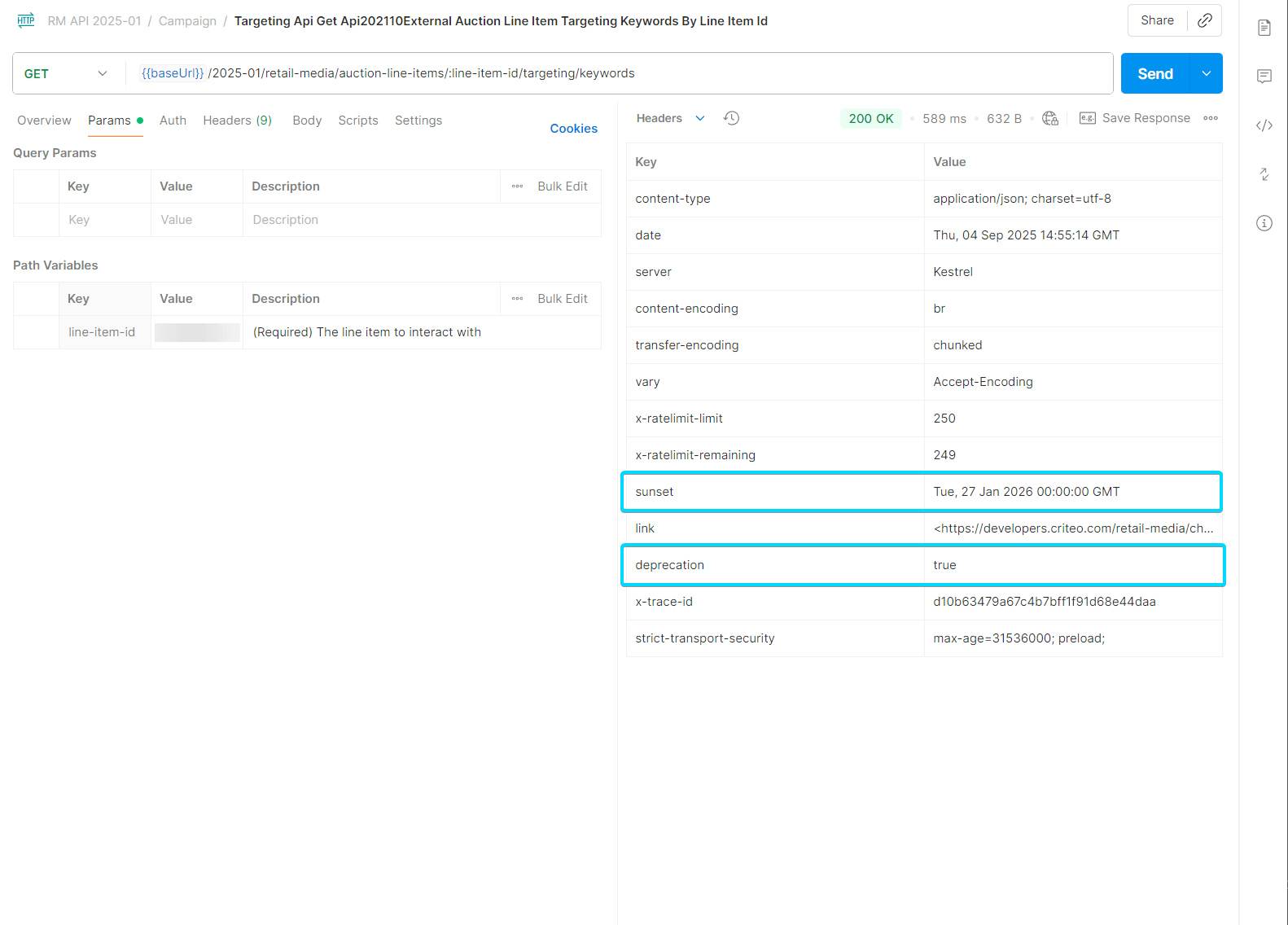
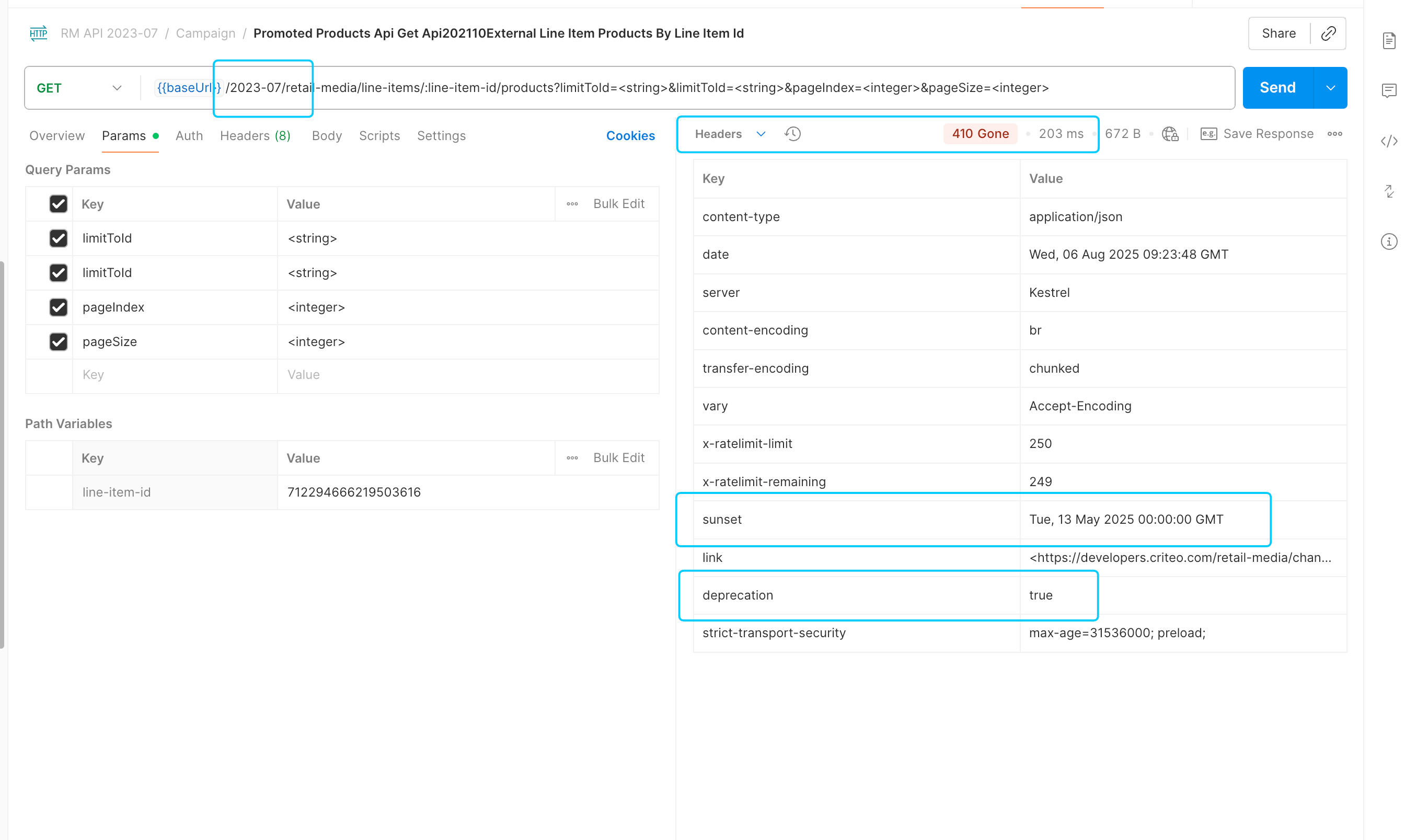
Deprecation: true and Sunset, and to log a warning or alert in your system.410 Gone response code and the deprecation attribute will be set as true. The sunset field will indicate the final sunset date.
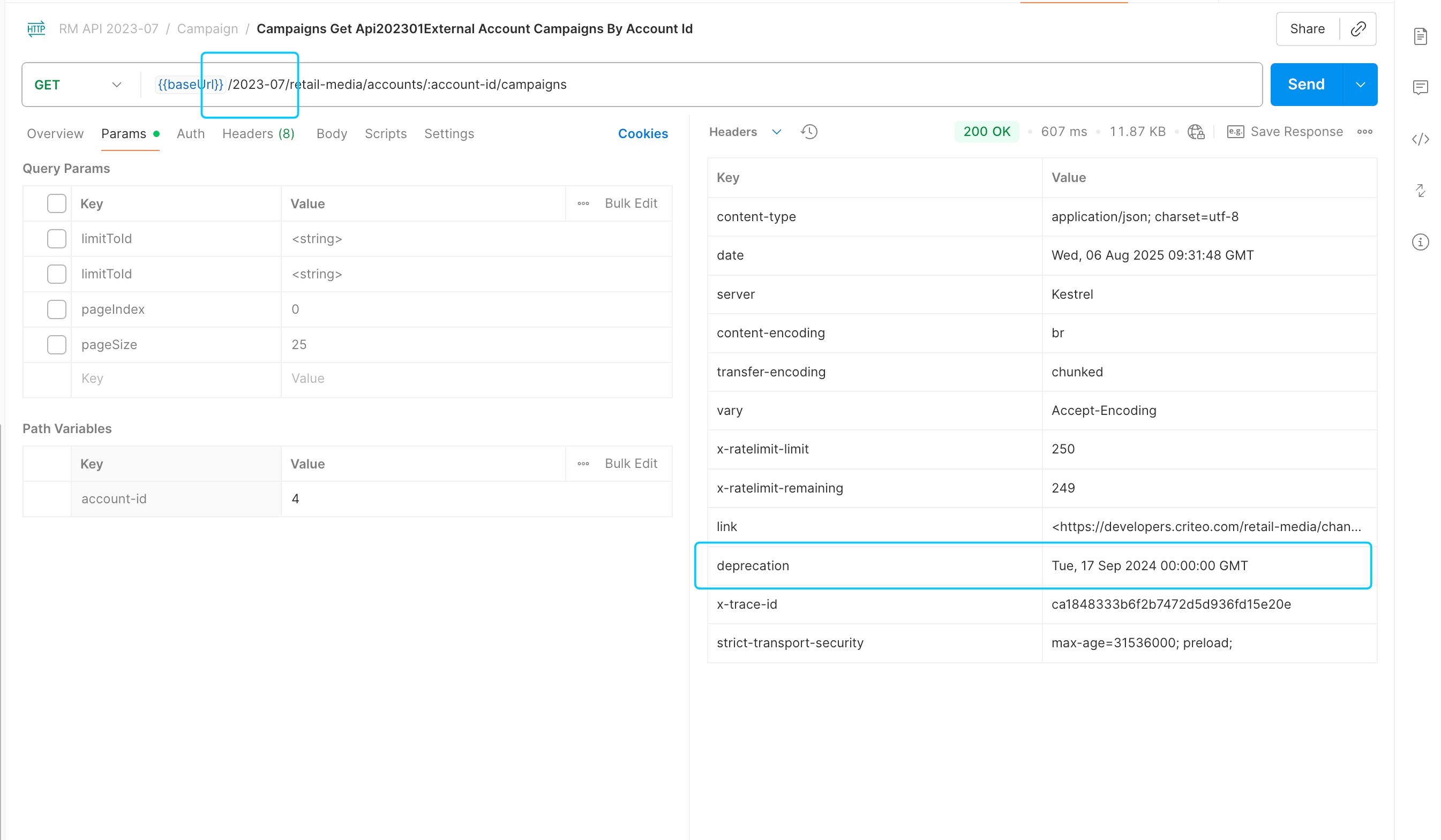
deprecation attribute, indicating the endpoint is deprecated but not sunset yet. The endpoint will still be functional, but we advise migrating to another, more recent endpoint.
Deprecated versions
Alerts
A breaking change has been introduced in the following endpoints, therefore these will be decommissioned soon. Please find below the list of impacted endpoints and the date of their decommission:Version | Endpoint | Decommission date | Time before decommission | Changelog |
|---|---|---|---|---|
2024-07 | PATCH /marketing-solutions/ad-sets | 01/27/2026 | 179 days | |
2024-07 | POST /marketing-solutions/ad-sets | 01/27/2026 | 179 days | |
2024-07 | POST /marketing-solutions/ad-sets/search | 01/27/2026 | 179 days | |
2024-07 | GET /marketing-solutions/ad-sets/{ad-set-id} | 01/27/2026 | 179 days | |
2024-10 | PATCH /marketing-solutions/ad-sets | 01/27/2026 | 179 days | |
2024-10 | POST /marketing-solutions/ad-sets | 01/27/2026 | 179 days | |
2024-10 | POST /marketing-solutions/ad-sets/search | 01/27/2026 | 179 days | |
2024-10 | GET /marketing-solutions/ad-sets/{ad-set-id} | 01/27/2026 | 179 days | |
2025-01 | PATCH /marketing-solutions/ad-sets | 01/27/2026 | 179 days | |
2025-01 | POST /marketing-solutions/ad-sets | 01/27/2026 | 179 days | |
2025-01 | POST /marketing-solutions/ad-sets/search | 01/27/2026 | 179 days | |
2025-01 | GET /marketing-solutions/ad-sets/{ad-set-id} | 01/27/2026 | 179 days |
Warning
These versions are out of support:- 2020-10
- 2021-01
- 2021-04
- 2021-07
- 2021-10
- 2022-01
- 2022-04
- 2022-07
- 2022-10
- 2023-01
- 2023-04
- 2023-07
- 2023-10
- 2024-01
- 2024-04
- 2024-07