

Introduction
When it comes to building your video ad implementation, there are a few high-level steps to consider:- Requesting and parsing the VAST tag,
- Creating the HTML structure of your player to be injected into the DOM,
- Firing beacons at the proper time during video playback,
- Incorporating additional verification scripts (OMID).
Step 1: requesting and parsing the VAST tag
To obtain the data for your video player, start by fetching the VAST information from the Criteo API Ad Response. Here is an example of how to request the VAST (if required) and parse it:DOMParser:Step 2: Creating the Video Player HTML Structure
Our video player is built around the video HTML tag. This tag inherits fromHTMLMediaElement and offers methods like play() and pause(), along with properties such as: volume, duration, and currentTime.
These properties help us mute or unmute the player and track playback progress.
<div> and incorporate additional HTML for the Play/Pause and Mute/Unmute and CC (close captions) buttons.
We add click listeners to these buttons to handle play, pause, and volume controls. Although the <video> tag includes a default controls attribute, we avoid using it as it permits seeking.
Additionally, be aware that local regulations may require a callout or pop-up for mandatory notices.
Step 3: Firing Beacons During Video Playback
<video> element for the can play event. This event is dispatched as soon as the browser determines the video is ready for playback and painted to the page, regardless of its position in the viewport.
The start, firstQuartile, midpoint, and thirdQuartile beacons are managed in a function triggered by a listener on the timeupdate event from the <video> tag.
Inside this playback handler function, we first check if we are within the first loop of video playback. If so, we calculate the percentage of video viewed by dividing the currentTime attribute by the duration attribute, then normalizing this value to a range of 0-100 by multiplying the result by 100.
Once we have a non-zero percentage, and we are in the first loop, we drop the start beacon. At 25 percent viewed and still within the first loop, we drop the firstQuartile beacon, and the same applies for 50 and 75 percent.
Since this handler is called many times per second (see timeupdate spec), we can build a handler as follows:
timeupdate event listener and its associated playback handler, as they are no longer needed.
Afterward, we increment the internal loop count for debugging and logging purposes and call play() on the video to create the looping effect. Subsequent “ended” events should only increment the loop count and restart the video.
ClickTracking beacon by attaching an event listener to our <video> tag for the click event. In the handler function, we drop the beacon and instruct the browser to open the ClickThrough URL from the VAST tag , only if a redirection URL is provided.
Step 4: Additional Verification with OMID Compatible Scripts (Video Views)
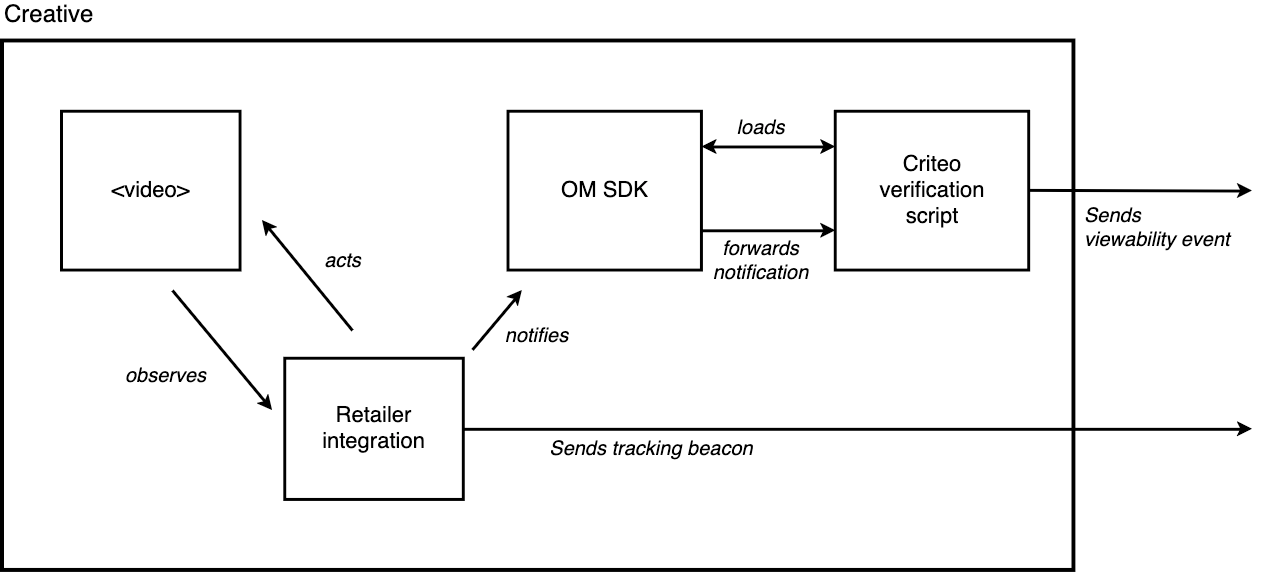
Clients must support OMID to enable their player to run additional scripts, hence allowing Criteo to track video viewability. This allows Criteo to send its own verification script within the VAST XML to track video viewability.AdVerifications element where these verifications reside. Each Verification element nested inside AdVerifications details the resources needed for verification.
- Load the OMID service script and session client
- Extract the necessary session client classes
- Pass the
VerificationParametersinformation to the session client’s adContext - Start a session
- Trigger
adEvents&mediaEventsevents to OM SDK when Video & Ad related events occur
Level | Beacon name | Description |
|---|---|---|
OMID ( |
| Indicates that the OMID Ad session was properly initialized. |
OMID ( |
| Indicates that the video just started, and the video is displayed 100% in the viewport. |
OMID ( |
| Indicates that the video just reached the 25% quartile, and the video is displayed 100% in the viewport. |
OMID ( |
| Indicates that the video just reached the 50% quartile, and the video is displayed 100% in the viewport. |
OMID ( |
| Indicates that the video just reached the 75% quartile, and the video is displayed 100% in the viewport. |
OMID ( |
| Indicates that the video just completed, and the video is displayed 100% in the viewport. |
OMID ( |
| Indicates that the video was playing for 2 consecutive seconds, and the video is at least displayed 50% in the viewport. Note that, buffering the video or pausing, will reset the 2 seconds counter. |
VAST XML - OMID |
| Indicates that the verification script failed to initialize. |
1. Load the OMID service script and session client
The provided IAB OM SDK JS is composed of two scripts (omweb-v1.js & omid-session-client-v1.js) that need to be included for the creative to support viewability.
omweb-v1.js– the OMID JS library for the web context.omid-session-client-v1.js– used by integration partners to perform ad session activities in the JavaScript layer.
- Log in or register at the IAB Tech Lab Tools Portal.
- Navigate to the Open Measurement SDK for Web section.
- Generate and download your
OMSDKpackage. - Host the downloaded files in your environment or reference them from your own CDN.
2. Extract the necessary session client classes
3. Pass the <VerificationParameters> information to the session client’s ad Context
Before the ad session initialization, the OMSDK requires specifying some parameters related to the Criteo integration:
AdSession will start:
4. Start a Session
When the ad session is started, the Criteo verification script is automatically loaded, using theContext information (step 3 of the IAB implementation guide).
At this point, the Criteo verification script will start observing any AdEvents & MediaEvents that are triggered toward the OM SDK.
5. Trigger Open Measurement Events
AdEvents & MediaEvents is accessible on IAB’s Github.- Criteo will be able to track quartile events (if the video is 100% part of the viewport)
- Advanced events are computed to track if 50% of the video is playing & displayed in the viewport during 2 consecutive seconds.
AdEvents & MediaEvents must be triggered aside of the existing tracking beacons for quartile & display events.
Additionally, the video buffering events must be triggered as described in the IAB code sample:
6. Select the right video when multiple videos are presented
loadAd(). You can dynamically retrieve the dimension using clientWidth and clientHeight, like so: