

Introduction
This guide walks you through the steps required to configure your catalog to support seller offers, including SKU ID structure, Cross Seller Product IDs (CSPID), and Buy Box Winner (BBW) updates.Glossary
Step 1 — Understand your current structure
Before you begin, identify your existing processes and setup, as they will impact the steps you need to complete.
To get started:
- Create a diagram with your TS rep for your current SKU ID structure (Parent ID → SKU ID), mapping your
SKU_IDstructure with the correct productSKU_IDs and anyParentandSeller_IDs. - Create an example file of your current feed to share with the Criteo R&D team.
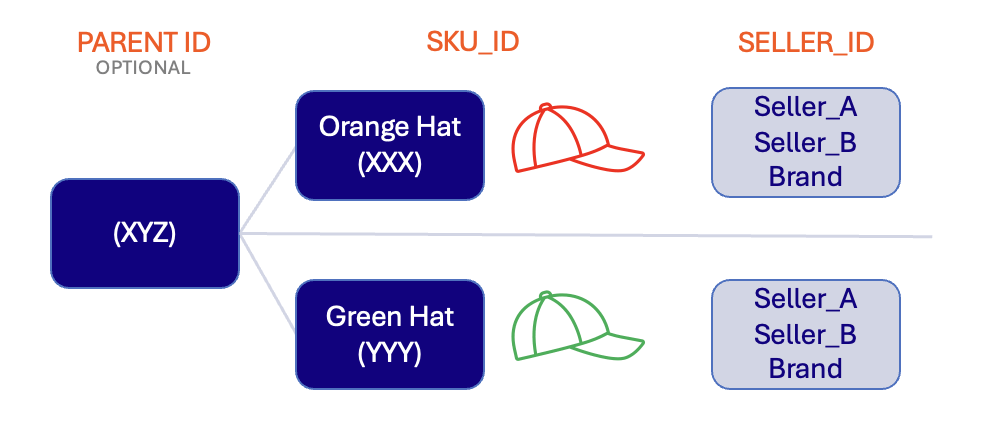
Example SKU ID structure: Parent ID → SKU IDs → Seller IDs
Step 2 — Decide on your SKU ID and CSPID structures
Choose a SKU ID structure
Design a unique SKU ID for each seller × product combination using one of three methods:- Concatenation (recommended): Combine the SKU ID with the Seller ID separated by a character (typically
-or_).- Example:
SKU_ID=XXX+Seller_ID=Seller_A→XXX-Seller_A
- Example:
- Unique SKU per seller: Create a new SKU designation for each seller.
- Example:
XXX,YYY,ZZZ
- Example:
- Hashing: Use a mathematical function combining the current SKU ID and Seller ID to produce a unique, consistent identifier.
- Example:
b21b29df0a2e2c2a
- Example:
- Maximum 50 characters
- Case-insensitive
- Must use ASCII characters
- Cannot use quotation marks
id,item_group_id, andseller_idcannot match each other
Choose a CSPID structure
The CSPID must represent one physical product across all sellers. You can use:- SKU ID — if your current SKU ID will continue to serve as the unique product identifier even after switching to a unique Seller ID (recommended when applicable).
- GTIN — already unique across products and consistent across sellers.
- Other — any value that is consistent over time and represents a single product across multiple sellers.
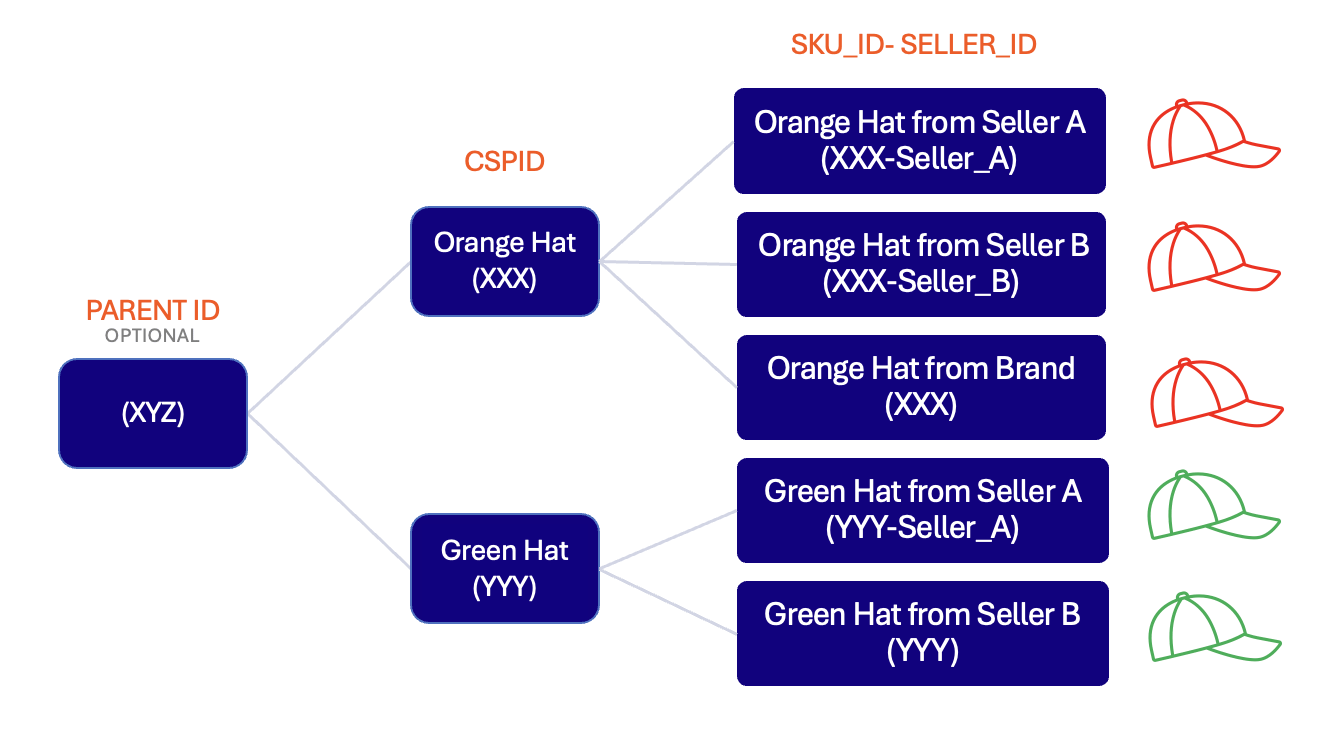
Example structure: Parent ID (optional) → CSPID → concatenated SKU ID per seller
Step 3 — Populate a CSPID
The CSPID groups all offers for the same physical product across all sellers. It enables Buy Box Winner changes by product group and lets users search for a specific product to see all offers at once. If you are newly introducing Seller IDs, or using a Rotation model: Introduce a unique product identifier. You must provide one CSPID per unique product across all sellers, reusing an existing, well-understood product identifier where possible. If your catalog already uses a concatenated SKU ID (productId-sellerId):
- Populate
cross_seller_product_idusing one CSPID per physical product across all sellers.- Example:
cross_sellers_product_id = XXXfor all offers aroundXXX-*, andcross_sellers_product_id = YYYfor all offers aroundYYY-*.
- Example:
- The concatenated SKUs remain the ingestion key per offer (e.g.
XXX-seller_A,XXX-seller_B), while the CSPID becomes the stable product-level grouping key used for Buy Box Winner and search.
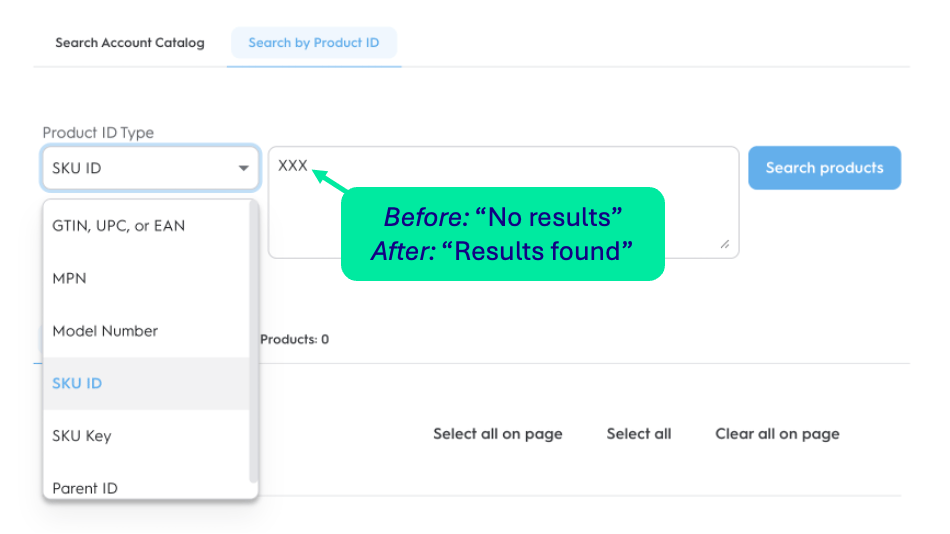
CSPID enables product-level search across all seller offers
Step 4 — Make necessary catalog changes
Required feed tags for seller offers:
seller_idsellernameis_marketplaceis_buybox
- SKUs in the previous format will be removed from the product feed and marked as “out of stock” in line-item reports.
- Direct sold Seller SKUs will be switched to the appropriate unique Seller SKUs — users will see 2 rows for the same product in the UI for up to 30 days. Data will not be duplicated or impacted.
- A message will be added directly in the UI to explain the temporary duplicate view.
- Attribution metrics will be saved on the old SKU — the updated SKU will show no data until it begins serving.
Step 5 — Deploy SKU ID updates elsewhere in your account
Complete this step alongside or immediately after Step 4 to ensure accurate attribution metrics. Wherever you share the SKU ID must be updated to use the new structure, including the Order Confirmation Page and Universal Beacons (when in use). The SKU ID value in the catalog feed must match the value used in Ad Requests, Beacons, and all Sales/Attribution events. Example — Concatenated SKU IDs (productID-sellerID):
Step 6 — Implement or update Buy Box Winner
Using the API endpoint to share Buy Box Winner updates is strongly recommended for the best experience.
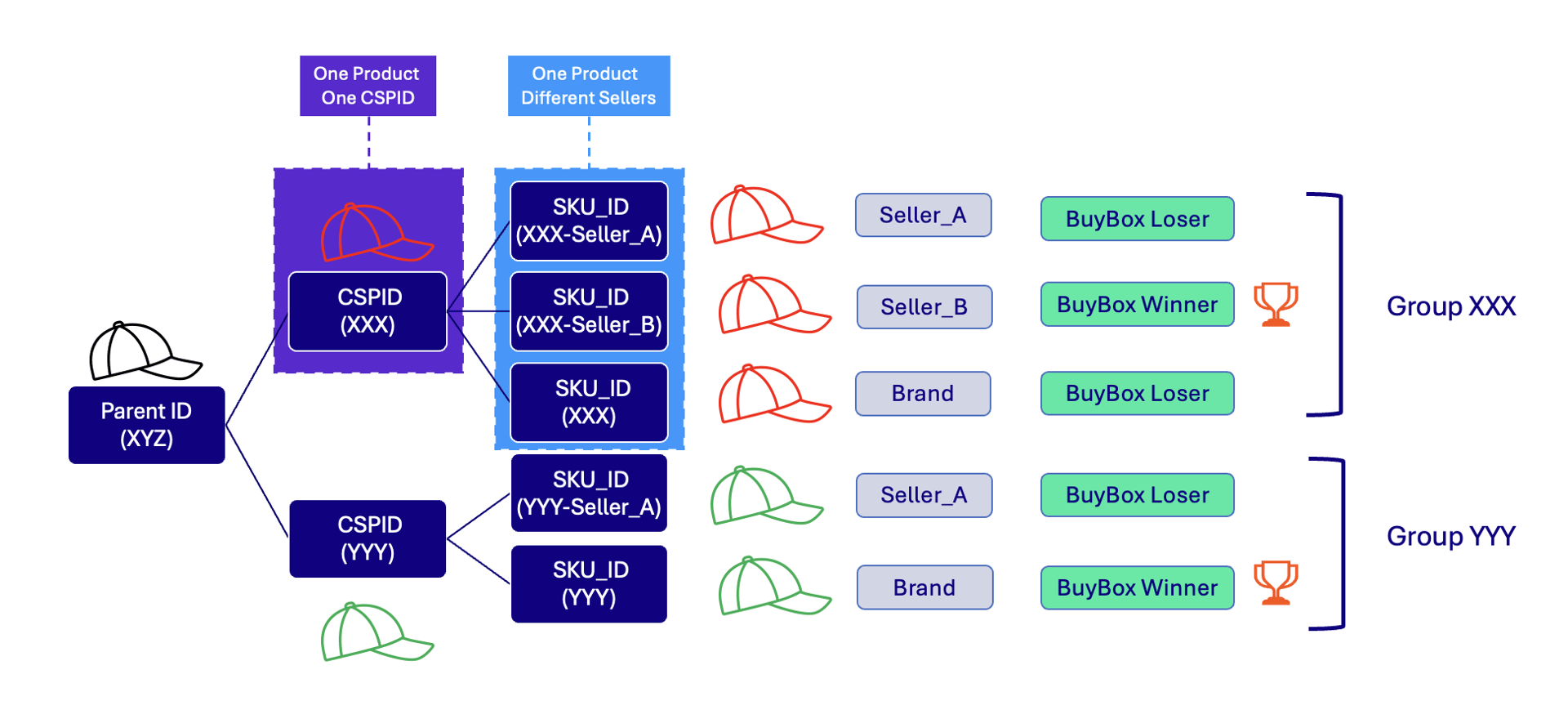
Buy Box Winner and Loser grouping by CSPID
Add BBW to your catalog feed
Sendis_buybox in the feed for seller offers. This tag tells Criteo the initial winner per CSPID group.
Send winner-only BBW data via the API
To set the winner per product using the API, callSetBuyBoxWinners with the new SKU ID structure. The request body specifies the Offer ID of the current Buy Box winner. A maximum of 5,000 Buy Box winners can be updated simultaneously.
The API does not replace the
is_buybox column in your catalog feed for existing PDP intraday updates (i.e. shopper visits). Both mechanisms work in tandem.