

- fetch and render Commerce Onsite Video formats, with API responses examples;
- see the full video player specifications;
- track ad-related activity surrounding the Commerce Onsite Video formats;
- implement the video player (Desktop and Mobile);
- implement the video player (App) for Android and iOS: coming soon.
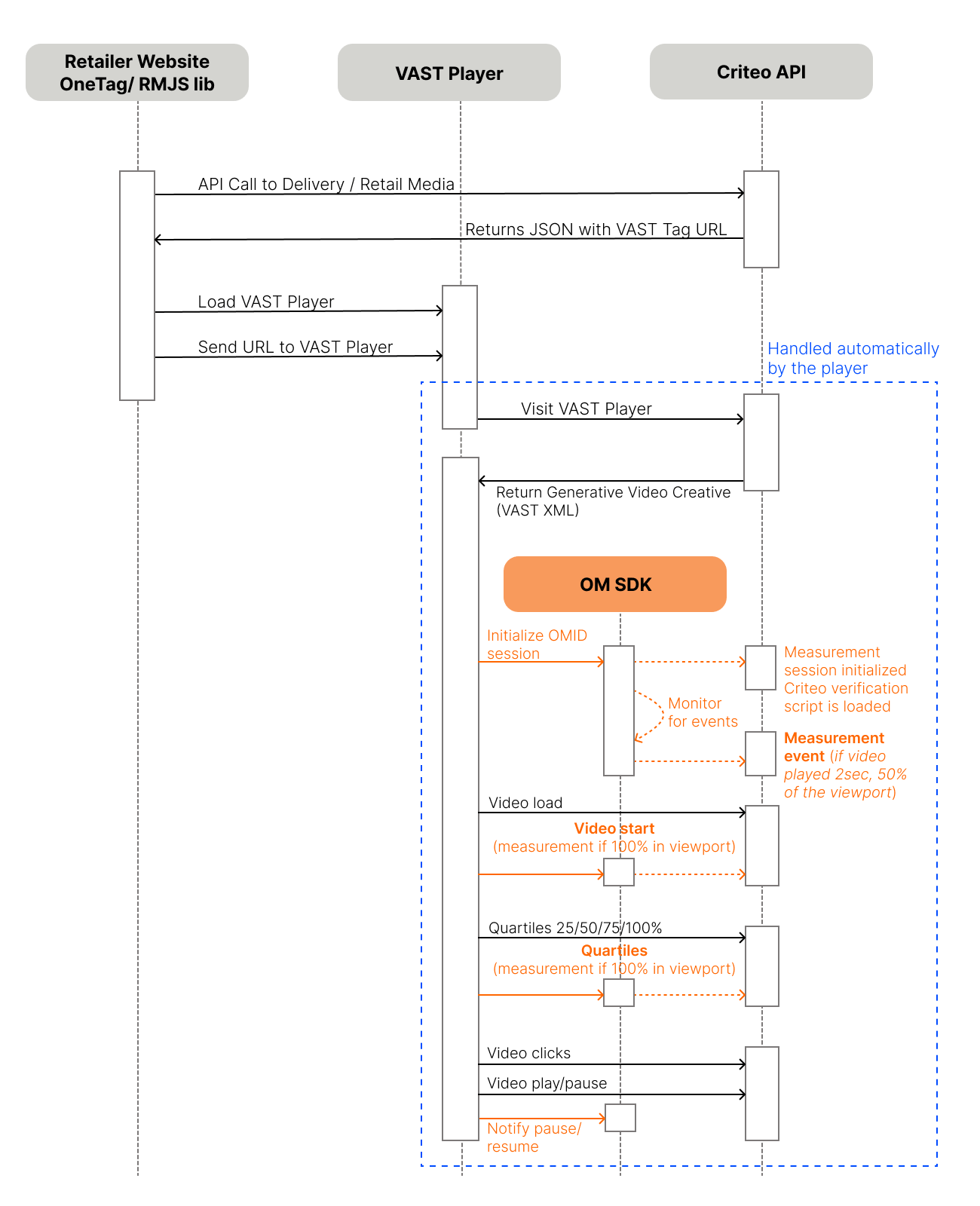
Onsite Video Sequence Diagram
Video Specific Definitions
VAST Video player
A VAST video player is a video player that supports the Video Ad Serving Template (VAST) standard, which is an XML schema developed by the Interactive Advertising Bureau (IAB) for delivering video advertisements to video players. VAST provides a standardized way for ad servers to communicate ad details to video players. A VAST video player can parse VAST XML responses and display video ads according to the instructions contained within the VAST document. These players support various features defined by the VAST standard, including linear and non-linear ads, click-through URLs, tracking events (e.g., impressions, clicks, quartile tracking), and companion ads.Pros
A key advantage of VAST is its ability to deliver detailed tracking data on ad performance, such as impressions, views, and interaction, providing valuable insights to users to optimize campaigns. VAST also supports a range of video formats and environments, making it a versatile solution that meets the diverse needs of retailers and advertisers.Cons
While VAST offers these advanced features, Criteo acknowledges its implementation, especially in mobile apps, can present technical challenges. Proper configuration is needed to ensure seamless ad delivery and tracking, which may require additional attention and support during setup.We talk more about the VAST video player in the Video player implementation guide.
Rendering
Rendering is the process of converting the video ad’s data into a visual display. In the context of retail media video integration, this includes:- Assembling the various components of the ad (e.g., video, images, text) based on the specified format and layout.
- Ensuring that the visual and interactive elements of the ad are properly displayed and functional within the user’s browser or application.
- Applying any format-specific properties, such as custom labels, colors, and image assets, to produce the final presentation of the ad.
Viewport
The viewport is the rectangular area that the user can see on their device’s screen. It varies depending on the device (e.g., desktop, tablet, mobile) and the size of the browser window. Ads need to be strategically placed within the viewport to ensure maximum visibility and engagement.Beacons for Video
A beacon refers to a small piece of code or a URL that is used to track specific events and interactions with an ad. Beacons are triggered when certain actions occur, such as an ad being viewed, clicked, or loaded, and they send data back to the ad server for analytics and reporting purposes. In the context of Criteo, a beacon is a network request (a URL) sent to Criteo’s servers, which allows us to log information stored in the URL’s parameters. Beacons are generated by Criteo’s delivery when an ad request is made, and they are returned in the API response along with the products. Beacons are the URL’s starting with//b.criteo.com.
Beacon usage in Retail Media Video Integration encompass:
- Impression Tracking: Beacons track when the video ad is loaded and displayed to the user, recording an impression.
- Interaction Tracking: Beacons monitor user interactions, such as clicks on the ad or buttons within the ad, providing insights into user engagement.
- Performance Metrics: Data collected by beacons is used to generate reports on ad performance, helping advertisers optimize their campaigns.