Introduction

Flagship is a Commerce Display unit combining branded assets with product tiles.
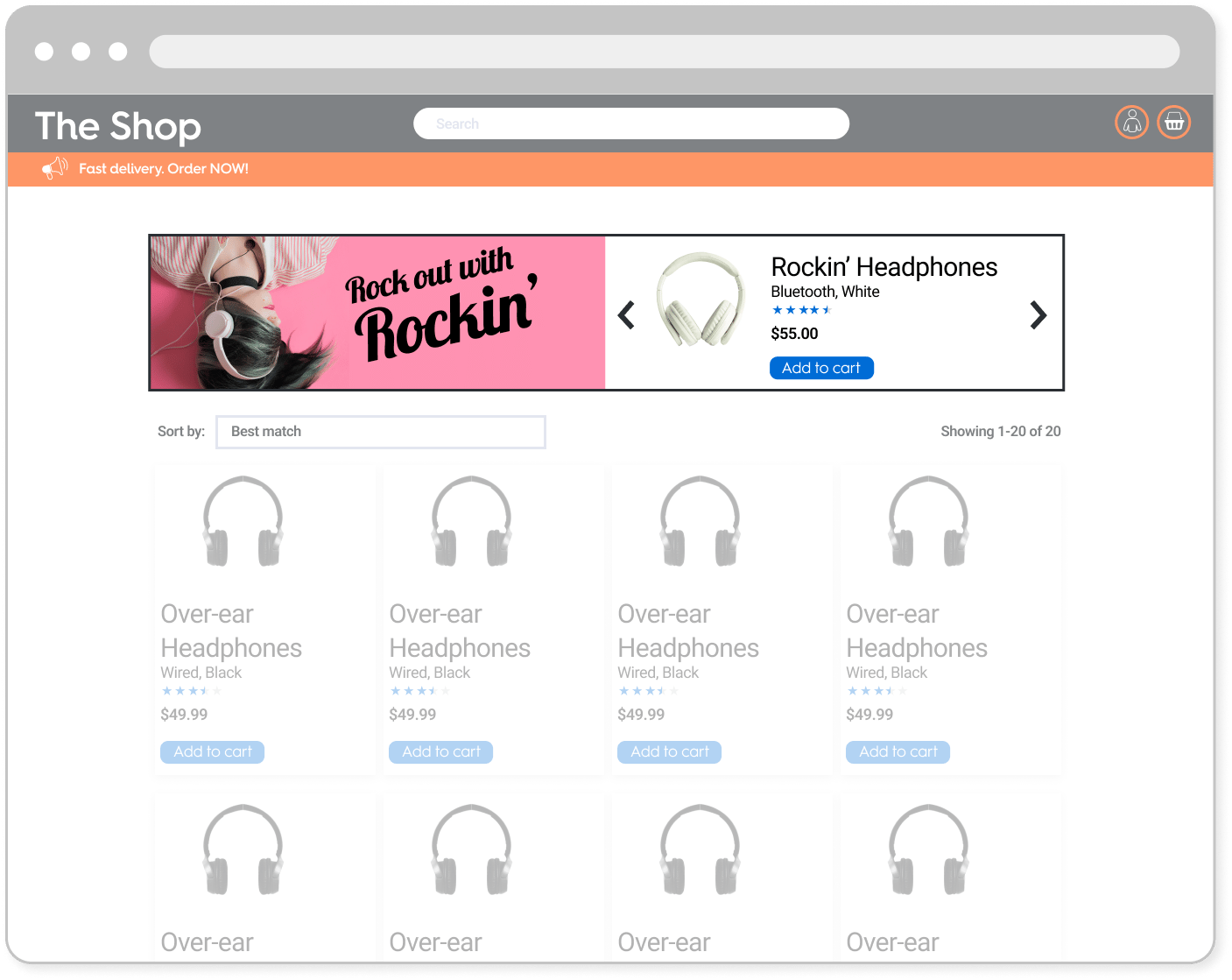
This format corresponds to the desktop version of Flagship. For mobile specs, please refer to Branded Header.
Example of the Flagship format on desktop

Specifications

General
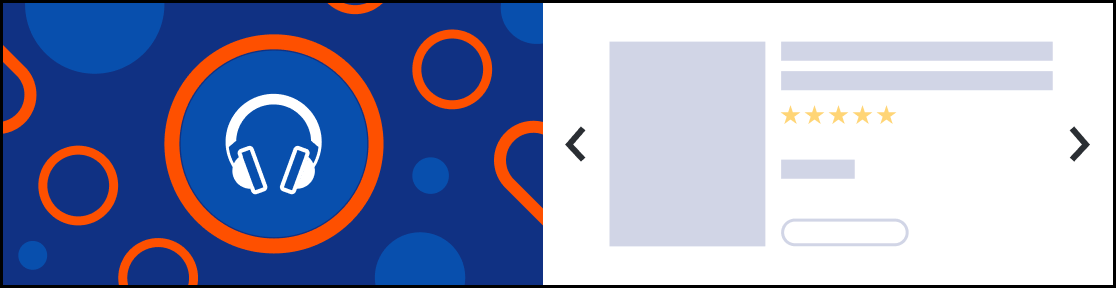
FS_desktop.jpg
  • The Flagship unit is composed of two parts
    • A branding zone on the left side
    • A product zone on the right side
  • This format is available with two heights: 200px and 300px.
  • The format must be able to host up to 5 products and support navigation arrows which allow the user to scroll through the products.

Asset sizes

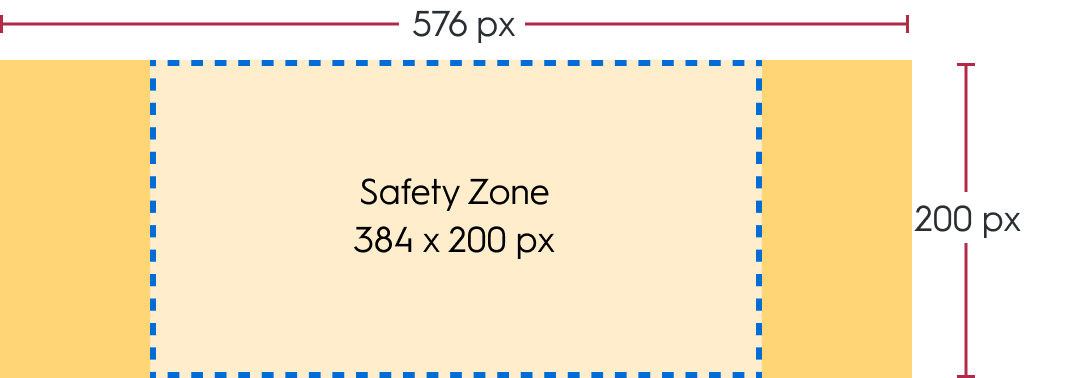
  • A background of 576x200px with a safe zone of 384x200px
59b215e86e56d118c43378f8a80c2077c07301501a49caa1c7a73a4944d9150f FS_200
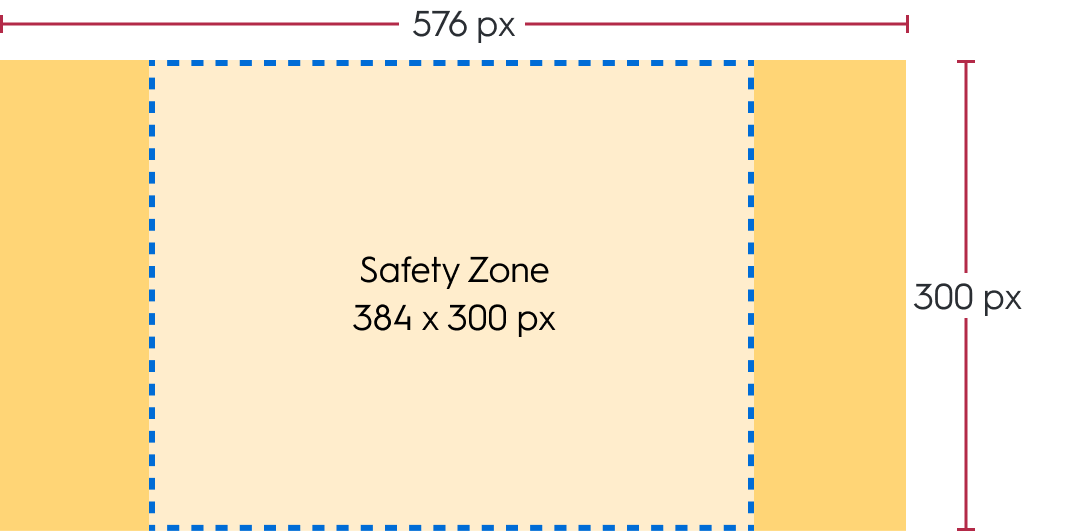
  • A background of 576x300px with a safe zone of 384x300px
36bf5a790fdeae80fe8cd1ab6943e34f9139941ba75ff229da13fc995a53dbd3 FS_300
Please note that only one of these size will be used once chosen.

Available options

The Flagship banner can be clickable and contain the redirection (a CTA button is typically included in the background image within the safe zone to indicate to the user that it is clickable. This button should be part of the image itself, not a coded element.). The user can click anywhere on the banner to be redirected. When a user clicks the background image of a Flagship banner, there are two possible redirection options.

Redirection

  • When a user clicks on the CTA button, they should be redirected to the link defined within the response.
  • There are two possible redirection options:
    • Self (open in the same tab)
    • Blank (open in a new tab)

PDF upload

  • A brand may choose for the CTA to result in a file download. This file will be included in the ad response.
  • At the banner’s click, a PDF file opens like a redirection link with both Self and Blank options (see above)

Technical details

  • The navigation arrows always have the same position within the product zone
  • The border should be fixed to 1px and surround the creative and the product zone.
  • Depending on placement size, the branding zone and product zone widths may vary. However, height stays the same.
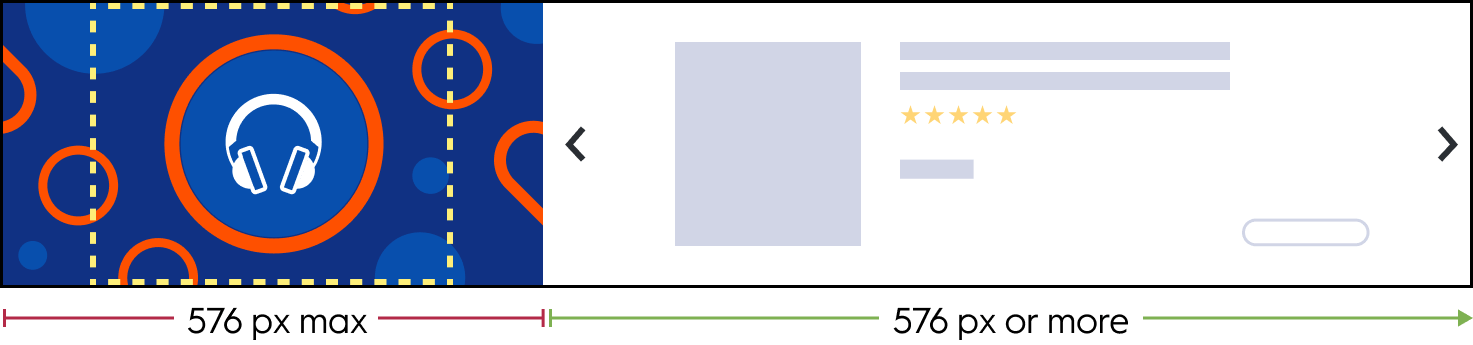
Placement width ≥ `1152 px`  
The background image is displayed in full size.

`768px` \< placement width \< `1152px`  
The background image is cropped on both sides. The branded zone and the product zone have the same size.
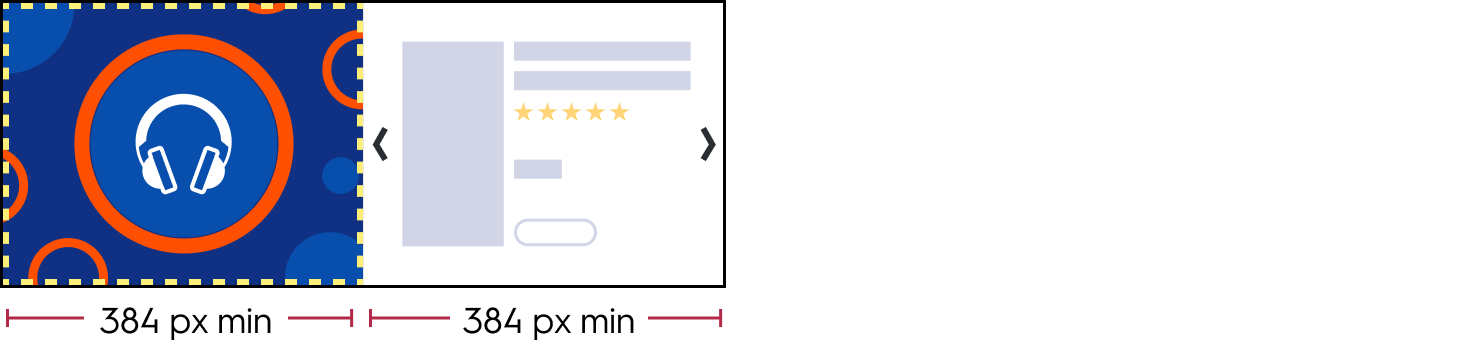
Placement width = `768px`  
The width of the background image equals the safe zone width (384 px).
Placement width \< `768px`  
The ad unit switches to mobile. For more details, refer [to the corresponding mobile specifications](https://dash.readme.com/project/retail-media-delivery/v1.0/docs/branded-header).

Response keys

rendering block

This block has global rendering data for the unit.

Key

Description

desktop_background_image

URL of the background image file for desktop/tablet app

desktop_background_image_alt_text

Alternative text for desktop background image

mobile_background_image

URL of the background image file for mobile

mobile_background_image_alt_text

Alternative text for mobile background image

border_color

Hex code for the format’s outline color

optional_footer_type

Can have the following values:

  • no-option: no footer option
  • redirection: expect values inoptional_footer_redirect_urland/oroptional_footer_redirect_url_app)
  • file: expect values inoptional_footer_media_file

optional_footer_redirect_url

URL that the user should be redirected to

optional_footer_redirect_url_app

Deeplink app that the user should be redirected to

optional_footer_redirect_target

Redirection target, can have the following values:

  • _blank: redirects to a new tab
  • _self: redirects in the same tab

(only applicable for web)

optional_footer_media_file

URL of the file that the user would download after clicking

products_order block

This block defines the order of the buttons on the left panel of the Butterfly unit.

Field

Description

products

The product that should be rendered when the button is clicked. The array is contains the priority order of product rendering. If you are checking product availability in real time, you should render thefirst available productin the array, i.e., if the first product is not available, check the second one, then check the third, and so on.

isMandatory

Iftrue, the unit should only be rendered ifat least oneof the products in theproductsarray is available.

Iffalse, the button can be ignored if no product in theproductsarray is available.

  • Note:* This option is only relevant if you are check product availability in real time, before rendering the units.

Sample response

{
    "status": "OK",
    "placements": [
        {
            "viewHome_API_desktop-Flagship": [
                {
                    "format": "FS",
                    "products": [
                        {
                          "ProductId": "134679258",
                          "OnLoadBeacon": "//b.us5.us.criteo.com/rm?rm_e=gLYh9%2fxsFGq%2b67gaahP4kVXGGZXfgfgU1JveA8o1zBL%2bVeGhkRciu4XrLOsI4T7SC%2bNbEtyqg3GhqGgDtwtWLWaTC0EBVHxpNlqJcrfrUzWk3IBuDj7ZAr8t28y7EJfH3BnEZQxAvbjEP3nRJYq9z9TfOhi0mWVLYxVFIURTPBvcp0cVPY5qaHvmPC6%2bppv7TH9Kja6zXlrKhib2DOtKo4aEMw3FQqRbnCeTVdjqmFbHK8s%3d&ev=2",
                          "OnViewBeacon": "//b.us5.us.criteo.com/rm?rm_e=aLSOJrKI2G%2fY8SwmqYnI5SqMi2jvKfgfgnJDZb06hcliInWkDeRqN4Tu%2fKZnJgmGIrIuQVurCYsVELSi%2byX2oOKpicAj5tACVgpEYVcGZxNOU68BYLhRUxn80y3s4USfHLmeeOvP9wxb6RlGyydpJ4U4k%2fM7uL3DawyB9O%2bC9qebO%2bKTIUZ2fbQV5EuwvNxzYqCcfSjxWkMF%2fC5XfdIeovQeU5%2b7UpYhV62LdPj910grWaLwAIZ1BFFDCShQC%2fNTvqXt&ev=2",
                          "OnClickBeacon": "//b.us5.us.criteo.com/rm?rm_e=S82J7C%2fY88eObEWE7XzLk2PMzSUfgfgTawyt81nDPKP2IJov%2byGjGihnQ6n4aM8AN03iCTSLqrRZTClsvRLjR3xIKFGaqgilehlQj2WuFQK5Eht9iUY9Pe9S9fRvms7BB055liFkgZqzmChn6L06LcP0MOPdwUT3dsUhokauwiziBsb3nVQF5k51wvEy%2fQ0YrxsM2ZlOOBmpNrWij8%2fnRxJiCMylA%2fOxqr6%2bJw5nCICO18dWz8SvNAyV0TeI2h9mUSk3jOljbyNUUAK%2fpNYfzRPDuw%3d%3d&ev=2",
                          "OnBasketChangeBeacon": "//b.us5.us.criteo.com/rm?rm_e=LQNEHBKa5%2bIRktK7%2bD%2fR5fgfgD1TbxYrFDDNLffHIbCiNsnssxDZSllOGbux%2f88BUiFFUTugPFOhm0oaM9DsesFQmoNghWjKaIr76vj9B7fcvNR1zZmYOOseWCbQZlkpozMPlugkYyH0W33iV6j2w%2fRdBY%2bQVgQT0BBmYdVPRODed3SIOgkAxOZF4upAfAxSf83%2bp4Nh8bvlY6b840bGvL9UMgQHy1FM8ncNj90PsUwnANQrLmidsAghSTnZELKUpQZYmFXAVPPk%2bBHu%2bpB6QhkK8twFzGcDVBp5MCtpmZGe%2brg%3d&ev=2",
                          "OnWishlistBeacon": "//b.us5.us.criteo.com/rm?rm_e=8yGOJDbiWkOj%2bHVuvsc59my1UyuWPnozIfwfOmrFm5ZtZmX4a4bi3IZLEYS57LOv59wkboF346v%2fKa4X8Zim7YSCjw9tNN2yBYCr%2fb%2fgfgb9QELv2JEprUOfBSZ1ZIwILrpD5CgOWkvQpEnYP137RzR4LFirlrSnfXe0Tanl8sHU5PjOXA%2f9iKHps%2bYB2aD35M02Br8%2fPx%2b2%2bDlQq4RKw4xMuAmnlafk2dUWI%2f%2bjGVwATj0LfINKS2LSt77USBGLOcWw5cDekIMvWptqyccI3oKCQQ%3d%3d&ev=2"
                        },
                        {
                            // other products
                        },
                    ],
                    "products_order": [
                        {
                            "products": [
                                "134679258"
                            ],
                            "isMandatory": false
                        },
                        {
                            // other products
                        }
                    ],
                    "rendering": {
                        "desktop_background_image": "//crtormassetmguseprod.blob.core.windows.net/creativeassets-live/try44gf6h46tyu4yj46gfh64fg6h4rt46r78t8rfb4cdf178378c.jpg",
                        "desktop_background_image_alt_text": "alt text for desktop image",
                        "mobile_background_image": "//crtormassetmguseprod.blob.core.windows.net/creativeassets-live/try44gf6h46tyu4yj46gfh64fg6h4rt46r78t8rfb4cdf178378c.jpg",
                        "mobile_background_image_alt_text": "alt text for mobile image",
                        "border_color": "#fb00ff",
                        "optional_footer_type": "no-option",
                        "optional_footer_redirect_url": "",
                        "optional_footer_redirect_url_app": "",
                        "optional_footer_redirect_target": "",
                        "optional_footer_media_file": ""
                    },
                    "OnLoadBeacon": "//b.us5.us.criteo.com/rm?rm_e=2DP313G8ktSXXaFvImaO4VKGjOamMqFSCkvmGlcTz98dfgdfgdmtngUKQgwShE9%2bvNSjDndYD%2bnpLT4PWDoNaCb862AMTvSopOdYNFGidZfBHggUmtpL%2fYOudEdDP7kANk%2bGmsBy3OCIm58C0uAYEJSHBdruRC%2fhbWLKUdZ2VdHdFwvBg8IT9Yt4V0DS%2bufcBDtvWbEhioZmIPaBY3uuykPSXyOlpMB6eGyzI1s6hD6xIgZ1h%2bWR398LW3neLVwwmgtpHax%2f%2bEObEu9bzKawPFfHqZ%2bg%3d%3d&ev=2",
                    "OnViewBeacon": "//b.us5.us.criteo.com/rm?rm_e=YIfuO34D8lTreAuY8MIlZiNjtIYz4b8eDlYzK0kXFMI9RuhZjwV6cVwkirv6Tbbix2k6Wgh7TLqia3Gw1uOcHcNCs%2f4hpPjT2yIGBXUv36EjR20dfgdfgsjFkZFPx8QGY9uakIYTCoH73BwvmoZdM5ForssG%2fkumRGMydeN9VqXHDdF8PxDvlVFUP3M%2fgFsSYQcCTO%2brLIhUs4%2bTKzg3mOxt%2fzSrsyOkQzOP7b7x5lupA2unc%3d&ev=2",
                    "OnClickBeacon": "//b.us5.us.criteo.com/rm?rm_e=Db34znl4Lx0Oq1zpo6o%2fb%2b2A1ExBZx5W7GLNmopfgN3f4DE5lpjSxb8eBUtw1dsIWqH8%2fbjaLIwGVlIukvlY5suhA5G%2fYZcU2Lx0aiFdfgdfgR7hNwL%2blregzZewZ6wuArnzW9sBqia4vvWq%2bBsGU39FRUuYm94OcSReYRutW%2fXtQ5Vx7lExUKg0P3%2fQRk%2bWuroBUmFR5M0atLoYvduF7Qmb4Vms1Ma4dOAwiCKtgh0t27j5Z5IPvlm3I%2fwHMEiS3jnBSD&ev=2",
                    "OnFileClickBeacon": "//b.us5.us.criteo.com/rm?rm_e=Db34znl4Lx0Oq1zpo6o%2fb%2b2A1ExBZx5W7GLNmohjpfgN3f4DE5lpjSxb8eBUtw1dsIWqH8%2fbjaLIwGVlIukvlY5suhA5G%2fYZcU2Lx0aiFdfgdfgR7hNwL%2blregzZewZ6wuArnzW9sBqia4vvWq%2bBsGU39FRUuYm94OcSReYRutW%2fXtQ5Vx7lExUKg0P3%2fQRk%2bWuroBUmFR5M0atLoYvduF7Qmb4Vms1Ma4dOAwiCKtgh0t27j5Z5IPvlm3I%2fwHMEiS3jnBSD&ev=2",
                    "OnBundleBasketChangeBeacon": "//b.us5.us.criteo.com/rm?rm_e=EPQZxjkhpjUK980SuOdWt4pHabkuwfAR3bGmfCsTUVMLvk3FuugK%2f7NaEZDdh5JUtR8YNx8PZUKRY2b93LwBFzLYDA3EppPd336FlC3y9%2dfgdfgbUcOP6qdW5k27ef5KwplDMOMh%2bnhF%2blpeguQpact691q70oFry4KYaNbRhKHmCm9wtVmDBbiwGBNW77%2f0lIKintx2O3Dv%2fuCEymreHBITagpX7GXLP0pTQ6O0%2fdMEH%2fI4Z2dPtUHa3ps7G4V%2fvDspyR&ev=2"
                }
            ]
        }
    ],
}

Implementation Example


What’s next